

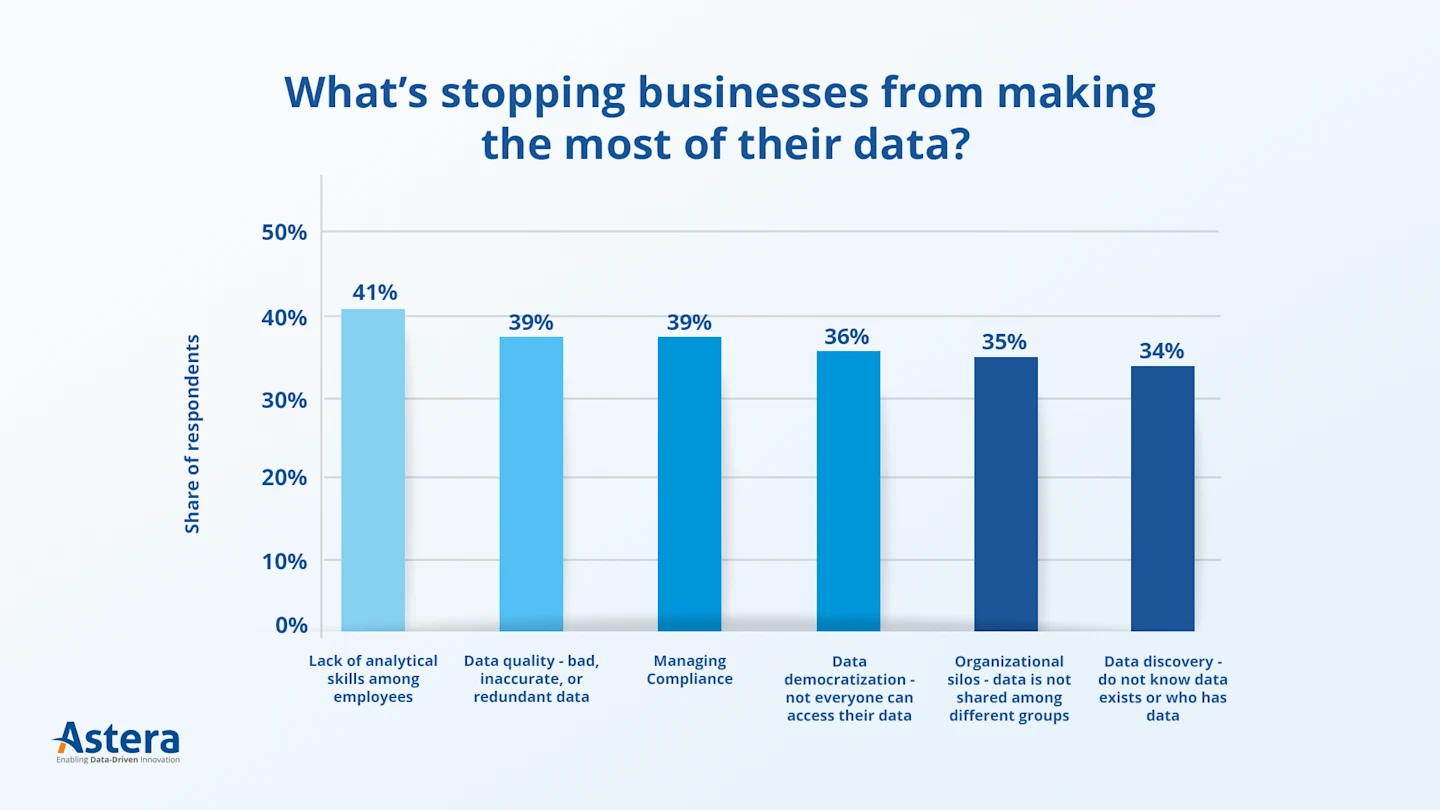
Data preparation is the process of turning raw data into clean, consistent, analysis-ready data. It is also the step most likely to hold up analytics and AI projects. In a Gartner survey of data management leaders, 63% of organizations said they don’t have, or aren’t sure they have, the right data management practices for AI. Gartner predicts that through 2026, organizations will abandon 60% of AI projects that aren’t supported by AI-ready data.
Preparation also takes up much of the working week. Data scientists and analysts routinely report that finding, cleaning, and wrangling data takes more of their time than analysis itself.
This guide covers what data preparation is, why it matters, the seven key steps (with a worked example), common challenges, best practices, and how AI-powered, conversational tools are making data prep faster and accessible to non-technical users.
What Is Data Preparation?
Data preparation (also called data prep) is the process of collecting, cleaning, transforming, and validating raw data so it can be used reliably for analysis, reporting, and machine learning. Raw data is usually full of errors, duplicates, missing values, and inconsistent formats, and it is scattered across different systems. Left as is, it undermines data quality and every decision built on it.
A typical data preparation workflow pulls data from sources such as databases, spreadsheets, PDFs, and applications. It profiles the data for problems, fixes them, reshapes and combines the data into a consistent structure, and checks the result before sharing it with analysts, BI tools, or AI models.
Modern AI-powered conversational data preparation tools are particularly valuable here as they allow teams to describe their needs in natural language rather than learning complex technical processes.
Data Preparation vs. Related Terms
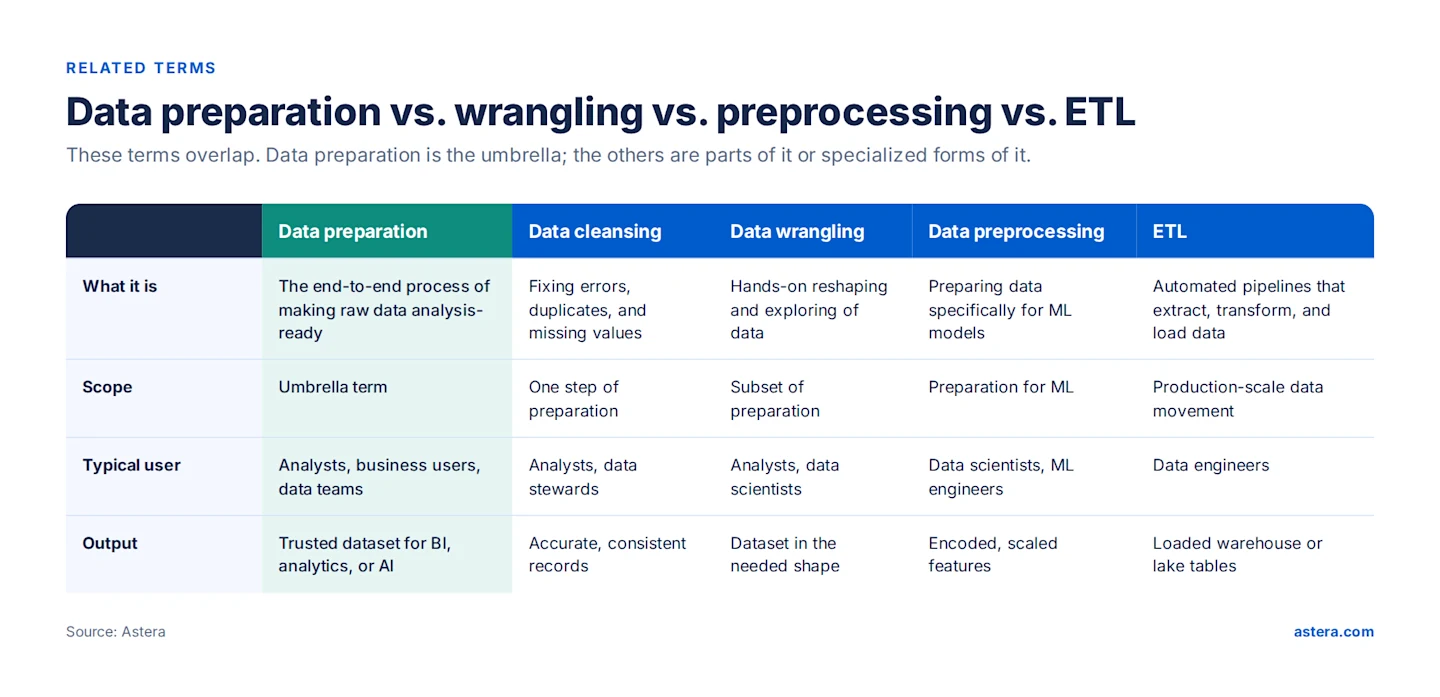
Several terms overlap with data preparation. Data preparation is the umbrella; the others are parts of it or specialized forms of it:
Data cleansing: fixing errors, duplicates, and missing values. It is one step within data preparation.
Data wrangling: hands-on exploring and reshaping of data, usually by analysts or data scientists.
Data preprocessing: preparing data specifically for machine learning, including encoding, scaling, and feature engineering.
ETL (extract, transform, load): automated, scheduled pipelines that move prepared data into warehouses and lakes at production scale.
Why Is Data Preparation Important?
Raw data is messy, incomplete, and inconsistent, and it is spread across many sources, formats, and types. Data preparation helps businesses in five ways:
It Makes Unstructured Data Usable
Much valuable business data sits in PDFs, text files, emails, and reports. Data preparation extracts data from unstructured sources and converts it into a structured format. For example, it can pull revenue and expense figures from hundreds of PDF financial statements into one table for trend analysis.
It Improves Data Quality
Preparation fixes errors, inconsistencies, missing values, and outliers, then validates the data for correctness and completeness. For example, data quality management rules can remove duplicate entries from a customer database so that customer counts and revenue per customer are accurate.
It Adds Value Through Enrichment
Preparation can add useful context, such as geolocation, industry codes, or sentiment scores, and combine data from multiple sources into a single view. For example, adding sentiment scores to customer feedback turns free-text comments into a measurable satisfaction metric.
It Makes Analysis Faster and More Accurate
Consistent formats make data compatible with analytics tools and make patterns easier to spot. For example, converting dates recorded in five different formats into one standard format is what makes time-series analysis possible.
It Makes Data Easier to Consume and Trust
Documentation and metadata tell users where each field came from and what it means. Prepared data can then be shared through files, databases, or APIs, so every team works from the same trusted version.
Data Preparation Has Never Been Easier
Clean, well-prepared data is just a chat away. The only thing Astera Dataprep needs you to do? Have a conversation with it.

Benefits of Data Preparation
Higher data quality: Correcting errors, inconsistencies, and missing values produces reliable datasets for decision-making.
More accurate insights: Clean, well-structured data reduces bias and improves the accuracy of analytics and machine learning models.
Greater efficiency: Automated preparation cuts time spent on cleaning, transforming, and integrating data, so teams can focus on analysis.
Unified view of the business: Standardizing formats and resolving discrepancies across sources creates one consistent picture.
Better compliance and governance: Validation and documentation help meet regulatory requirements and protect sensitive data.
AI readiness: Clean, well-documented data is the foundation for reliable AI models and AI agents.
7 Data Preparation Steps
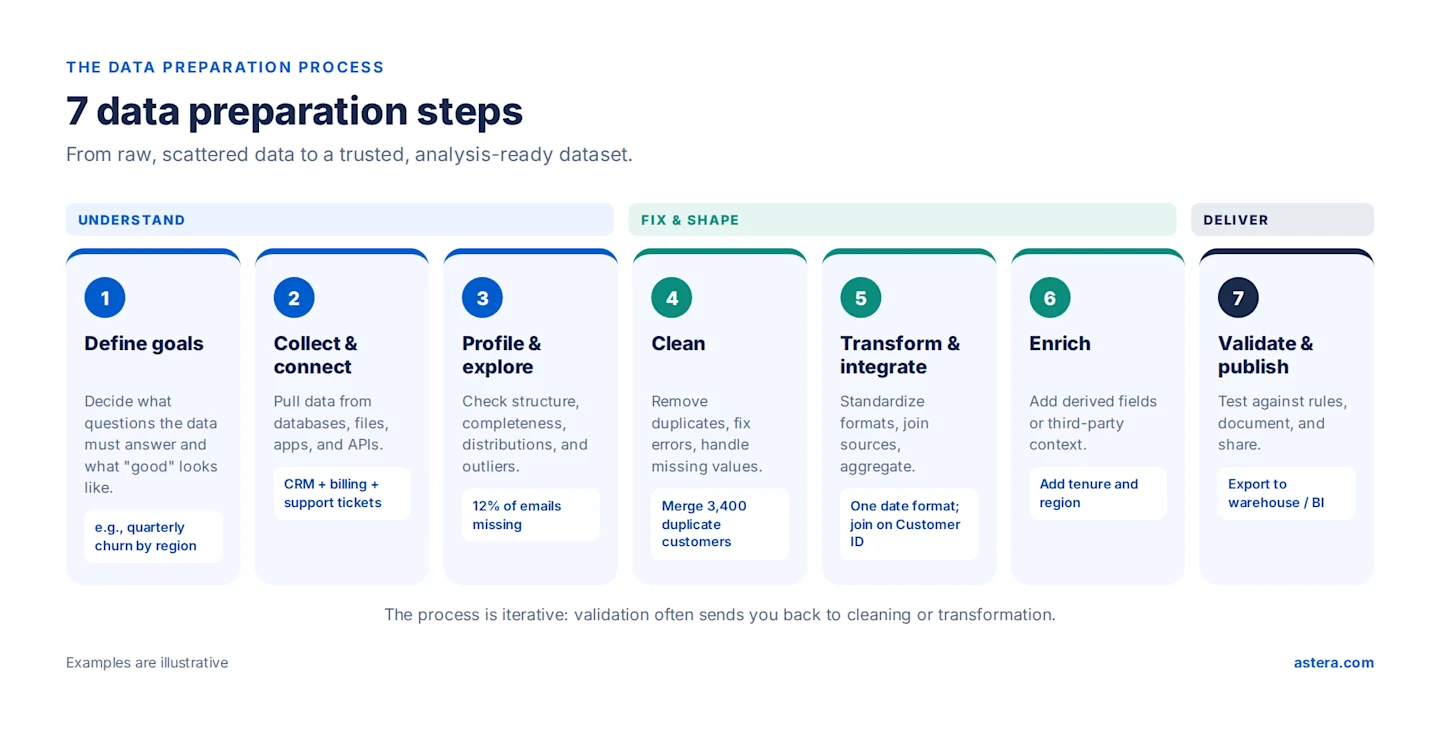
Data preparation usually follows seven steps. In practice the process is iterative: validation often sends you back to cleaning or transformation.
Step 1: Define Your Goals
Start with the questions the data must answer, who will use it, and what quality standards it must meet. A clear goal (for example, “quarterly churn by region”) tells you which sources, fields, and level of detail you need, and prevents wasted effort on data you won’t use.
Step 2: Collect and Connect Data
Gather data from every relevant source: databases, data warehouses, spreadsheets, CSV and JSON files, PDFs, SaaS applications, and APIs. Use connectors rather than manual exports wherever possible, so the process can be repeated when the data changes.
Step 3: Profile and Explore the Data
Before changing anything, examine the data’s structure and quality: row counts, data types, missing values, duplicates, value distributions, and outliers. Profiling shows you what needs fixing, for example that 12% of customer records have no email address or that dates appear in several formats.
Step 4: Clean the Data
Data cleansing fixes the problems profiling uncovers. Remove or merge duplicate records, correct errors and typos, handle missing values (fill, flag, or remove them), and deal with outliers. Document every rule so the results can be reproduced.
Step 5: Transform and Integrate
Standardize formats (dates, phone numbers, currencies, units), normalize names and categories, and reshape the data into the structure your analysis needs. Then join datasets from different sources on common keys, such as combining CRM and billing data on Customer ID, and aggregate where needed.
Step 6: Enrich the Data
Add fields that make the data more useful: calculated columns (for example, customer tenure or order value), segments, or third-party data such as geography or firmographics. Enrichment turns a clean dataset into an insightful one.
Step 7: Validate, Document, and Publish
Test the prepared data against business rules and quality thresholds. For example, check that every order has a valid customer and that totals reconcile with the source. Then document field definitions and lineage, and publish the data to its destination: a warehouse, a BI tool, a machine learning pipeline, or a shared file.
Data Preparation Example
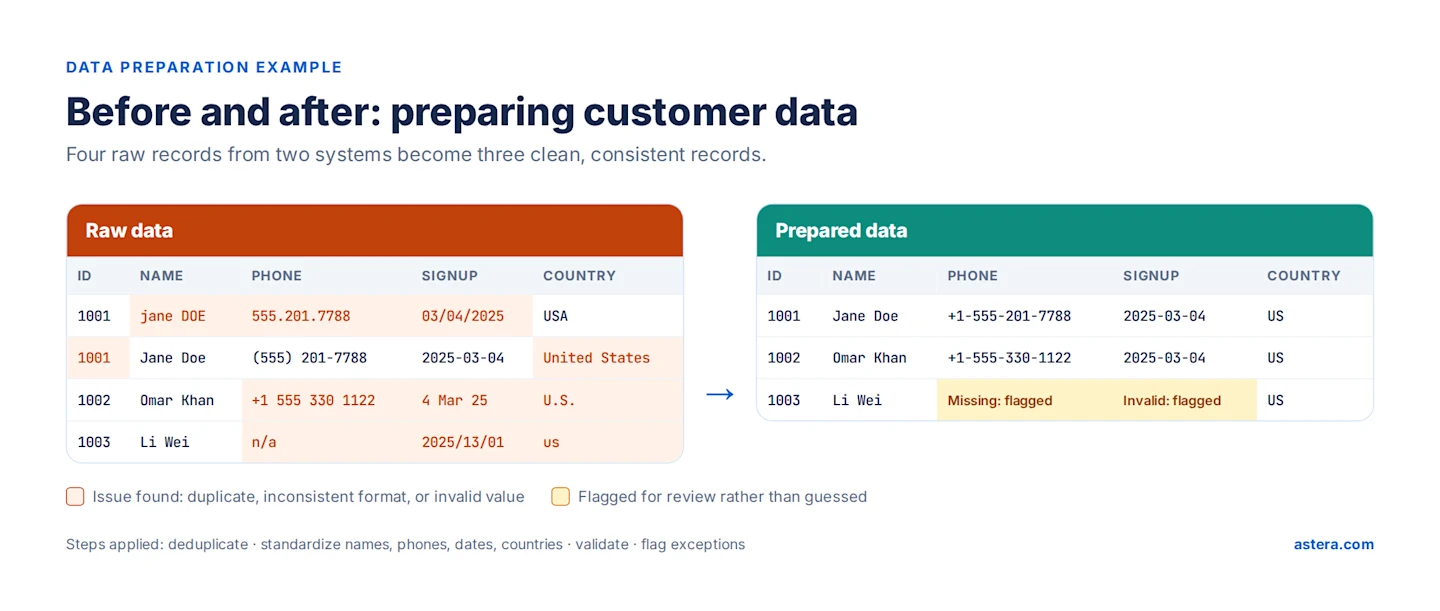
Suppose a company wants to analyze customer sign-ups but its customer data comes from two systems: the CRM and an e-commerce platform. The combined raw data has four records for three customers, and several problems:
Duplicates: Jane Doe appears twice, once from each system.
Inconsistent formats: Names in mixed case; phone numbers in four formats; dates as 03/04/2025, 2025-03-04, and “4 Mar 25”; and the country recorded as “USA,” “United States,” “U.S.,” and “us.”
Missing and invalid values: One phone number is “n/a,” and one date (2025/13/01) doesn’t exist.
Data preparation merges the duplicate record, standardizes names, phone numbers, dates, and country codes, and validates every field. Values that can’t be corrected with confidence are flagged for review rather than guessed. The result is three clean, consistent records that any analysis tool can use.
Common Data Preparation Challenges and How Astera Dataprep Solves Them
Despite its benefits, data preparation comes with challenges. Here is each one, with how Astera Dataprep addresses it:
Challenge | Why it’s hard | How Astera Dataprep helps |
Poor data quality | Raw data contains duplicates, missing values, and inconsistencies | Built-in profiling automatically flags issues with cleanliness, uniqueness, and completeness, and fixes are previewed before they’re applied |
Diverse sources and formats | Structured and unstructured data arrives from databases, APIs, spreadsheets, and PDFs | Connects to 50+ sources, including Excel, CSV, JSON/XML, SQL Server, Oracle, PostgreSQL, APIs, and cloud platforms, with no code |
Time-consuming manual work | Hand-built scripts and repeated cleanup delay insights | Transformations are described in plain English and executed instantly, with a live preview |
Scale | Large volumes across platforms need robust infrastructure | Cloud deployment with enterprise plans for high-volume processing, scheduling, and clustered environments |
Compliance and security | Sensitive data must meet GDPR, HIPAA, and internal policies | No data is sent to external LLMs; cloud, on-premises, or private cloud deployment |
Inconsistent practices | Every team prepares data differently, so results don’t match | Every action is saved as a reusable “recipe” in plain English that teams can share and schedule |
Data Preparation Best Practices
Start with the business question. Prepare the data you need for a defined goal, not everything you have.
Profile before you fix. Measure quality first so you know what to clean and can show the improvement.
Never overwrite the source. Keep raw data intact and write prepared data to a separate destination.
Make every step repeatable. Use saved workflows or recipes instead of one-off manual edits, so the next refresh takes minutes.
Flag rather than guess. When a value can’t be corrected with confidence, mark it for review.
Document definitions and lineage. Record what each field means and where it came from.
Put business users closer to the data. Self-service tools let the people who understand the data prepare it, without waiting on IT.
For more on the last point, see self-service data preparation.
AI-Powered Data Preparation: From Code to Conversation
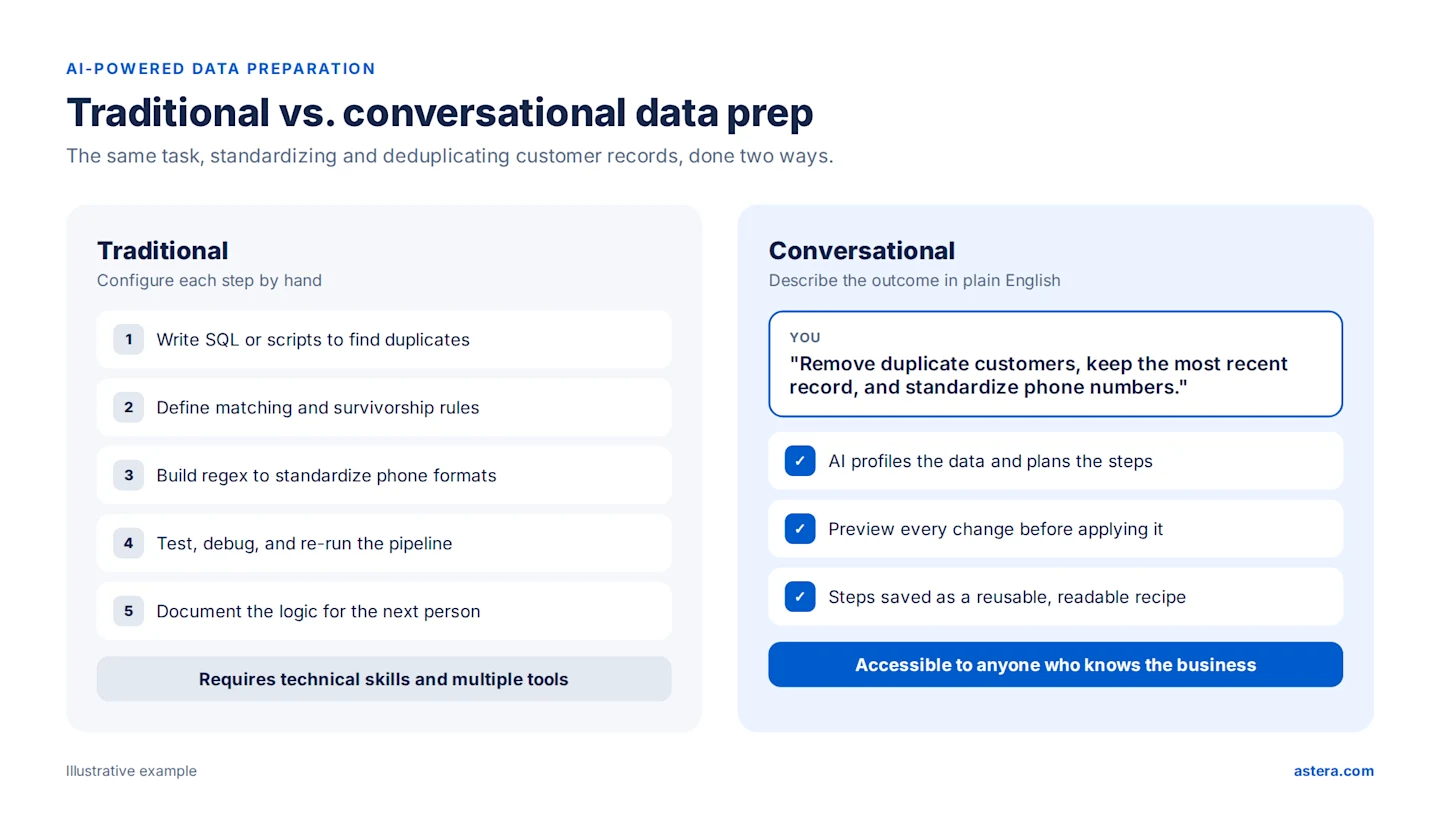
Data preparation is changing fast. Instead of writing scripts or configuring multi-step pipelines, technical and business users can now describe what they need in plain English and let AI carry out the transformation.
Traditional approach: Write SQL or scripts to find duplicates, define matching rules, build regular expressions to standardize phone numbers, then test and debug the pipeline.
Conversational approach: Type “Remove duplicate customers, keep the most recent record, and standardize phone numbers.”
Conversational data preparation rests on three capabilities:
Natural language understanding: AI interprets business requirements expressed in everyday language.
Intelligent execution: The system works out the right transformation steps from your data’s structure.
Real-time preview: You see exactly what will change before you apply it, so you stay in control.
The result is data preparation that anyone who understands the business can do, with every step recorded, repeatable, and reviewable.
What to Look for in Data Preparation Tools
Data preparation tools can be standalone or part of a unified data platform. Look for:
Automated data cleaning that finds and fixes errors, duplicates, and inconsistencies.
Broad connectivity to databases, cloud storage, applications, APIs, and files, including unstructured documents.
Transformation and enrichment to standardize formats, apply business rules, and add context.
An interface business users can use, whether no-code, low-code, or conversational.
Scalability for large datasets, through cloud or distributed processing.
Governance and collaboration: metadata, documentation, access control, and shareable, reusable workflows.
Compare the leading options in our guide to the top data preparation tools.
Data Preparation in the Cloud
As data volumes grow, more teams are preparing data in the cloud. Cloud-based data preparation offers on-demand scalability, easy integration with cloud storage and APIs, real-time processing, and lower upfront costs, since you pay for compute as you use it. Combined with a conversational interface, it lets teams prepare data from anywhere while the cloud handles the heavy lifting.
How Much Time Can AI-Powered Data Prep Save?
Time savings depend on data volume, complexity, and team skill. The ranges below are illustrative, based on typical tasks:
Task | Manual approach | Conversational approach |
Basic data cleaning | Hours | Minutes |
Joining and integrating sources | Hours to days | Under an hour |
Data validation | Hours | Minutes |
Documentation | Hours, often skipped | Generated automatically as a recipe |
How to Prepare Data with Astera Dataprep in 4 Steps
Step 1: Connect and Import Data
Connect to spreadsheets, databases, cloud platforms, and more with no code. Drag and drop files, or connect to sources such as Excel, CSV, databases, and APIs, with an instant preview.
Step 2: Explore and Profile Through Chat
Ask “Show me data quality issues” and get instant graphical profiles of structure, patterns, and problems, with every change visible in a live table view.
Step 3: Transform and Validate in Plain English
Run data operations with simple instructions:
“Remove duplicates and fix date formats”
“Combine sales.csv with inventory.xlsx on Product ID”
“Create a Total Sales field by multiplying Price by Quantity”
Built-in intelligence flags quality issues as you work, with instant visual feedback on every change.
Step 4: Save the Recipe and Export
Your actions are saved automatically as a reusable recipe of step-by-step English instructions. Export analysis-ready data to Excel, CSV, or a database, or schedule the recipe to run on fresh data.
Efficient Data Prep at Your Fingertips
Effortlessly clean and transform data with Astera's no-code, point-and-click navigation, making data preparation accessible to all.
Make Data Preparation Easy with Astera Dataprep
Data preparation decides whether your analytics and AI can be trusted. Astera Dataprep lets anyone prepare enterprise-grade data by describing what they need in plain English:
Prepare data in the cloud with scalable, secure processing and seamless connectivity.
Empower non-technical users to clean, transform, and enrich data without code.
Reduce reliance on IT by letting business teams handle their own data needs.
Ensure accuracy and consistency with the same validation and data quality engine as the rest of Astera’s platform.
Collaborate with shareable, reusable recipes everyone can read.
Start your free trial and see how quickly raw data becomes analysis-ready.