

Data replication is the process of creating, distributing, and managing copies of data across multiple locations so it stays available, protected, and close to the people and systems that use it. Changes made in a source system, such as a new order or an updated record, are copied automatically to one or more targets, either continuously in near real time or on a schedule.
Organizations replicate data to keep applications running when a system fails, to recover quickly from disasters, to speed up access for users in different regions, and to feed analytics without slowing down production databases. This guide explains how data replication works, the main types and strategies, how it differs from backup and synchronization, and how to implement it. It ends with a worked example that shows how Astera handles each step.
What is data replication?
Data replication means copying data from a primary source to one or more secondary locations and keeping those copies up to date. The goal is to make data available, resilient, and fast to access wherever it is needed.
The process is usually automated. When data is added, updated, or deleted in the source, the change is detected and applied to the replica. Replication can run in a few ways:
One time, for example to seed a new system or migrate a database.
At scheduled intervals, such as hourly or nightly.
Continuously, in near real time.
Several factors decide which approach fits:
Data freshness: how current the copy must be.
Recovery time objective (RTO): how quickly you must be back up after a failure.
Recovery point objective (RPO): how much recent data you can afford to lose.
Network bandwidth: how much data you can move, and how often.
Volume and frequency of change: how much data changes between runs.
How does data replication work?
Data replication keeps data synchronized between a source and one or more targets. It can move data from on-premises to on-premises, from on-premises to the cloud, or between clouds. Whatever the environment, the pattern is the same:
Capture. The system detects changes in the source, often by reading the database transaction log.
Transfer. The changes travel over the network to the target.
Apply. The target applies the changes so it matches the source.
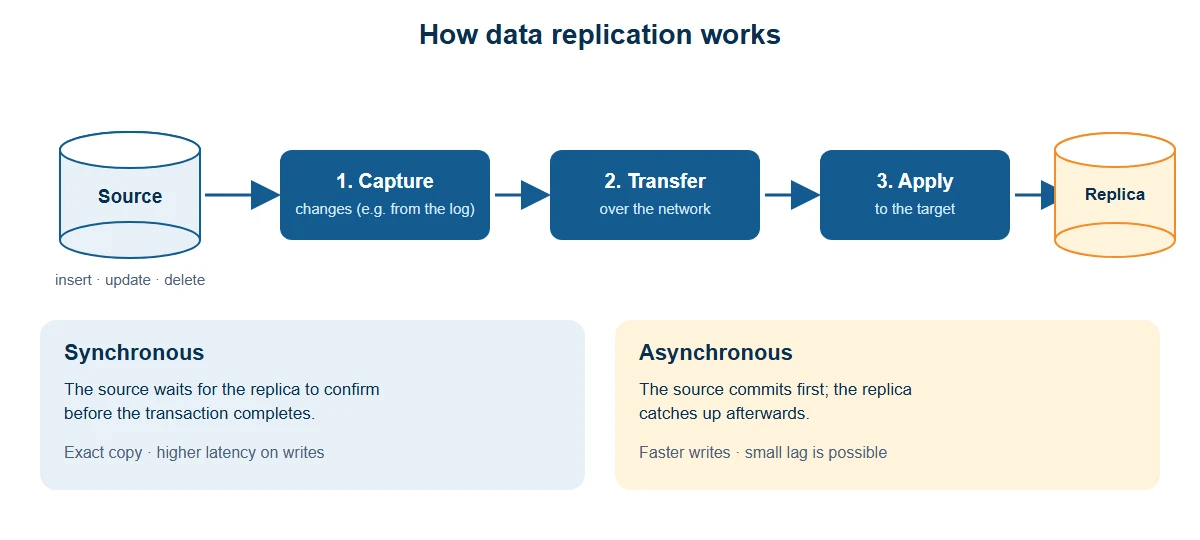
Timing is the key design choice:
Synchronous replication writes each change to the primary and secondary systems at the same time. The transaction completes only after both confirm. Copies are always identical, but writes are slower because every transaction waits for the replica.
Asynchronous replication writes to the primary first and updates the replica afterward. It is faster and has less impact on the source, but the replica can lag behind. If the primary fails before a change is copied, that change can be lost.
Data replication vs. backup, synchronization, and ETL
These terms are often confused. They solve different problems, and most organizations use more than one.
Data replication | Backup | Data synchronization | ETL | |
|---|---|---|---|---|
What it does | Keeps a live copy of data current | Saves point-in-time copies | Keeps systems consistent, often both ways | Copies and reshapes data for analysis |
Main goal | Availability, failover, performance | Restore after loss or corruption | Consistency across apps | Analytics and reporting |
Freshness | Near real time or scheduled | As of the last backup | Near real time or scheduled | Usually scheduled |
Direction | Usually one way (can be multi-way) | One way, to storage | Often two way | One way, source to target |
Weakness | Errors and deletions copy to the replica | Slower restore, recent data may be lost | Conflicts must be resolved | Data is less fresh |
Two more terms are worth knowing. Mirroring is a form of replication, often at the storage or database level, that keeps an exact duplicate for failover. Data replication is the broader idea that covers copies of data at any level, while database replication focuses on copying data between database servers. For a closer look at keeping systems aligned, see our guide to data synchronization tools.
Replication is not a backup. If someone deletes a table or corrupts a record, replication copies that change to the replica too. Use both: replication for availability and backups for recovery from mistakes.
Types of data replication
Replication methods are grouped by timing, direction, and scope.
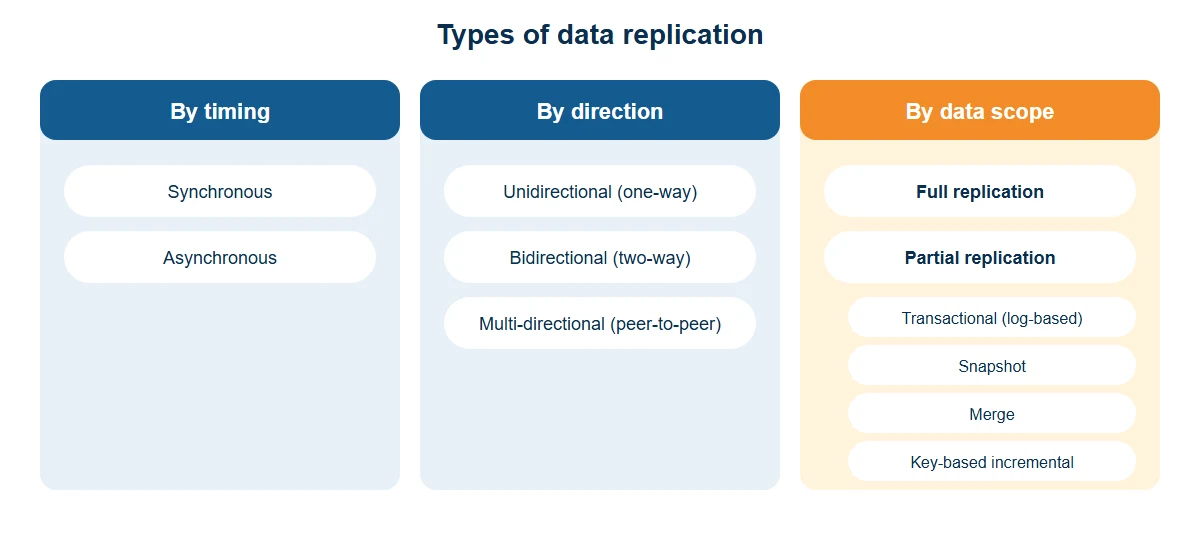
hBased on timing
Synchronous replication: changes are written to all replicas before the transaction completes. Strong consistency, higher latency.
Asynchronous replication: changes are written to the primary first and sent to replicas later. Lower latency, with a risk of lag or loss if the primary fails first.
Based on direction
Unidirectional (one-way) replication: data flows from a primary source to read-only replicas. It suits reporting and read-heavy workloads.
Bidirectional (two-way) replication: data flows both ways, so a change in either database appears in the other. It supports independent updates but requires conflict handling.
Multi-directional (peer-to-peer) replication: many databases act as both publisher and subscriber. It supports high availability and distributed writes, but conflict resolution and consistency are much harder.
Based on data scope
Full replication: the entire database or dataset is copied. It gives a complete copy but uses a lot of storage and bandwidth. Full table replication copies whole tables, often as the initial step or on a periodic basis.
Partial replication: only a subset is copied, such as chosen tables, filtered rows, or selected columns. This saves resources. Common partial methods are transactional, snapshot, merge, and key-based incremental replication (explained below).
Data replication strategies and methods
Within those categories, these are the methods teams use most often.
Method | How it works | Best for | Trade-off |
|---|---|---|---|
Snapshot replication | Copies the data as it is at a point in time and applies it to the replica | Initial loads, data that rarely changes | Replica is stale between snapshots |
Full table replication | Copies whole tables from source to target, on a schedule or once | Small tables, first-time sync | Heavy on storage and bandwidth |
Key-based incremental replication | Uses a key such as a timestamp or version column to find rows changed since the last run | Simple incremental loads | Misses deletes unless handled; needs a reliable key |
Transactional (log-based) replication | Reads the source transaction log and applies each change to the target in order | Low-latency, high-consistency needs | Needs log access and setup |
Merge replication | Merges changes made independently on replicas back into the primary and other replicas | Occasionally connected or distributed sites | Needs conflict-resolution rules |
Change data capture (CDC) is the technique behind most log-based and incremental replication. It identifies inserts, updates, and deletes in the source and replicates only those changes, which reduces load on the database and gets fresh data to the target faster than repeated full extracts. Read more in our guide to CDC for ETL.
Data replication across different environments
File storage systems
File systems use replication for durability and availability. Mirroring creates exact copies on separate storage devices for immediate failover, and RAID spreads data across disks with different levels of redundancy. File replication protects raw data and is simpler than database replication because conflicts are easier to resolve. But it does not transform data, integrate systems, or produce analytics-ready output.
Cloud environments
Cloud platforms offer replication within a region (across availability zones) or across regions for disaster recovery. Managing replicated data across hybrid and multi-cloud setups adds synchronization and governance complexity. Teams that load replicated data into a cloud warehouse also need to transform and unify it so it is ready for queries. See our overview of data integration techniques for how replication fits with ETL, ELT, and consolidation.
Distributed systems
Distributed applications replicate data for fault tolerance and speed, keeping copies close to users and compute. The main trade-off is consistency:
Strong consistency: all replicas show the same state immediately. Accurate, but adds latency.
Eventual consistency: replicas converge over time. Faster, but replicas can briefly disagree.
CDC-based pipelines are often used to keep replicated data aligned across databases, warehouses, and APIs for analytics, machine learning, and operations.
Benefits of data replication
Data accessibility and availability. Users in different locations reach data locally, and a failure at one site does not block access elsewhere.
Disaster recovery. A current copy in another location lets you keep operating after hardware failure, outages, or security incidents.
Better server performance. Directing reads to replicas frees the primary server for write-heavy work.
Better network performance. Placing replicas near users cuts latency. A user in Asia or Europe reading from a data center in Australia, for example, will see slower response than from a nearby replica.
Analytics support. Copying data from many sources into a warehouse or data lake lets analysts work on shared data without querying production systems.
Faster testing. Replicas give test and development systems quick access to realistic data.
Automate data replication with a modern, AI-driven platform
Start my 14-day free trial
Data replication examples by industry
Healthcare: replicating electronic health records (EHRs) across a hospital network lets doctors and nurses see critical patient information from any facility.
Finance: replicating transaction data across distributed branches keeps account balances and histories consistent, which supports trust and regulatory compliance.
E-commerce: replicating order-processing data lets fulfillment continue from another location if one processing center has an outage, which limits disruption for customers.
Data replication use cases
Geographic data distribution. Bring data closer to local users to reduce latency, especially for latency-sensitive applications.
System migration and upgrades. Replicate to the new system while the old one stays live, then cut over with minimal downtime. See our guides to data migration and data migration tools.
Data integration. Consolidate data from multiple systems into one place for analysis. Learn more about data movement and data ingestion tools.
Data warehousing and BI. Replicate operational data into a data warehouse, where it can be transformed and analyzed without affecting transactional systems.
Challenges, risks, and best practices
Risks and challenges
Data inconsistency. In asynchronous setups, delays or failures can leave replicas out of step with the source, which can lead to wrong decisions.
Larger attack surface. More copies mean more places to secure. Consistent access controls on every replica are essential.
Corruption amplification. Bad data can reach replicas before anyone notices.
Complexity. Configuring replication across different systems and networks takes expertise.
Network and source impact. Frequent replication of large data sets consumes bandwidth, and tracking changes uses resources on the source system.
Cost. Extra storage, tooling, and people add to the total cost, especially at scale.
Best practices
Start with your RPO and RTO. Choose the timing and method from recovery and freshness goals, not by default.
Replicate incrementally. Use CDC or key-based incremental loads after an initial full load.
Replicate only what you need. Partial replication saves storage and bandwidth.
Validate the data. Check row counts and key values between source and target, and add quality rules in the pipeline.
Secure every copy. Apply the same access controls, authentication, and encryption to replicas as to the source.
Monitor lag and errors. Alert on delays, failures, and unexpected volumes.
Test failover. Practice switching to a replica before you need it.
Keep backups too. Replication does not protect against accidental deletion or corruption.
How to implement data replication
Set your goals. Define why you are replicating (availability, recovery, performance, analytics), your RPO and RTO, and how fresh the data must be.
Choose the method. Decide on timing (synchronous or asynchronous), direction (one-way or multi-way), and scope (full or partial, snapshot or CDC).
Map sources and targets. Match tables, columns, and data types, and plan any transformations or filters.
Run the initial load. Copy a full snapshot so the target starts in sync with the source.
Replicate ongoing changes. Capture and apply only what changed, on a schedule or continuously.
Monitor, secure, and test. Track lag and errors, secure all copies, and rehearse failover.
How to choose a data replication tool
Data replication tools automate the initial load, ongoing changes, and scheduling, so teams do not have to script and maintain each pipeline. When you compare options, check:
Connectivity: support for the databases, warehouses, files, and cloud platforms you use, both relational and NoSQL.
CDC support: log-based or incremental change capture to keep load on the source low.
Transformation and data quality: built-in cleansing, mapping, and validation, so replicated data is usable.
Scheduling and automation: time-based and event-based triggers, plus near real-time options.
Ease of use: no-code or low-code design, so more of the team can build and maintain pipelines.
Scalability: the ability to handle growing volumes and more pipelines.
Security and governance: role-based access, authentication, and logging.
Monitoring: clear visibility into runs, errors, and lag.
For a side-by-side comparison, see our roundup of the best data replication software.
Astera data replication features
Astera Centerprise is an enterprise data management platform with no-code data replication built in. These are the capabilities that matter most for replication:
Change data capture (CDC). Replicate only the data that isn't yet in the destination, for example from a transactional database to an analytical one. This speeds up analytics and reduces the load of repeated full copies. CDC oversight for relational databases is managed from one platform.
No-code, drag-and-drop design. Build replication flows visually, without writing scripts. A conversational interface lets users describe a pipeline in natural language.
AI-powered semantic mapping. Map source fields to target fields accurately and consistently, which is one of the most time-consuming parts of replication.
Built-in transformations and data quality. A library of transformations and functions, plus custom validation rules and data profiling, to cleanse and check data as it moves.
Wide connectivity. Built-in connectors for databases, data warehouses, file formats, and cloud storage, so you can replicate across heterogeneous systems. Centerprise connects to hundreds of source systems.
Scheduling and automation. Trigger-based job scheduling by time or event, including a continuous option for near real-time synchronization of CDC-enabled pipelines.
Security and access control. Role-based user access and authentication, including bearer token authentication, granular access control, and integration with Windows Active Directory.
Monitoring. Real-time logging and monitoring, with traceable execution steps.
Sample use case: replicating a retailer's order data
To see how these pieces fit together, consider a hypothetical mid-sized retailer. Its order system runs on an on-premises relational database. The business wants:
Fresh sales dashboards in a cloud data warehouse, so merchandising can react during the day.
A standby copy of the order data for recovery and reporting.
No slowdown at checkout. Analytics queries must not compete with customer orders.
Running reports directly on the production database would slow orders down, and nightly full extracts would leave dashboards a day behind. Replication solves both problems.
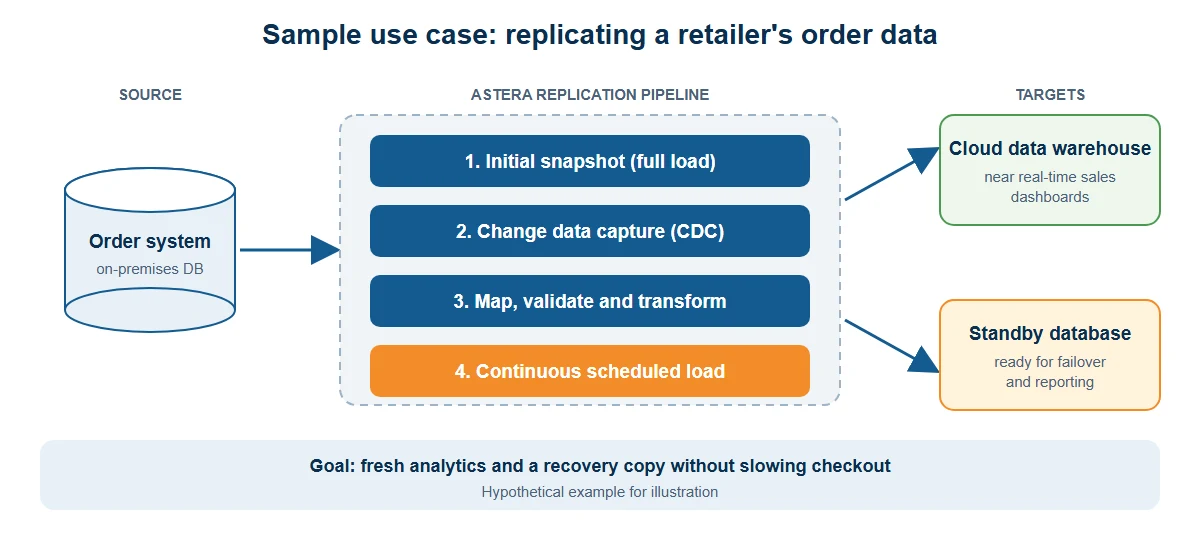
The design choices
Method: one-way (unidirectional), asynchronous replication, because the targets are read-only and a small delay is acceptable.
Scope: an initial full snapshot, then log-based CDC for ongoing changes.
Targets: a cloud data warehouse for analytics and a standby database for recovery and reporting.
How Astera handles each step
Step | What the retailer needs | Astera capability |
|---|---|---|
Connect | Link the on-premises order database and the cloud targets | Built-in connectors for databases, warehouses, files, and cloud storage |
Build the flow | Create the pipeline without custom scripts | No-code, drag-and-drop designer, or a conversational interface |
Map the schema | Match order, customer, and product fields to the warehouse model | AI-powered semantic mapping |
Initial load | Seed the targets with historical orders | Initial synchronization of historical data, run once |
Ongoing changes | Move only new and changed orders | Change data capture (CDC) |
Clean and check | Standardize formats and reject bad records | Built-in transformations, validation rules, and data profiling |
Keep it fresh | Update dashboards during the day | Trigger-based scheduling, with a continuous option for near real-time sync |
Protect the data | Limit who can see and change pipelines | Role-based access, authentication, and Active Directory integration |
Watch it run | See errors and delays quickly | Real-time logging and monitoring |
What changes for the business
Orders keep flowing through the production database untouched, while only the changes are replicated, so the source carries far less load than repeated bulk extracts. Dashboards in the warehouse stay close to current, and the standby database gives the team a recovery option and a place to run reports. Business users in IT and analytics can build and adjust the pipeline themselves, because it is no-code. The same pattern applies to any transactional system, such as billing, inventory, or customer records.
Conclusion
Data replication keeps the right data in the right place at the right time. Used well, it improves availability, speeds up access, supports disaster recovery, and feeds analytics without burdening production systems. Used carelessly, it adds cost, risk, and inconsistent data. Start with clear recovery and freshness goals, choose the simplest method that meets them, replicate incrementally, and monitor everything.
Astera automates the full replication process, from CDC and mapping to scheduling and monitoring, in a no-code interface, alongside extraction, integration, cleansing, transformation, and warehousing.
Automate data replication with a modern, AI-driven platform. Start a free trial, request a demo, or explore Astera Centerprise.
Related reading: Database replication · Best data replication software · CDC for ETL · Streaming ETL · ETL batch processing · ETL