

Data scrubbing tools find and fix the errors that make enterprise data unreliable, such as duplicates, formatting inconsistencies, and missing values. They do it automatically, so you don't have to check data row by row, which stops working as data volume grows.
The right tool depends on how much data you have, how much you want to automate, and whether scrubbing needs to run inside a larger integration or ETL pipeline. This guide covers what data scrubbing is, how it works, what to look for in a tool, and how the 7 leading data scrubbing tools compare.
What is data scrubbing?
Data scrubbing is the process of finding and fixing errors in raw data so it's accurate, consistent, and correctly formatted. It removes or corrects duplicate, incorrect, incomplete, and badly formatted records. Errors usually come from manual data entry, inconsistent formats across systems, and missing values.
Scrubbing is one of the most direct ways to improve data quality. Clean data makes reports, analytics, and AI models more reliable.
Data scrubbing vs. data cleansing
The two terms are often used interchangeably, but there's a technical difference. Data cleansing is the broader practice of preparing analysis-ready data. Data scrubbing is part of it, focused on removing inconsistencies and fixing formats. If you're comparing cleansing tools specifically, see our guide to the best data cleansing tools.
Data scrubbing | Data cleansing | |
Scope | Fixing errors, duplicates, and formats | All steps to make data analysis-ready |
Typical tasks | Deduplication, standardization, removing invalid values | Scrubbing plus enrichment, validation, and transformation |
Relationship | A subset of data cleansing | The umbrella term |
Why data scrubbing matters
Clean data lets teams spend time on analysis instead of fixing records by hand. It also reveals cost savings and supports better long-term decisions.
Example: the logistics team at an eCommerce company relies on customer and order data. With clean, consistent data, it can quickly see which regions place the most orders, which products are popular, and the average order size. It can then plan warehouse and delivery operations for faster, cheaper fulfillment.
With flawed data, the same analysis goes wrong, which leads to:
Slower, more manual processes
Extra labor and costs to correct errors
Lower efficiency and productivity
Poor decisions based on bad numbers
Over time, persistent data quality problems can cost customers through missed deliveries and miscommunication. That's why data scrubbing belongs in every data quality strategy. You can track progress with data quality metrics.
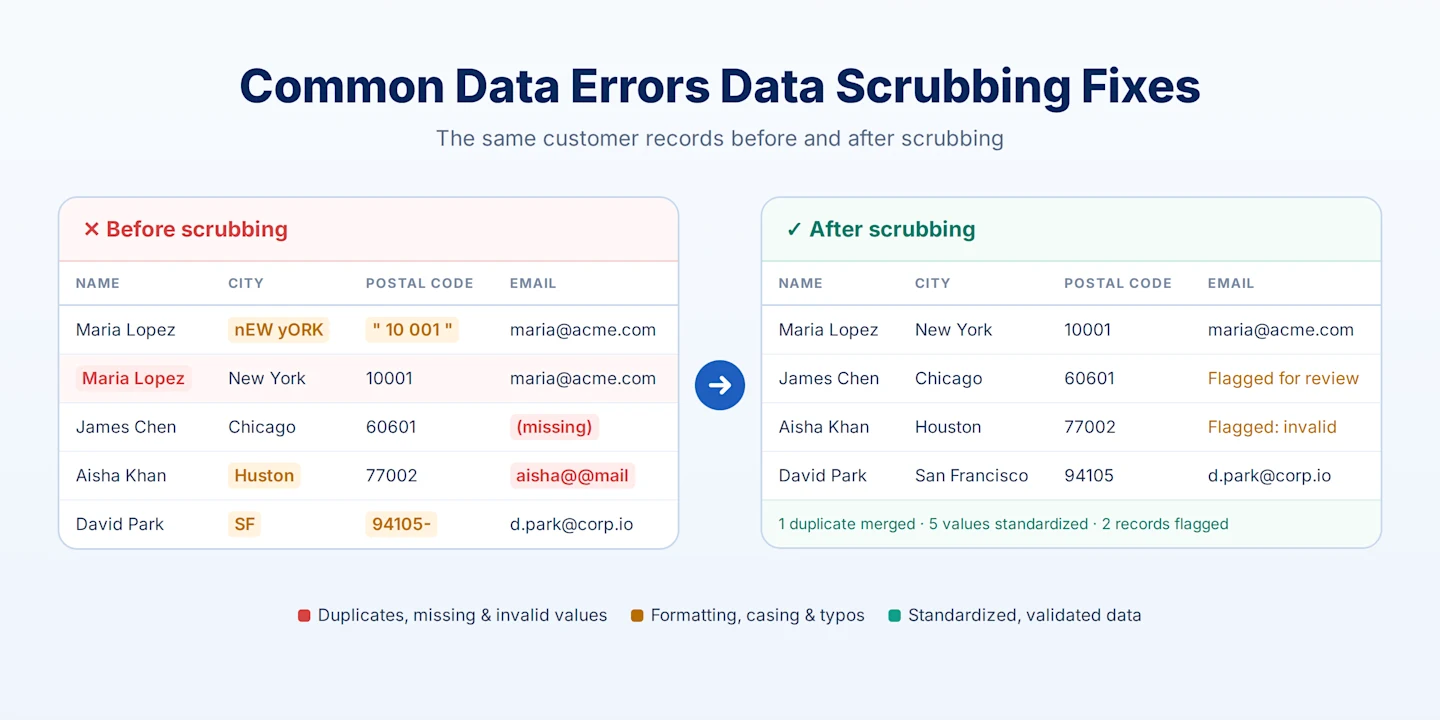
Where data scrubbing fits in data management
Data integration
Data integration combines data from different sources in one place. Scrubbing the incoming data keeps the integrated dataset standardized before it reaches the destination system.
Data migration
Moving large volumes of data between systems is a common point where errors and duplicates slip in. Scrubbing during data migration keeps the destination data correctly formatted, structured, and free of duplicates.
Data transformation
Data transformation applies rules, filters, and expressions so data matches the target system's format. Data scrubbing tools do much of this with built-in transformations.
ETL pipelines
In ETL (extract, transform, load), scrubbing prepares data for reporting and analysis. For example, a retailer pulling data from a CRM and an ERP can scrub out errors and duplicates, standardize the format, and load clean data into a data warehouse.
How data scrubbing works: 8 steps
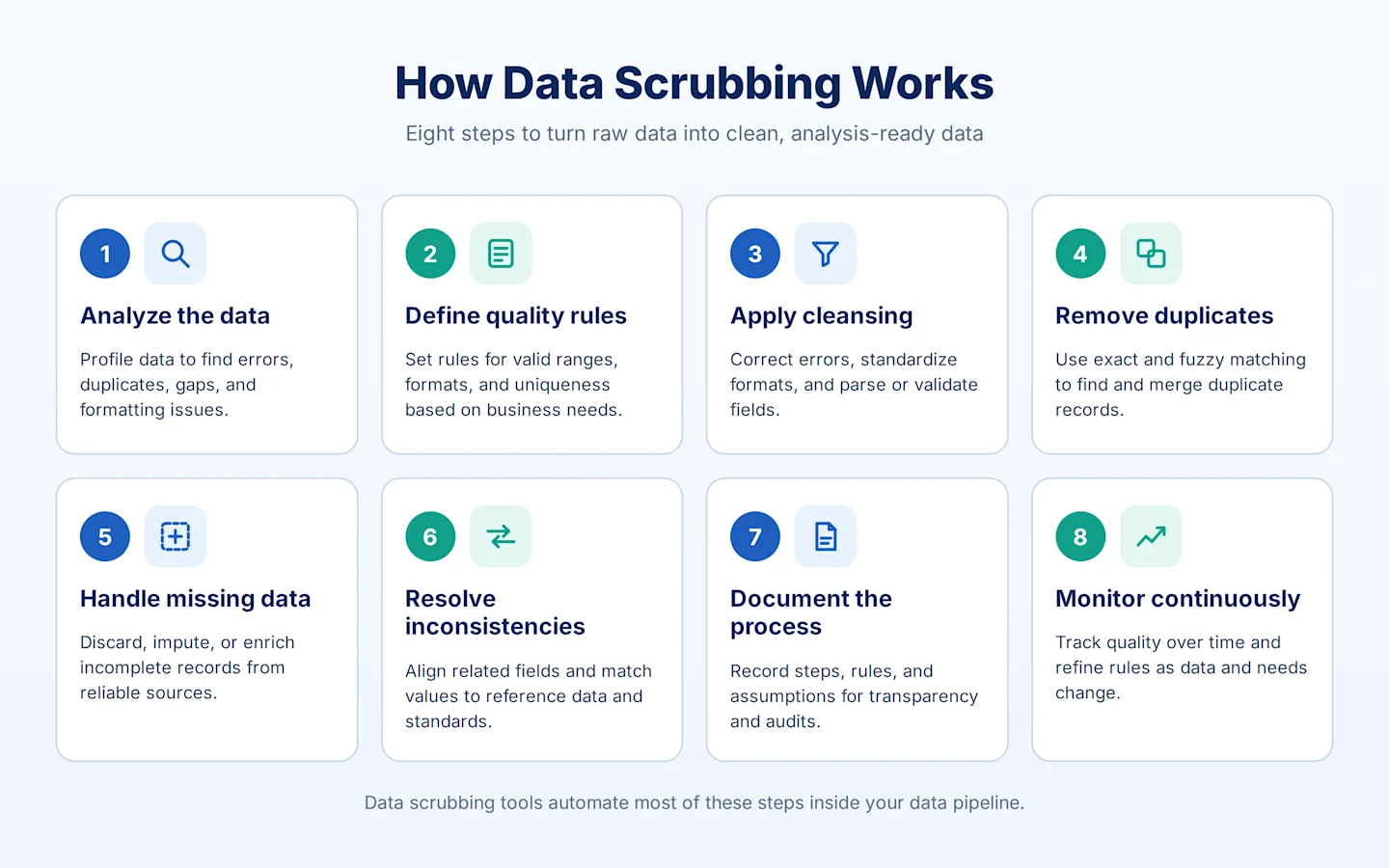
Here are 8 steps you can take to ensure your data is cleansed properly:
1. Analyze the data. Examine it for inconsistencies, errors, duplicates, missing values, and formatting problems. Data profiling tools speed this up.
2. Define data quality rules. Set criteria based on business requirements, such as valid value ranges, formats, uniqueness constraints, and referential integrity.
3. Apply cleansing techniques. Correct errors, standardize formats, and resolve inconsistencies using parsing, data validation, and transformations.
4. Remove duplicates. Use record comparison, fuzzy matching, and deduplication algorithms to find and merge duplicate records.
5. Handle missing data. Discard incomplete records, impute missing values, or fill gaps from reliable sources, depending on the use case.
6. Resolve inconsistencies. Fix mismatches between related fields, such as names and IDs, and align values with reference data.
7. Document the process. Record the steps, rules, and assumptions used, so the process is transparent and easy to troubleshoot.
8. Monitor continuously. Data scrubbing is ongoing. Track quality over time and refine rules as data and requirements change.
Doing all of this by hand takes a lot of time. Data scrubbing tools automate most of these steps.
Benefits of Data Scrubbing Tools
Data scrubbing tools can help you skip the tedious and manual process of data cleaning, saving you the trouble of going through the entries individually, row-by-row, and inspecting them for any invalidities, missing values, etc. Instead, the tool cleanses the data through built-in transformations.
For example, consider the lead list delivered by your marketing team. Imagine going through each contact’s name to verify the complete addresses, phone numbers, and email IDs. Erroneous lead entries can create operational issues and lead to time wastage.
Data scrubbing tools can help you remove errors via automated processes to systematically inspect the data, using different rules and algorithms to identify and correct any flaws. Hence, making the analysis and business intelligence more straightforward and effective.
Scrubbed data improves your enterprise data quality, making it readily available for accurate and valuable data analysis. Thus, making them a worthy business investment.
What to Look For in a Data Scrubbing Tool
Not every data scrubbing tool solves the same problem, so the right choice depends on a few specifics about how you work with data.
Scale and performance. A tool built for cleaning a few thousand rows in a spreadsheet behaves very differently at millions of records. Check whether the tool is designed for batch processing at enterprise volume or optimized for smaller, ad hoc cleanups.
Rule customization. Off-the-shelf cleaning rules rarely match your business logic exactly. Look for tools that let you define custom validation and standardization rules — not just apply generic ones — without writing extensive code.
Deduplication and matching accuracy. Duplicate detection is one of the hardest parts of data scrubbing, especially with near-matches (typos, formatting differences, abbreviations). Tools vary significantly in how accurately they catch these versus requiring manual review.
Integration with your existing pipeline. A standalone scrubbing tool that isn't connected to your broader data integration or ETL process creates an extra manual handoff. If scrubbing needs to happen automatically as part of a larger pipeline — rather than as a separate, one-off cleanup step — that's a different category of tool than a standalone cleaning utility.
No-code vs. code-required. Some tools require SQL or scripting knowledge to configure rules and transformations; others offer drag-and-drop interfaces that let data analysts and business users manage scrubbing without engineering support. This affects both who can use the tool and how fast you can make changes.
Deployment model. Cloud, on-premises, or hybrid — this matters more for organizations with strict data residency, compliance, or security requirements than for smaller teams.
For a broader view of the market, see our guide to the best data quality tools.
7 Best Data Scrubbing Tools
1. Astera Data Pipeline
A no-code data integration platform with built-in data scrubbing through its Data Cleanse Transformation, plus data profiling and rule-based quality checks.
Best fit if scrubbing needs to happen automatically as part of a larger pipeline — ingestion, transformation, and delivery — rather than as a standalone step. Drag-and-drop interface means data teams can configure and adjust cleaning rules without writing code.
Key features:
Drag-and-drop Data Cleanse transformation for whitespace, characters, nulls, and find-and-replace
Data profiling and data quality rules in the same dataflow
Pre-built connectors, job scheduling, and workflow automation
Best for: Teams that want scrubbing to run automatically inside a larger pipeline, not as a separate step.
Pricing: Quote-based; free trial available.
Better Analytics Starts With Better Data
Astera cleans and delivers analysis-ready data to your BI platform of choice, so your team spends less time on prep.

2. Data Ladder (DataMatch Enterprise)
Focused on matching and deduplication accuracy, with fuzzy matching built to catch near-duplicate records that exact-match rules miss.
Key features:
Fuzzy, phonetic, and numeric matching
Data profiling and standardization
Merge and purge of duplicate records
Best for: Organizations where duplicate and inconsistent records, especially in CRM and customer data, are the main problem.
Pricing: Quote-based.
3. Qlik Talend Data Quality
Talend's data quality tools, now part of Qlik Talend Cloud, combine profiling, cleansing, and matching with Qlik's integration and governance tools.
Key features:
Data profiling, cleansing, and standardization
Matching and deduplication
Data stewardship and governance features
Best for: Teams already using Qlik or Talend who want scrubbing to plug into existing pipelines.
Pricing: Subscription tiers; quote-based.
4. OpenRefine
A free, open-source tool for exploring and cleaning messy data interactively.
Key features:
Faceting and filtering to explore data
Clustering to find and merge near-duplicate values
Transformations using its own expression language
Best for: One-off cleanups of moderately sized datasets. It needs more hands-on work and isn't built for automated, ongoing pipelines.
Pricing: Free and open source.
5. Informatica Data Quality
An enterprise-grade product within Informatica's Intelligent Data Management Cloud. Salesforce completed its acquisition of Informatica in November 2025.
Key features:
Profiling, rule-based cleansing, and matching
Strong governance, compliance, and audit features
AI-assisted data management
Best for: Large enterprises with dedicated data management teams and complex requirements.
Pricing: Consumption-based; quote-based.
6. WinPure Clean & Match
A more accessible, lower-cost option aimed at small and mid-sized businesses.
Key features:
Data cleansing and standardization
Fuzzy matching and deduplication
Simple setup for CRM and marketing data
Best for: SMBs cleaning and deduplicating CRM and marketing lists.
Pricing: Subscription; lower cost than enterprise platforms.
7. Melissa Data Quality Suite
Specializes in contact data quality specifically — address verification, name/phone/email validation and standardization.
Key features:
Global address verification and standardization
Name, phone, and email validation
Data enrichment for contact records
Best for: Businesses whose main scrubbing need is customer and contact data hygiene.
Pricing: Subscription or credit-based.
Tool | Best for | No-code? | Built for pipelines/ETL? | Deployment |
Astera Centerprise | Scrubbing embedded in a broader integration pipeline | Yes | Yes | Cloud & on-prem |
Data Ladder | High-accuracy matching & deduplication | Yes | Limited | Cloud & on-prem |
Talend Data Quality | Teams already using Talend Data Fabric | Partial | Yes | Cloud & on-prem |
OpenRefine | Free, one-off cleanups of moderate datasets | Yes | No | Self-hosted (open source) |
Informatica Data Quality | Large enterprises needing governance & compliance | Partial | Yes | Cloud |
WinPure Clean & Match | SMBs cleaning CRM/marketing data | Yes | No | Cloud & on-prem |
Melissa Data Quality Suite | Contact data hygiene (address, name, phone, email) | Yes | Limited | Cloud & on-prem |
How To Scrub Data with Astera: A Step-by-Step Overview
Astera Data Pipeline includes built-in connectors for disparate sources, plus transformations and automated validation for scrubbing, cleansing, and delivering standardized data to any destination. Here's how to scrub a customer dataset with the Data Cleanse transformation.
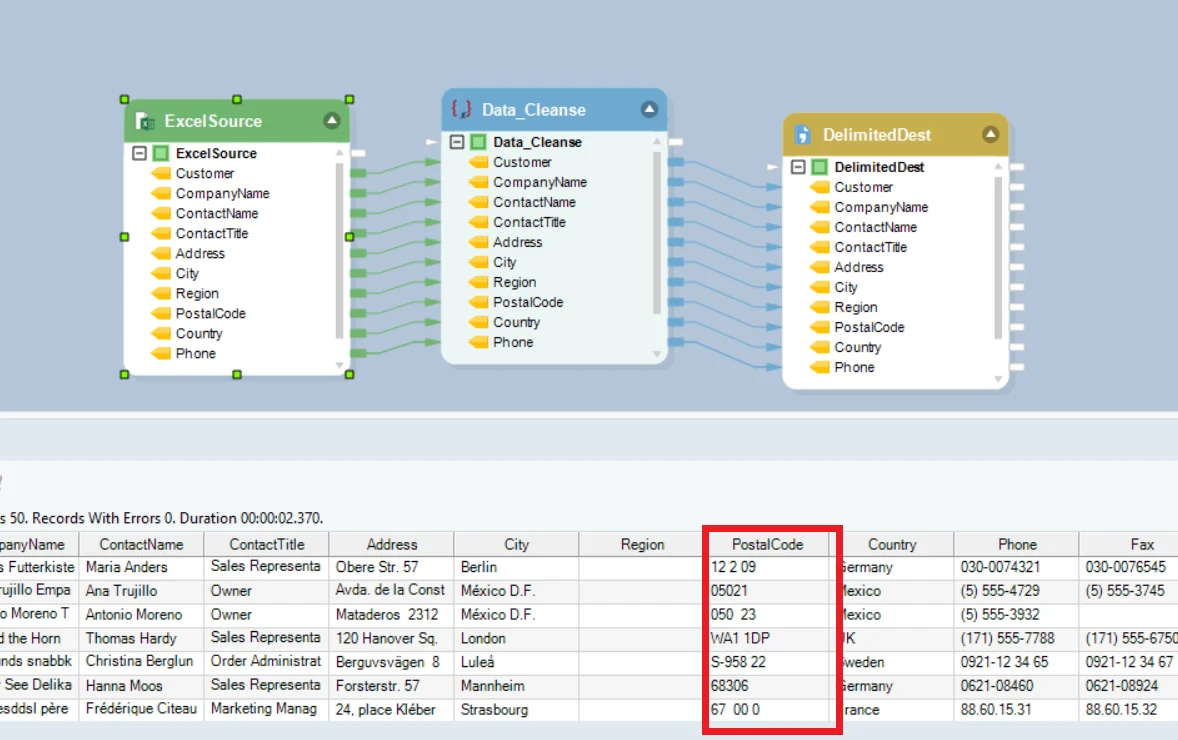
Figure 1- Data set containing white spaces and formatting issues
The dataset shown in Figure 1 contains information regarding different customers, and as you can see, there are some white spaces between the postal codes, and it is not formatted correctly. Thus, we will use the Data Cleanse transformation on this data set.
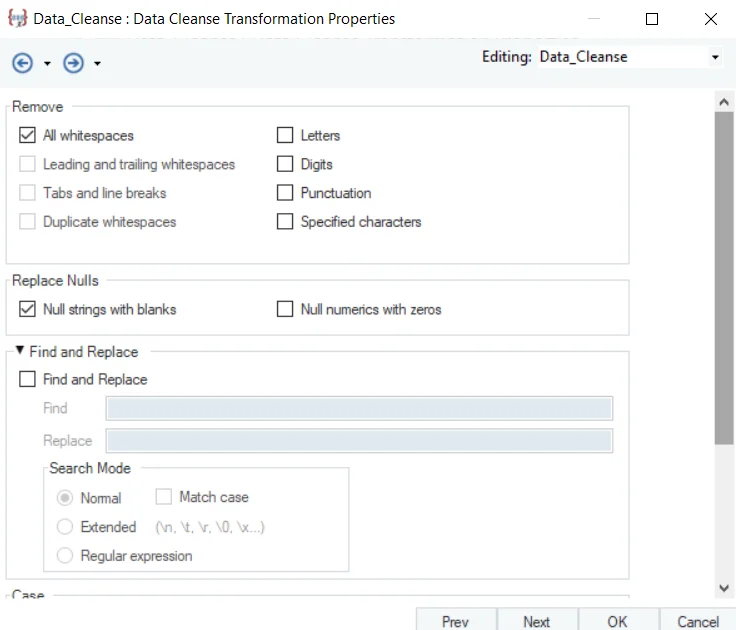
Figure 2 – Features of Data Cleanse Transformation
Figure 2 shows the various cleansing options present in this transformation. You can remove white spaces, letters, digits, and punctuation, or specify any other characters you want to remove. Secondly, you can replace null characters or find and replace any other characters by applying numerous options in the fields with one click. You can also use custom expressions to clean your data.
Figure 3 shows the data preview after applying the Data Cleanse transformation.
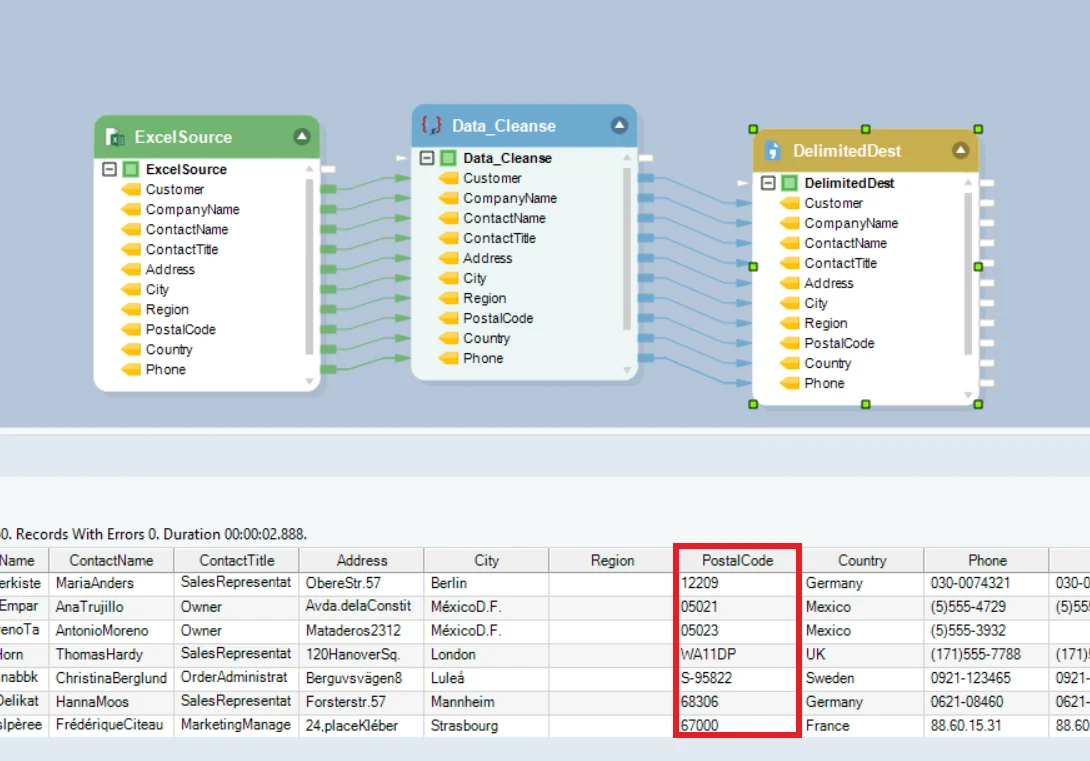
Figure 3- Cleansed dataset
As you can see, all the white spaces have been removed, and the data is now correctly formatted. Furthermore, it can be transferred to any destination of your choice.
Other transformations like Data Profiling and Data Quality Rules enable users to profile data sets to get a statistical breakdown and set quality standards to identify records that contain errors or warnings.
Streamline Data Scrubbing With Astera Data Pipeline
Astera's drag-and-drop interface lets business users and data analysts scrub high-volume datasets without writing code. With job scheduling and workflow automation, scrubbing runs inside your data pipelines automatically, with no manual steps. To see how AI is changing this work, read our guide to AI data cleaning.
Start a free trial or book a demo to see Astera clean your data.
Better Analytics Starts With Better Data
Astera cleans and delivers analysis-ready data to your BI platform of choice, so your team spends less time on prep.