

Cloud data integration is no longer optional for most businesses — as more data moves into cloud warehouses, SaaS applications, and cloud storage, connecting and consolidating that data is what actually makes it usable. Without it, teams end up working from disconnected systems that don't reflect the same information, which slows down every decision that depends on that data.
Cloud data integration solves this by automatically pulling data together from wherever it lives, transforming it into a consistent format, and keeping every system in sync — so businesses can act on their data instead of chasing it down first.
In this post, we will discuss the need, benefits, and challenges of cloud data integration, go through a sample use-case, check various steps in the cloud data integration process, and delve into the details of choosing the right cloud integration software for your business. So what is cloud data integration? Let’s begin
What is Cloud Data Integration?
Cloud data integration involves the consolidation of disparate data from multiple systems where at least one endpoint is a cloud source such as Azure SQL, Google Cloud SQL, Amazon RDS, Oracle Cloud Database, Snowflake etc.
With data scattered across multiple cloud sources, finding business-critical insights becomes a challenge. Cloud data integration helps consolidate, transform, and clean this data to give business users a 360-degree view of all important enterprise interactions. This can then be used to drive insights from and make better business decisions. Now that you know what cloud integration is, let’s move on to its benefits.
Benefits of Cloud Data Integration
Businesses use cloud-based integration tools or services to capitalize on the following benefits:
Data compliance: Companies need to store and maintain customer data according to industry standards such as HIPAA, GDPR and PCI DSS to ensure security of this sensitive information. Using enterprise data integration software, businesses can easily set up workflows in place that help meet these requirements.
Data synchronization: Businesses may use different systems or applications for different teams, and one major challenge in this case is the existence of duplicate records on different systems that have inconsistent data due to updates. Cloud integration ensures that there is the same information on all systems that is updated in real-time. This removes the possibility of errors in analysis and decisions based on incorrect data.
Process automation: Manual data entry and duplication is prone to human error and usually consumes a lot of time. Automating data integration to cloud streamlines and accelerates the process and allows businesses to allocate their valuable resources elsewhere.
Data modernization: Some companies that have been using legacy systems and have accumulated years’ worth of data find it difficult to shift to modern cloud systems due to the sheer bulk of data that needs to be transformed and migrated. With cloud service integration tools, legacy data can be easily transformed and loaded to the desired cloud destination.
Business scalability: Cloud data integration helps eliminate data silos through automation of processes and allows businesses to manage any volume of data with workflows and powerful ETL engines. This ensures that a company can scale up any time without worrying about manual, time-consuming tasks like data entry and execution of SQL queries.
The Right Data Integration Platform Can Change The Game
Astera's AI-powered solution not only maps your data but ensures end-to-end data integration. Leverage our unified platform to make the most of your data.
Challenges of Cloud Data Integration
Integrating data between cloud systems or between cloud and on-premise systems presents its own challenges that businesses need to keep in mind before they look for solutions. Following are some of the most common issues:
Moving high-volume data with accuracy: Moving high volume data to or from the cloud while ensuring data accuracy is a tricky process. It requires comprehensive strategies in place so that the migration can be error-free while meeting the frequency requirement of the data transfer.
Complex ETL processes: Extracting, transforming, and loading data to or from the cloud is a humongous task, the complexity of which is directly proportional to the volume and veracity of business data. Writing code for this task is also quite time-consuming. This can be mitigated by using a cloud-based data integration service or software that replaces manual jobs with automation and helps simplify the complete ETL process.
Choosing the right cloud integration software: Choosing the right tool for a business’ use case is one of the most important challenges of setting up a cloud data integration automation platform. The chosen solution should be able to perform sophisticated integrations and meet every requirement of the use case so that the company would not need another tool to meet the remaining needs.
What to Look for in a Cloud Data Integration Software?
When looking for the right enterprise data integration software, here are some considerations to keep in mind before making the final call:
Meets all project needs: Every business is different. When choosing cloud-based integration tools, it is imperative to make sure that the platform checks all boxes of the specific use case needs. This means identifying elements that are must-haves and confirming with a (preferably live) demo that the platform offers all features that are required
Connectivity: The tool should have built-in connectors for the file sources, databases, and applications that are currently in use by the business or may be adopted later. Ability to connect with APIs is a bonus that can ensure that your data architecture can integrate data from new applications in the future
Ease of use: When searching for cloud data integration solutions users may find out that there are many tools that can provide a solution to the same business use case. In this case, the best filter is to identify which software is the easiest to use. A software with a shallow learning curve will help save both training time and the time to create complex integrations
Meeting these criteria looks different depending on the platform. Here's how some of the most widely used cloud data integration tools compare against the same three factors: how well they handle complex project requirements, the connectivity they offer out of the box, and how much of a learning curve they require.
Platform | Best For | Connectivity | Ease of Use |
Astera | Teams that want a no-code platform combining integration, ETL/ELT, and data quality in one place | Built-in connectors for common databases, files, cloud apps, and warehouses | No-code, drag-and-drop design — minimal learning curve |
Fivetran | Teams that want automated, low-maintenance data replication into a cloud warehouse | Large library of pre-built, managed connectors | Largely automated, but limited transformation flexibility |
Informatica IICS | Large enterprises needing AI-assisted integration with deep governance and compliance controls | Broad enterprise connector catalog | More setup and configuration overhead, suited to dedicated data teams |
Qlik Talend Cloud | Organizations combining data integration with data quality and governance under one platform | Wide range of connectors, plus data quality and cataloging tools | Moderate learning curve, geared toward technical users |
AWS Glue | Teams already standardized on AWS who want serverless ETL | Native to AWS services; fewer built-in connectors outside AWS | Requires familiarity with AWS and, often, some scripting |
Azure Data Factory | Teams already standardized on Azure who need pipeline orchestration at scale | Native to Azure services, plus a growing set of external connectors | Visual pipeline builder, but assumes cloud engineering familiarity |
Use Cases
TheChemLabs is a world-renowned company in the manufacture and distribution of chemical products. They cater to customers in multiple industries across the globe. Each country has a business unit that stores the customer, production facility and distribution center data in their internal systems. The data comes from multiple sources and is in different file formats, which makes it difficult to analyze and gain insights from.
This scattered data hindered the company to gain business-critical insights. To gain a 360-degree view of their global interactions, they decided to consolidate the disparate data to a cloud data warehouse. They chose Amazon Redshift for its ease and performance. Now all that was left to do was to implement this bulk data integration to the cloud.
The main challenges in this project were:
Complexity: TheChemLabs had multiple data sources for their data, and the sheer volume of it increased the complexity of the project. Moreover, some records were stored in mainframe systems like , and modernizing this data for the cloud was another struggle.
Time: Writing code for such a project would be immensely time consuming, not to mention that there would be a good chance of human errors
Ensuring seamless, error-free integration: Consolidating disparate data from multiple sources, correcting data duplication, transforming data into required formats, and setting up data validation checks were essential components of the project
Working on the project in-house was not an option for TheChemLabs and they started looking for enterprise data integration tools in the market that would serve their needs. After reviewing multiple platforms and their features in detail, they ‘s native connectivity to cloud databases like Redshift made the data movement easier. Moreover, the various database write strategies in Astera like incremental updates, rule-based updates, record synchronization, and slowly changing dimensions allowed them to implement advanced logic when writing a dataflow to the destination.
Using Astera to Execute Data Integration in the Cloud
Astera is a powerful cloud data integration software with robust options that help simplify and streamline business processes. TheChemLabs found the in-built transformations and drag-and-drop data mapping extremely helpful to manage their data and ensure data compliance.
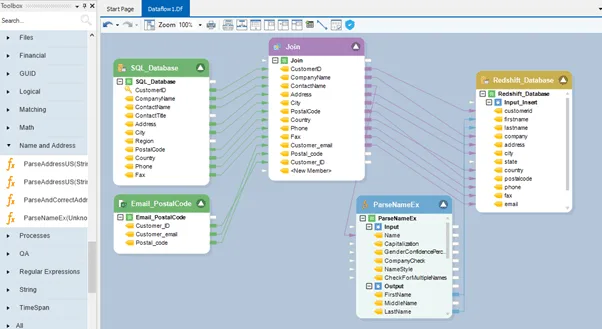
The built-in data quality and validation features also helped TheChemLabs to make sure that the transformed data was error-free before using Astera’s native Redshift connector to move data to the destination.
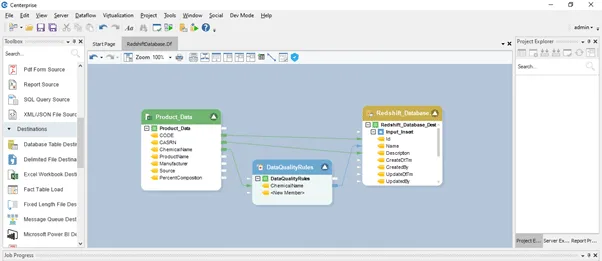
Sample 2:Dataflow with a data quality check on one error-prone element of source data before being mapped to the destination table
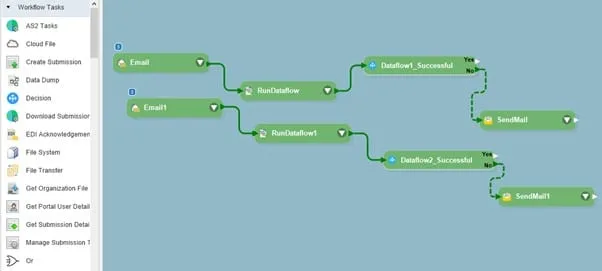
Once the dataflows and workflows were in place, TheChemLabs used Astera’s job scheduler to set the frequency for each workflow. This helped them cut down manual work and accelerate the time-to-insights.
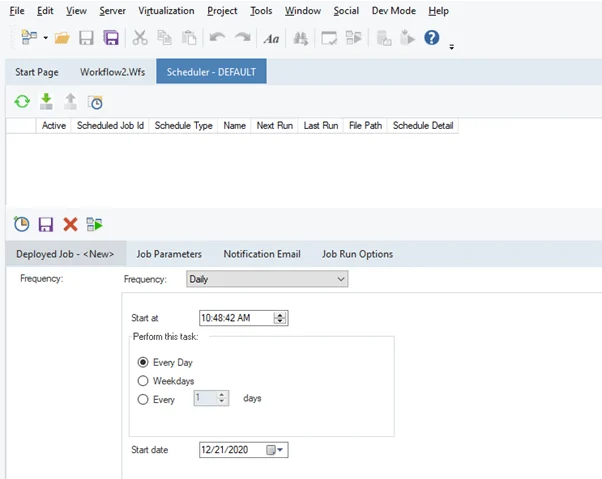
In addition to scheduling jobs, TheChemLabs set up triggers in workflows so that whenever a dataflow did not run successfully, an email with the error logs were sent so they could be rectified as soon as possible.
Start Your Cloud Data Integration Journey with Astera
Many businesses may have the same cloud data integration platform need as TheChemLabs. Whether it involves cloud-to-cloud data integration or between cloud and on-premise systems, Astera can help automate the process and cut down both cost and time for the company. Furthermore, the built-in cloud connectors to cloud databases like Azure SQL, Google Cloud SQL, Amazon RDS, Oracle Cloud Database etc. allow more ease for users.
Take control of your data, whether on-premises or in the cloud
Learn MoreThe 14-day free trial of Astera allows you to explore the features of the product. Test out the built-in transformations, connect with various cloud sources, check errors with data validation checks and more. Get started today!