

TL;DR: IBM mainframe reports, settlement files, general ledger, and other banking mainframe reports pack 15-30 fields per line at fixed character positions with no delimiters. Astera ReportMiner maps those positions through auto-generated templates, handles multi-section layouts and hierarchical data independently, and runs the full extraction-to-excel or database pipeline unattended on a daily schedule or event-based triggers.
If you work in banking operations, you know what a green bar report is, also knows as IBM mainframe reports. You probably have a stack of them arriving every morning: end-of-day balancing reports, settlement summaries, general ledger extracts, and transaction logs that run hundreds or thousands of pages. These reports are printed in fixed-width text with alternating green and white bands so someone with a highlighter can trace a number across 132 columns without losing their place.
These reports are generated by COBOL programs running on IBM z/OS or AS/400 systems, and they have been generated the same way, in the same format, for decades. The column positions, section headers, and separator lines made of dashes and equals signs have not changed in all that time.
What has changed is that the data locked inside these reports now needs to reach SQL databases, BI dashboards, reconciliation engines, and regulatory submission systems. It needs to get there automatically, accurately, and without a team of analysts spending half their day copying numbers into spreadsheets.
This is a solvable problem via pattern-based template data extraction.
What Makes These Reports Different
Green bar reports are not unstructured. They are actually highly structured, but the structure is positional rather than semantic.
A field in a green bar report starts at character position 22 and ends at position 28, with no delimiters, no XML tags, and no column headers repeating on every page. The relationship between a header field on page 1 and a detail row on page 247 is implied entirely by spatial position, which means there are no semantic cues for a AI models to process. This lack of labels, combined with the sheer size of these files (often thousands of pages), makes AI-based extraction impractical for this format.
Template-based extraction sidesteps the problem entirely because it operates on character positions directly. You define the field as "characters 22 through 28" and it extracts exactly that range, every time, on every page, across every instance of that report, with no probability distribution and no hallucination risk.
The Six Report Types Banking Operations Teams Extract Most
1. Green bar end-of-day balancing reports (cold reports)
These are the original green bar reports, and every branch, every department, and every operations team gets one. They contain transaction totals, account balances, exception items, and reconciliation figures for the business day, and a single report can run thousands of rows.
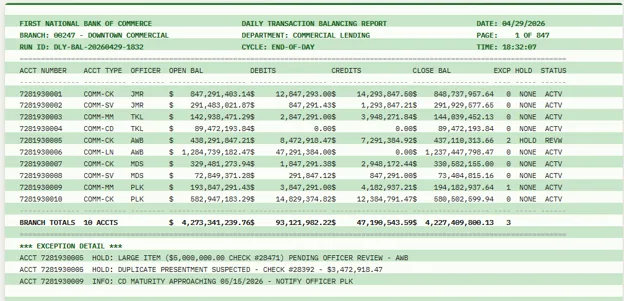
The extraction challenge of these files is column density: fifteen to thirty data fields packed into a single 132-character line with no whitespace between columns. If your extraction logic is off by one character position, the entire row shifts. A balance of $847,291,403.14 picks up a trailing digit from the adjacent column and becomes $8,472,914,031.40, and in financial services, this kind of silent error triggers a reconciliation investigation that takes hours.
2. Daily settlement reports (Fedwire, CHIPS, ACH)
Every major US bank receives Fedwire settlement reports daily for end-of-day reconciliation. These are multi-section documents where each section has a completely different column layout: the transaction summary might have 7 columns, the settlement position detail has 6, and the reserve summary has no columns at all, just key-value pairs.
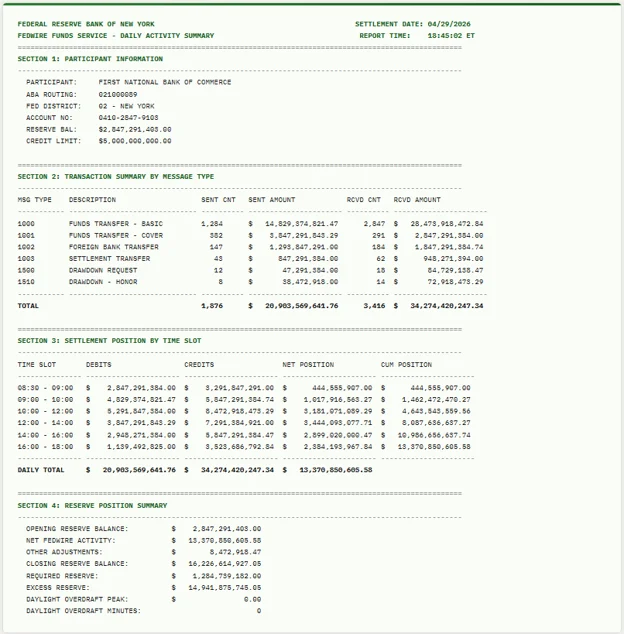
An extraction system that applies a single template to the entire document will either miss sections or corrupt data by applying the wrong column definitions. The correct approach uses pattern-based section detection to identify where each section begins and ends, with separate field definitions for each.
ACH files add another layer. They are fixed-width ASCII files where each record is exactly 94 characters long, with fields at specific positions within each line. The volume is high (billions of transactions annually across the network) and the tolerance for error is zero.
3. General ledger extracts
The monthly general ledger extract from an AS/400 system can run 1,000+ pages. It contains trial balances, sub-ledger details, chart of accounts data, and journal entry summaries. These are among the most column-dense reports in banking, often using the full 200-character width.
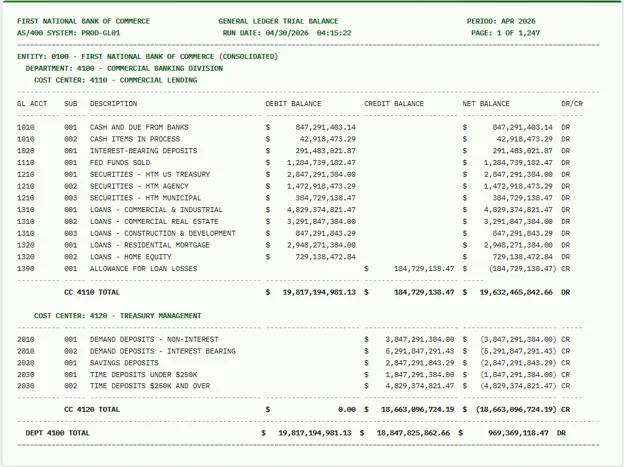
The extraction challenge here is scale and hierarchy. Header-level fields (entity, department, cost center, reporting period) apply to every detail row below them. The detail rows contain account numbers, descriptions, debit amounts, credit amounts, and running balances. The totals rows must reconcile with the sum of their children. Extracting this correctly means preserving the parent-child relationships in the output.
4. Nostro/vostro reconciliation reports
Banks maintain accounts at other banks in foreign currencies to facilitate cross-border payments. Monitoring these accounts requires daily reconciliation of debit and credit updates and end-of-day statements. The reports are generated by the mainframe in fixed-width format and contain multi-currency transactions, correspondent bank identifiers, value dates, and running balances.
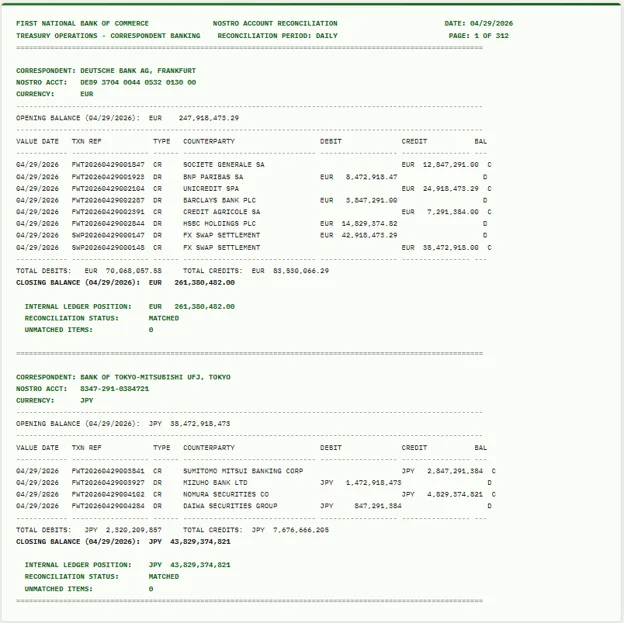
The extraction difficulty is structural: each correspondent bank section has its own column layout, currency amounts may include different decimal conventions, and the cross-reference between the nostro statement and the internal ledger position must be preserved so the reconciliation engine can match them.
5. Regulatory filing extracts (CCAR, DFAST, FR Y-9C, Call Reports)
Stress test submissions and capital adequacy reports are generated from mainframe batch jobs and must be reformatted for regulatory submission. These reports contain hundreds of line items across multiple schedules, each with its own layout.
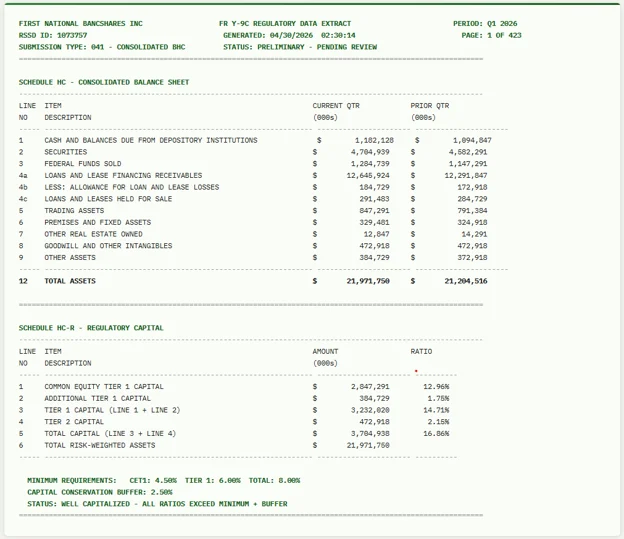
The extraction requirement here is not just accuracy but auditability. Every number in the submission must trace back to a specific field in the source report. Template-based extraction provides this traceability because the field definitions are deterministic. You can prove that the value in Schedule HC-R, line item 42 came from character positions 85-100 on page 347 of the source report.
6. SWIFT message summaries and transaction logs
MT940 account statements and MT950 netting statements are generated by mainframe batch jobs for treasury and operations teams. They summarize inbound and outbound SWIFT messages, transaction volumes, settlement amounts, and exception items.
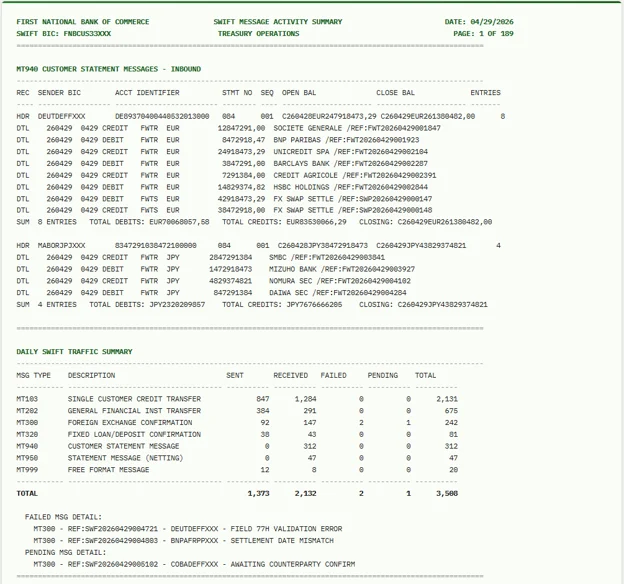
These reports are typically fixed-width with multiple record types per line: a header record identifies the message type and counterparty, detail records contain individual transaction amounts, value dates, and reference numbers, and summary records contain aggregated totals. Extracting all three record types correctly from a single report requires the extraction engine to distinguish between them based on position-based identifiers.
How Template-Based Extraction Handles Green Bar Reports
For all six report types, the extraction approach follows the same pattern.
You load the report, and the auto-generate layout feature analyzes the document structure. It identifies the sections, their column layouts, the header and footer patterns, and the separator lines. A complete extraction template is generated in seconds.
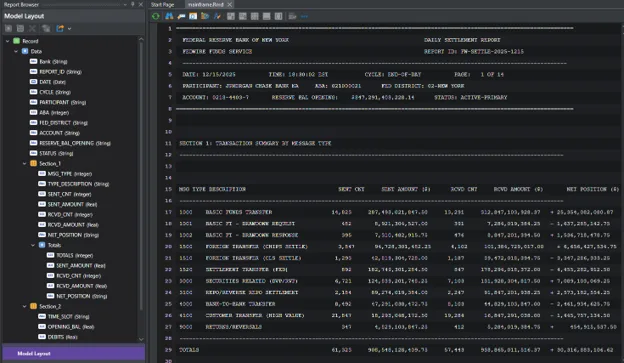
The template maps each data region independently, so the end-of-day balancing section gets its own field definitions, the settlement summary gets its own, and the reserve positions get their own. Each region extracts to its own output table with a foreign key back to the shared header fields.
You preview the output, verify every field, and adjust any misaligned positions. For a well-formed mainframe report, the auto-generated template typically gets this right on the first pass.
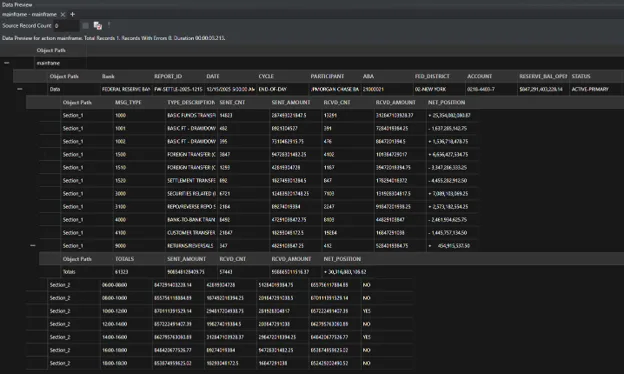
Then you add validation rules: totals must match the sum of detail rows, amounts must be numeric, ABA routing numbers must match a known participant list, and closing balances must equal opening balances plus credits minus debits.
Then you automate. The job scheduler triggers extraction when the daily file arrives via SFTP. The pipeline extracts, validates, transforms, and loads the data into the target database. Alert emails fire if validation rules fail. The team reviews exceptions only.
For a bank that receives these reports every business day, initial setup takes less than an hour per report type. From that point forward, it runs automatically with no manual intervention.
Why This Matters Now
Banking operations teams are not going to rewrite the COBOL programs that generate these reports. The programs work, they have worked for decades, and the mainframe is not going away. 97% of respondents in the 2025 BMC Mainframe Survey see it as a long-term platform, the highest percentage in the survey's 20-year history.
What banking teams need is a way to get the data out of the reports the mainframe generates and into the systems where it can be used. That is an extraction problem, not a modernization problem. And for fixed-width, position-based, multi-section documents that have not changed format in years, template-based extraction is the right method.
The alternative is a team of analysts with highlighters and spreadsheets, doing the same work every morning that a configured pipeline could do in seconds. At scale, that is not sustainable. At the accuracy requirements of financial services, it is not safe.
Getting Started
ReportMiner handles the full extraction pipeline for mainframe reports: ingestion from any file source (txt, rpt, prn, pdf), template-based extraction with AI-assisted template creation, multi-section and hierarchical data support, validation against business rules, transformation with 200+ built-in functions, and export to 300+ destinations.