

A well-designed database contains accurate and up-to-date information for analysis and reporting — which is exactly what good database design delivers.
Database design plays a crucial role in executing queries efficiently and keeping information consistent, especially for companies dealing with heaps of data regularly.
This guide covers what database design is, why it matters, the database development lifecycle, common database design techniques, and how to design a database step by step for your enterprise.
What is Database Design?
Database design is a collection of steps that help create, implement, and maintain a business’s data management systems. The primary purpose of designing a database is to produce physical and logical models of designs for the proposed database system.
What is a Good Database Design?
Specific rules govern a good database design process. The first rule in creating a database design is to avoid data redundancy. It wastes space and increases the probability of faults and discrepancies within the database. The second rule is that the accuracy and comprehensiveness of information are imperative. A database containing erroneous information will lead to inaccurate analysis and reporting. Consequently, it can mislead decision-makers and adversely affect a company’s performance. Therefore, it’s essential to keep things rules in mind when designing the database for your organization.
So, how can you ensure that your database design is good? A well-designed database is one that:
Distributes your data into tables based on specific subject areas to decrease data redundancy
Delivers the database the information needed to link the data in the tables
Provides support and guarantees the precision and reliability of data
Caters to your information processing and reporting requirements
Functions interactively with the database operators
Free 14 day trial - ETL your enterprise data using pre-built database connectors
Try it Now!
Importance of Database Design
Database design defines the database structure used for planning, storing, and managing information. To ensure data accuracy, you must design a database that only stores relevant and valuable information.
A well-designed database is essential to guarantee information consistency, eliminate redundant data, efficiently execute queries, and improve the database’s performance. A methodological approach toward designing a database will save you time in the database development phase.
The reliability of data depends on the table structure, whereas creating primary and unique keys guarantees uniformity in the stored information. You can avoid data replication by forming a table of probable values and using a key to denote the value. So, the alteration happens only once in the main table whenever the value changes.
As the general performance depends on its design, a good database design uses simple queries and faster implementation. Also, it is easy to maintain and update. On the other hand, when the database is poorly designed, even trivial interruptions may harm stored events, views, and utilities.
Database Development Lifecycle
There are various stages in database development. However, it is not necessary to follow each of the steps sequentially. The lifecycle can be divided into three phases: requirement analysis, database designing, and implementation.
1- Requirement analysis
Requirement analysis requires two steps:
Planning: In this stage of database development, the entire Database Development Lifecycle plan is decided. It also requires an analysis of the organization’s information systems strategy.
Defining the system: This stage explains the proposed database system’s scope.
2- Database designing
The actual database design takes into account two fundamental data models:
Logical model: It uses the given requirements to create a database model. The complete structure is laid out on paper at this stage, without considering any specific database management system (DBMS) requirement or physically implementing it.
Physical model: This stage comes after the logical model and therefore involves physically implementing the logical model. It takes the DBMS and other physical implementation factors into consideration.
3- Implementation
The implementation phase of the database development lifecycle is concerned with:
Data conversion and loading involve importing and converting data from the old system into the new database.
Testing: Finally, this stage identifies errors in the new system and meets all the database requirement specifications.
Database Design Techniques
The two most common techniques used to design a database include:
Normalization: Tables are organized in such a way that it decreases data redundancy and dependency. Larger tables are divided into smaller tables and are linked together using relationships.
Entity-Relationship (ER) Modeling: A graphical database design approach models entities attributes and defines relationships among them to signify real-life objects. An entity is any real-world item different or unique from the surroundings.
Streamline Cross-Database Analysis through codeless integration
Explore NowNormalization | ER Modeling | |
Approach | Organizes tables to reduce redundancy | Graphical mapping of entities and their relationships |
Best for | Cleaning up an existing or growing schema | Planning a new database from scratch |
Output | A set of related, non-redundant tables | An entity-relationship diagram |
How to Design a Database: Steps of Designing Database
The first question you need to ask when designing a database is, how will you specify the structure of the database?
Database designing generally starts with identifying the purpose of your database. The relevant data is then collected and organized into tables. Next, you specify the primary keys and analyze relationships between different tables for an efficient data design. After refining the tables, the last step is to apply normalization rules for table standardization.
Let’s look at these steps of database design in detail:
Define the objectives of your database The first step is to determine the purpose of your database. For example, if you are running a small home-based business, you can design a customer database that maintains a list of consumer info to generate emails and reports. Hence, understanding the importance of a database is vital. At the end of this step, you will have a strong mission statement that you can refer to throughout the database design process. It will help you concentrate on your objectives when making important decisions.
Locate and consolidate the necessary data The next step is to collect all kinds of information you might want to store in the database. Begin with the existing data and mull over the questions you want your database to answer. It will help you decide which data needs to be recorded.
Distribute the data into tables Once you have amassed all the necessary data items, the next step is to divide them into main entities or subject areas. For example, if you are a retailer, some of your main entities could be products, customers, suppliers, and orders. Each entity will then become a separate table.
Change data items into columns Data is segregated into tables, such that every data item becomes a field and is shown as a column. For instance, a customer table might include fields like name, address, email address, and city. After determining the initial set of columns for every table, you can refine them. For instance, you can record customer names in two separate columns: first and last names. Likewise, you can store the address in five distinct columns based on address, town, state, zip code, and region. It will make it more convenient for you to filter information.
Identify primary keys The next step to improve your database design is to select a primary key for every table. This primary key is a column or a set of columns that pinpoint each row distinctively. For instance, in your customer table, the primary key could be customer ID. It will allow you to identify unique rows based on the customer ID. More than one primary key can also exist, called a composite key, including multiple columns. For example, the primary keys in your Order Details table could be order ID and product ID. The composite key can be made using fields with similar or varying data types. Similarly, if you wish to get an idea of your product sales, you can identify the product ID from the Products table and the order number or ID from the Orders table.
Determine how tables are related After dividing data into tables, information needs to be brought together in a meaningful manner. So, you can explore each table and Identify the connection between the tables. If required, you can add fields or form new tables to simplify the relationship based on the types of information.
Below is an example of different entity types and relationship types.
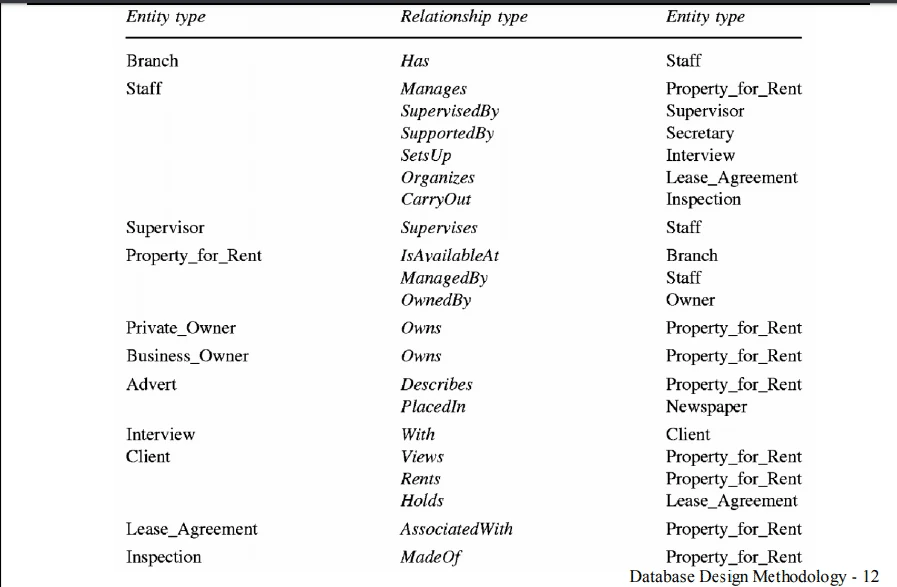
Source: City University of Hong Kong
This step will create one-to-one, one-to-many, and many-to-many relationships between different table entries.
When a single item from a table is associated with an item from another table, it’s called a one-to-one (1:1) relationship. In a one-to-many (1:M) relationship, an item in one table is related to many items in the other table, such as one customer placing several orders. A many-to-many (M:N) relationship occurs if more than one table item is related to many items in the other table.
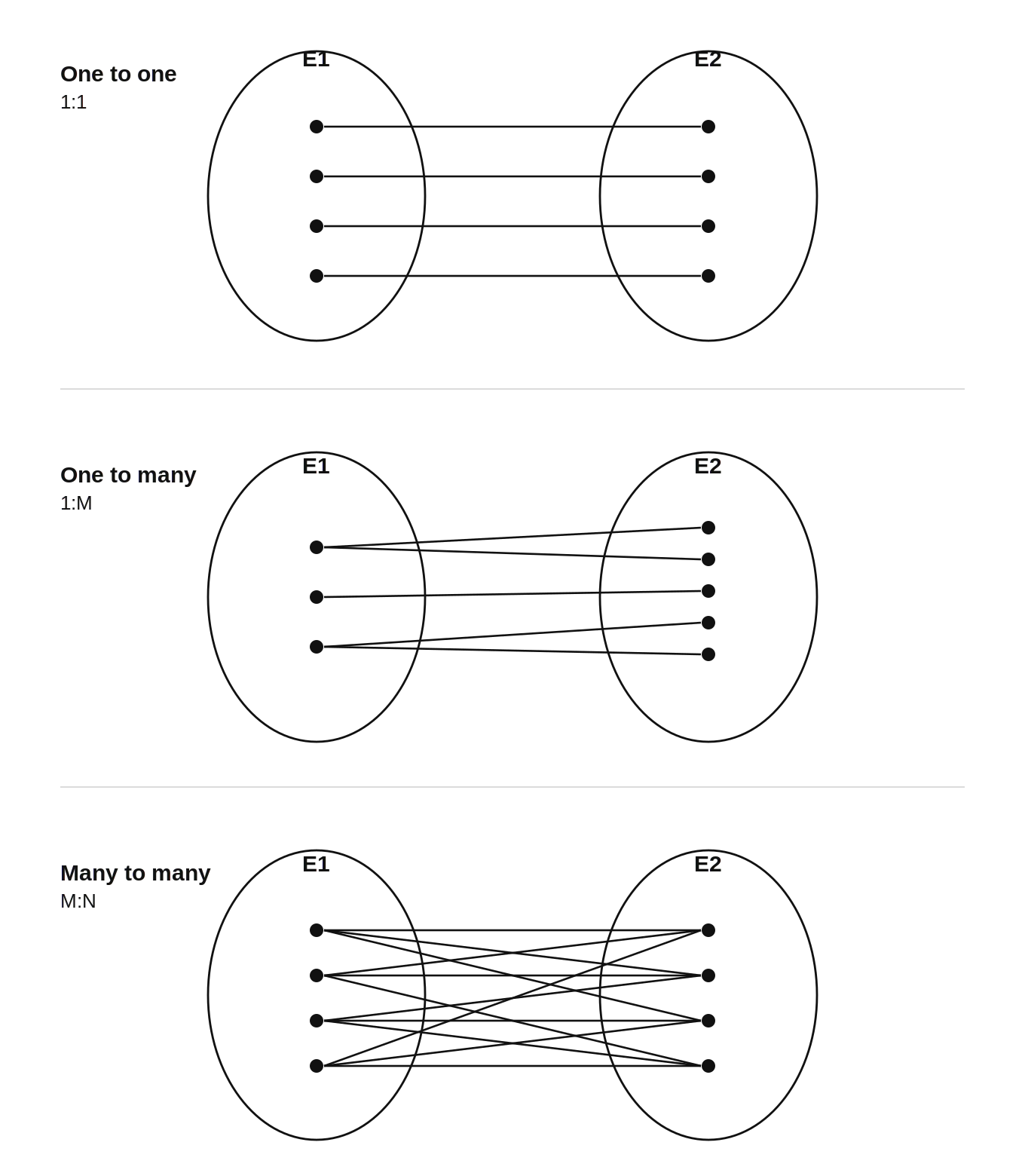
Source: GerardNico
Enhance your database design Now that you have all the required tables, fields, and relationships, the next step is to refine your database design by creating and populating your tables with mockup information. Experiment with the sample data by running queries or adding new items. It will help you analyze your design for faults, and you will be able to highlight possible errors. If needed, adjust your design to mitigate those problems.
Implement the normalization rules The last step is to implement the normalization rules for your database design. A systematic approach removes redundancy and unwanted characteristics, such as Insertion, Update, and Deletion irregularities. The multi-step process stores data in a tabular form, which helps eliminate redundant data from the relation tables.
Final Words
Let’s summarize what a database design is. The database design process helps you simplify your corporate data management system’s design, development, execution, and maintenance.
Expedite data integration with an automated ETL tool
View product demoA good database design can help save disk storage space by reducing data redundancy. Along with maintaining data precision and reliability, it allows you to access data in various ways. Moreover, a well-designed database is easier to use and maintain, making integration a breeze.