

ETL batch processing is a method of extracting, transforming, and loading data in scheduled groups (batches) instead of record by record as data arrives. Data builds up in source systems over a set period, such as an hour, a night, or a week. A job then moves the whole batch through the ETL pipeline and loads it into a target such as a data warehouse, data lake, or database.
Batch ETL has been the default way to move data for decades, and it is still the right choice for many workloads. It handles large volumes efficiently, allows complex transformations, and can run during off-peak hours so it doesn't slow down operational systems.
In this guide, you'll learn how batch ETL works, how it compares with streaming, how to build a batch pipeline step by step, and where it fits best.
A quick refresher on ETL
ETL stands for extract, transform, load. It is the process of moving data from source systems into a destination where it can be analyzed.
Extract: collect data from databases, files, APIs, applications, and other sources.
Transform: clean, validate, standardize, and reshape the data to match business rules and the target schema.
Load: write the prepared data into a data warehouse, data lake, or other target.
For a full overview, see our guide to what ETL is. ETL pipelines can run in batch mode, in real time, or in a hybrid of the two. This article focuses on batch.
How ETL batch processing works
Batch ETL follows a repeatable cycle: collect, process, load, repeat.
Data accumulates. Transactions, logs, files, and records collect in source systems over a defined window.
A trigger starts the job. A schedule (for example, every night at 2 a.m.) or an event (such as a file landing in a folder) kicks off the pipeline.
Extraction. The job pulls the new or changed data from every source. This can be a full extract or an incremental one that picks up only what changed since the last run.
Transformation. The batch is cleaned, deduplicated, validated, joined, aggregated, and converted to the target format.
Loading. The transformed batch is written to the target, usually with bulk-load methods that are much faster than inserting single rows.
Logging and verification. The job records row counts, errors, and run time, and flags any records that failed validation.
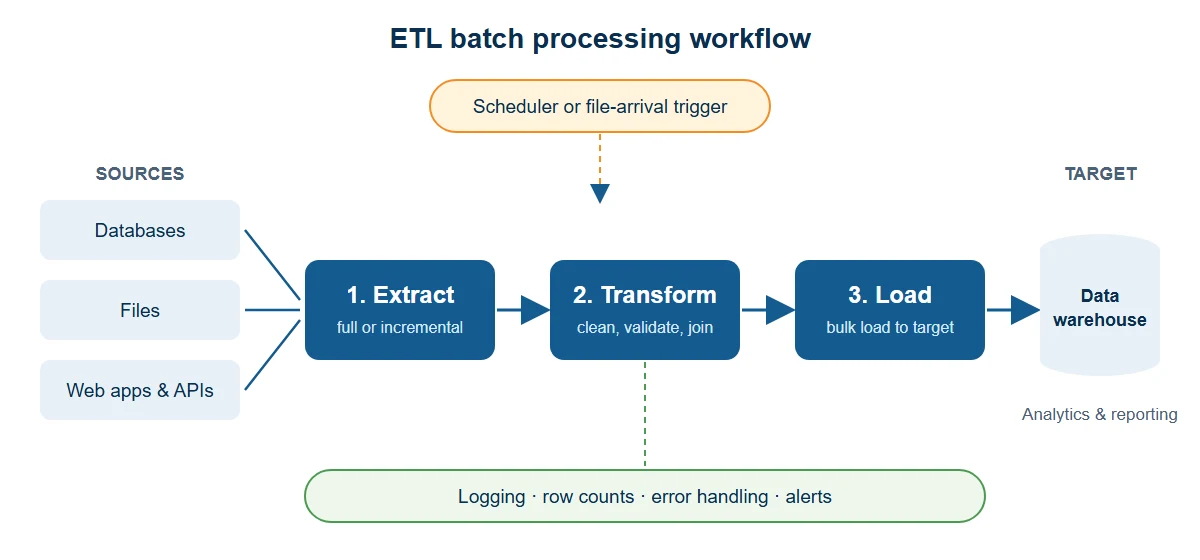
Because the whole batch is available at once, the pipeline can run heavy operations that are hard to do on a live stream, such as large joins, historical lookups, and multi-step aggregations.
Key factors in batch ETL design
Four decisions shape every batch ETL pipeline.
Data size
Batch size affects speed and resource use. Very large batches need more memory and compute, and a failure late in the run costs more to recover from. Very small batches add overhead from job start-up and many small loads. Size batches around the volume your systems can handle inside your batch window.
Time of execution
Schedule jobs when source systems are quiet, usually overnight or on weekends, so extraction doesn't compete with business users. The time period during which a job is allowed to run is called the batch window. Make sure the job finishes comfortably inside it, and that downstream reports are ready when people need them.
Processing time
Track how long each run takes and how that changes as data grows. If runtime creeps toward the end of the batch window, split the work, load incrementally, or run steps in parallel before it becomes an outage.
Data processing order
Order matters when data depends on other data. For example, load customer and product dimensions before the sales facts that reference them. Define dependencies explicitly so a step starts only after the steps it needs have succeeded.
Batch ETL vs. streaming ETL
Streaming ETL processes each record, or very small groups of records, within seconds of arrival. Batch ETL waits and processes data in groups. Neither is better in every case. The right choice depends on how fresh the data must be.
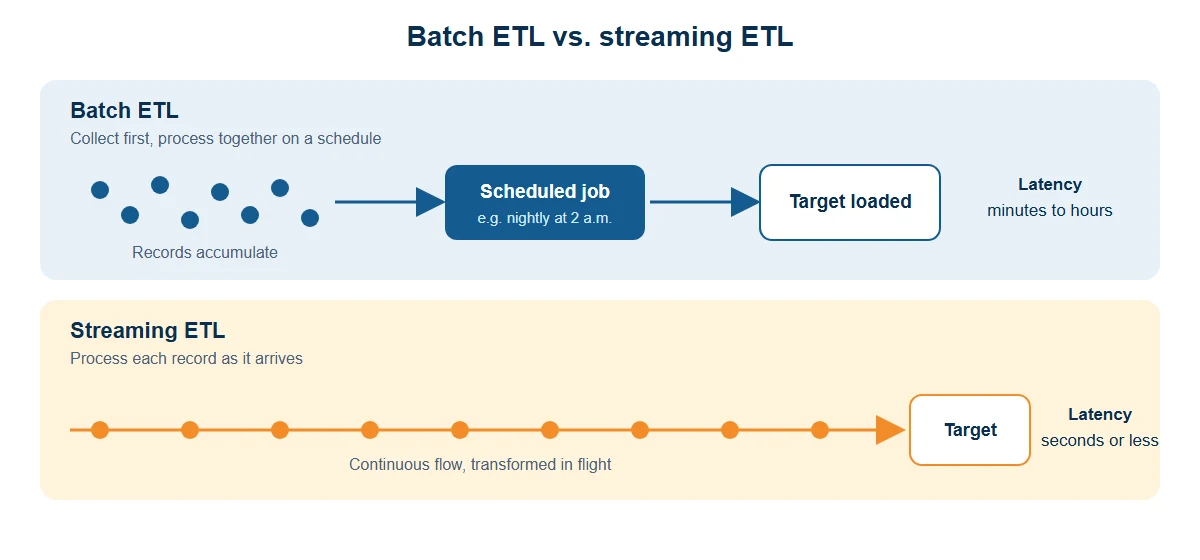
Batch ETL | Streaming ETL | |
|---|---|---|
Latency | Minutes to hours or longer | Seconds or less |
Data handled | Large, finite sets | Continuous, unbounded flow |
Typical triggers | Schedule or file arrival | Each new event |
Transformation depth | Complex, multi-step, historical | Usually lighter, in flight |
Infrastructure cost | Generally lower | Generally higher (always-on) |
Complexity | Simpler to build and debug | More complex to operate |
Best for | Reporting, warehousing, reconciliation | Fraud alerts, live dashboards, monitoring |
For a deeper comparison, read batch processing vs. stream processing. To learn how continuous pipelines work, see what streaming ETL is.
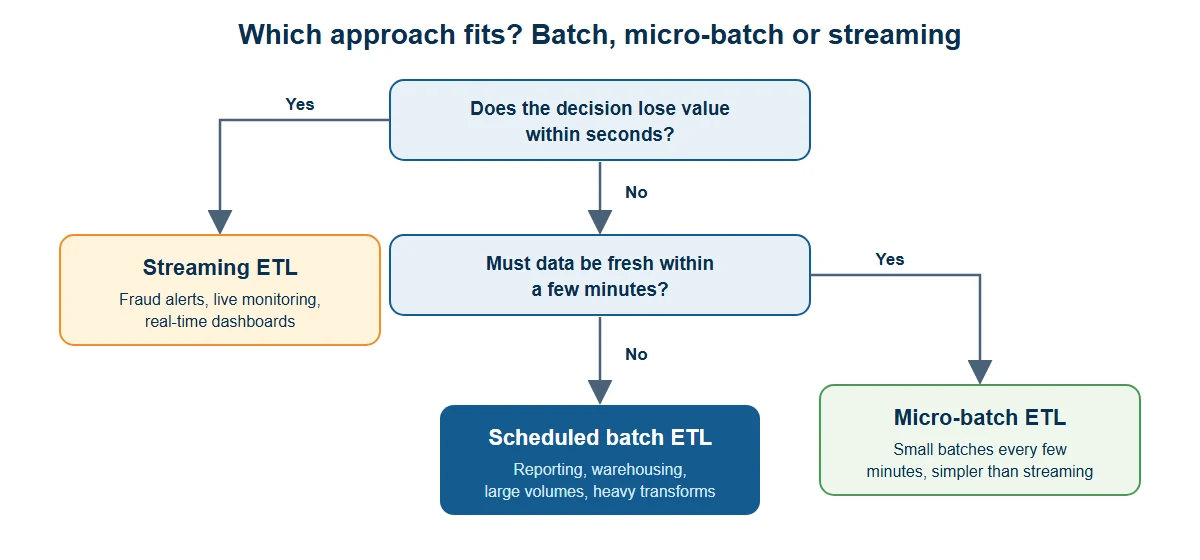
Rule of thumb: if the business decision can wait until the next report, batch is usually the simpler and cheaper option. If a decision loses value within minutes, consider streaming.
Batch ETL vs. micro-batch and ELT
Two related terms often come up alongside batch ETL.
Micro-batch processing runs very small batches at short intervals, for example, every minute or every five minutes. It narrows the freshness gap with streaming while keeping a batch-style model.
ELT (extract, load, transform) loads raw data into the target first and transforms it there, using the power of a cloud data warehouse. ELT can also run in batches. Choose ETL when you must clean or mask data before it lands in the target. Choose ELT when the target can transform data at scale and you want to keep the raw data.
Many organizations run a hybrid: batch for heavy historical and reporting loads, and streaming or micro-batch for the few feeds that need to be current.
Benefits and limitations of batch ETL
Benefits
Efficient at scale. Bulk extraction and loading handle large volumes at a lower cost per record.
Deep transformations. With the full batch available, you can run joins, aggregations, and quality checks that are hard in real time.
Predictable resource use. Jobs run on a known schedule and can use off-peak capacity.
Easier to test and audit. A batch has clear start and end points, which simplifies reconciliation, retries, and compliance reporting.
Simpler to maintain. Batch pipelines generally have fewer moving parts than always-on streaming systems.
Limitations
Data latency. Results are only as fresh as the last completed run.
Batch window pressure. Growing data can push jobs past their window.
Big failures. If a large job fails near the end, recovery can be slow unless the pipeline supports restarts and checkpoints.
Spiky load. Large scheduled runs can create peaks in compute and network use.
How to build a batch ETL pipeline
Follow these steps to design and launch a batch pipeline.
Define the goal and the freshness requirement. Decide what the data will be used for and how current it needs to be. This confirms that batch is the right model.
Identify your sources. List the databases, files, APIs, and applications involved, and note their formats, volumes, and access constraints.
Design the extraction. Decide between full and incremental extraction. Incremental loads (using timestamps, change flags, or change data capture) cut run time dramatically for large tables.
Map and transform. Define the field mappings and business rules: cleansing, deduplication, type conversion, lookups, and calculations. Add validation rules that reject or quarantine bad records.
Choose the load strategy. Pick full refresh, append, or upsert (insert or update) for each target table, and use bulk loading for speed.
Schedule and orchestrate. Set the frequency and the dependencies between steps. Add error handling and notifications.
Test with realistic data. Check row counts, totals, and edge cases. See our guide to ETL testing for what to verify.
Monitor and tune. Track runtime, throughput, and failure rates. Adjust batch size, parallelism, and schedules as data grows.
Our guide to the ETL pipeline covers architecture and components in more detail, and what a data pipeline is explains how ETL fits into the wider data pipeline landscape.
Best practices for reliable batch jobs
Make jobs idempotent. Running the same job twice should not create duplicates. Use upserts or truncate-and-reload patterns where appropriate.
Load incrementally where you can. Process only what changed to shorten runs and reduce source-system load.
Validate early. Catch bad data at extraction and transformation, and route rejects to an error table for review instead of failing the whole batch.
Design for restarts. Use checkpoints so a failed job resumes from the last good step.
Monitor and alert. Notify the team on failures, unusual run times, and unexpected row counts.
Keep an audit trail. Log what ran, when, how many records were processed, and what was rejected.
Document dependencies. Make job order and upstream and downstream impacts explicit.
Plan for growth. Review run times regularly so you can scale before the batch window becomes a problem. For design patterns, see
Use cases of ETL batch processing
Healthcare data management
Hospitals and health networks consolidate patient records, lab results, and billing data from separate systems into one warehouse overnight. Batch jobs apply standardization and masking rules so analysts can report on outcomes and costs while sensitive data stays protected. A nightly claims reconciliation is a typical example.
Logistics and supply chain management
Shipment scans, inventory counts, and supplier feeds are loaded in scheduled batches to update stock positions and delivery performance reports. Teams use them for demand planning and route analysis that don’t need second-by-second data.
E-commerce and retail
Retailers load the day’s orders, returns, and web analytics each night to refresh sales dashboards, reconcile payments, and update customer segments before the next business day.
Social media and marketing analysis
Marketing teams batch-load campaign, engagement, and ad-platform data to compare performance across channels. Daily or weekly loads are enough for trend analysis and budget decisions.
Real-time data processing augmented by batch analysis
Many organizations combine both approaches: streaming handles alerts and live views, while batch jobs enrich and reconcile the same data later with full history. For example, a live fraud flag can be confirmed or cleared by a nightly batch comparison against longer-term patterns.
Compliance and regulatory reporting
Regulated industries use batch ETL to assemble complete, auditable datasets at period end. Predictable runs, validation rules, and logs make it easier to show regulators how reported figures were produced.
Education and learning management systems
Schools and universities consolidate enrollment, attendance, and learning platform data in scheduled loads to track student progress and report on outcomes.
Running ETL batch jobs in Astera
Astera gives teams a no-code way to build and schedule batch ETL pipelines, without writing scripts for every job.
Visual pipeline design. Build extraction, transformation, and loading flows on a drag-and-drop canvas.
Broad connectivity. Connect to databases, files, applications, and APIs through built-in connectors.
Built-in scheduling. Run jobs once, hourly, daily, weekly, or monthly, run them continuously, or trigger them when a file is dropped in a folder. You can pass job parameters, and enable pushdown hints and dataflow optimization from the schedule.
Notifications and job logs. Send email alerts when a job starts, finishes, or fails, in summary or detailed form. Results are stored in the job log, and each running scheduled job appears in the job progress window.
Change data capture. Load only changed data in batches, in defined increments, or as a real-time stream.
Pushdown (ELT-style) execution. Run transformations in the source or target database in partial or full pushdown mode.
Data validation. Apply quality rules in the flow and route invalid records for review.
APIs from the same environment. Design and publish APIs so other systems can request current data on demand.
To see how a full workflow is set up, follow the partner onboarding ETL walkthrough in our documentation. If you’re comparing options, see our roundups of the best ETL tools and the best data pipeline tools.
Ready to build your first batch ETL pipeline? Start a free trial or book a consultation.
Related reading: Data integration · Data warehouse · Data lake · Data ingestion vs. ETL