

TL;DR: Fiserv platforms generate fixed-width .rpt files where every field sits at an exact character position. Astera ReportMiner maps those positions through a visual template editor, extracts the data, validates it against your business rules, and writes it directly to Excel, CSV, or 200+ other destinations. One template handles every future instance of the same report type, and the full pipeline runs unattended on a schedule.
Fiserv core banking platforms like Premier, DNA, and Signature generate report files (.rpt) as fixed-width text output from batch jobs, scheduled runs, and on-demand queries. These files contain account data, transaction histories, regulatory extracts, general ledger summaries, and loan portfolio details in a structured but positionally-encoded format where every field occupies a specific character range on each line.
Astera ReportMiner reads these .rpt files directly, maps the field positions through a visual template editor, and writes the extracted data to Excel, CSV, text, databases, or any of its 200+ supported destinations. The entire process from loading a Fiserv report to producing a clean Excel output can be configured in under an hour for most report types.
How the Extraction Works
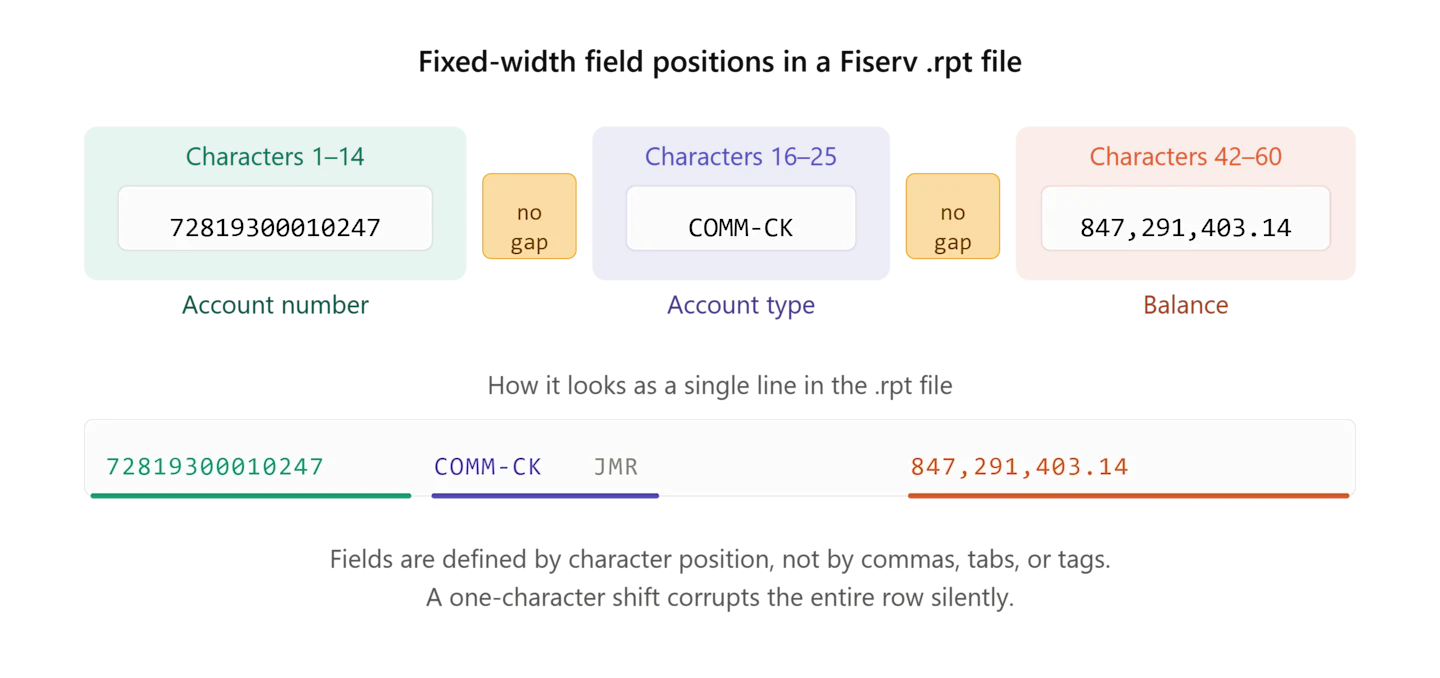
Fiserv .rpt files follow fixed-width formatting conventions where fields are defined by character positions rather than delimiters. An account number might occupy characters 1 through 14, an account type field sits at characters 16 through 25, and a balance field spans characters 42 through 60. These positions remain consistent across every instance of the same report type, which is what makes template-based extraction so effective for them.
Astera ReportMiner's auto-generate layout feature analyzes the structure of a loaded .rpt file and identifies repeating patterns, section boundaries, header and footer lines, and column positions. It produces a complete extraction template that maps every data field to its character range. You verify the output in the preview panel, adjust any positions that need refinement, and the template is ready.
For Fiserv reports with multiple sections (a common pattern where the same file contains a summary section followed by a detail section followed by totals, each with different column layouts), ReportMiner applies independent field definitions to each section. The sections are detected by pattern matching on header lines or separator characters, so the extraction engine knows exactly where one layout ends and the next begins.
Once the template is configured, it applies identically to every future instance of that report type. The Fiserv batch job that generates the .rpt file runs the same COBOL program with the same output formatting every cycle, so a template built against one instance handles all subsequent files without modification.
Writing Output to Excel or CSV
ReportMiner writes extracted data directly to .xlsx, and .csv. The output mapping is configured in a visual dataflow where you connect the extraction template to a destination object, map the fields, and apply any transformations you need along the way.
For Excel output specifically, you control the worksheet name, column headers, data types, formatting, and whether the output appends to an existing workbook or creates a new one. If your current workflow produces one Excel file per report run, ReportMiner replicates that. If you need consolidated output where multiple report runs aggregate into a single workbook with separate tabs, that works too.
The dataflow also supports writing the same extracted data to multiple destinations in a single run. You can output to Excel for the operations team, to a SQL Server table for the BI platform, and to a CSV archive simultaneously without running the extraction twice.
Fiserv Extraction Pipeline in ReportMiner
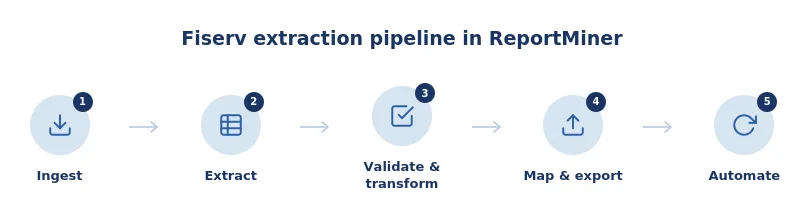
Ingest
Upload .rpt files from SFTP, email, network folders, cloud drives, or API calls. ReportMiner reads fixed-width text, CSV, PDF, Excel, EDI, and image-based reports directly, with no preprocessing or format conversion required.
Extract
Load a Fiserv .rpt file and run Auto-Generate Layout to create a complete extraction template in seconds. The template maps every data field to its character range, with independent field definitions for each section in multi-section reports. For one-off or variable-format files, LLM Generate offers AI-powered templateless extraction using natural language prompts. Both methods work within the same pipeline.
Validate and Transform
Apply validation rules to catch errors before data reaches your destination: account numbers must be 14 digits, balances must be numeric, section totals must reconcile with detail rows. Use 300+ built-in transformation functions for date format conversion, sign normalization, code lookups, calculated fields, and data type standardization.
Map and Export
Write extracted data to Excel, CSV, JSON, XML, SQL Server, Oracle, Snowflake, or any of 300+ supported destinations. Route different data sets to different destinations within the same run: Excel for the operations team, a database table for the BI platform, and a CSV archive, all from a single extraction pass.
Automate
Configure the built-in Job Scheduler to trigger extraction on file arrival, time schedule, or API event. Once a template is configured for a Fiserv report type, every subsequent file runs unattended. The operations team reviews only flagged exceptions, not routine output.
Getting Started
The fastest way to evaluate Astera ReportMiner for your Fiserv reports is to load one of your actual .rpt files into the template editor and run auto-generate layout. The preview panel shows the extracted data immediately, so you can verify accuracy against the source report before building out the full pipeline. Most teams complete their first report type within an hour.
See Astera ReportMiner in action on your Fiserv reports. Book a demo call.