

Most of what lands in an enterprise inbox isn't a clean, high-resolution PDF. It is a faxed invoice with coffee stains, a mortgage pay stub photocopied six times, a bill of lading stamped across the important fields, a 120 DPI scan from a twenty-year-old multifunction printer.
Astera ReportMiner's intelligent character recognition is built for the real-world scanned document quality. For most enterprises, these degraded documents aren't edge cases. They make up the majority of the inbound pipeline.
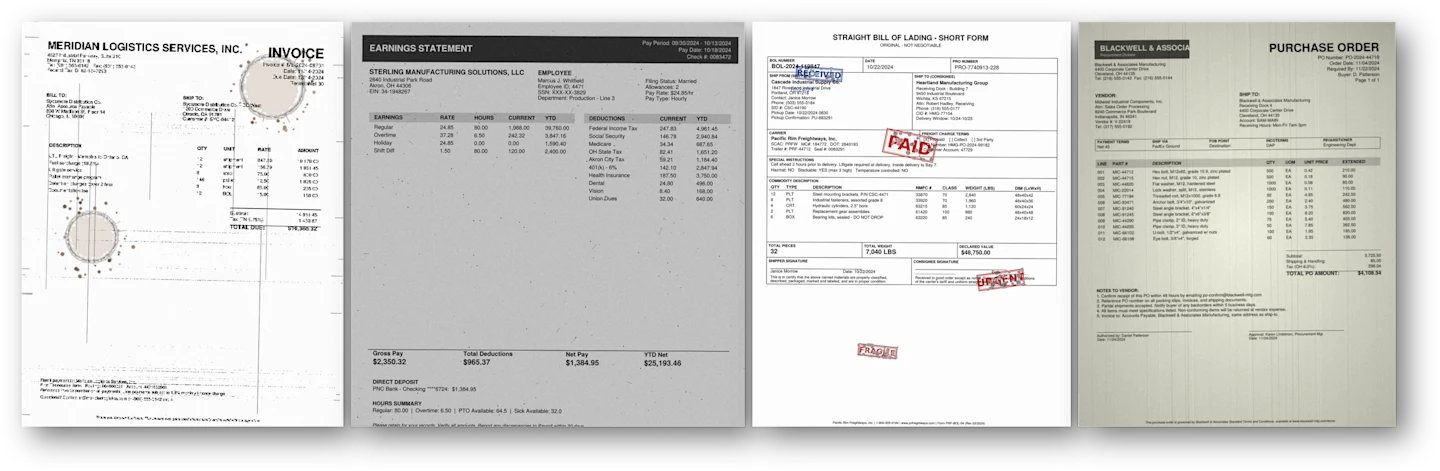
This blog walks through how Astera ReportMiner's AI OCR assesses the quality of each document, preprocesses it, decides which recognition engine to use, corrects misreads using the document's own context, and scores its own output so downstream systems act accordingly.
What Is Intelligent Character Recognition (ICR)?
Intelligent character recognition (ICR) is OCR with AI built into every stage of the process: quality assessment, engine selection, character correction, and validation. Traditional OCR software reads characters against a fixed template and treats every document the same way. Intelligent OCR uses artificial intelligence to judge document quality first, choose the recognition engine suited to that specific document, and correct misreads using context instead of a static dictionary.
Astera ReportMiner is built around this idea. Feed it a clean invoice and a coffee-stained fax on the same day, and the AI OCR software behind ReportMiner treats them differently: one gets a fast, lightweight pass, the other gets heavier preprocessing and a different recognition engine entirely. That is the difference between OCR AI that reacts to what is on the page and the traditional OCR software that assumes every document looks the same.
AI OCR vs. Traditional OCR
Traditional OCR treats every document the same way. Astera ReportMiner's AI OCR or ICR makes a decision at each stage of the process, based on what a specific document actually needs.
Traditional OCR | Astera AI OCR | |
Engine selection | One fixed engine runs on every document | Routes each document to one of five OCR engines based on an automatic quality assessment |
Preprocessing | Same fixed preprocessing chain applied to all documents | Preprocessing (deskew, rotation correction, resolution) tuned to what each document and engine needs |
Degraded scans | Produces garbled output or fails silently on skew, noise, or watermarks | Routes degraded documents to heavier processing automatically |
Processing handwritten documents | Character-by-character recognition struggles with handwriting, often needs a separate specialized tool | A custom LLM-based engine reads the full page as visual context instead of isolating individual characters, so it handles handwritten fields alongside the printed text around them |
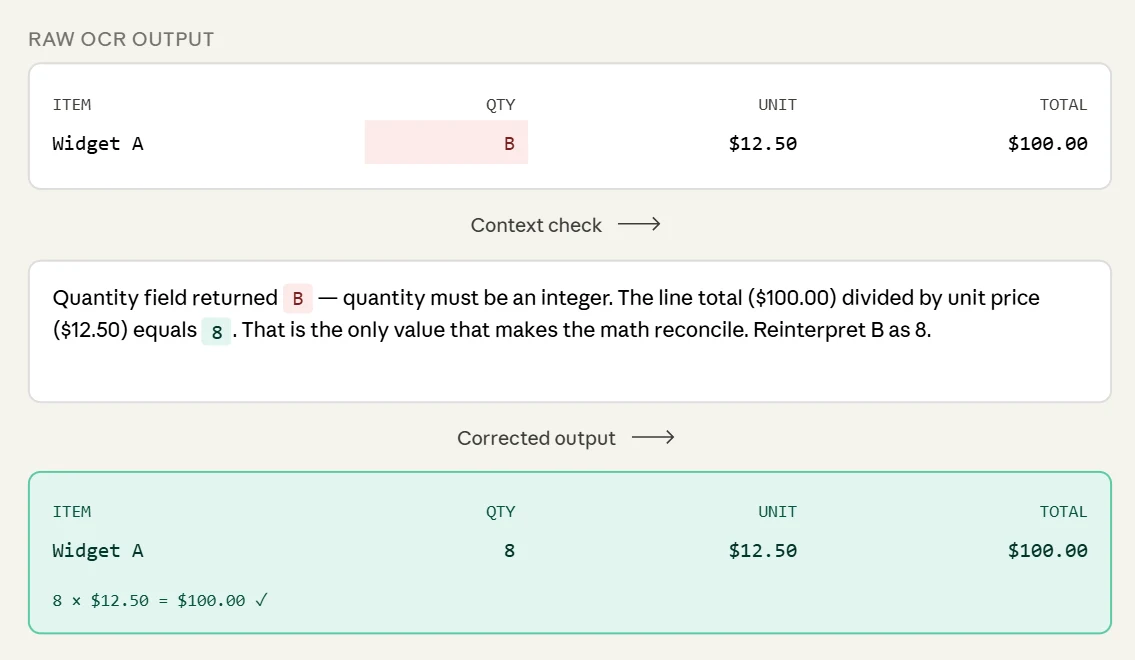
Character-level errors | Little to no correction, or dictionary lookups on running text | Context-driven semantic correction using the document's own math and structure (e.g., reconciling a misread quantity against the line total) |
Validation before output | None built in | Deterministic validation layer: mathematical reconciliation, pattern checks, cross-field logic, completeness checks |
Confidence signal | None | Output carries a trust signal so downstream systems know which documents need review |
New vendor formats | Usually requires a new template per format | Pretrained foundation model handles new formats without manual templates |
Accuracy across mixed quality | High on clean scans, drops sharply as scan quality degrades | Consistently higher accuracy across a mixed batch, since each document gets the path suited to it |
The Range of Documents a Production Pipeline Has to Handle
A scanned document pipeline has to handle skew and rotation from careless feeding, compression artifacts from fax transmission or low DPI scans, watermarks and stamps layered over critical fields, faded ink, handwritten annotations, multiple documents on one page, and language or script variation. A production pipeline has to handle all of them, often in the same document, at volume, without a human reviewing every exception.
Single-engine OCR tools apply one engine and a fixed preprocessing chain to everything. When a document falls outside those assumptions, the tool produces garbled output or fails silently and passes bad data downstream, neither of which is acceptable when the extracted data flows into an ERP or a payment gateway.
Astera ReportMiner treats OCR as a routing problem. Different documents need different engines, different preprocessing, and different validation, and this intelligent OCR platform makes those decisions automatically, consistently, and fast enough to keep up with enterprise volume.
The ReportMiner Processing Pipeline
A scanned document moves through a sequence of stages once it enters ReportMiner. Each stage has a specific job and produces signals the next stage uses to make a better decision. Here's what happens between ingestion and the moment structured data lands in a target system.
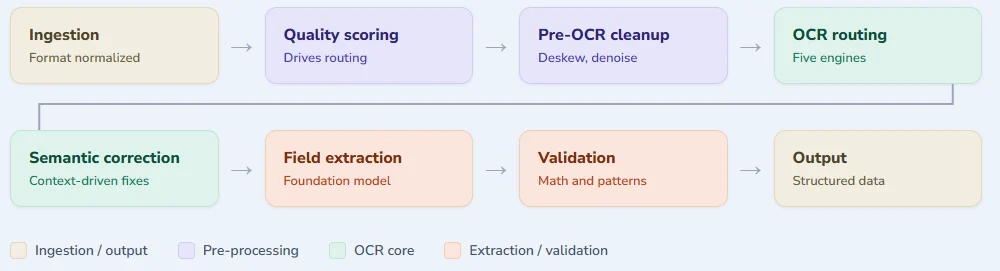
Ingestion and Quality Assessment
Scanned documents arrive as PDFs (native or image-only), TIFF, PNG, JPEG, and occasionally some unusual formats from legacy scanning hardware. ReportMiner normalizes these into a consistent internal representation, splits multi-page TIFFs, and identifies files that contain multiple documents stacked together.
Before any OCR engine touches a document, ReportMiner runs a quality assessment on each page: DPI, skew angle, noise level, contrast, watermarks and background patterns, dark or colored table backgrounds, and whether text looks faded or overwritten. These signals combine into an internal quality score that drives routing in the next stage including OCR engine, preprocessing steps apply, and how aggressive post-processing correction needs to be.
Pre-OCR Image Processing
For clean documents, this stage is close to a no-op. For degraded scans, it's where the real work happens: deskewing and rotation correction, noise reduction, contrast enhancement, background removal, watermark and stamp separation, and binarization tuning for faded text.
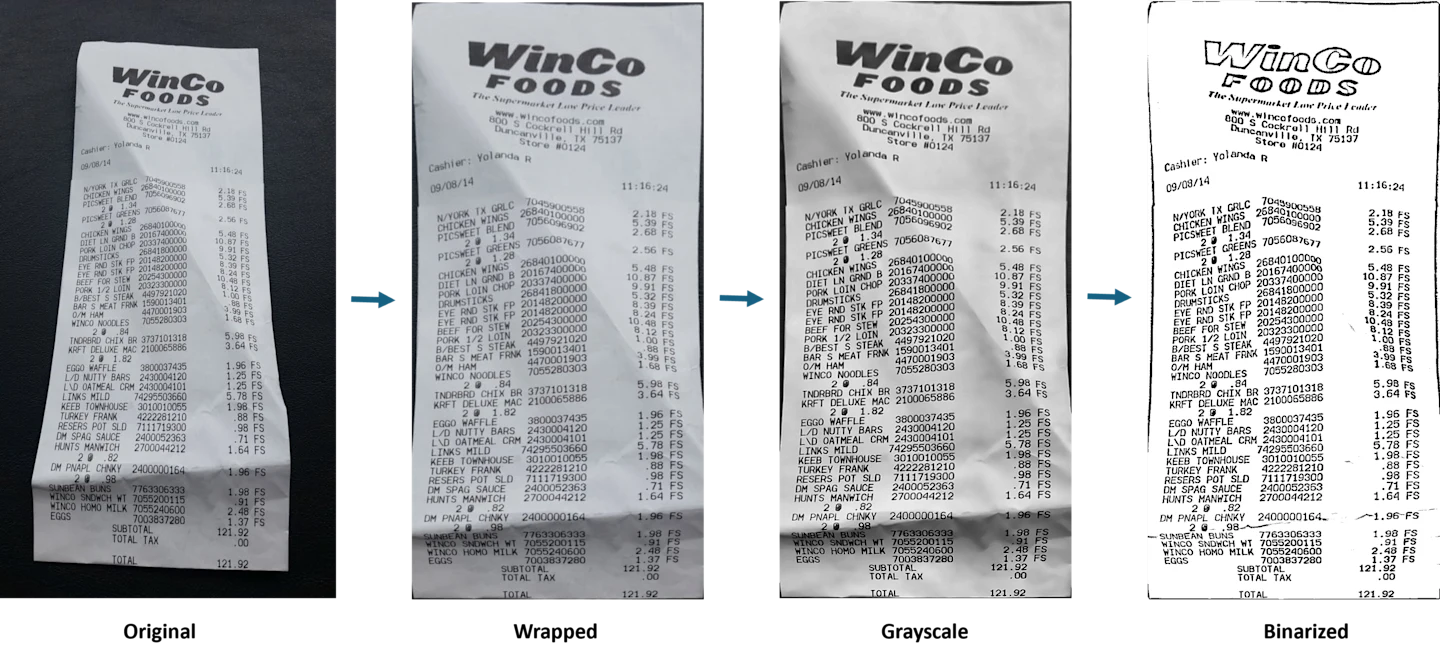
These steps aren't applied uniformly. A document that scores high on quality assessment skips most of this, since over-processing a clean document introduces its own issues. A document that scores low gets the full treatment, sometimes with multiple passes at different parameter settings.
AI OCR Routing: Five Engines, One Decision Layer
This is where ReportMiner's intelligent character recognition diverges from single-engine OCR tools. Instead of committing to one engine and hoping it covers every document type, ReportMiner maintains five OCR paths and routes each document to the one suited for it.
Engine | Best For | Why It Matters |
Native Lightweight | High-volume, clean scans above 300 DPI. On-premises data residency requirements. | Speed and throughput at scale. Processes entirely within your infrastructure with zero cloud dependency. |
Native Heavy-Duty | Severely degraded scans: heavy skew, watermarks, stains, faded text, dark table backgrounds. | Handles the documents most platforms give up on. Tuned for the hardest cases in your pipeline. |
Google Cloud OCR | Mobile captures, photographed receipts, documents in mixed languages or non-standard typefaces. | Strong performance on low-resolution, real-world photographic inputs where on-premises engines typically degrade. |
Amazon Textract | Structured documents with complex table layouts and form fields. High-precision tabular extraction. | Native table and form structure understanding with built-in orientation handling for rotated documents. |
Custom LLM-Based | Dense tables where traditional OCR collapses columns, handwritten content, low-resource languages. | Interprets the full page as visual context rather than isolated text regions. Robust on layouts that defeat template-based approaches. |
Users who want more control can override the routing. Any of the five paths can be forced as the default for a workflow, a document type, or an individual job. This is important for industries with data residency compliance regulations.
A Scenario: Mortgage Pay Stubs Across Decades of Scanning
A mortgage processor handling loan files with borrower pay stubs might have a single file containing pay stubs scanned yesterday at 600 DPI on a modern color scanner alongside pay stubs scanned in 2008 at 120 DPI on a black and white scanner with a rusted platen. Both need to produce the same structured output: employer, pay period, gross pay, deductions, net pay.
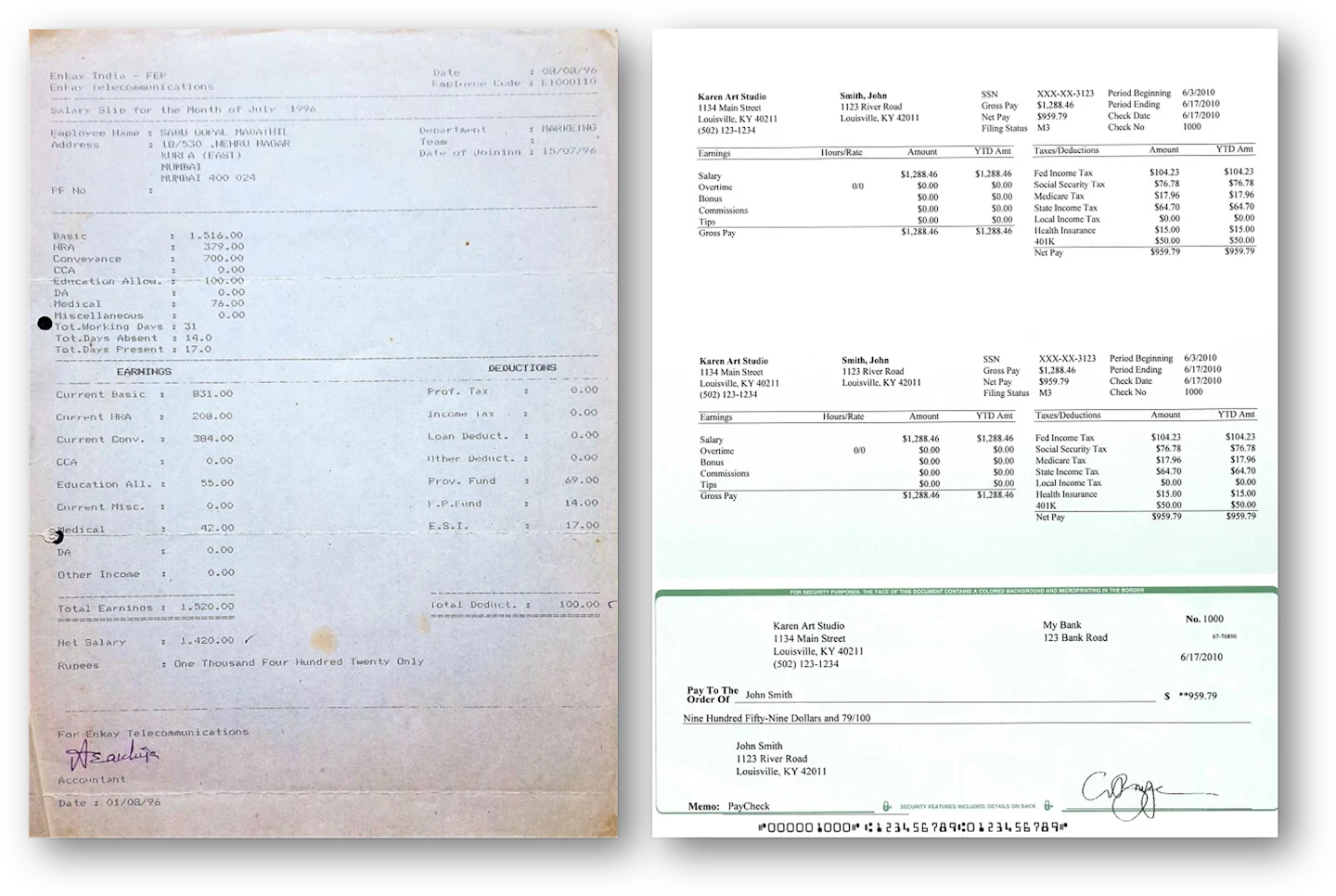
For the modern scan, ReportMiner skips most preprocessing, routes to native light OCR, and extracts fields in under a second. For the old scan, the pipeline flags it as heavily degraded, runs binarization, deskewing, and contrast enhancement, then routes to the native heavy-duty engine. Due to the data privacy regulation in financial industry, only native engines are selected by the intelligent document recognition system.
Post-OCR Semantic Correction: Where Context Fixes Bad Character Recognition
Every OCR/ICR engine makes mistakes. At enterprise volume, even 99% character accuracy means thousands of misreads a day. A rigid extraction tool passes those misreads downstream. ReportMiner's intelligent character recognition catches them.
In ReportMiner, post-OCR correction is context-driven rather than dictionary-driven, and the distinction matters. Dictionary-based correction looks up misread words against a list of known terms and swaps in the closest match. That works for running text but fails on most critical information in business documents: invoice numbers, amounts, dates, tax IDs, product codes. A dictionary can't tell you a quantity field should be an integer, or that a line total has to equal unit price times quantity.
Context-driven correction uses the structure of the document itself. When the OCR engine reads a quantity field as the letter B, ReportMiner knows quantity fields hold integers and that the surrounding math has to reconcile, so it reinterprets the B as an 8 because that's the only value that makes the line total correct.
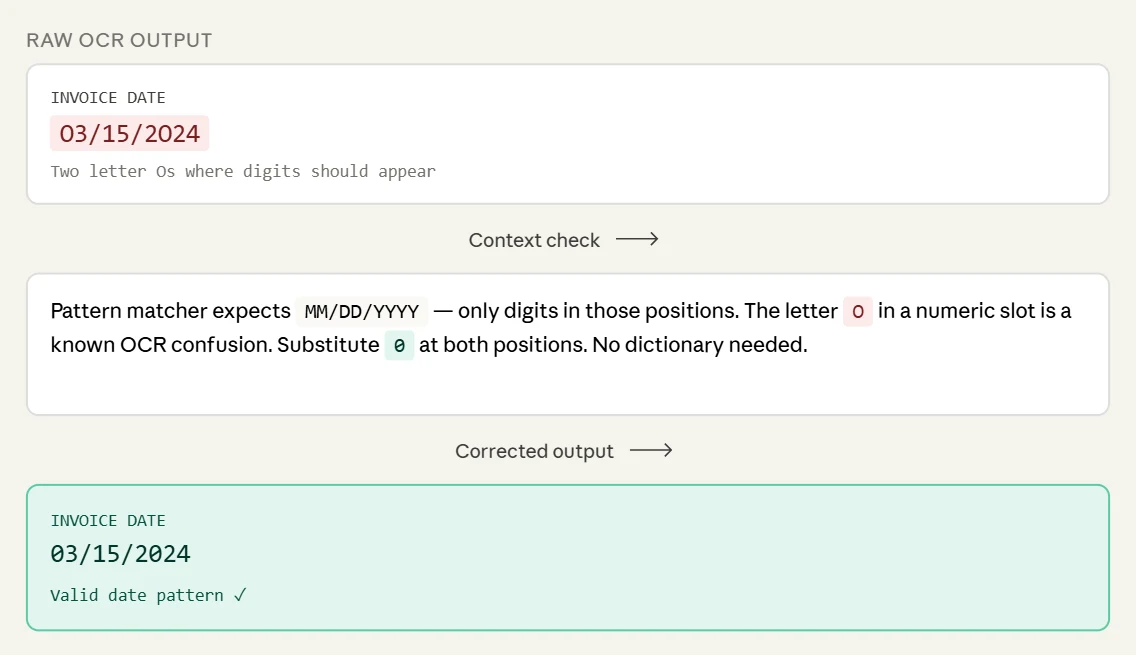
When a date field comes back as O3/15/2O24 with letter Os where zeros should be, pattern recognition for date formats catches it without needing a dictionary.
The same logic extends further. If an invoice subtotal doesn't match the sum of its line items, ReportMiner re-examines the line items to find which ones were misread, using the document's own internal consistency as a correction signal — the same way a person reads a degraded document.
Validation and Exception Flagging
Once a document has been through intelligent OCR and semantic correction, ReportMiner extracts the required fields. The extraction layer uses a pretrained foundation model that already understands how business documents are structured, so ReportMiner processes new vendor formats easily, without manual template configuration.
Every extracted field goes through a deterministic validation layer before data leaves the platform: mathematical reconciliation, pattern checks on structured fields like dates and tax IDs, cross-field logic such as discounts reducing totals and taxes increasing them, required-field completeness, and currency and unit consistency.
Documents that pass all validation checks flow straight through to the ERP. Documents that fail the quality check are routed to a reviewer with the uncertain fields and records flagged.
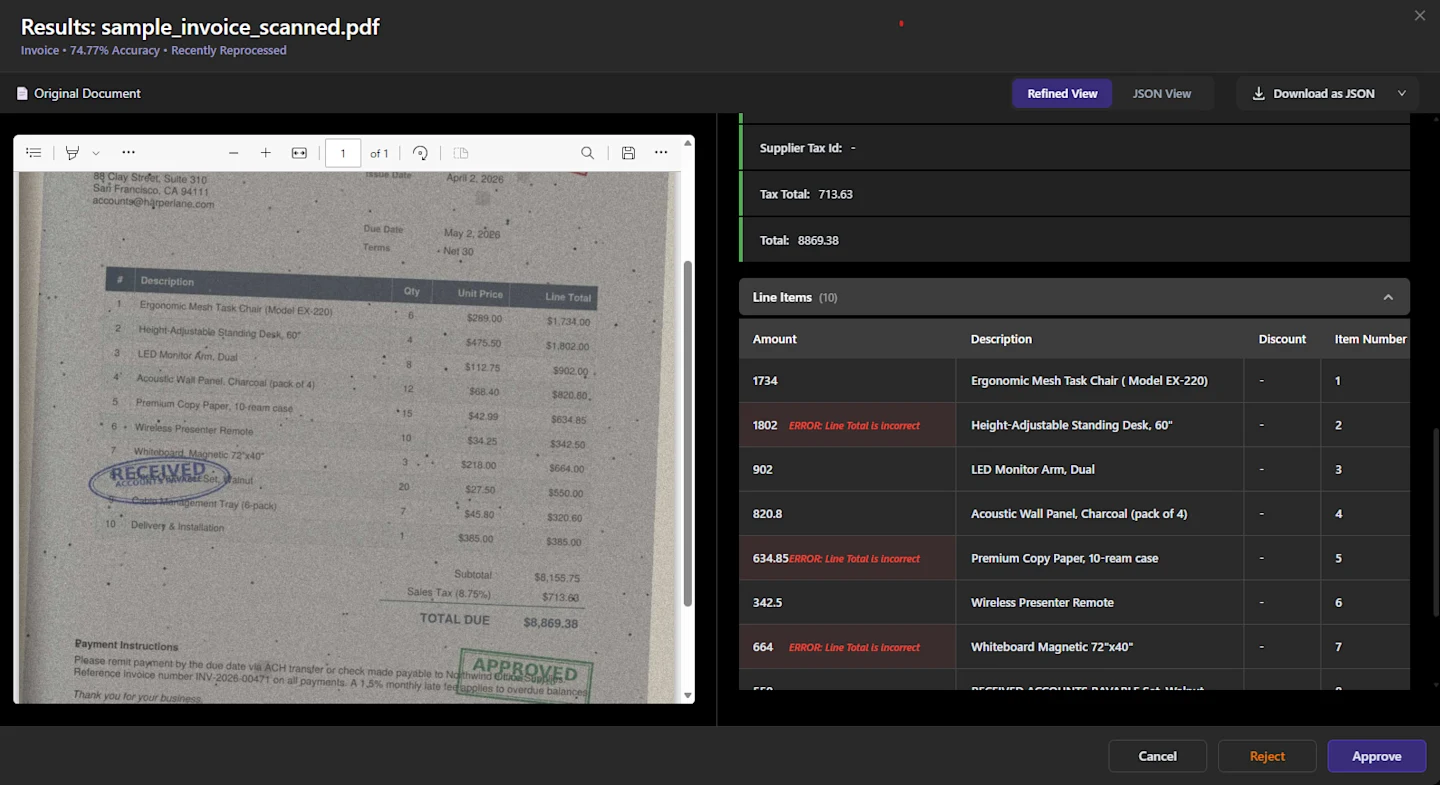
Users can configure custom business rules and data quality checks to ensure documents are flagged for meaningful exceptions.
Scaling to Enterprise Volumes
The entire OCR pipeline has to run fast enough for enterprise volume. A mid-market AP team might process ten thousand invoices a month. A mortgage servicer during a refinance surge can hit tens of thousands a day. Astera ReportMiner handles that through concurrent jobs, asynchronous processing, and intelligent batching. The runtime processes documents in parallel, each moving through its own pipeline independently, and because OCR routing decisions are local to each document, the system doesn't need to coordinate across documents.
Every document produces a job trace showing which OCR engine ran, which preprocessing steps applied, which fields were corrected during semantic checks, and which validations passed or failed. When a customer asks why a specific invoice was flagged for review, the answer is in the trace — which for high-volume teams is what separates a platform they can operate in production from a black box they have to wrap in their own monitoring.
Getting Started
Scanned document processing at enterprise scale is a systems engineering problem more than an OCR selection problem: which engine runs on which document, how to clean up a document before OCR touches it, how to correct misreads using the document's own context, and how to communicate confidence to downstream systems in a way that supports straight-through processing.
Astera ReportMiner's intelligent OCR routing, its pre- and post-processing layers, its validation stack, and its data quality controls are what keep a document processing system reliable in production. For an enterprise handling thousands of scanned documents a day, reliability matters more than any single feature.
See how Astera ReportMiner's intelligent character recognition works on your files. Book a Demo