

In our first two blogs, we introduced Large Database Models and walked through ten business use cases where similarity search over your own data creates real value. In this blog, we get practical: what does it actually take to run similarity search over your own database rows - to ask a question like "return the top 5 rows most similar to this one" - and what does the underlying pipeline look like?
Let's build it using Astera.
Two Ways to Ask "What's Similar to This?"
There are two levels at which you can run similarity search, and the right choice depends on the question you're actually trying to answer.
Whole-row similarity treats an entire record - every field - as one unit of comparison. This is the right choice when "similar" should mean broadly alike across the board: a product that resembles another product in category, price, and rating all at once, or an order that resembles another order across every attribute.
Field-level similarity narrows the comparison to one field, or a specific subset of fields, and ignores the rest. This is the right choice when you want to control exactly what "similar" means: two support tickets might resemble each other only in the free-text complaint description, regardless of which product or customer they came from, or two products might be priced completely differently but nearly identical in what they actually do.
Neither approach is universally better - the point is that you get to choose the dimension of similarity that matters for the question at hand, rather than being locked into whatever a single black-box model decided mattered.
Example 1: Whole-Row Similarity Over a Product Catalog
Say you're running a retail product catalog and want to answer:
"Return the top 5 products most similar to P-2048, based on category, price, rating, and description."
The pipeline compares the reference row against every other row in the table and returns a ranked result - no exact-match filter required, just "closest":
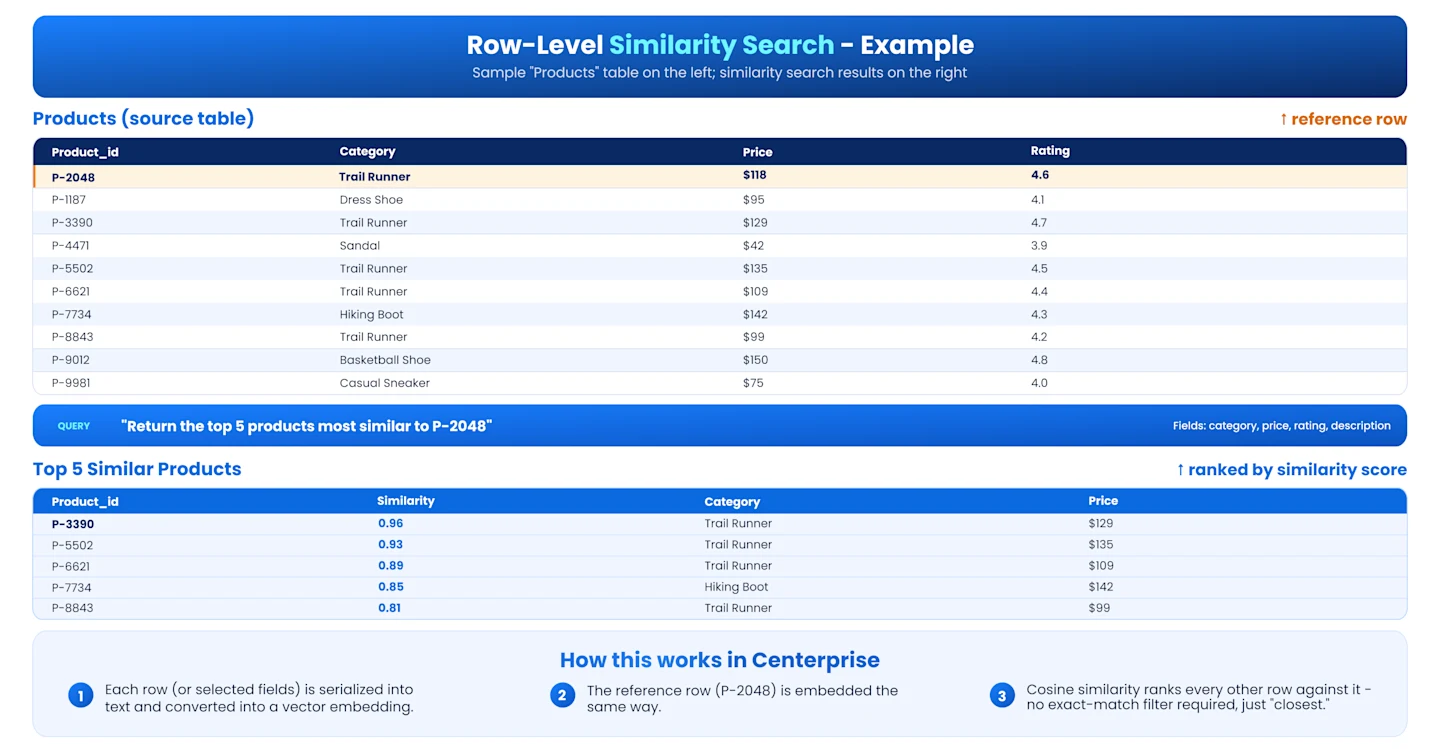
Notice what's happening here: the top match isn't the cheapest or the highest-rated product - it's the one that's closest across all the fields considered together, including a trail runner priced above the reference product but with a near-identical rating and description. That's the core difference from a traditional SQL query, which would have required you to define exact thresholds for each field up front, and likely would have missed this match entirely if you filtered too narrowly on price.
Example 2: Field-Level Similarity Over Support Tickets
Now consider a different question, on a completely different table:
"Which past support tickets most resemble this new one, based on the complaint description alone - ignore the customer, product, and agent who handled it?"
Here, whole-row similarity would actually work against you - it would pull in irrelevant noise from customer ID, product SKU, and agent name. Field-level similarity solves this by embedding only the free-text description field, so a new ticket describing "app crashes when exporting a large report" gets matched against past tickets describing the same underlying problem in different words - "export feature freezes on big files," for instance - even though the wording, customer, and product involved are all different.
Building This as a Pipeline
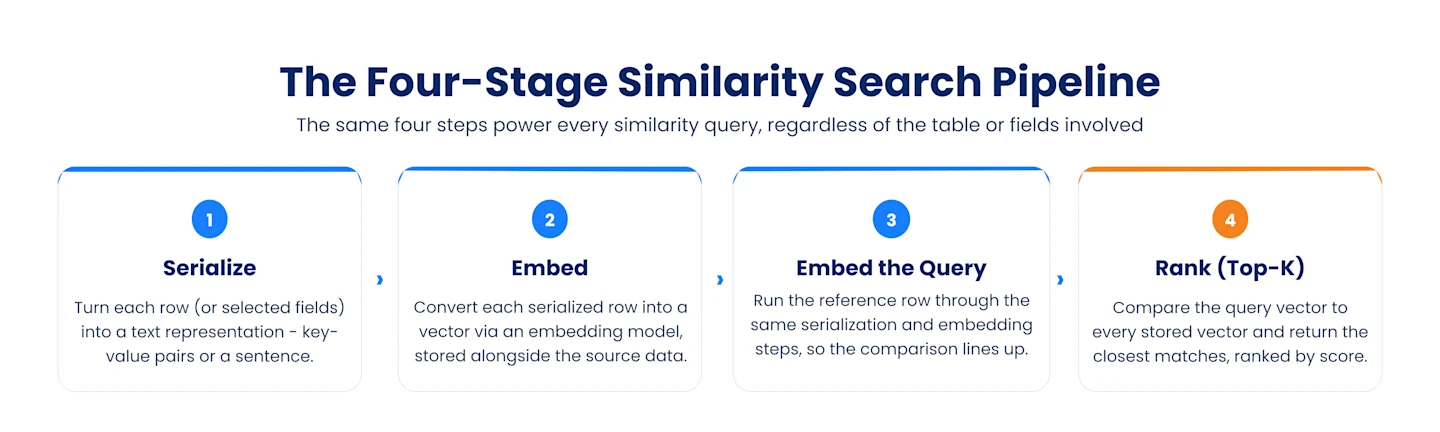
Here's how the four-stage pipeline - row serialization, embeddings, query embeddings, and top-k similarity search - maps onto a real data pipeline, using either example above:
Serialize the record. For whole-row similarity, pull in the relevant fields (via joins or a data model) and concatenate them into a text representation per row - either simple key-value pairs or a natural-language sentence. For field-level similarity, this step is even simpler: you're just passing the single field of interest (like the ticket description) through as-is.
Generate embeddings. Each serialized row (or field) gets converted into a vector via an embedding model. The output is stored - alongside the row's original fields - in a destination that supports vector storage.
Embed the query. When someone asks "find me rows similar to this one," the reference row (or field value) goes through the exact same serialization and embedding steps used for the source data, so the comparison is apples-to-apples.
Run top-k similarity search. The query vector is compared against every stored vector - usually via cosine similarity - and the top-k closest matches are returned, ranked by similarity score.
More Example Queries You Can Ask
Once this pipeline is in place, the kinds of questions you can run against your own tables start to look less like SQL and more like plain language:
"Return the top 5 products most similar to this one, based on category, price, and rating."
"Which past support tickets most resemble this new one, based on description alone?"
"Find the 10 job candidates most similar to our best recent hires for this role."
"Show me the transactions most similar to this flagged transaction, across all fields."
"Find the 5 store locations whose sales pattern most closely matches this new store."
Each of these is the same underlying mechanism - serialize, embed, compare, rank - just pointed at a different table, a different set of fields, and a different reference record.
Whole-Row vs. Field-Level: A Practical Rule of Thumb
Use whole-row similarity when... | Use field-level similarity when... |
You want a general sense of "what's like this" | You want to control precisely which dimension of similarity matters |
Multiple fields all meaningfully contribute to the comparison | One field (e.g., a description or notes field) carries most of the signal |
You're exploring or don't yet know which fields drive the outcome | You already know exactly what "similar" should mean for this question |
In practice, most real use cases end up combining both: apply a structured filter first (e.g., "only in-stock products" or "only tickets from the last 90 days"), then run similarity search on top of the remaining fields - narrowing the candidate pool before ranking by similarity. This hybrid approach tends to produce the most useful, relevant results.
Conclusion
That's the whole pipeline: serialize, embed, compare, rank. Point it at any table, and you can start answering questions like "what's most similar to this row," "which records resemble this one on a specific field," or "what are the top-k closest matches to this reference record" - all without writing a rigid SQL filter.