

A faster, efficient, more capable Astera with same licensing cost
Astera 11.2 is available now for every product on the platform: Centerprise, ReportMiner, EDI Connect. High-volume jobs process up to 2x faster, extraction templates are generated under five seconds with AI-powered Auto-Generate Layout, and Dataflows can run a full retrieval-augmented generation (RAG) pipeline without a separate tool. The release also simplifies deployment, and adds email-driven workflow triggers.
Platform-wide updates touch job processing, deployment, and AI configuration across every product. ReportMiner-specific updates go further, turning extraction into a fuller document intelligence workflow with AI-driven templateless extraction, OCR improvements, and RAG.
"The AI-driven field interpretation handles layouts we haven't explicitly templated." — Vincent, IT Manager @Gap Solutions
Server Performance and Job Processing at Scale
Job submission now happens in batches instead of one at a time, cutting per-job overhead by 50% and pushing more jobs through the queue under heavy load. Job purge runs against a partitioned repository, so clearing old records no longer competes with jobs still running, and busy file drop folders keep up with the senders feeding them.
New cluster-level runtime settings can be tune for throughput, latency, or memory constraints. Exception logging is on by default, containing details needed to diagnose a failed job.
Simplified Deployment and Catalog Management
Projects now deploy as a single unit, keeping every flow version-consistent and reducing the risk of version mismatches between environments. The catalog is enabled by default for every artifact too, removing a manual step that used to precede every deployment. The tradeoff: every existing project needs to be re-deployed once a server moves to 11.2. Schedules do not need rebuilding by hand, they export from the current version and import straight into 11.2.
LLM Generate and Smart Source
LLM Generate is a new drag-and-drop transformation that connects ETL (extract-transform-load) pipelines directly to OpenAI, Anthropic, Llama, Together AI, or a custom, self-hosted language model. A configurable prompt, written once with placeholders for mapped inputs, can classify data, extract information, generate SQL from a natural-language request, summarize content, or enrich a dataset, all inside the same dataflow as everything else.
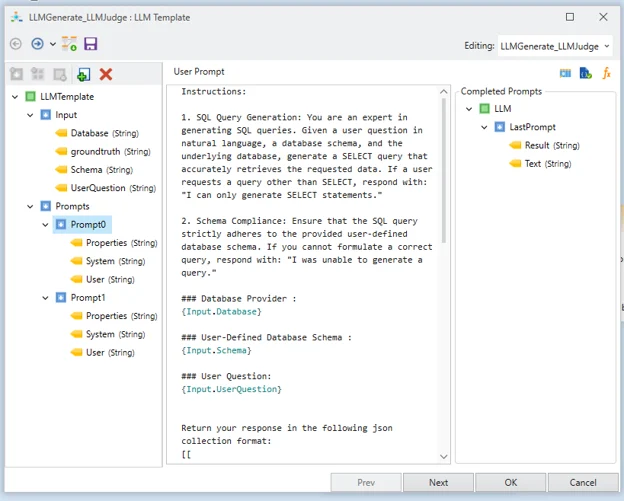
Smart Source maps JSON, CSV, Excel, TXT, delimited files, and serialized data with varying layouts to one consistent target schema, using exact matching, dictionaries, AI-powered semantic matching, or a combination.
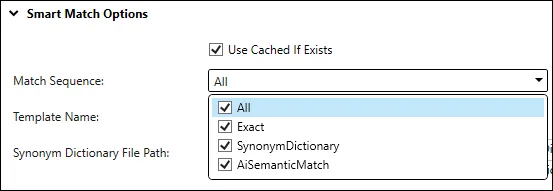
A change in a partner's file layout adapts at runtime, which matters most for teams onboarding new data sources on a recurring basis. It ensures data privacy by sending only field names and structure to the AI.
Email-Driven Workflow Automation
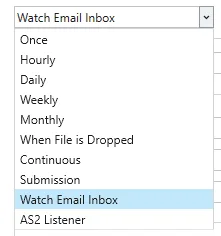
Watch Email Inbox is a new scheduling trigger that starts a workflow the moment an email with an attachment arrives, so vendor and partner files get processed without anyone checking an inbox first.
The Context Info object now exposes the email's sender, recipient, subject, and body for flow-level branching, and SendMail supports up to five attachments per message.
ReportMiner: From Extraction to Document Intelligence
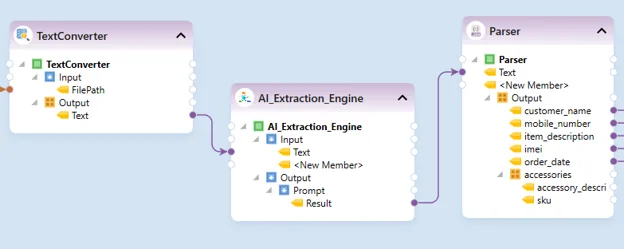
For ReportMiner customers, 11.2 goes beyond extraction into document intelligence, handling documents that vary in layout, format, and quality on the same platform. Template-based extraction still fits high-volume, repeatable layouts; AI-driven, templateless extraction now handles documents whose layout is not consistent from one file to the next.
"From 40 Minutes to 2: Invoice Automation That Just Works." — Verified ReportMiner 11.2 user on G2, processing 10,000 to 15,000 invoices a month across 3,000+ vendors
An extraction template, or report model, used to take ten minutes or more to build by hand. AI-powered Auto-Generate Layout (AGL) builds one in about five seconds instead, identifying data regions and fields automatically and flagging anything it is uncertain about for review.
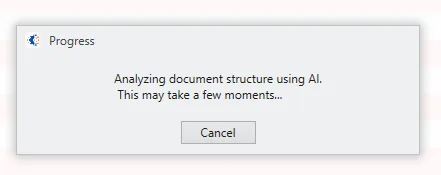
Text Converter extracts searchable, editable text from PDFs, Word files, images, HTML, Markdown, TXT, Excel, and CSV files inside the dataflow, now with Google OCR, AWS Textract, Tesseract, and custom OCR models, plus rotation correction and deskew that clean up scans before extraction starts.
Retrieval-Augmented Generation, Built Into the Platform
Retrieval-augmented generation (RAG) grounds a language model's response in a customer's own data instead of relying only on what the model learned during training. 11.2 adds three new Dataflow objects that build a complete RAG pipeline without a separate tool:
SplitText chunks incoming text
Build Embeddings generates vector embeddings for storage in a vector database
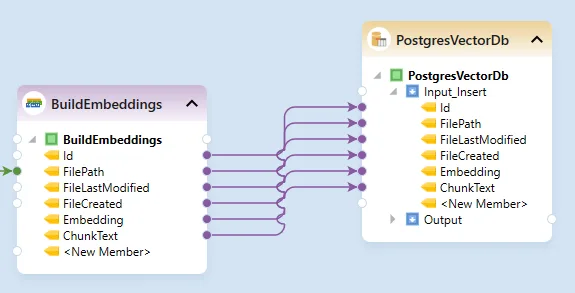
Astera flow building embeddings and inserting them with file metadata into a PostgreSQL vector database Query Vector DB embeds a user's question and searches it against those embeddings, with support for dense, sparse, and keyword vectors, multiple similarity methods, and reranking for more accurate results.
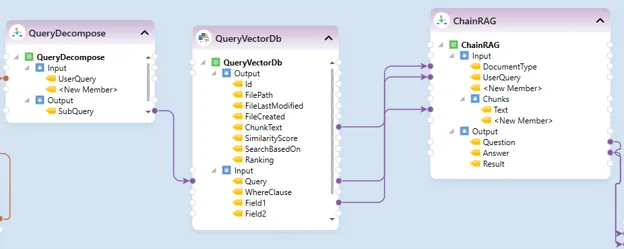
Astera retrieval augmented generation flow decomposing a query, searching a vector database and chaining results into an answer
“For ReportMiner customers, the same platform that extracts a document can now chunk it, embed it, store it, and answer questions against it too.” — Ayesha Amjad, AI Product Architect @Astera
Before and After: Astera 11.2 at a Glance
Area | Capability | Version 10 or Earlier | Version 11.2 |
Platform-wide | Runtime | .NET 8 | .NET 10, supported through Nov 2028 |
Platform-wide | Server throughput | Standard job submission and purge | Batch submission, partitioned purge, cluster tuning |
Platform-wide | Deployment | Artifact-based | Project-based, with the catalog on by default |
Platform-wide | AI key | Astera default only | Your own OpenAI or Anthropic key |
ReportMiner | Report model creation | Manual, 10+ minutes | AGL builds it in about 5 seconds |
ReportMiner | OCR and text extraction | Not available | Text Converter with deskew and rotation correction |
Platform-wide | LLM transformations | Not available | LLM Generate, drag and drop |
Platform-wide | Varying file layouts | One mapping per layout | Smart Source maps to a fixed schema |
ReportMiner | Knowledge base and RAG | Not available | Chunk, embed, store, and query your own data |
Platform-wide | Email-driven flows | Not available | Watch Email Inbox trigger |
Migrating to 11.2
A repository upgrade and a service restart are required, and Astera recommends the Repository Upgrade Utility to handle it. Every project needs to be re-deployed, since artifact-based deployment no longer exists, and customers on Windows or Azure authentication will need to reconfigure it after the upgrade. Teams that want to test first can run 11.2 alongside an existing Astera 10 (or earlier) environment, since the two use different default ports.
Ready to upgrade?
Customers on version 10 or earlier get the upgrade at no additional cost under their current license. Book a one-on-one migration review with your account manager or reach out to support@astera.com to discuss what upgrading to 11.2 looks like in your environment.
New to Astera?
If you’re exploring ways to process data faster, reduce manual work, or bring AI into your existing workflows, we’d be happy to discuss your use case. Book a personalized demo to see how Astera 11.2 could fit your data and AI needs.