

EDI translation is the process of converting business data from a company's internal format, such as JSON, XML, CSV or ERP records, into a standard EDI format like ANSI X12 or EDIFACT, and back again. It lets two companies with completely different systems exchange purchase orders, invoices and shipping notices automatically, without re-keying anything.
The software that does this is called an EDI translator, or EDI translation software. It reads incoming EDI files, checks that they follow the standard, converts them into data your systems can use, and does the same in reverse for outgoing documents.
In this guide, we explain how EDI translation works in both directions and walk through a real example of a JSON order translated into an 850. We also cover how translation differs from EDI mapping, compare the leading EDI translation software, and share what to look for when choosing an EDI translator.
What is EDI Translation?
EDI translation is the process of converting data from proprietary or inconsistent formats into standardized and structured formats that adhere to EDI standards.
To see why translation matters, consider what happens without it. Every company stores data in its own way: one supplier's ERP might record a purchase order as XML while its retail customer's system expects an ANSI 850. Even when two companies agree to "use EDI," their internal systems still can't read each other's data directly. Something has to sit in the middle and convert one format into the other, accurately and every time. That's the job of EDI translation.
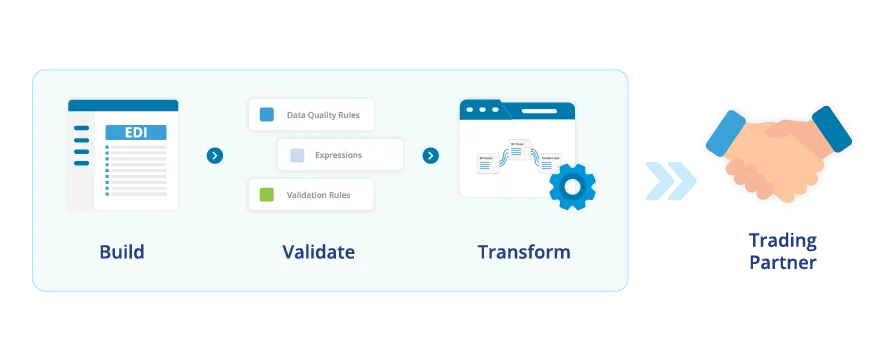
Let's understand EDI translation with an example. Say we have a retailer that generates a purchase order (PO) in a proprietary XML format using its Enterprise Resource Planning (ERP) system. The supplier's system requires the information to process the PO, however, in a different format. What's needed here is an EDI translator to convert the XML data into a standardized EDI format that the supplier's systems can easily understand and process.
What Is EDI Translation Software?
EDI translation relies on tools known as EDI translators to perform these conversions. EDI translation software plays a vital role in the EDI ecosystem by converting data from various formats into a standardized structure that complies with EDI standards. This software handles data transformation from non-EDI formats such as XML, PDFs, and emails into structured EDI formats like EDI X12 and EDIFACT.
EDI translators can also convert standardized EDI data back into non-standard formats when needed. This capability ensures that data can be adapted for systems that do not use EDI formats, providing flexibility in how information is handled and shared across different systems.
EDI translation software is versatile in terms of deployment. It can run on various types of hardware and operating systems, including Windows, Unix, and AS400. Companies can either develop this software in-house or buy it from third-party EDI providers. Whether relying on an EDI translation provider or using a custom-built solution, EDI translation software is important for facilitating smooth and efficient data exchanges between business partners.
Yet, purchasing an off-the-shelf EDI tool is often the more practical approach. These tools are generally reliable, come with ongoing support, and are updated to meet industry standards. Choosing a commercial EDI solution can save you time and effort, allowing you to concentrate on running your business activities.
EDI Translators vs. Middleware
EDI translators and middleware both help organizations manage the exchange of EDI data, but they serve different purposes.
EDI Translators:
They are specialized software applications that convert data between various EDI formats and standards, such as ANSI X12, EDIFACT, and XML. Their main function is to read, write, and validate EDI messages, ensuring data is accurately and compliantly converted between different formats.
EDI translators are particularly useful for smaller-scale EDI implementations or scenarios involving limited trading partners. They focus specifically on EDI data conversion and compliance.
Middleware:
Middleware is a relatively more comprehensive software platform that connects internal systems, like ERP, CRM, and accounting, with EDI translators and trading partners. Middleware offers additional functionalities beyond EDI translation, including data mapping, workflow automation, error handling, and reporting. It is suitable for larger organizations with complex IT environments, offering a unified solution for integrating various applications.
Here's a comparative overview of the two:
Aspect | EDI Translators | Middleware |
|---|---|---|
Purpose | Converts EDI data between formats | Integrates and connects various IT systems |
Ideal For | Small to medium EDI implementations | Large enterprises with complex system needs |
Functions | EDI message validation and compliance | Data integration, communication, and automation |
Integration | Directly handles EDI format standards | Connects EDI with ERP, CRM, and other systems |
Examples | Tools for ANSI X12, EDIFACT, and XML, like Astera EDIConnect | Platforms providing end-to-end system integration, like IBM Worklight and Microsoft BizTalk Server |
Importance of EDI Translation
The EDI software market is growing steadily. According to Fortune Business Insights, the EDI software market was valued at USD 1.78 billion in 2022 and is projected to reach USD 4.52 billion by 2030, with a CAGR of 12.5%. This growth reflects the increasing reliance on EDI systems for efficient electronic transactions and highlights the critical role of EDI translation in modern business operations.
Let's understand the importance of EDI translation with a practical example.
Suppose a global retail company wants to source products from suppliers across different continents. The company's internal systems generate purchase orders and invoices in formats unique to their software, while their suppliers use different formats and standards. Without a standardized method to convert these documents, the company faces different challenges in processing and interpreting data.
The Problem:
Data Incompatibility: The company's documents and those from their suppliers are in different formats that may lead to compatibility issues.
Manual Handling: Without an EDI translator, employees must manually convert documents, which is time-consuming and prone to errors.
Operational Delays: Errors and delays in data conversion can affect order fulfillment and invoicing processes, disrupting the supply chain.
Increased Costs: Handling these inefficiencies leads to higher operational costs due to additional resources needed for error correction and delayed transactions.
The Solution:
An EDI translation system effectively addresses these challenges. Here's how it provides a solution:
Standardized Data Conversion: EDI translation software converts data from various internal formats into standardized EDI formats like ANSI X12 and UN/EDIFACT, maintaining compatibility across different systems and trading partners.
Automated Processes: Automated EDI translation reduces the need for manual intervention, speeding up data processing and minimizing errors. The result? More efficient operations.
Faster Transactions: With accurate and timely data conversion, the company can process orders and invoices quickly. The faster transactions reduce operational delays and help maintain smooth supply chain activities.
Cost Efficiency: Reducing errors and improving processing times lowers operational costs. Fewer resources are required for error correction, and transactions are completed more efficiently.
Enjoy Frictionless B2B Data Exchange with Our Enterprise-Ready EDI Software
Sign Up for Free Demo
How EDI Translation Works: Inbound and Outbound
EDI translation runs in both directions:
Outbound: Your ERP creates a purchase order → the translator maps it to an X12 850 or EDIFACT ORDERS message → the message is checked against the standard and your partner's rules → it's sent over AS2, SFTP or a VAN.
Inbound: A partner's invoice arrives as an X12 810 → the translator checks it and sends back a 997 or 999 acknowledgment → it converts the data into your internal format → it loads the invoice into your ERP or accounting system.
Video: Astera EDIConnect parsing and validating an EDI source file for BI tools, APIs and ERP systems, then serializing transactions back into EDI
Document Preparation
Start by collecting and organizing the data you need to send. This data may come from various sources, such as ERP systems, databases, or spreadsheets. Ensure that the data is in electronic format and ready for processing.
Data Translation into EDI Standards
Next, input the electronic data into an EDI translation software or system. This software will convert the data into EDI standard formats, such as ANSI X12 or UN/EDIFACT. The software uses appropriate data and segmentation elements to ensure the data meets EDI standards.
The translation software typically outputs the data in a structured format, which could be a native programming language, XML, JSON, or a predefined database structure. The key is to ensure the data:
Is formatted to be easily manipulated programmatically.
Conforms to the rules and structure of the EDI standard.
The translation is often bi-directional, meaning the software can also take EDI files and convert them back into programming language instances, XML, JSON, or database records as needed.
Connecting and Transmitting EDI Documents
Once the data is translated into the EDI format, it's ready for transmission to your business partners. The data can be sent through various communication methods, including:
Integrated EDI: Directly integrated systems within your IT infrastructure.
EDI via AS2: Secure data exchange over the internet using AS2 protocol.
EDI via SFTP: Secure File Transfer Protocol for transmitting data.
EDI via FTP: Standard File Transfer Protocol for data exchange.
EDI VAN: Value-added networks that handle data transmission and additional services.
Cloud EDI: Cloud-based solutions for scalable and flexible EDI processing.
EDI Outsourcing: Third-party services that manage all aspects of EDI translation and communication.
Methods of EDI Translation
There are two primary methods for EDI translation: External Translation and Internal Translation. Each method offers unique advantages depending on the business's needs and transaction volumes.
External Translation (Manual EDI Translation)
This method involves using third-party EDI software or services to translate documents into appropriate EDI formats. The translation process occurs on the systems or software that the company doesn't own. An external EDI translator receives the EDI data and provides printed reports, which are then manually entered into the company's internal systems.
This approach, often called "Rip and Read" or "Print and Re-key," is useful for businesses that prefer to delegate translation tasks to external providers but may involve additional manual processing steps.
Internal Translation (Integrated EDI Translation)
Internal translation involves implementing an EDI translation solution directly within the company's own systems. This method provides greater control over the translation process and is often preferred by organizations with higher volumes of EDI transactions.
The internal EDI translator automatically converts EDI documents into a format compatible with the company's ERP or accounting system. The translated data is then integrated into the internal system. This method also supports converting internal ERP data into EDI transaction sets for outgoing messages.
How to Choose Your EDI Translator
In the early days of Electronic Data Interchange (EDI), businesses would often build their own EDI translators. However, the complexities of maintaining custom code and adhering to ever-evolving EDI standards have made this approach increasingly impractical.
Today, purchasing a pre-built EDI translator from a reputable vendor is generally a more efficient and cost-effective solution.
Here's a structured approach to selecting the best EDI translator:
Evaluate the Cost vs. Affordability
While many low-cost EDI translators are available, these often offer only basic functionality and require in-depth EDI knowledge to operate effectively. Instead of focusing solely on low prices, consider the total cost of ownership.
Your EDI translator should be affordable while providing ease of implementation and use without requiring extensive EDI expertise.
Prioritize Automation
Automation is essential for optimizing EDI processes. A good EDI translator should automate repetitive tasks and streamline data handling. This feature minimizes manual intervention, reduces errors, and enhances overall efficiency in processing EDI transactions.
Ensure Scalable Growth
Select an EDI translator that offers a scalable upgrade path. As your business grows, your EDI needs will likely expand. Choose a solution that can start with a few trading partners and scale up to support hundreds as needed.
Look for an Integrated EDI Software Package
Ideally, choose an integrated EDI software package that includes both an EDI translator and an EDI mapper. This combination ensures comprehensive data handling, where the EDI mapper converts specific data fields into standardized EDI formats, and the EDI translator facilitates bidirectional data conversion.
Consider Compatibility
Ensure that the EDI translator is compatible with your trading partners' data formats and systems. It should efficiently translate data into standard EDI formats commonly accepted in your industry, facilitating seamless communication across various systems.
Assess Security Features
Choose an EDI translator with robust security measures to protect your proprietary information. The software should prevent unauthorized access and ensure data integrity during transmission, avoiding vulnerabilities associated with less secure methods like email or fax.
How Astera Helps with EDI Translation
Given the fast pace of B2B transactions, businesses need a reliable solution that simplifies and accelerates their electronic data exchange processes.
Astera EDIConnect excels in addressing these needs. It offers an automated, no-code platform that simplifies EDI translation for businesses that regularly send and receive EDI documents from their trading partners. Users can ingest EDI documents in real time with built-in APIs.
Astera EDIConnect enables organizations to:
Simplify EDI: Map between EDI messages and backend systems with a drag-and-drop UI.
Translate data formats: Convert EDI messages to and from JSON, XML, and delimited files.
Streamline transfer of EDI files: Eliminate manual intervention with Automated File Transfer.
Preview data any time: Test and preview capabilities while designing EDI flows to parse, transform, or serialize EDI documents.
Use multiple communication protocols: Share EDI messages via AS2, FTP, SFTP, and APIs.
Create detailed partner profiles: Maintain business partner profiles for secure EDI communication with built-in encryption, compression, and digital signatures.
Automate workflows: Streamline data processing tasks with automated triggers and workflows.
Integrate with ETL pipelines: Combine EDI data with other data sources for enhanced analysis and reporting.
Ensure data consistency: Maintain data integrity and accuracy across your business operations.
Astera EDIConnect's capability to handle various data formats and facilitate secure, real-time exchanges makes it a top choice for organizations seeking to enhance their EDI processes.
Explore how Astera EDIConnect can optimize your processes with a customized demo, or connect with our team to learn more.