

Informatica PowerCenter is at end of life. Standard support for PowerCenter 10.5, the last major version, ended on 31 March 2026. Extended support is reported to run until 31 March 2027, at extra cost. Informatica wants customers to migrate to IDMC (formerly IICS), but on-premises and hybrid alternatives such as Astera Data Stack are also options.
Key facts at a glance
Fact | Detail |
|---|---|
Product | Informatica PowerCenter, an on-premises ETL tool |
Last major version | 10.5 (service packs only since) |
Standard support ended | 31 March 2026 (10.5); 31 March 2024 (10.4) |
Extended support ends | 31 March 2027 (reported) |
Informatica's recommended path | Migrate to IDMC, formerly IICS |
Owner | Salesforce, since 18 November 2025 |
Customers signed to migrate to cloud | About 9.4% of the PowerCenter base (FY2024 10-K) |
What is happening to Informatica PowerCenter?
Informatica PowerCenter end of life is already under way. Standard support for PowerCenter 10.5, the last major version, ended on 31 March 2026. Only service packs have followed 10.5, and there is no public roadmap for the product.
Informatica is steering PowerCenter customers to its cloud platform, Intelligent Data Management Cloud (IDMC). At the same time, Informatica itself now belongs to Salesforce. That combination of an aging product, a forced platform change and a new owner is why so many teams are searching for what "Informatica end of life" means for them.
This guide covers the PowerCenter end of life timeline, why it is happening, the risks of staying put, and your realistic migration options. It closes with a step-by-step plan you can use whether you migrate to IDMC or choose another platform.
When is Informatica PowerCenter end of life? Dates and support timeline
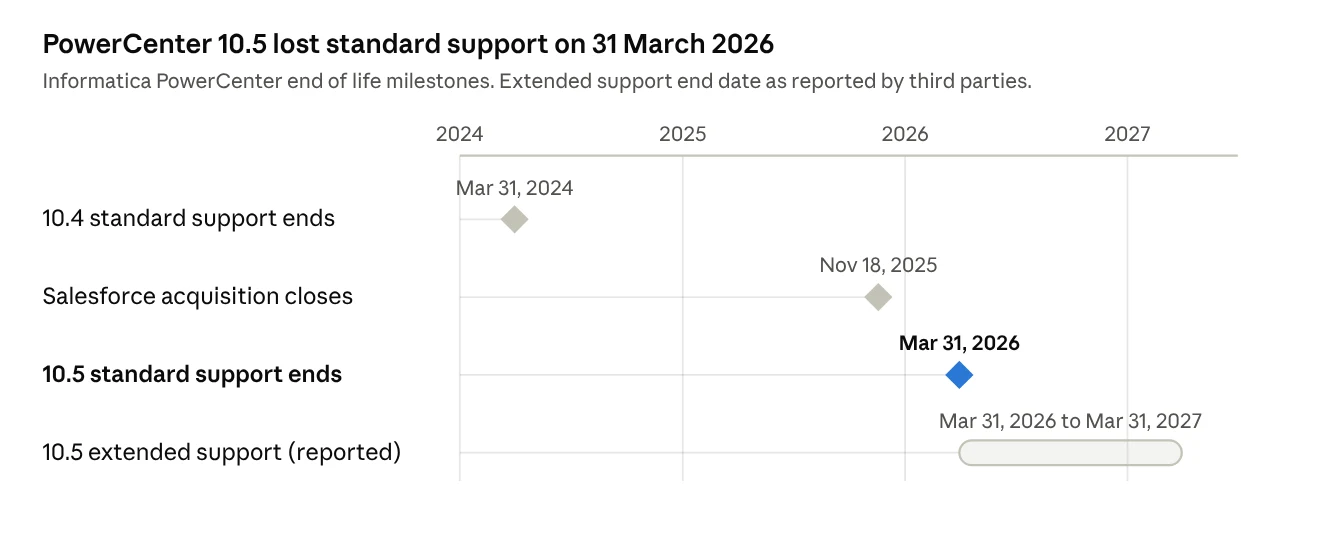
PowerCenter end of life happens in stages, not on one day. Informatica moves each version from standard support to paid extended support, and then to sustaining support, where fixes and patches stop.
Milestone | Date | What it means |
|---|---|---|
PowerCenter 10.4 standard support ends | 31 March 2024 | 10.4 moved to extended support, at a higher cost (Informatica) |
Salesforce completes its Informatica acquisition | 18 November 2025 | PowerCenter now sits inside the Salesforce product family |
PowerCenter 10.5 standard support ends | 31 March 2026 | No more standard fixes for the last major version |
PowerCenter 10.5 extended support ends (reported) | 31 March 2027 | Last paid tier with active fixes (Tarento) |
Sustaining support only (reported) | 2029 | Access to existing patches and knowledge base; no new fixes |
The extended and sustaining dates come from third-party analysis. Confirm them against Informatica's product lifecycle guide (DOC-18919) and your own contract, since entitlements vary by license.
Why is Informatica retiring PowerCenter?
Informatica's future is cloud-first, and PowerCenter is an on-premises product. Four changes explain the PowerCenter end of life:
A shift to IDMC. New features, including AI capabilities, are built for IDMC (formerly IICS), not PowerCenter. Version 10.5 has received only service packs since its release.
Consumption pricing. IDMC is billed in Informatica Processing Units (IPUs), with no published list prices. Moving customers from perpetual licenses to IPUs changes how Informatica earns revenue.
A new owner. Salesforce completed its acquisition on 18 November 2025, and CEO Amit Walia left in February 2026. Leadership changes often bring new priorities for roadmap and pricing.
Products folding into Salesforce. Integration, data quality, governance and MDM are being folded into Data 360, MuleSoft, Agentforce 360 and Tableau. Standalone availability is not confirmed.
Adoption of the cloud path has been slow. Informatica's FY2024 10-K showed that only about 9.4% of its PowerCenter base had signed to migrate to cloud.
What happens after PowerCenter end of support?
PowerCenter jobs keep running after end of support, but the cost and risk of running them rise every quarter. Here is what changes:
Higher support costs. Extended support is priced above standard support, and you pay more for less.
Security and compliance exposure. Once fixes stop, new vulnerabilities and OS or database incompatibilities stay unpatched. Auditors in banking, healthcare and government will flag unsupported software.
Compatibility gaps. New database versions, cloud warehouses and APIs are not certified against a frozen product.
Shrinking skills pool. Fewer engineers want to learn Designer, Workflow Manager and pmcmd, so the people who maintain your jobs get harder to replace.
Known product pain points. Reviewers already report caching problems, a Monitor that hangs and crashes that need a server reboot. These will not be fixed.
A rushed migration later. Teams that wait until extended support ends face the same migration under a hard deadline, with less room to negotiate.
Staying on PowerCenter can be a short-term bridge, but it should come with a dated exit plan.
What are your options: Informatica on-premise to cloud migration or an alternative?
You have four realistic paths, and only one of them requires moving to Informatica's cloud.
Option | What it involves | Best for | Main trade-off |
|---|---|---|---|
Pay for extended support | Keep PowerCenter running on extended terms | A short bridge while you plan | Higher cost; ends on a fixed date |
Migrate to IDMC (formerly IICS) | Convert mappings with Informatica's PowerCenter to Cloud conversion and run them on IDMC | Teams committed to the Informatica and Salesforce stack | IPU pricing, a vendor-hosted control plane, manual rework |
PowerCenter Cloud Edition | Run PowerCenter workloads under Informatica's cloud modernization program | Teams that want a staged step toward IDMC | Still tied to Informatica's cloud roadmap |
Move to an alternative platform | Convert flows to a platform such as Astera Data Stack, on-premises, private cloud or hybrid | Teams that want predictable pricing and control over hosting | A new tool for the team to learn |
For a wider comparison, see our list of the best Informatica alternatives.
What does it mean to migrate to IDMC?
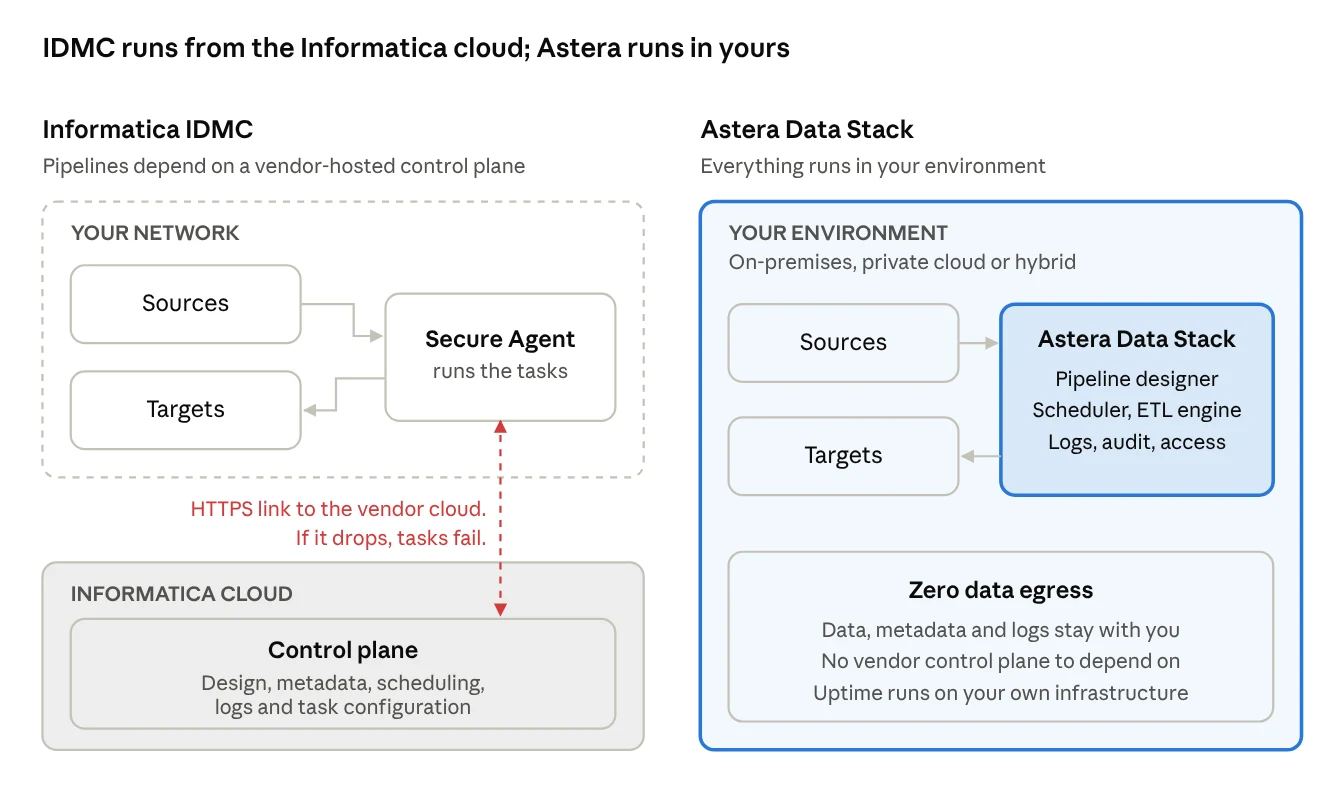
IDMC splits work between a Secure Agent in your network and a control plane in Informatica's cloud. Your business data stays local, but design, metadata, scheduling, logs and task configuration live in Informatica's cloud. If the Secure Agent cannot reach the control plane, tasks fail, even when your own infrastructure is healthy.
Reliability is in the vendor's hands too: Informatica reported a portal issue on 6 October 2026, and maintenance caused job and API failures in May 2025. Regulated teams should also confirm which regional pod holds their metadata.
How do you migrate to IICS or IDMC?
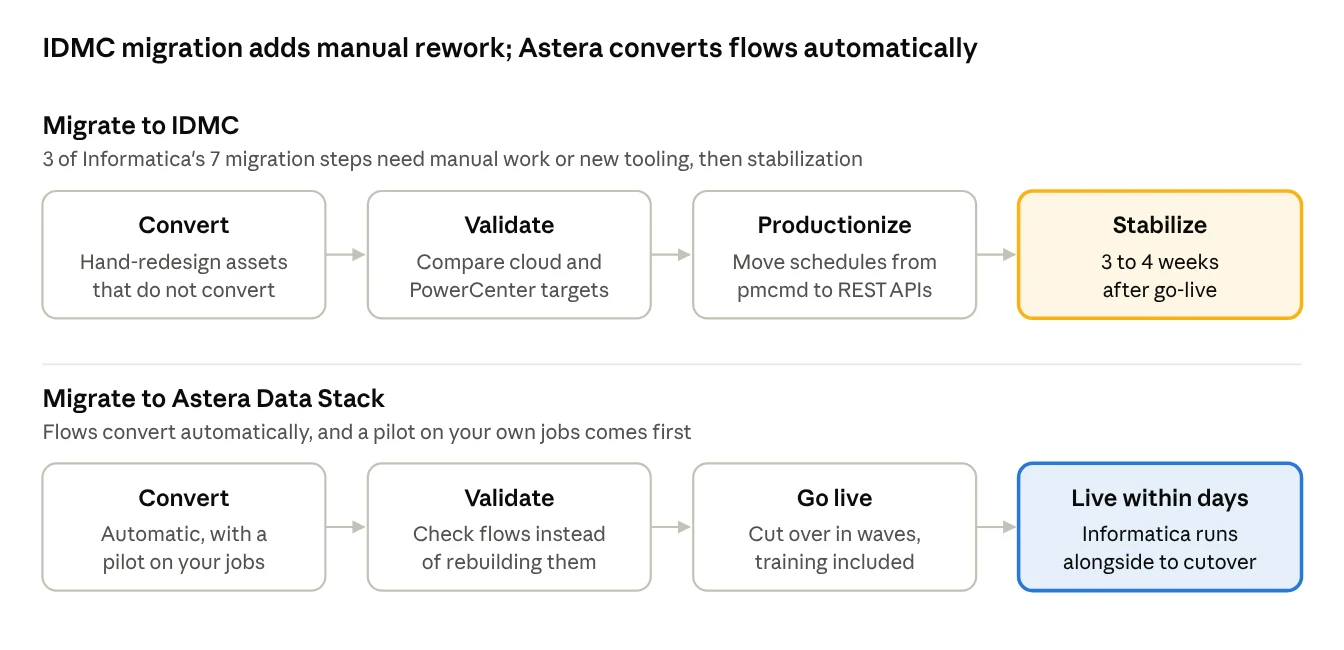
Informatica's own migration method has seven steps, and three of them need manual work or new tooling:
Convert. Assets that cannot be converted automatically are redesigned by hand. Informix and Greenplum connections are not supported in cloud conversion.
Validate. Cloud and PowerCenter targets are compared side by side.
Productionize. Schedules are moved from pmcmd to REST-based APIs.
Informatica's guidance adds 3 to 4 weeks of stabilization after go-live. Real projects show the effort involved: Informatica removed about 800 of roughly 2,000 mappings before its own migration, and a partner case with 150 workflows and 3,000+ objects took 20 weeks, with nearly 90% of objects not ready to run after automated conversion.
The Informatica Switch Guide
Informatica is changing. See how Astera Data Stack compares before you renew.

How do you migrate off PowerCenter? A step-by-step plan
Whichever platform you choose, a PowerCenter migration goes better in waves than in one big cutover.
Check your dates. Note your PowerCenter version, support tier and renewal date. Work back from the renewal so you are not negotiating under pressure.
Inventory your jobs. Export a list of workflows, mappings, sessions, connections and schedules. Note which use PowerExchange, CDC, mainframe or SAP sources, since these are the hardest to move.
Clean up first. Retire unused and duplicate mappings before you convert anything. Informatica cut about 40% of its own mappings this way.
Set your requirements. Decide on hosting (on-premises, private cloud, cloud or hybrid), data residency, pricing model and who will build pipelines.
Run a pilot on your own jobs. Convert a handful of representative workflows, including at least one complex one, and see them run before you commit.
Convert and validate in waves. Move jobs by business area, comparing outputs side by side with PowerCenter still running.
Move schedules and monitoring. Replace pmcmd scripts and Workflow Monitor checks with the new platform's scheduling, alerts and logs.
Cut over and decommission. Switch each wave to production, keep a short parallel run, then shut down PowerCenter servers and stop paying for support.
To shortlist platforms for step 4, compare the leading data migration tools.
How does Astera Data Stack help you move off PowerCenter?
Astera Data Stack converts your Informatica flows automatically and runs them entirely in your own environment, so you can be up and running within days.
Area | Informatica PowerCenter / IDMC | Astera Data Stack |
|---|---|---|
Hosting | PowerCenter on-premises; IDMC depends on a vendor-hosted control plane | On-premises, private cloud, cloud or hybrid; no vendor control plane |
Data, metadata, logs | IDMC keeps metadata and logs in Informatica's cloud | Zero data egress: everything stays with you |
Pricing | Perpetual license plus maintenance; IDMC billed in IPUs with no published list prices | Renewal terms in writing, annual increases capped for existing licenses, unlimited pipelines |
Build experience | Desktop tools: Designer, Workflow Manager, Workflow Monitor, Repository Manager | No-code drag-and-drop, plus an AI copilot that takes plain-language prompts |
Roadmap | 10.5 is the last major version; AI features positioned in IDMC | New capabilities in every release for existing customers |
Ownership | Part of Salesforce since November 2025 | Privately held and independent for over 30 years |
How do you migrate from PowerCenter to Astera?
Convert. Astera's migration agent converts your Informatica flows automatically. A pilot on your own jobs comes first, so you see them running before you commit.
Validate. You review the converted flows instead of rebuilding each one, with Informatica still running alongside.
Go live. Cut over in waves, with onboarding and live training from Astera engineers.
Beyond ETL, the same platform covers CDC, EDI (ANSI X12, EDIFACT, HL7), AI-powered document extraction, data warehousing (Data Vault 2.0, star and snowflake schemas, SCD types 1, 2, 3 and 6), and 300+ connectors.
Astera has been named G2 Best Support, Mid-Market (Winter 2024, Spring 2024, Winter 2025) and SoftwareSuggest Top Performer, ETL Software, 2025. As one customer put it: "What used to take us weeks now only takes a few days."
What should PowerCenter customers do next?
Informatica PowerCenter end of life is not a reason to panic, but it is a reason to plan. Standard support is already over, extended support has a fixed end, and the default path to IDMC brings new pricing, a vendor-hosted control plane and a sizable rework project.
The teams that migrate well start early, clean up first, pilot on their own jobs and move in waves. That approach works whether you migrate to IDMC or choose a platform you host yourself.
See your own Informatica jobs running in Astera Data Stack before you renew. Share your renewal date and job inventory, and we will map your top jobs, agree a pilot and compare results. Book a call or email sales@astera.com.
Not ready for a call? Download the Informatica Switch Guide for a side-by-side look at PowerCenter, IDMC and Astera Data Stack.
The Informatica Switch Guide
Informatica is changing. See how Astera Data Stack compares before you renew.