

Fact and dimension tables are the two building blocks of a dimensional data warehouse: fact tables store measurable business events, such as sales amounts and quantities, while dimension tables store the descriptive context, such as customer, product, date, and store, that explains those events. Fact tables link to dimension tables through keys, so analysts can slice the numbers by any attribute.
Kimball-style dimensional modeling has been the go-to architecture for most data warehouse developers over the past couple of decades. The denormalized nature of these schemas, coupled with optimization for history maintenance, makes the dimensional model an ideal tool for the data warehousing arsenal, especially for reporting through business intelligence (BI) tools.
On the face of it, the idea is simple: fact tables contain transactional information, and dimensions provide context to these facts through foreign key relationships. The questions that arise, however, are the following: How easy is it to load and maintain data in fact and dimension tables? And is it worth the effort? This guide explains what fact and dimension tables are, how they differ, and what it really takes to load them.
What Are Fact and Dimension Tables?
In a dimensional model, data is organized into a central fact table surrounded by dimension tables, a layout known as a star schema. Each row in the fact table refers to one row in each dimension.
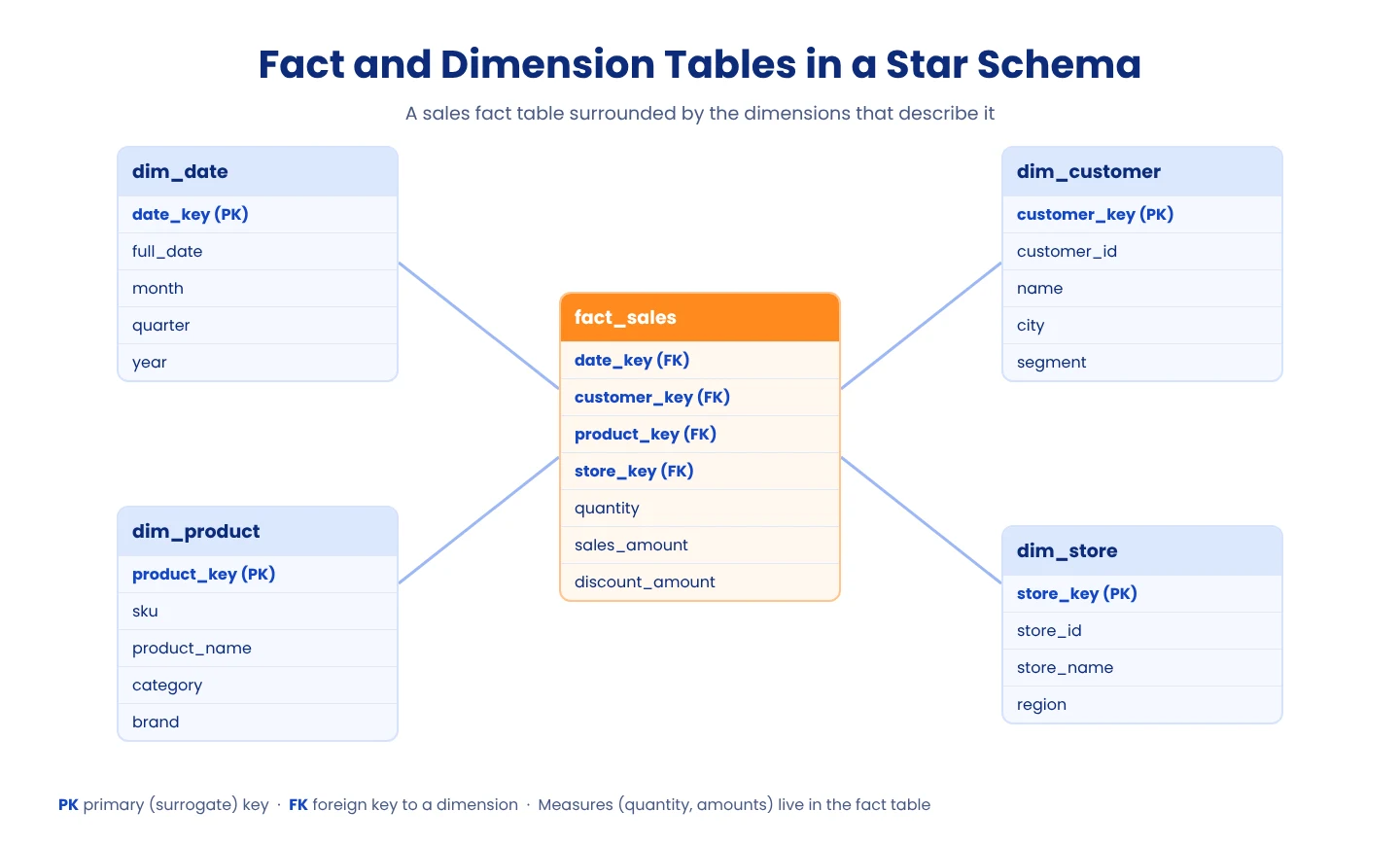
What is a fact table?
A fact table stores the measurements of a business process. Each row records an event or a state at a specific level of detail, called the grain, such as one row per order line. A fact table contains:
Measures: Numeric values to analyze, such as quantity, sales amount, or discount.
Foreign keys: Keys that point to the related rows in each dimension table.
Degenerate dimensions (optional): Identifiers such as an order number that have no dimension table of their own.
What is a dimension table?
A dimension table stores the descriptive attributes used to filter, group, and label facts. A customer dimension, for example, might hold the customer's name, city, and segment. Each dimension row has a surrogate key, a system-generated identifier, alongside the business (natural) key from the source system. Dimensions also hold the history of how those attributes change over time, using slowly changing dimension (SCD) techniques.
Fact Table vs. Dimension Table
Aspect | Fact table | Dimension table |
|---|---|---|
What it stores | Measurable events and metrics | Descriptive attributes and context |
Typical columns | Measures and foreign keys | Surrogate key, business key, and attributes |
Shape | Long and narrow: many rows, few columns | Short and wide: fewer rows, many columns |
Growth | Grows quickly with every transaction | Grows slowly as new customers or products appear |
Keys | Foreign keys to dimensions (often a composite key) | A surrogate primary key |
Change handling | Usually insert-only | Attributes change, tracked with SCD types |
Example | fact_sales: quantity, sales_amount | dim_customer: name, city, segment |
Load order | Loaded after dimensions | Loaded first |
For the key concepts behind these relationships, see primary key vs. foreign key.
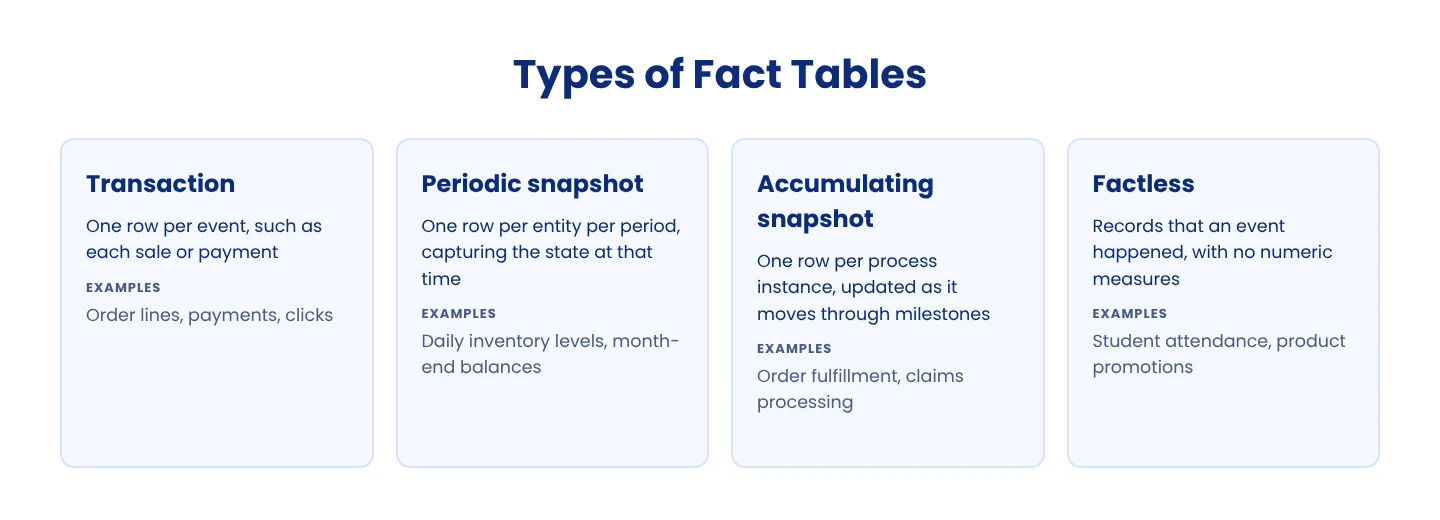
Types of Fact Tables
Transaction fact tables record one row per event, such as each sale or payment. They're the most common type.
Periodic snapshot fact tables record the state of something at regular intervals, such as daily inventory levels or month-end account balances.
Accumulating snapshot fact tables track a process with defined milestones, such as order fulfillment. Each row is updated as the process moves forward.
Factless fact tables record that an event happened, such as a student attending a class, without any numeric measures.
Measures themselves come in three types. Additive measures, such as sales amount, can be summed across all dimensions. Semi-additive measures, such as account balances, can be summed across some dimensions but not over time. Non-additive measures, such as ratios and percentages, can't be summed at all.
Common Types of Dimensions
Conformed dimensions are shared across several fact tables, such as one date dimension used by sales and inventory facts.
Role-playing dimensions are one dimension used for several purposes, such as a date dimension acting as order date and ship date.
Junk dimensions combine low-cardinality flags and indicators into one table to keep the fact table clean.
Degenerate dimensions are dimension keys, such as invoice numbers, stored directly in the fact table.
Slowly changing dimensions keep track of how attributes change over time. See how to configure SCD-ready dimensional models and common SCD use cases.
For a deeper look at designing these tables, see our dimensional modeling guide.
How to Load Fact and Dimension Tables
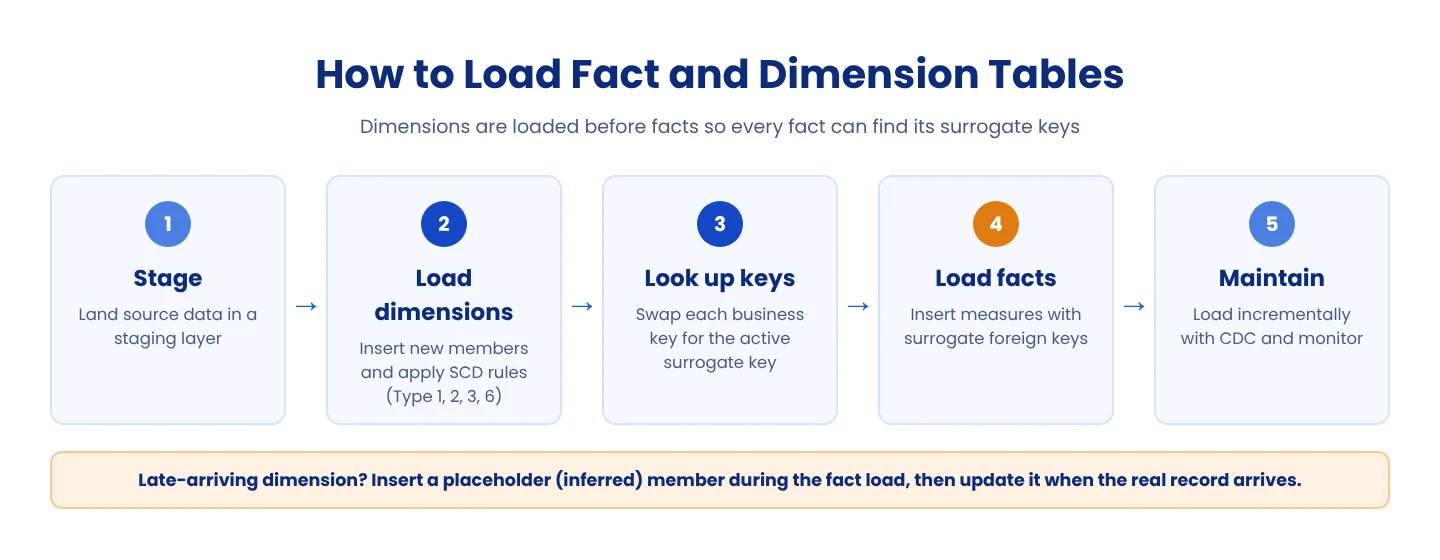
Which is loaded first: fact tables or dimension tables?
Dimension tables are loaded first. Fact rows store surrogate keys that are generated in the dimension tables, so the dimensions must already contain the right records before the facts can be loaded. The only exception is a late-arriving dimension, covered below.
Loading dimension tables
Let's take a scenario where you've set up an architecture for your data warehouse: a simple star schema consisting of sales information in the fact table, surrounded by a few dimensions, such as customers, suppliers, etc. The source data initially coming in from disparate systems has been loaded into a unified staging layer.
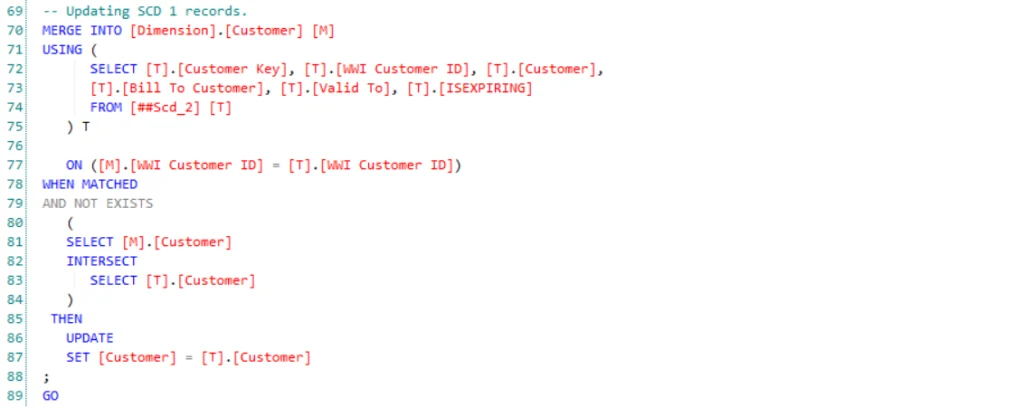
The objective is to set up a loading and maintenance process for your dimension and fact tables. Loading data into dimension tables can be simple, given that you're not looking to maintain history. In such a case, you would only want to update the destination records, which can be performed via Slowly Changing Dimensions Type 1 (SCD1). Here's a snippet of what that query would look like:
SQL merge statement updating type 1 slowly changing dimension records in a customer dimension.
However, it is unlikely that this would be sufficient in a practical business scenario. It's important to maintain at least some history in a data warehouse to identify trends and patterns. That is where other, more complicated, SCD types come into play, such as SCD 2, 3, and 6.
If you intend to use SCD 2 or 6 on certain fields, the table needs to contain record identifiers as well to recognize the active row for each record. This could be a true/false flag, an effective expiration date range, or just a version number for each record, to name a few examples.
In case you're looking to use SCD 3 or 6, you would need an additional field to store the previous value of the field in question.
Here's what a chunk of the query could look like if you were to use SCD 2 or 6 to maintain history:
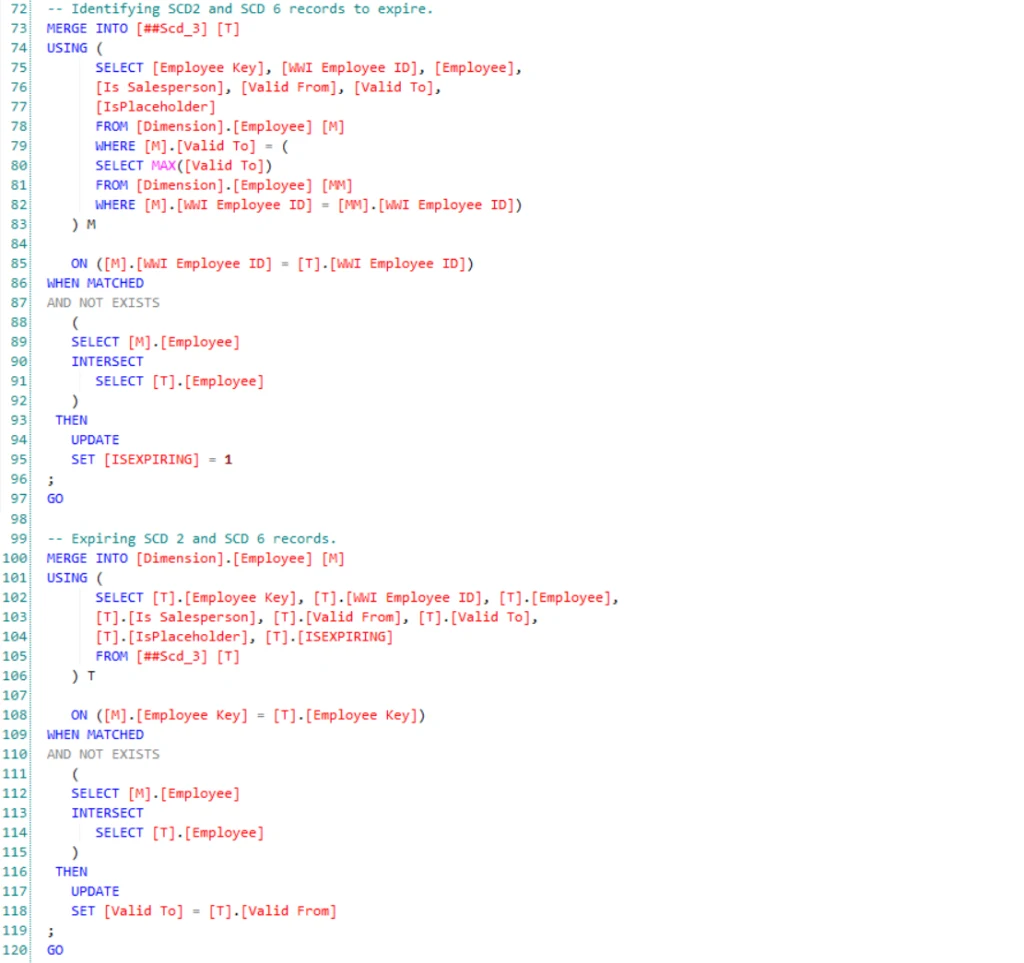
Is it starting to look a bit complicated? We've only touched the tip of the iceberg.