

TL;DR: Mainframe reports from IBM z/OS, AS/400, and similar systems are fixed-width text files where data fields sit at exact character positions with no delimiters or markup. ReportMiner's Auto-Generate Layout creates a complete extraction template in seconds by identifying sections, column positions, and header/footer patterns automatically. Each section in a multi-section report (like a Fedwire settlement file with transaction summaries, position details, and reserve data) gets independent field definitions, and the output preserves parent-child hierarchies across sections. The template applies identically to every future instance of that report type, processing 1,000+ page documents in seconds with zero per-page inference cost, and the full pipeline from ingestion to database export runs unattended via the Job Scheduler.
Mainframe reports are one of the oldest and most persistent data extraction challenges in enterprise IT. They are generated by COBOL programs, printed by JES2/JES3 spoolers, and exported as fixed-width text files from IBM i Series, z/OS, AS/400, and similar systems. They power critical operations in banking, insurance, government, healthcare, and manufacturing.
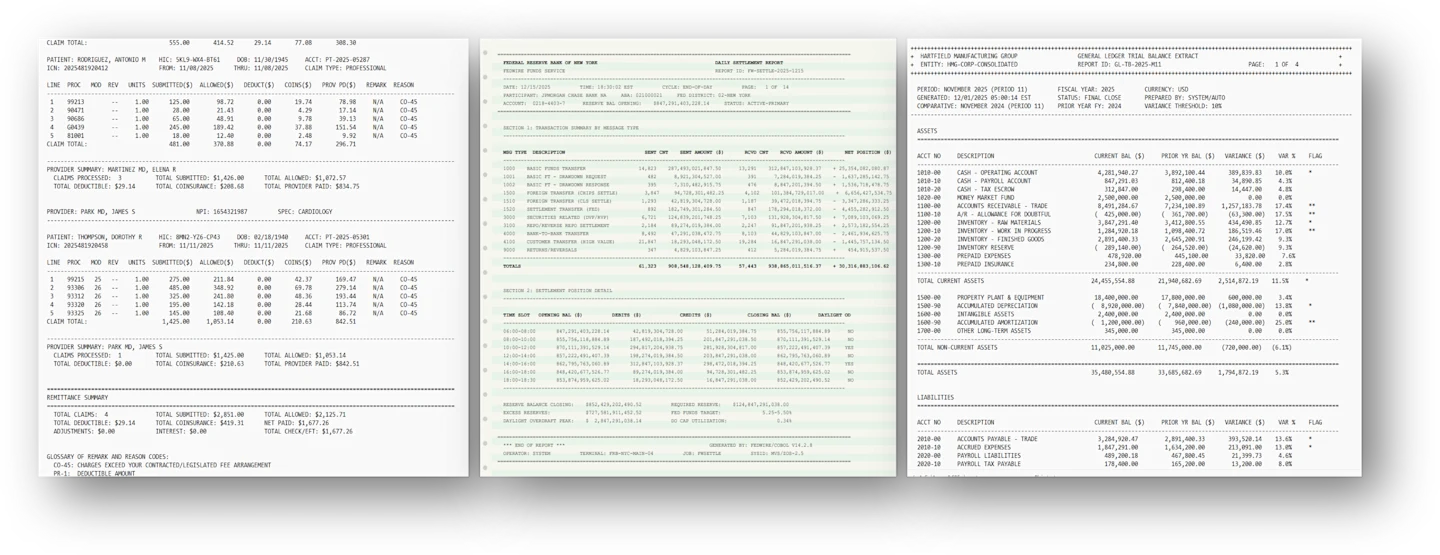
They also look nothing like the documents that modern AI extraction tools are designed for.
A typical mainframe report has no XML tags, no HTML structure, no table borders, and no field labels in the conventional sense. It is a fixed-width text file where data alignment is determined by character positions, section boundaries are marked by repeating characters like dashes or equals signs, and the relationship between header fields and detail rows is implied by spatial position rather than stated explicitly.
This is the document type that ReportMiner was originally built to handle, and it remains one of its strongest use cases.
What Makes Mainframe Reports Difficult to Extract
The difficulty is not that mainframe reports are unstructured. They are actually highly structured, but the structure is positional rather than semantic. Understanding why this matters requires looking at what an extraction system actually has to do with these documents.
Fixed-width column alignment
In a mainframe report, every data value occupies a specific range of character positions on each line. "BASIC FUNDS TRANSFER" starts at position 0 and ends at position 20. The sent count of “14823” starts at position 22 and ends at position 28. The sent amount of “287493021847.50” starts at position 30 and ends at position 45. There are no delimiters between fields, no column headers that repeat on every page, and no markup to indicate where one field ends and another begins.
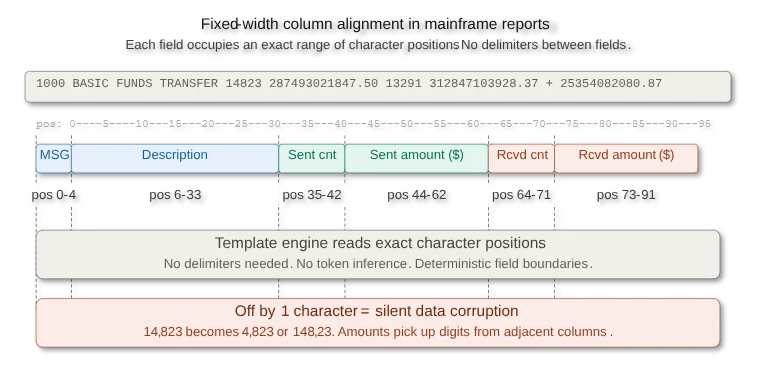
If the extraction logic is off by even one character position, the entire row of data shifts. A sent count of 14,823 becomes 4,823 or 148,23. An amount of $287,493,021,847.50 picks up a trailing digit from the next column. These errors are silent because the extracted values still look like valid numbers.
LLMs handle this poorly because they process text as tokens, not as character-position arrays. A language model reading "14823 287493021847.50" has no reliable way to determine where the count field ends and the amount field begins without explicit delimiters. ReportMiner's template engine operates on character positions directly, which is why it extracts these values correctly regardless of how many columns the report contains.
Multi-section documents with different schemas
Mainframe reports frequently contain multiple sections within a single file, each with its own column layout. A Fedwire daily settlement report, for example, contains a header section with participant information (bank name, ABA routing number, Fed district, account number, reserve balance), followed by a transaction summary section organized by message type (with columns for sent count, sent amount, received count, received amount, and net position).
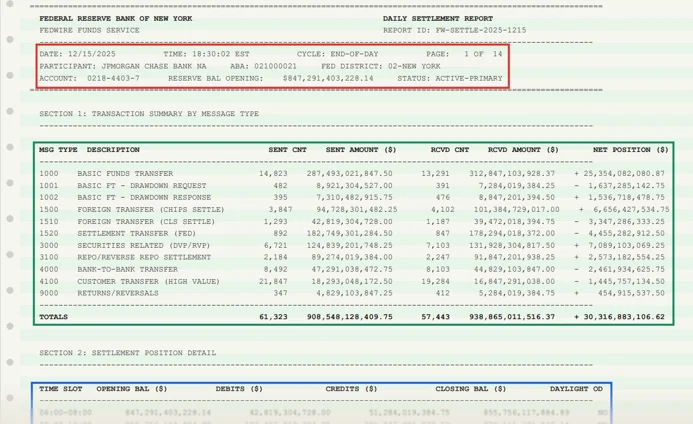
Section 2 in the same document provides settlement position details organized by time slot (with columns for opening balance, debits, credits, closing balance, and daylight overdraft status), followed by a reserve summary section with key-value pairs for closing balance, required reserve, excess reserves, and Fed funds target.
Each of these sections has a completely different column layout. The transaction summary has 7 columns. The settlement position detail has 6. The reserve summary has no columns at all, just label-value pairs. An extraction system that applies a single template to the entire document will either miss sections or corrupt data by applying the wrong column definitions.
ReportMiner handles this by allowing multiple data regions within a single template, each with its own field definitions and extraction rules. The template maps Section 1 (transaction summary by message type) independently from Section 2 (settlement position detail), and both independently from the header and footer.
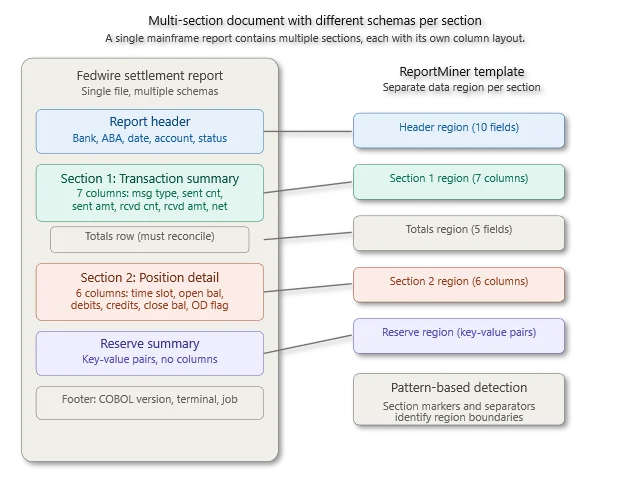
Pattern-based section detection identifies where each section begins and ends using the section headers and separator lines that mainframe reports consistently include.
Hierarchical relationships across sections
The data in a mainframe report is not flat. The header fields (bank name, report ID, date, ABA number) apply to every row in every section below them. The transaction summary totals should reconcile with the individual message type rows above them. The settlement position closing balance at 18:30 should match the reserve balance closing value in the summary section.
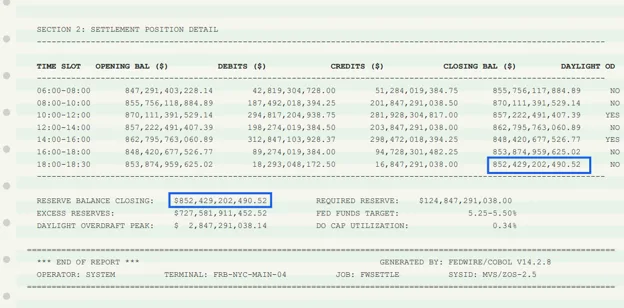
Extracting these relationships correctly means the output needs to preserve the hierarchy. ReportMiner exports mainframe report data with parent-child relationships intact. The header-level fields (participant, ABA, account, Fed district) appear as the parent record, with Section 1 rows as children and Section 2 rows as a separate child collection. This hierarchical output can go directly to JSON, XML, or normalized database tables where each section maps to its own table with a foreign key back to the header.
Reports that span thousands of pages
Enterprise mainframe reports are not short. A daily Fedwire settlement report runs 50 pages. A monthly general ledger extract from an AS/400 system can run 1000+ pages. At organizations like Walmart, which processes over 2.5 million supplier transactions per hour across 4,700+ stores, a single daily inventory position report or purchase order summary generated by their mainframe batch jobs can run into thousands of pages.
At this scale, LLM-based extraction becomes impractical for three reasons.
The per-page inference cost adds up quickly. Processing a 1000-page report through an LLM at typical API pricing becomes expensive when done daily.
Context window limitations mean the LLM cannot see the full report at once, so cross-page relationships (like a header on page 1 that applies to data on page 247) are lost.
Latency makes batch processing slow because each page requires a separate inference call.
ReportMiner's template engine processes these documents as continuous text streams, not as individual pages. A template defined on page 1 applies consistently across all 1k or 10k or 10M pages because the extraction logic operates on character positions and pattern rules that repeat throughout the document. Processing time scales linearly with document size, typically completing a 1000-page report in seconds.
How ReportMiner Extracts Mainframe Reports: A Practical Walkthrough
To make this concrete, consider extracting data from a Federal Reserve Fedwire daily settlement report shown as Example 1. This is a real document type used by every major bank in the United States for end-of-day reconciliation.
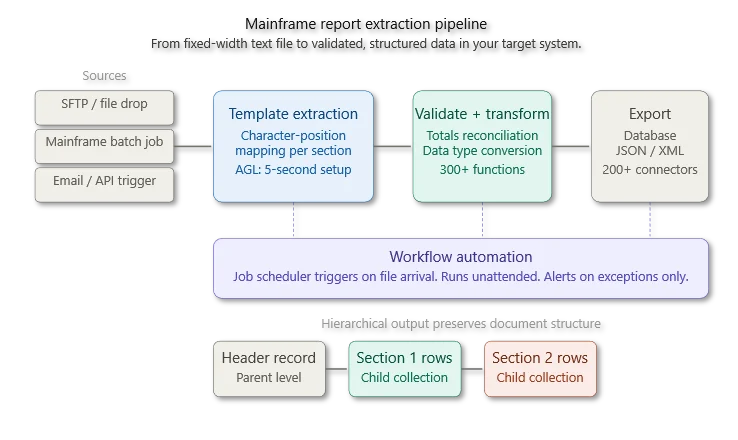
Step 1: Ingestion
The report arrives as a fixed-width text file exported from the Fedwire system. It could come via SFTP from the Fed, via a file drop from an internal mainframe batch job, or via an automated feed from the bank's operations platform. ReportMiner ingests the file directly without any preprocessing or format conversion. No OCR is needed because the text is already machine-readable.
Step 2: Template creation with Auto-Generate Layout
You load the report into ReportMiner and use the Auto-Generate Layout feature. The AI analyzes the document structure and identifies the distinct sections, their column layouts, and the header/footer patterns. A complete extraction template is generated in approximately 5 seconds.
The generated template includes separate data regions for the report header (bank, date, ABA, account, reserve balance), the transaction summary table (message type, description, sent count, sent amount, received count, received amount, net position), the totals row, the settlement position detail table (time slot, opening balance, debits, credits, closing balance, daylight overdraft), and the reserve summary key-value pairs.
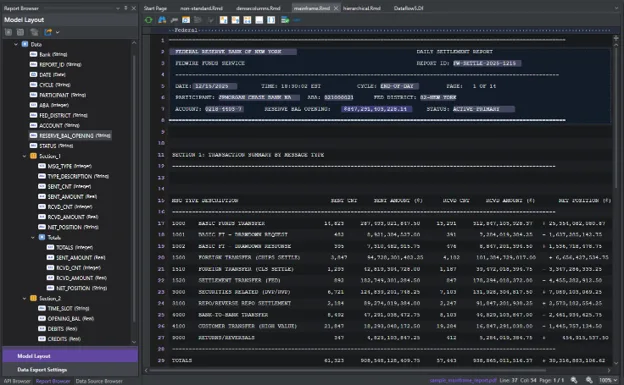
Each data region has its own field definitions mapped to the correct character positions. The template also defines the pattern rules that identify section boundaries, such as the "SECTION 1:" and "SECTION 2:" markers and the separator lines made of equals signs and dashes.
Step 3: Preview and verification
Before running the template against a full batch, you preview the extracted output. ReportMiner shows the extracted data in a hierarchical preview where you can verify that every field has been captured correctly. The header fields appear at the top level. Section 1 rows appear as children with their message types, counts, and amounts. Section 2 rows appear as a separate child collection with time slots and balances.
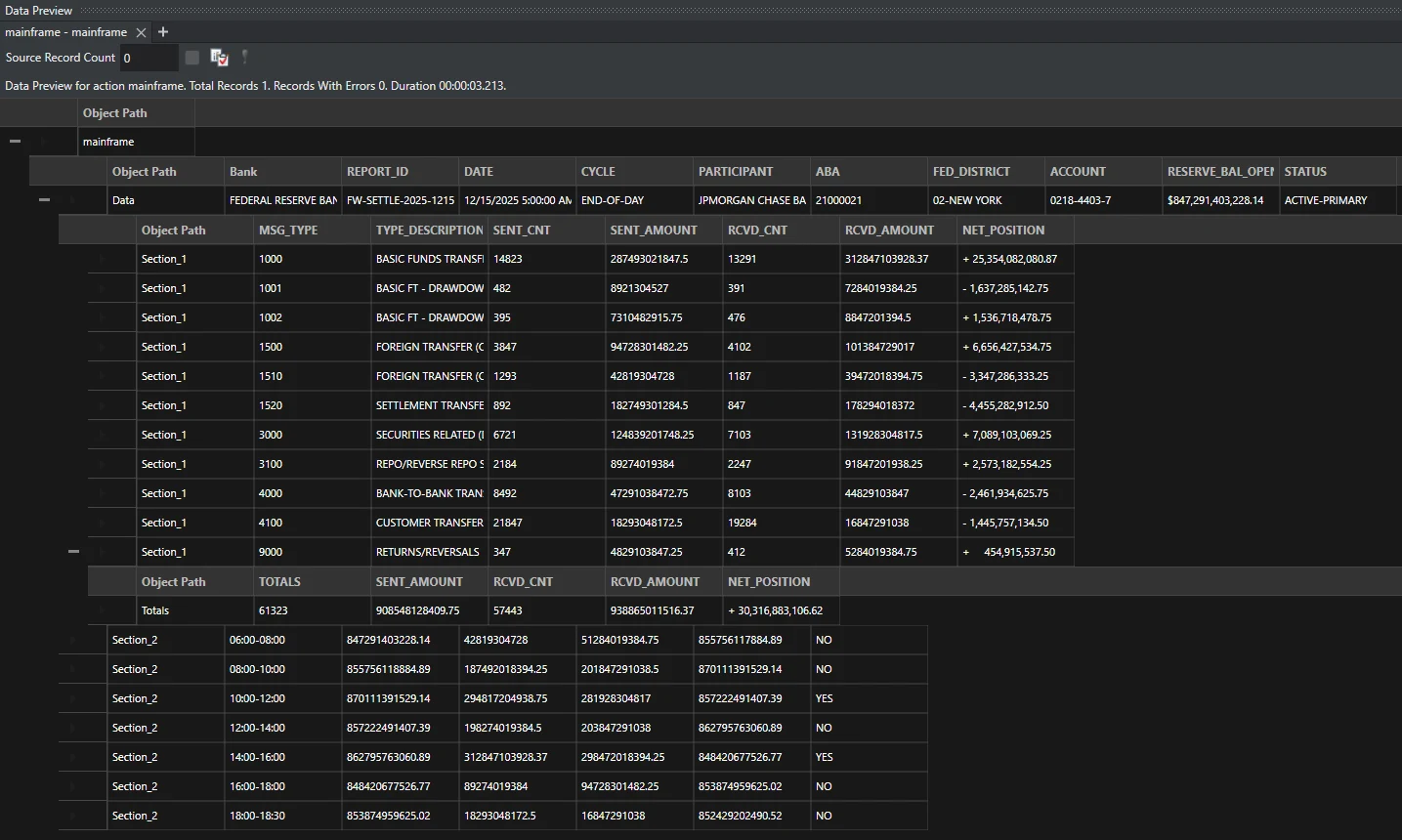
If any field is misaligned, you adjust the character positions in the template. For a well-formed mainframe report, the Auto-Generate Layout typically gets this right on the first pass.
Step 4: Validation and transformation
Extracted data passes through validation rules defined in the pipeline. For this report type, you might validate that the sent count and sent amount columns are numeric, that the totals row matches the sum of the individual message type rows, that the closing balance at 18:30 reconciles with the reserve balance closing value, and that the ABA routing number matches a known participant list.
ReportMiner's 300+ transformation functions handle formatting conversions automatically. The reserve balance of "$847,291,403,228.14" is converted to a numeric value. Date formats are standardized. The positive/negative indicators on net position values ("+" and "-") are converted to signed numbers.
Step 5: Export to destination
The validated, transformed data exports directly to your target system. For a bank processing Fedwire settlement data, this typically means writing to a SQL Server or Oracle database where the operations team runs reconciliation queries. ReportMiner's 200+ native connectors support direct export to databases, data warehouses, flat files, APIs, and cloud storage without manual export steps.
Step 6: Automation
Once the template and pipeline are configured, the entire process runs unattended. The Job Scheduler triggers extraction when the daily settlement file arrives via SFTP. The pipeline extracts, validates, transforms, and loads the data into the target database. Alert emails notify the operations team if any validation rules fail. The team reviews exceptions only, not routine extractions.
For a bank that receives this report every business day, the initial setup takes less than an hour. From that point forward, it runs automatically with no manual intervention.
Common Mainframe Report Types That ReportMiner Handles
The Fedwire example above illustrates the approach, but the same pattern applies across industries and report types.
Banking and financial services: Daily settlement reports, general ledger extracts, SWIFT message summaries, regulatory filings (CCAR, DFAST, FR Y-9C), nostro/vostro reconciliation reports, and treasury position reports. These reports typically have multiple sections with different column layouts and require cross-section validation.
Insurance: Claims run reports, loss ratio summaries, actuarial data extracts, policy administration printouts, and reinsurance bordereau files. These often include hierarchical data where policy-level headers apply to multiple claim-level detail rows.
Manufacturing: Bill of materials reports, production scheduling outputs, inventory position reports, quality control batch records, and material requirements planning (MRP) outputs from AS/400 and IBM i systems. These reports frequently use nested structures where a work order header contains multiple operation-level detail rows.
Government and healthcare: Medicare remittance advice reports, Medicaid eligibility files, Social Security administration outputs, VA claims processing reports, and CMS regulatory submissions. These are among the most complex mainframe reports in production, often spanning hundreds of pages with multiple hierarchical levels.
Utilities and telecommunications: Billing system extracts, usage summary reports, network performance outputs, and regulatory compliance filings. These reports are generated by legacy COBOL systems that have been in continuous operation for decades and produce fixed-width text output that has not changed format in years.
Why Template-Based Extraction Outperforms AI on Mainframe Reports
For most modern document types, there is a legitimate trade-off between template-based and AI-powered extraction. Templates offer deterministic accuracy but require initial setup. AI offers flexibility but introduces variability.
For mainframe reports, this trade-off barely exists. Template-based extraction is the clear winner for several reasons.
Mainframe reports have stable layouts. The COBOL programs that generate these reports have not been modified in years or decades. The column positions, section headers, and separator patterns are identical in every run. A template defined once works on every future instance of that report without modification.
Mainframe reports have high column density. A single line in a financial settlement report can contain 15 to 30 data fields packed into 132 or 200 character positions. Template-based extraction handles this deterministically because it operates on exact character ranges. AI-powered extraction struggles with this density because the absence of delimiters makes it difficult for language models to determine field boundaries.
Mainframe reports are processed in high volume. A bank that receives 50 settlement reports daily, or a manufacturer that processes 200 MRP reports weekly, needs extraction that runs in seconds per document with zero per-page inference cost. Template-based extraction meets this requirement. LLM-based extraction does not, because the per-page API cost and latency compound at volume.
Mainframe reports require zero tolerance for error. In financial services, a misaligned column that shifts a decimal point on a settlement amount can trigger a reconciliation failure that takes hours to investigate. Template-based extraction eliminates this risk because the character positions are deterministic. There is no probability distribution involved, no hallucination risk, and no output variability between runs.
This does not mean AI has no role in mainframe report processing. ReportMiner's Auto-Generate Layout uses AI to create templates faster. And for mainframe reports with unusual or one-time layouts, LLM-powered templateless extraction can handle the initial analysis before a template is built for recurring use. The point is that for the steady-state processing of recurring mainframe reports, template-based extraction is the right method, and ReportMiner has been optimized for it for over a decade.
The Operational Model
Teams that use ReportMiner for mainframe report extraction tend to follow a consistent pattern.
During initial setup, they load sample reports, generate templates using Auto-Generate Layout, verify the extracted output in the preview, define validation rules, and configure the export destination. This typically takes between 15 minutes and 60 minutes per report type, depending on the complexity of the document.
Once configured, the pipeline runs on a schedule or on file arrival triggers. The Job Scheduler picks up new files from SFTP directories, email inboxes, or file drops. Extraction, validation, transformation, and export run automatically. A centralized monitoring dashboard shows the status of every job. Alert emails notify the team of failures or validation exceptions.
The team's ongoing involvement is limited to handling exceptions (reports that fail validation rules) and onboarding new report types (which follows the same template creation process). Routine extraction requires no manual interaction.
For organizations that have been processing mainframe reports manually or using fragile scripts that break when the report format changes slightly, this represents a significant operational improvement. The extraction logic is maintained in a visual template editor rather than in custom code. The pipeline is monitored through a dashboard rather than through log file analysis. And the entire system runs within ReportMiner's unified platform rather than across a collection of scripts, cron jobs, and manual processes.
Getting Started
If your organization processes mainframe reports from IBM i Series, z/OS, AS/400, or similar systems, Astera ReportMiner handles the full cron extraction pipeline: ingestion from any file channel, template-based extraction with AI-accelerated template creation, multi-section and hierarchical data support, validation against business rules, transformation with 300+ built-in functions, and export to 200+ destinations.
The fastest way to evaluate it is to load one of your actual mainframe reports, run Auto-Generate Layout, and check the extracted output in the preview. Most teams see accurate extraction on the first pass and have a production-ready pipeline within the same day.