

Every day, businesses send payment files, purchase orders, and patient records to partners and systems. Managed file transfer (MFT) is how many of them keep those exchanges secure, automated, and auditable.
Demand is rising with security and compliance pressure. The MFT market is estimated at $2.46 billion in 2026 and is forecast to reach $4.02 billion by 2031, a 10.32% annual growth rate (Mordor Intelligence).
This guide covers how MFT works, the protocols behind it, how it differs from FTP and SFTP, and what to plan for once files reach your systems.
What is Managed File Transfer?
Managed file transfer (MFT) is a technology that securely automates the exchange of files between systems, trading partners, and people. An MFT platform combines secure transfer protocols such as SFTP, FTPS, HTTPS, and AS2 with encryption, access control, workflow automation, and centralized audit logging, all managed from one place.
Unlike a basic FTP server or a one-off script, MFT treats every transfer as a governed process. It verifies who sent a file, confirms the file arrived intact, retries failed transfers, and records each step for compliance.
How Managed File Transfer Works?
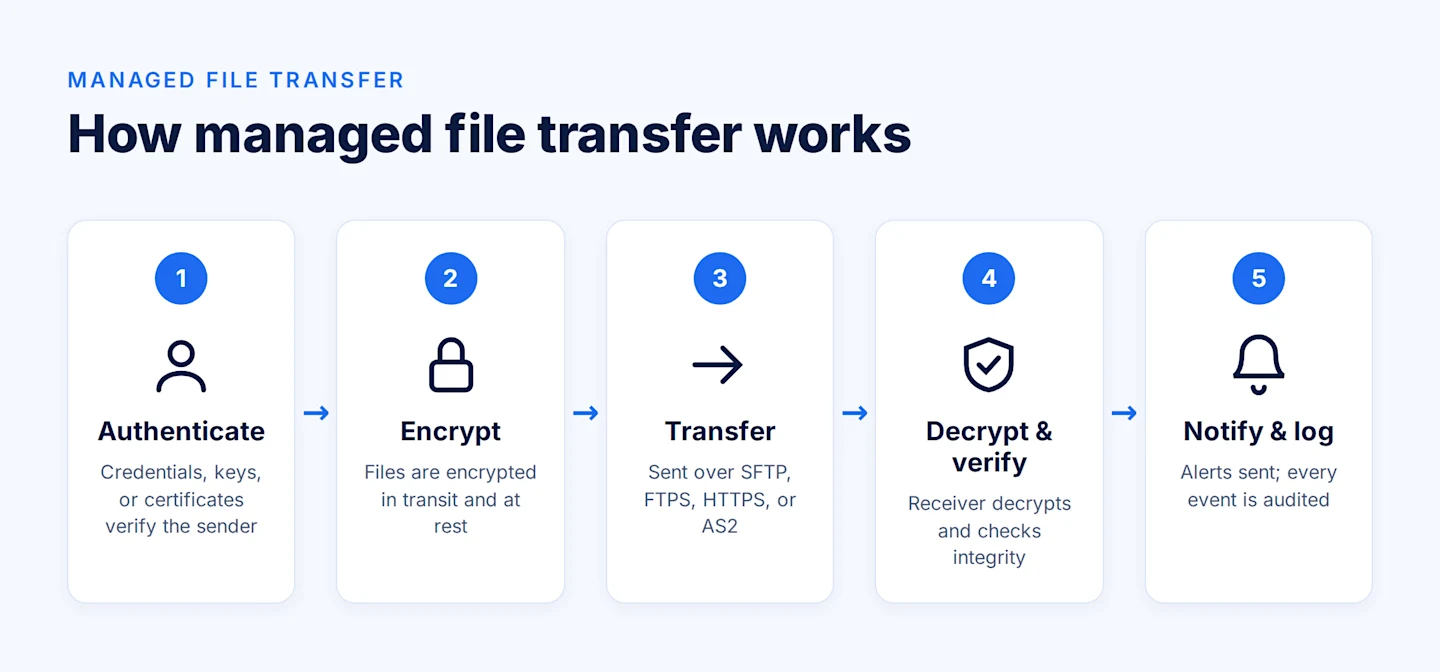
Most MFT platforms follow five steps:
1. Authenticate. The sender or system proves its identity with credentials, keys, or certificates, and permissions decide what it may send or receive.
2. Encrypt. Files are encrypted in transit and often at rest, so only a holder of the right key can read them.
3. Transfer. Files travel over a secure protocol such as SFTP, FTPS, HTTPS, or AS2, across the internet or a private network.
4. Decrypt and verify. The receiver decrypts the file and checks its integrity (for example, with a checksum or digital signature).
5. Notify and log. Both parties get delivery confirmations or error alerts, and every event is written to an audit log.
Managed File Transfer Protocols
MFT is not a protocol itself. It is a management layer that runs over one or more of these protocols:
FTP — the original file transfer protocol. Fast and simple, but it sends data and credentials in plain text, so it is unsuitable for sensitive files.
SFTP — file transfer over SSH. Encrypts both commands and data through a single connection; the most common choice for partner exchanges.
FTPS — FTP secured with TLS. Common in legacy environments that already run FTP.
HTTPS — web-based upload and download secured with TLS; used for browser portals and APIs.
AS2 — a B2B protocol that adds digital signatures and signed receipts (MDNs), giving non-repudiation. Widely used for EDI in retail, healthcare, and manufacturing.
AS4 — a newer, web-services-based successor to AS2, used in some government and energy-sector exchanges.
For a deeper look at how these apply to EDI specifically, see EDI file communication methods: VAN, AS2, FTP, and direct.
MFT vs FTP vs SFTP
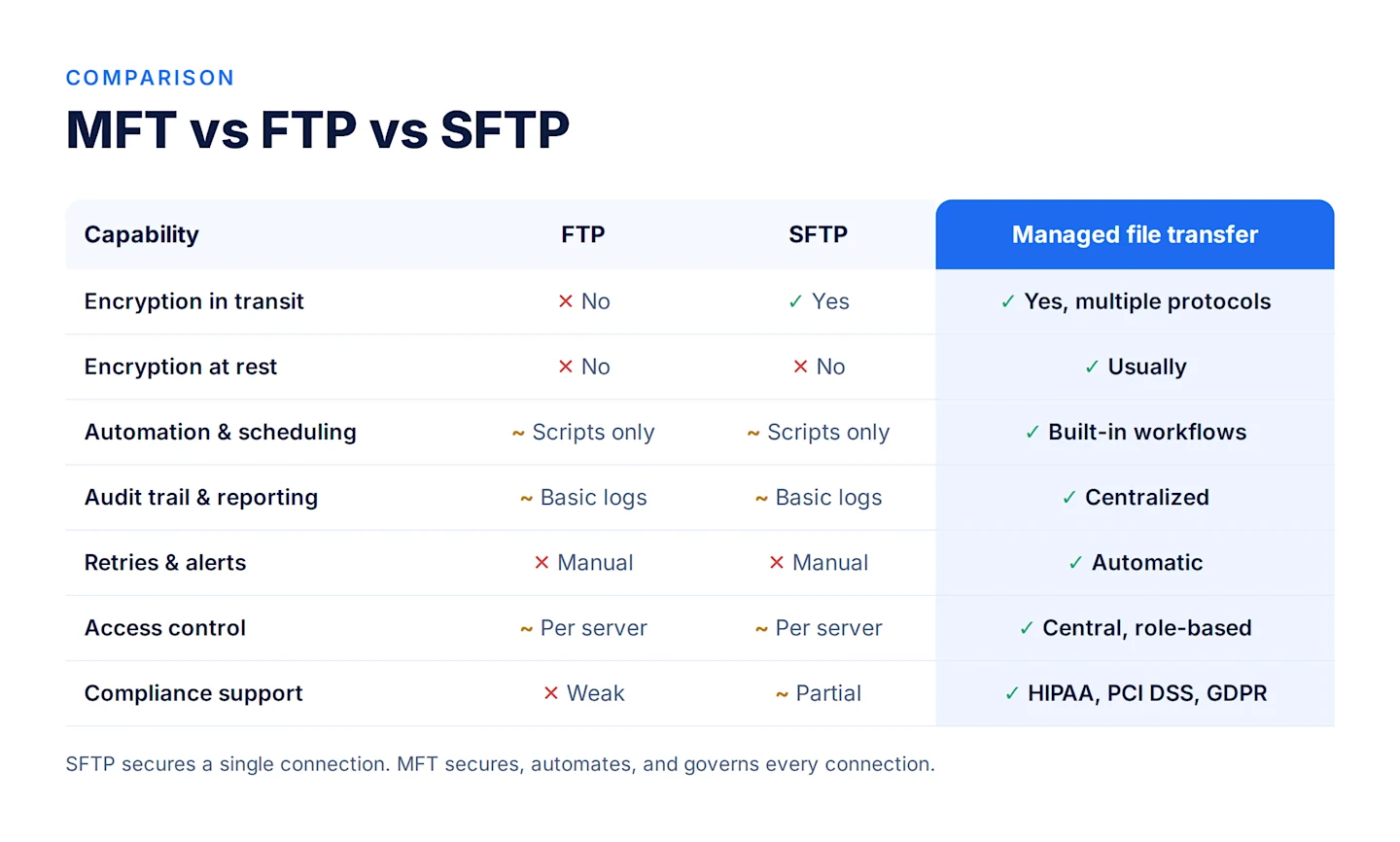
Capability | FTP | SFTP | Managed file transfer |
Encryption in transit | No | Yes | Yes, across multiple protocols |
Encryption at rest | No | No | Usually |
Automation and scheduling | Scripts only | Scripts only | Built-in workflows and triggers |
Audit trail and reporting | Basic server logs | Basic server logs | Centralized, searchable |
Retries and alerts | Manual | Manual | Automatic |
Access control | Per server | Per server | Central, role-based |
Compliance support | Weak | Partial | Designed for HIPAA, PCI DSS, GDPR audits |
In short: SFTP secures a single connection; MFT secures, automates, and governs every connection.
Benefits of Managed File Transfer
MFT solutions can significantly enhance the efficiency and performance of organizations of all sizes. Here are some key benefits of MFT:
Stronger security. Encryption, key management, and role-based access reduce the risk of intercepted or misdirected files.
Less manual work. Scheduled and event-triggered transfers replace hand-run scripts, cutting errors and missed deliveries.
Visibility and control. One dashboard shows who sent what, to whom, and when, plus any failures.
Easier compliance. Audit logs and retention policies give auditors the evidence that regulations like HIPAA and GDPR expect.
AUTOMATE SECURE FILE EXCHANGE
Book a Demo Today!See how Astera handles authentication, encryption, and delivery automatically, no manual steps required.

Managed File Transfer Use Cases
MFT shows up wherever sensitive or high-volume files cross company boundaries on a schedule. These are the most common scenarios.
Banking and financial services
Banks exchange payment files, account statements, and reconciliation reports with clearing houses, corporate clients, and regulators every day. In the US, ACH payment batches follow the Nacha file format and often move over SFTP on tight cutoff windows. A late or failed file can delay payroll or vendor payments.
MFT schedules these transfers around cutoff times, retries failures automatically, and alerts operations teams before a deadline is missed. Its audit logs also support PCI DSS, SOX, and GLBA reviews. For a deeper look, see managed file transfer in banking.
Healthcare
Providers, payers, and clearinghouses exchange claims (X12 837), remittance advice (X12 835), eligibility checks (X12 270/271), and benefit enrollment files (X12 834). Labs and hospitals also send results and patient records to partner systems.
These files carry protected health information, so HIPAA requires controls such as encryption, access restrictions, and audit trails. MFT provides all three and gives compliance teams a single record of who accessed which file and when.
Retail, manufacturing, and supply chain
Retailers and suppliers trade purchase orders (EDI 850), invoices (EDI 810), and advance ship notices (EDI 856) with hundreds of trading partners. Large retailers often require suppliers to connect over AS2, and they may fine suppliers for missing or late documents.
MFT manages each partner's protocol, certificates, and schedule in one place, and AS2 receipts (MDNs) prove each document was delivered. Learn more about EDI and how these documents are structured.
Insurance
Insurers exchange policy, premium, and claims data with brokers, agencies, reinsurers, and third-party administrators. Many of these files follow ACORD standards and contain personal and financial information.
MFT secures these exchanges and automates recurring feeds, such as daily policy updates or monthly bordereaux reports, so teams stop chasing files by email.
Government and public sector
Agencies share tax records, benefits data, and case files with other agencies, contractors, and citizens. These exchanges often have strict data-handling rules and require detailed audit evidence.
MFT enforces encryption and role-based access, and keeps the audit trail that public-sector security reviews expect.
Internal IT and data operations
Not every transfer leaves the company. IT teams move nightly database exports, log files, and backups between on-premises servers, cloud storage such as Amazon S3 or Azure Blob, and data warehouses.
MFT replaces fragile cron jobs and custom scripts with monitored workflows. When a file fails to arrive, the team gets an alert instead of discovering the gap in the next morning's report.
How to choose an MFT solution
Before comparing vendors, answer these questions:
Which protocols do your partners require (SFTP, AS2, FTPS, HTTPS)?
Do you need cloud, on-premises, or hybrid deployment?
Which regulations apply, and what audit evidence must you produce?
How many partners and transfers per day will you run, and how fast is that growing?
What happens to files after they arrive — does someone still re-key or reformat them?
The last question is where many teams find their real bottleneck.
What happens after the file arrives
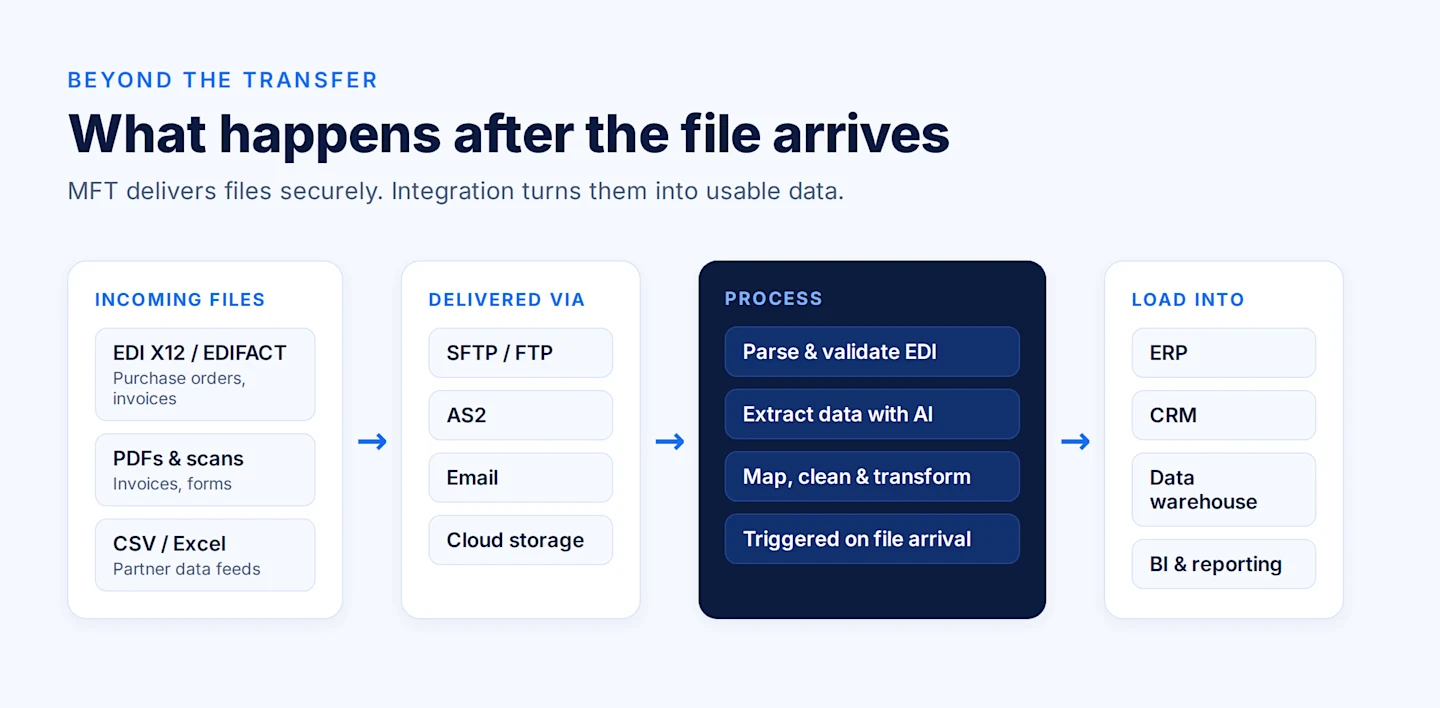
MFT guarantees a file is delivered securely. It does not make the contents usable. A purchase order arrives as an EDI X12 file, an invoice as a PDF, a partner feed as a CSV with its own column names. Someone still has to parse, validate, map, and load that data into your ERP, CRM, or data warehouse.
That step is data integration, and it is where Astera fits. Astera connects to the endpoints files land in — SFTP and FTP servers, email inboxes, cloud storage, and AS2 for EDI — and triggers processing as soon as a file arrives:
Astera EDIConnect parses, validates, and maps EDI transactions to your systems.
Astera Intelligent Document Processing uses AI to extract data from PDFs, invoices, and forms.
Astera Centerprise AI runs no-code ETL pipelines that clean, transform, and load the data wherever it is needed.
SECURELY MANAGE SENSITIVE DATA
Astera's Managed File Transfer streamlines secure and efficient file transfers with multi-protocol support, automated workflows, and advanced scheduling, ensuring compliance and data integrity.