

Data warehouse migration to the cloud is the process of moving your data, schemas, pipelines, and reports from an on-premises data warehouse to a cloud platform such as Snowflake, Google BigQuery, Amazon Redshift, or Microsoft Fabric. Done well, it gives you elastic scale and lower upfront costs without disrupting the reports your business relies on.
As organizations begin to realize the need for and importance of data analytics, more and more of them are looking into implementing an enterprise data warehouse to leverage data that would otherwise be trapped in silos. In addition to helping organizations consolidate their data, a data warehouse can be used to maintain data history and make it easier to query data.
While both on-premises and cloud data warehouses offer benefits, most organizations now choose modern cloud data warehouses over legacy ones for the agility, scalability, and security they offer. Cloud-based data warehouses also offer more flexibility and can cost less for organizations still working out which features they need and how much storage their projects will use.
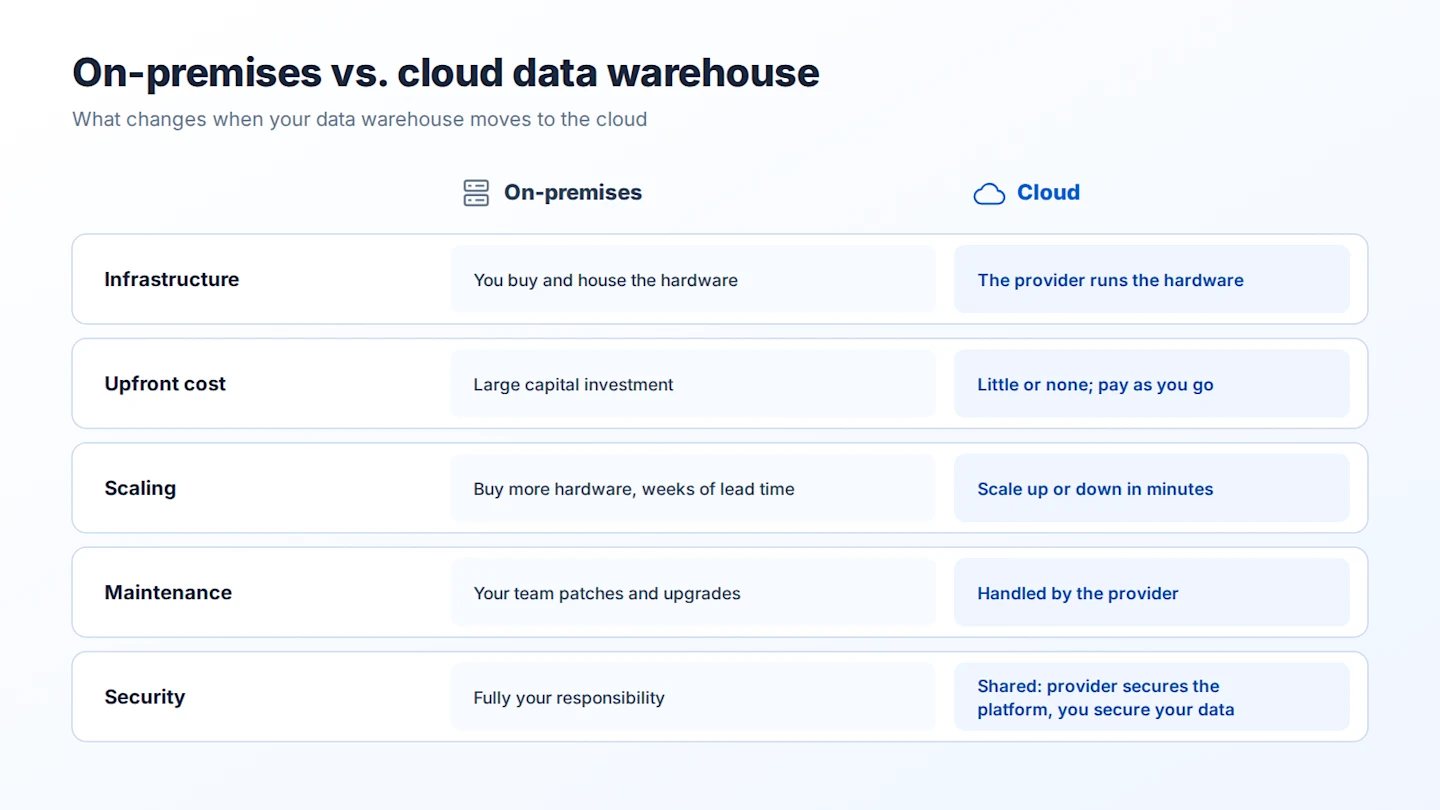
Thinking of moving your data analytics architecture to the cloud? This guide covers the approaches, a step-by-step process, the costs and challenges to plan for, and a checklist to make your data warehouse migration smooth.
What Are On-Premises and Cloud Data Warehouses?
Organizations that use an on-premises data warehouse need to purchase all the storage equipment that will house their data themselves. They will also be responsible for setting up the necessary infrastructure at a physical location of their choice and all subsequent maintenance activities for this hardware.
The reverse is true for cloud data warehouses.
The cloud data warehouse provider takes care of all of the hardware and maintenance of the data pipelines and data warehouse. What’s more, most cloud data warehouse providers also allow users to pay only for the services that they have availed, allowing organizations to scale their architecture based on storage and processing requirements.
Why Migrate Your Data Warehouse to the Cloud?
Cloud data warehousing offers several benefits that on-premises data warehouses can’t match, and adoption is growing fast. Gartner forecast that worldwide public cloud spending would reach USD 723.4 billion in 2025, up 21.5% from 2024. Here are some reasons to move your data warehouse to the cloud:
Lowering Costs and Empowering Data Users
A cloud data warehouse can cost a lot less than an on-premises data warehouse for several reasons. With a cloud data warehouse, you don’t need to purchase equipment for storage, security, or anything else. This upfront cost of on-premises data warehouses can be a deterrent for organizations on a tight budget.
Additionally, cloud data warehouse solution providers offer a number of functionalities and capabilities on a pay-as-you-go basis, making it easier for organizations to experiment and figure out what they need and what works best for their analytics solutions.
Plus, modern data warehouse automation tools remove the need to code and provide an intuitive, point-and-click interface, so business users can take charge of their BI initiatives. This saves costs because teams can build a migration plan around their current architecture and future needs without relying heavily on technical teams and consultants.
Scaling Analytics
Cloud-based data warehouses offer immense scalability and flexibility to organizations looking to improve their analytics efforts. The elasticity offered by cloud data warehouse solution providers also gives organizations the freedom to scale up or down as and when required.
Boosting Data Integration and Processing
Cloud data warehouses generally use the ELT method to integrate and process data much faster than on-premises data warehouses. Users can take advantage of the massively parallel processing (MPP) capabilities of cloud platforms such as Amazon Redshift, Snowflake, and Google BigQuery to build ELT pipelines to and from their data warehouse.
With ELT, users no longer need to leverage their in-house hardware to perform expensive transformations. Instead, they can leverage the power of the target platform to perform those operations far more quickly without any unnecessary data movement.
Preventing Vendor Lock-In
Modern automation tools are platform-agnostic, which means that they work equally well across different cloud environments. This capability protects businesses from vendor lock-in problems since these modern tools allow them to modernize their data warehouses by deploying them on the platform of their choice without worrying about recoding data pipelines or losing critical data.
Faster Migration Through Automation
Automation speeds up every stage of the move, whether you are building a new cloud data warehouse from scratch or modernizing a legacy system. End-to-end platforms can automate data ingestion, schema conversion, and pipeline creation, and they support every migration approach: rehosting, replatforming, or a hybrid setup with some systems on-premises and some in the cloud.
Automation also reduces human error, data loss, and downtime. The result is a shorter migration, lower overall cost, and minimal disruption to business operations.
Planning Your Cloud Data Warehouse Migration Strategy
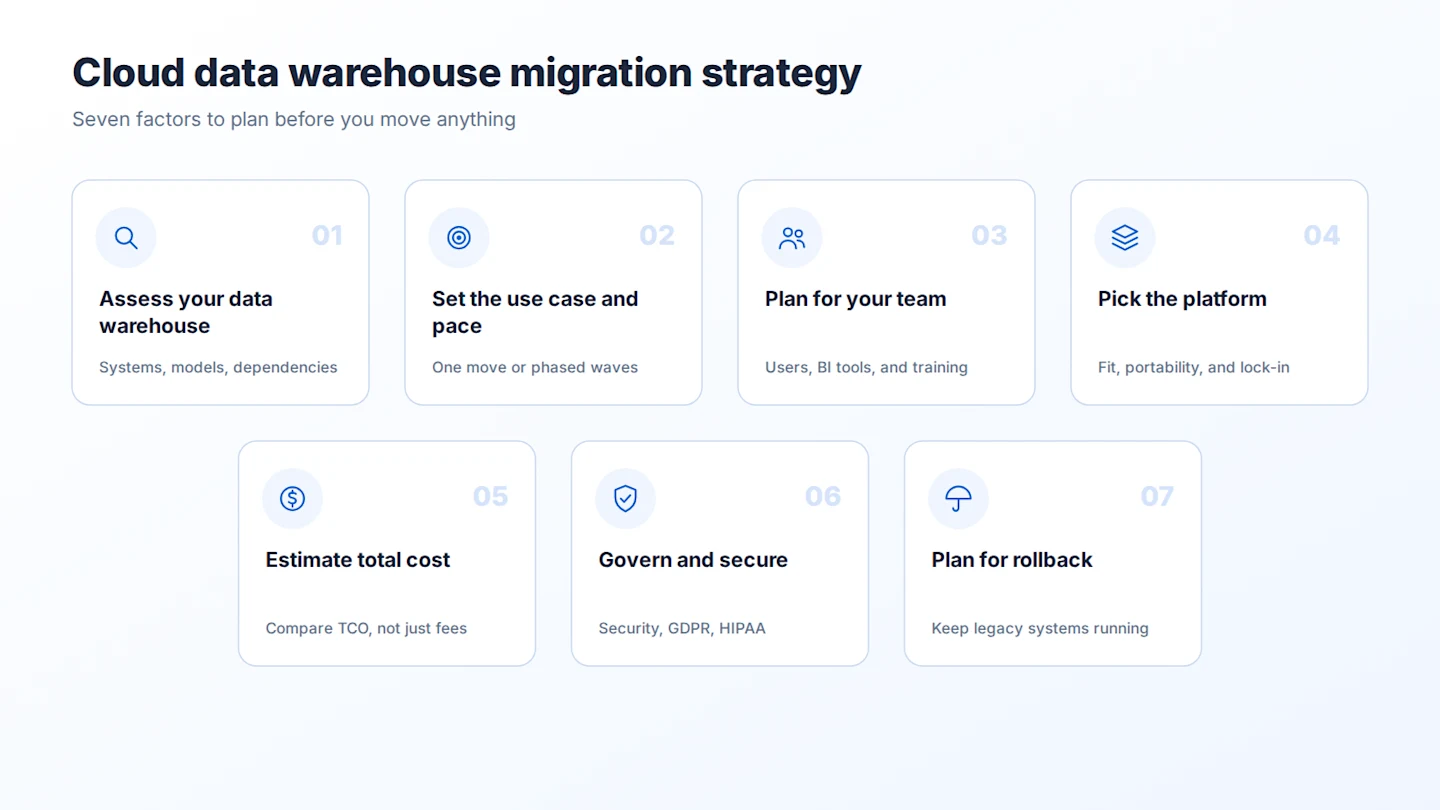
McKinsey estimated in 2021 that cloud adoption could unlock more than USD 1 trillion in run-rate EBITDA across Fortune 500 companies by 2030. Capturing that value is another matter. Migration also poses real challenges, so plan around the factors below before you move anything.
Timelines have also shrunk. Netflix took seven years to move fully to the cloud, and many enterprises now aim to migrate within a year.
Assess Your Existing Data Warehouse
Assessing your existing data warehouse is one of the most crucial steps when you’re preparing for a migration to the cloud. A thorough assessment will not only allow you to pinpoint how your systems, applications, data models, and other dependencies interact with each other, but you’ll also be able to identify where your current system is lacking, allowing you to mitigate any issues caused by these weaknesses in your new data warehouse.
Performing a thorough, unbiased assessment will also help you choose the right migration approach for your current data warehouse. Use the checklist at the end of this guide to make sure nothing is missed.
Determine Your Use Case and Pace
Start by defining the business case for moving your data warehouse. Once your objectives are clear, aligning resources and timelines becomes much easier. Will the cloud data warehouse support real-time analytics or disaster recovery? Will it unify financial data across multiple systems, or hold archival data?
Then decide on the pace. Some organizations modernize and migrate in one go, while others move in phases. Either way, avoid letting the project drag on for too long, as this delays your business intelligence and analytics work.
Regardless of the use case, it is critical to realize what the most efficient path to the cloud looks like. This includes identifying non-critical data, for example, email archives, which can move in the first phase. The requirements also include:
Determining the level of the organization’s dependency on its data, for example, whether there is data that will need to be resynced
Determining whether specific compliance requirements need to be met, for example, complying with HIPAA when moving patient medical history
Identifying if the data needs to be cleaned first
Understand How On-Premises to Cloud Migration Will Affect Your Team
It’s also important to involve key personnel who will be using your cloud data warehouse during the migration process and define how they fit into the overall planning. Keeping key personnel in the loop throughout the process will ensure that the cloud data warehouse is leveraged to the fullest with minimal to no disruptions.
At this point, it’s also important to know how crucial tools and applications, such as visualization platforms and business intelligence (BI) tools, will work with the new architecture.
Design, develop, and deploy your data warehouse in the cloud
Building a data warehouse no longer requires coding. With Astera Data Warehouse Builder you can design a data warehouse and deploy it to the cloud without writing a single line of code.

Identify the Best Platform
Your cloud migration strategy should be able to address the vendor lock-in problem. The ability to lift and shift data and IT workloads freely is invaluable for businesses. However, cutthroat competition, regulatory restrictions, and proprietary technologies and software mean that extending some of the services offered by the existing cloud service provider to another cloud platform is not possible. Therefore, most enterprises are committed to a single service provider for long periods.
Hence, conducting thorough research before embracing a cloud platform is essential. Some best practices to safeguard your organization against the vendor lock-in problem are provided below.
Identify all your business and technology requirements
Identify the commonalities and complex dependencies
Assess the cloud platform vendor market thoroughly
The cost associated with migrating to a competing platform can quickly turn out to be the single biggest obstacle; ensure you have done your homework on this front
Consider upgrading before migrating
Ensure your choice of platform does not lead to interoperability issues between systems
Evaluate Associated Cost Requirements
While modernizing your data warehouse reduces costs in the long run, the process can require a substantial initial investment. Therefore, your cloud migration strategy must highlight potential avenues for cost optimization along the entire modernization process. Once the data warehouse modernization plan is in place and you have identified all the requirements, you should be able to make a reliable cloud migration cost projection.
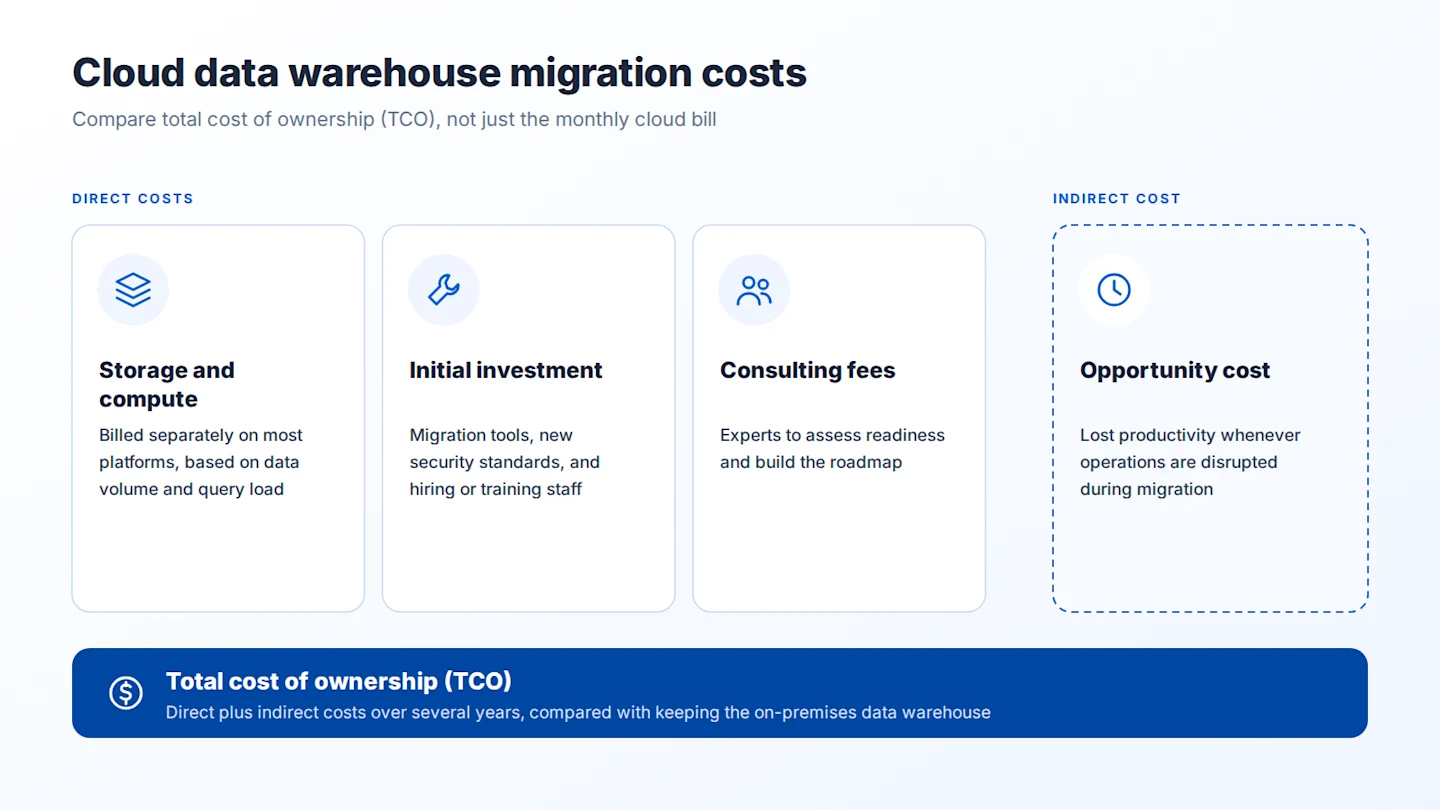
The cost structure of a legacy data warehouse is different from that of a cloud data warehouse. The most important metric to consider when comparing costs associated with an on-premises data warehouse with costs associated with a cloud data warehouse is TCO (total cost of ownership).
Consider the following direct and indirect costs associated when migrating your data warehouse to the cloud:
Storage and compute costs: Most cloud data warehouses bill storage and compute separately. Snowflake, for example, charges for compute credits used by virtual warehouses, storage per terabyte per month, and cloud services. Check each vendor’s current rates, or use its pricing calculator, for your expected data volume and query load.
Initial investment: Depending on your current architecture and desired end state, this can include new security standards, third-party migration platforms, and hiring and training staff. Labor is often one of the largest costs of the project.
Consultation fees: While the right technology stack can mitigate roadblocks, it is necessary to have the right expertise on board to guide the migration journey. Consultants are hired to assess the organization’s overall preparedness for cloud migration and play an important role in strategizing and creating a solid roadmap.
Another essential cost associated with data warehouse modernization is the opportunity cost incurred whenever business operations are disrupted during the migration process.
Cloud migration calculators can estimate costs from realistic assumptions. It’s also worth working with cloud platform vendors to find ways to cut costs, both during migration and once the cloud data warehouse is running.
Ensure Good Data Governance Practices
One of the biggest business concerns regarding cloud data warehouse migration is security and compliance. Typically, cloud platforms operate on a shared operational model as far as responsibility is concerned, which means that the vendor is responsible for the security of the infrastructure. At the same time, the organization, or the customer, has to secure its data and workloads independently.
Furthermore, the data warehouse modernization process itself is risky when it comes to sensitive data. Although several cloud platform vendors provide state-of-the-art security controls backed by certifications, such as SOC 2, it is still the organization’s responsibility to ensure they are configured as per requirements.
Completing the migration doesn’t end these responsibilities. Businesses must continue to comply with regulations such as GDPR and HIPAA. Under GDPR, for example, a migration that loses or exposes personal data can lead to serious penalties. That’s why compliance belongs in your migration strategy from day one.
Have a Contingency Plan
When migrating to the cloud, it’s essential to keep in mind that the reality may be different than what you had anticipated. In fact, in some cases, you might even need to revisit your data warehouse migration strategy to ensure that crucial data is not lost and the productivity of your business is not affected during the transition.
Regardless of the data warehouse migration approach you choose, you’ll also need to keep your legacy systems operational for at least some time in case you discover that something’s amiss. Not doing so can prove detrimental if you need to roll back and have nothing to support your data warehouse.
Data Warehouse Migration Approaches
There are three main approaches to moving a data warehouse to the cloud. Your assessment of where your data warehouse stands today will tell you which one fits.
1. Rehost (Lift and Shift)
The lift and shift approach to data warehouse migration involves migrating your data and applications to the cloud without any redesigning or restructuring. The lift and shift approach works best for organizations that are confident that their data warehouse architecture is working perfectly fine and just want to move to the cloud for added benefits such as enhanced security, compliance, or even disaster recovery.
Also known as rehosting, the lift and shift approach can also help save costs involved in buying and maintaining storage equipment and space to house your data and applications and increase the availability of your data warehouse.
2. Replatform (Simplify and Migrate)
The second option is to adapt your data warehouse to the cloud platform as you move it. This is known as replatforming. It keeps your overall design but changes what the target needs, such as converting SQL dialects, schemas, and stored procedures, and switching from ETL to ELT. The aim is to benefit from the cloud’s scalability and performance without a full rebuild. Note: the original post called this approach "refactoring", which usually means a full redesign.
3. Refactor (Redesign and Migrate)
In some cases, an assessment of your current data warehouse architecture will reveal that it isn’t fit for the cloud at all. Then you need to build a new, cloud-native data warehouse from scratch, often with a new data model. You can still take lessons from your on-premises data warehouse about how to solve specific problems more efficiently in the new design.
Comparing the Approaches
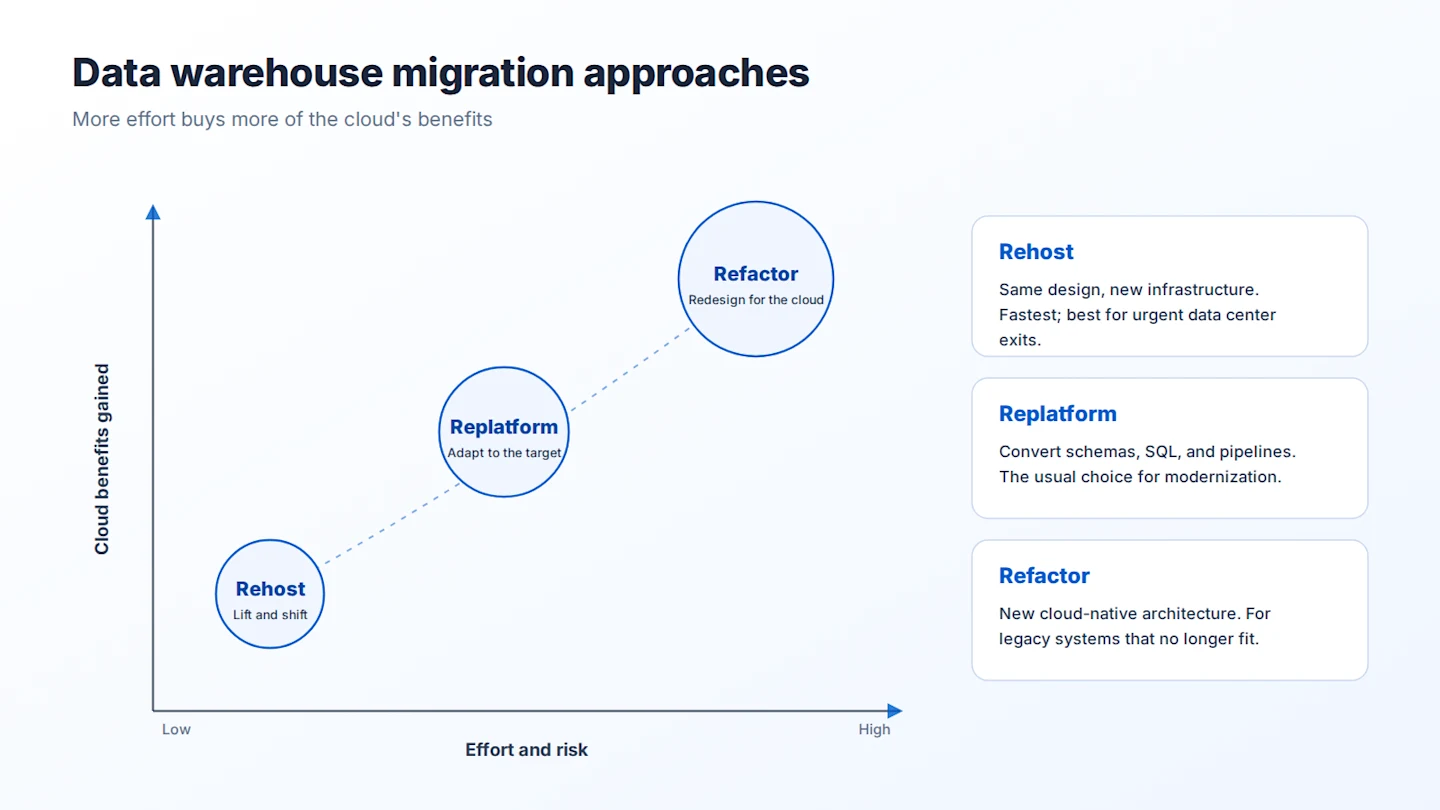
Approach | What changes | Effort and risk | Cloud benefits gained | Best for |
Rehost (lift and shift) | Almost nothing. Same design on cloud infrastructure. | Lowest | Limited: mainly hardware savings and availability | Urgent data center exits, or stable systems that already work well |
Replatform | Schemas, SQL, stored procedures, and pipelines adapted to the target | Medium | Most of the scalability and performance benefits | Most modernization projects |
Refactor (redesign) | New architecture and data model | Highest | Full cloud-native benefits | Legacy systems that no longer meet business needs |
How to Migrate a Data Warehouse to the Cloud: 8 Steps
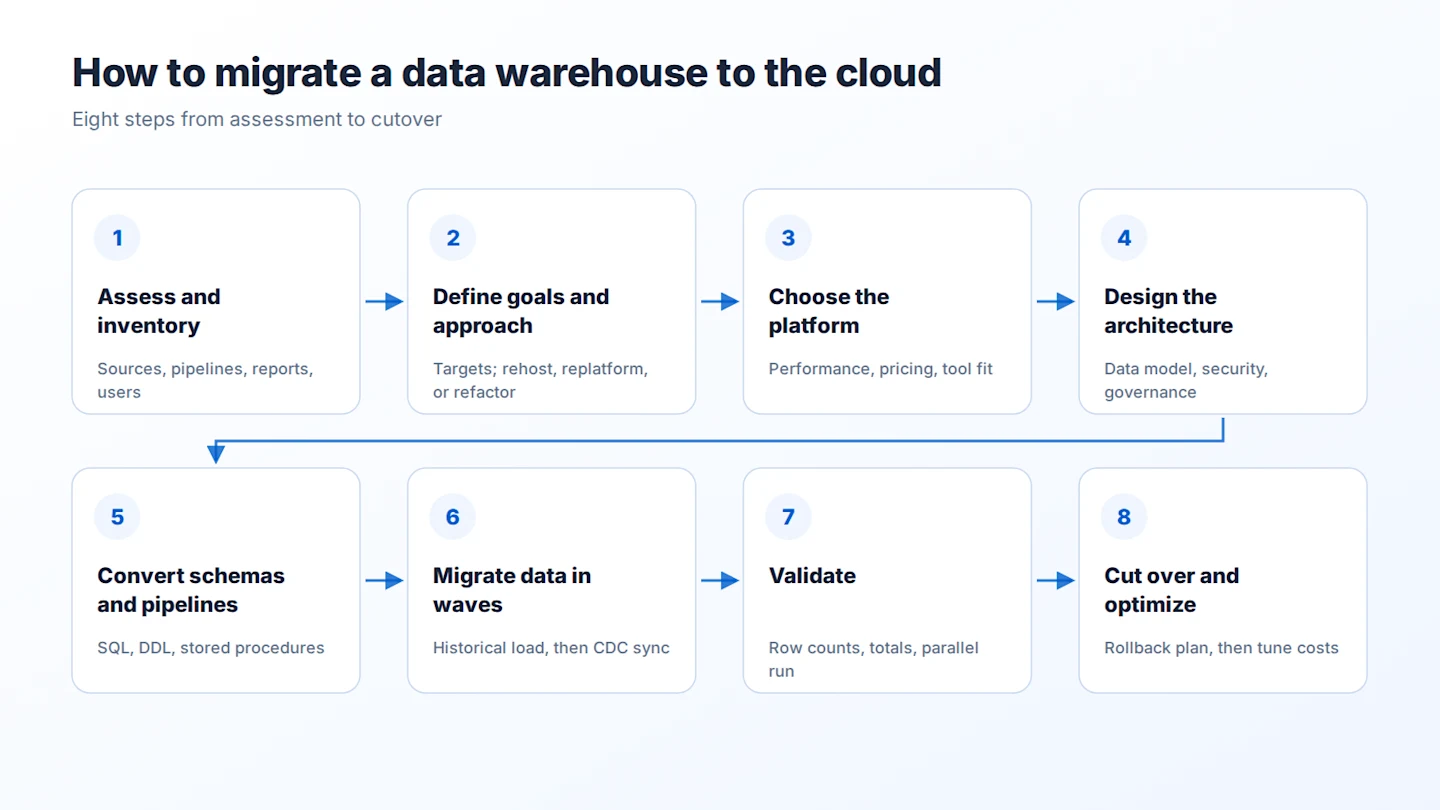
Once you’ve chosen your approach, follow these steps to move your data warehouse with minimal disruption:
Assess and inventory. List every source, table, pipeline, stored procedure, report, and user of the current data warehouse. Flag unused objects so you don’t migrate them.
Define goals and pick an approach. Set measurable targets, such as report refresh times or cost per month, and choose rehost, replatform, or refactor for each workload.
Choose the target platform. Compare cloud data warehouses on performance, pricing model, security, and fit with your existing tools.
Design the target architecture. Plan the data model, security roles, and governance rules. Decide how pipelines will run, whether ETL or ELT.
Convert schemas and pipelines. Translate DDL, SQL, and stored procedures to the target platform, and rebuild data pipelines. Automation tools can generate much of this code.
Migrate data in waves. Move a historical snapshot first, then keep the source and target in sync with incremental loads or change data capture (CDC) until cutover.
Validate. Compare row counts, checksums, and key totals between the old and new systems, and run both in parallel so users can confirm their reports match. See our guide to data validation.
Cut over and optimize. Switch users and applications to the cloud data warehouse, keep a rollback plan, and decommission the legacy system only after a stable period. Then tune queries and set cost controls.
Choosing a Cloud Data Warehouse Platform
The most common targets are Snowflake, Google BigQuery, Amazon Redshift, Microsoft Fabric (and Azure Synapse Analytics), and Databricks. When comparing them, look at:
Pricing model: pay per query, per compute hour, or for reserved capacity
Performance: for your largest queries and number of concurrent users
Ecosystem fit: your current cloud provider, BI tools, and data integration tools
Security and compliance: encryption, access controls, and certifications your industry needs
Portability: how easily you could move again, to limit vendor lock-in
Learn more in our guide to cloud data warehouses.
Data Warehouse Migration Challenges
Migrating your data warehouse to the cloud can pose a few different challenges. Here are a few on-premises to cloud data warehouse migration challenges that you need to be aware of before you migrate your data warehouse to the cloud:
1. Replanning Your Data Model
When migrating your data warehouse to the cloud, it’s often recommended to follow a denormalization approach to enhance performance. That said, the denormalization process can be complicated especially since you might be required to keep your old and new data models working in harmony during the migration process.
2. Converting Stored Procedures
Stored procedures hold much of the business logic in many legacy data warehouses. Major cloud data warehouses, including Snowflake, BigQuery, Amazon Redshift, and Azure Synapse, support stored procedures, but each uses its own SQL dialect or language. Procedures written for Oracle, Teradata, or SQL Server usually need to be rewritten or converted, and some teams move this logic into orchestration or ELT pipelines instead.
Inventory your stored procedures early and plan the time to convert and test them, so your organization’s efficiency isn’t affected after the move.
3. Establishing Connectivity Between Your New Data Warehouse and Custom Applications
Connecting your custom applications to your cloud data warehouse may not be as simple as you’d like. While some custom applications might easily be connected and integrated with your cloud data warehouse just by changing a few SQL statements here and there, you might have to dive deeper to discover other connectivity issues. Often, these issues may manifest in the form of erroneous or inconsistent data, which can cause problems if not detected in a timely manner.
4. Keeping Data in Sync During Migration
Business doesn’t stop while you migrate. New records keep arriving in the legacy system, so the cloud data warehouse must stay in sync until cutover. Incremental loads or CDC keep both systems current and let you run them in parallel for validation.
5. Controlling Cloud Costs
Pay-as-you-go pricing can surprise teams after go-live, especially with inefficient queries or compute that runs all day. Set budgets, auto-suspend idle compute, and monitor usage from the first week.
Design a Cloud Data Warehouse From Scratch
With Astera Data Warehouse Builder, you can design purpose-built, cloud data warehouses from scratch within days. Sign up for a demo and see how it's done.
Migrate Your Data Warehouse to the Cloud with Astera Data Pipeline
Renamed from "What Astera DW Builder Offers". All product references now point to Astera Data Pipeline.
Astera Data Pipeline is an AI-powered, no-code platform for building and managing automated data pipelines, which makes it well suited to moving an on-premises data warehouse to the cloud. With over 100 connectors, it reads from legacy databases such as Oracle and SQL Server and loads into cloud platforms on AWS, Azure, and Google Cloud.
Its built-in support for batch and real-time processing lets you run the historical load first, then keep the legacy and cloud data warehouses in sync with change data capture until cutover. AI-driven semantic mapping speeds up mapping legacy schemas to the new data model, and the built-in job scheduler automates and orchestrates every dataflow.
With Astera Data Pipeline, your organization can get the full benefits of the cloud, with faster analytics, flexibility, and scalability, without writing code. Request a demo or start a free trial to see how it can help with your data warehouse migration.