

An EDI agent is an AI tool that speeds up the hardest part of electronic data interchange (EDI): building and maintaining the workflows. Once an EDI workflow is running, it moves purchase orders, claims, invoices, and other documents between trading partners automatically. Getting there takes real effort.
Someone has to read a partner's implementation guide, map that format to your internal systems, write the validation rules, and test everything before it goes live. An EDI agent takes on much of that setup and maintenance work, so your team can onboard partners and roll out changes faster.
What is an AI EDI agent?
An EDI agent is a natural-language tool for building and maintaining EDI workflows. It doesn't take over the day-to-day job of parsing, validating, and moving transactions. That's the EDI platform's role, running continuously on live data.
The agent gives you a faster way to set up that automation instead. Describe what a flow needs to do, or hand it a document like a trading partner's implementation guide. It works out which segments, fields, and rules are involved, and assembles them into a working configuration.
EDI agent vs. EDI platform
An EDI agent isn't a replacement for an EDI platform. It works alongside one. The platform provides the infrastructure that exchanges documents with trading partners. The agent gives you a quicker way to configure that infrastructure.
Aspect | EDI Platform | EDI Agent |
Job | Runs transactions. Parses, validates, transforms, and delivers EDI documents. | Helps build those workflows. Turns a request or document into a working configuration. |
Input | Live transaction data moving between trading partners. | A plain-language request, or a document such as an implementation guide. |
Output | A completed transaction: validated, translated, and delivered. | A flow, mapping, or configuration change, tested before handoff. |
Runs | Continuously, on every transaction that moves through it. | On demand, when a workflow needs to be built, onboarded, or changed. |
Oversight | Follows the rules and permissions already configured. | Produces work a person reviews before it goes live. |
How an EDI agent works
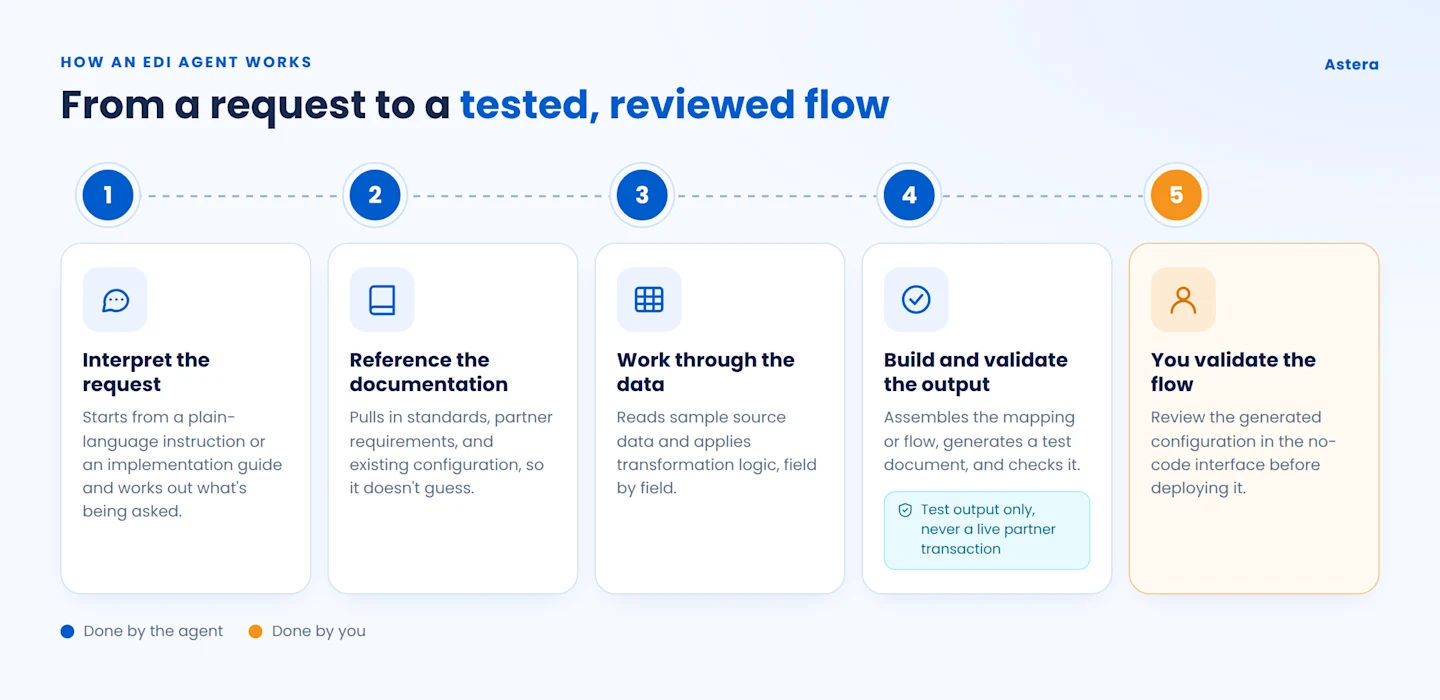
Here’s how an EDI agent helps you speed up the process of building and parsing an EDI transaction:
Interpret the request. It starts with what you give it: a plain-language instruction, or a document such as a partner onboarding implementation guide. Then it works out what's actually being asked.
Reference the relevant documentation. It pulls in the standards, partner requirements, or existing configuration it needs. That way it doesn't have to guess.
Work through the data. It looks at sample source data, then applies its transformation logic, field by field.
Build and validate the output. It assembles the mapping or flow and generates a test document from it. It checks the result before returning it. That test output is what gets validated, not a transaction sent to a live trading partner.
Hand off for review. You review and validate the generated configuration in the no-code interface, and approve it before it's deployed to production.
What an EDI agent can help with
Building a flow from a description. Describe what a workflow needs to do. The agent puts together a working, tested configuration. What used to take a day or two of manual build-and-test work can now wrap up in minutes.
Onboarding a trading partner. Give the agent a partner's implementation guide. It reads their specific requirements and builds a flow around them. That can cut onboarding time substantially compared to configuring it by hand.
Updating a flow that's already live. Describe a change: a new field, an updated requirement, a revised partner guide. The agent applies it to the existing flow. There's no need to rebuild it from scratch.
Suggesting mappings between two schemas. When a source and target structure need to be matched, the agent can propose field-level correspondences and transformations, the core of EDI mapping. This happens as part of a larger flow it's assembling, which reduces manual configuration.
Retrieving relevant documentation. EDI teams often need to check implementation guides, partner requirements, and internal specs while building or troubleshooting a flow. An agent can surface the relevant passage instead of someone searching for it by hand.
Manage Business Transactions Faster with Astera EDIConnect
View Demo
EDI agent vs. a schema-matching tool
It's worth separating an EDI agent from a narrower type of AI feature: schema matching. Many EDI tools already offer this. Point a schema-matching tool at two structures, and it suggests likely pairings between source and target fields. That's a single prediction. It's useful, but a person still has to accept or correct it. They still have to sequence the segments, add validation rules, and test the result.
An EDI agent takes on the larger task. Give it the same kind of input — a description, or a document like an implementation guide. It identifies the segments required. It builds the mapping, which may draw on that same field-matching logic underneath. Then it runs validation and returns a tested flow, not just a single suggestion.
For example: say a manufacturer is setting up a flow to receive invoices from a new supplier. A schema-matching tool would line up the supplier's invoice layout against the manufacturer's accounts-payable schema. It would suggest matches field by field. Someone would still need to review each suggestion. They'd need to work out how to handle a freight-allowance field with no direct match internally, sequence the segments, and test the result against a sample invoice.
Now give an EDI Agent the supplier's own EDI specification instead. It reads the document and builds the full invoice flow, including the segment structure, freight-allowance handling, and the manufacturer's validation rules. You can then review and validate the generated flow in the no-code interface.
The Agent can also scan the connected backend system through its native connectors, analyze the available schema, and identify the relevant tables for curating the required data.
If the supplier adds a new charge code down the line, you can describe the change to the Agent, and it can update the existing flow accordingly rather than requiring you to rebuild it from scratch.
Considerations when using an EDI agent
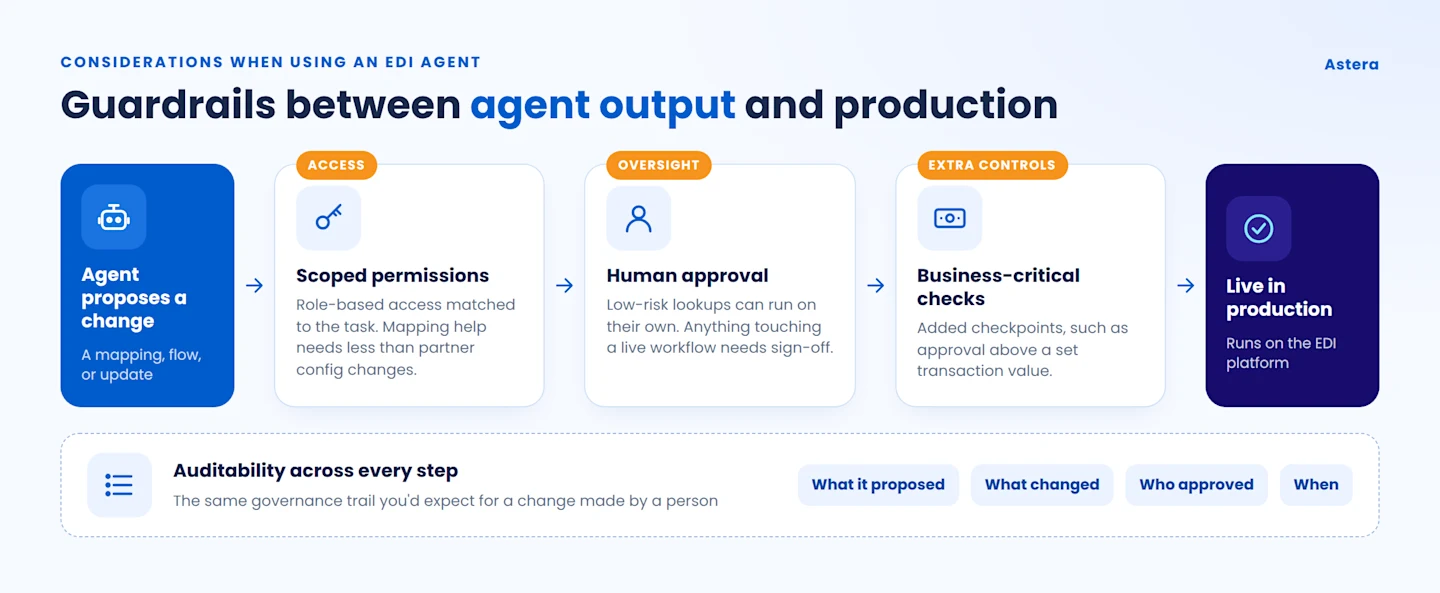
Human oversight
The right level of autonomy depends on the task. An agent might independently retrieve transaction information or draft a mapping suggestion. Other actions should require a person's approval first — anything that touches a live workflow or a business-critical transaction.
Data access and permissions
An EDI agent's access should match what it actually needs to do. An agent helping with mapping suggestions doesn't need the same access as one updating trading partner configurations. Role-based permissions help keep that boundary clear.
Auditability
An agent's output becomes part of a production workflow. So it helps to keep a record: what it proposed, what changed, who approved it, and when. That's the same governance trail you'd expect for a change made by a person.
Extra controls for business-critical transactions
Transactions with direct financial or operational impact can warrant extra checkpoints. For instance, you might require approval before a flow the agent helped build or update processes a transaction above a certain value.
What to look for in an EDI agent
Not every EDI agent is built the same way. When you evaluate one, check for these capabilities:
Standards support: coverage for the formats you actually use, such as ANSI X12, EDIFACT, HL7, HIPAA, or non-HIPAA X12.
Integration: the ability to connect with your existing EDI platform, ERP, databases, and APIs.
Context awareness: it should use relevant transaction data, business rules, and partner history, not guess.
Natural-language interaction: a way to describe what you need and get useful answers back, without a configuration UI for every step.
Human-in-the-loop controls: clear settings for which tasks the agent can complete on its own and which need your approval.
Security and governance: role-based access and authentication are supported for published artifacts.
Scalability: the ability to keep up as transaction volume, trading partners, and workflow complexity grow.
The EDI Agent in Astera EDIConnect
Astera EDIConnect's EDI Agent is a concrete example of how this plays out. Each capability above is available today. Each one runs as a multi-step task, not a single suggestion.
It sits above EDIConnect's existing schema-matching features, AI Automapper and AI Match. Those handle field-level matching. The EDI Agent uses that same capability as one part of a larger task: building and testing a complete flow from a description or an implementation guide.
Under the hood, it draws on a library of specialized skills rather than one general-purpose routine. Orchestration skills structure the inbound and outbound dataflow. A prerequisite skill reads a trading partner's profile. Transformation components handle joins, distinct/aggregate operations, constant values, and sequence generation. Message-specific references go down to the segment level, such as guidance on the HI segment in an 837I claim. The agent selects and assembles whichever of these a flow needs. It doesn't apply the same steps to every request.
Explore how Astera can help you modernize your EDI workflows with AI-powered capabilities. Learn more about Astera EDIConnect.
See EDIConnect Build and Validate an 834 in Minutes
Watch subscriber and dependent data get mapped, validated, and transmitted to a carrier, live and in a real workflow.