

A database provides an organized way to store, access, and manage data electronically. Databases power many of the systems you use every day. These include banking, e-commerce, CRM, and enterprise applications.
Databases can organize information in different ways to support different data and application needs. Whether you’re new to databases or want to strengthen your understanding of the fundamentals, this guide will help. You’ll learn how databases work, how they are structured, and where they are used. We’ll also cover database examples, database management systems (DBMS), different types of databases, and key comparisons.
What Is a Database?
A database is an organized collection of data that is typically stored electronically in a computer system. It helps users, applications, and other systems store and work with information efficiently.
How that information is organized depends on the data model. The model defines how data is structured, stored, and related. Depending on the database technology, databases can manage structured, semi-structured, and unstructured data.
For example: A database may contain structured data such as customer details, financial transactions, and inventory records. It may also store semi-structured data such as JSON documents and application logs, or unstructured data such as text documents, images, and other files.
Once stored, data can be added, retrieved, updated, or deleted as needed. A database management system (DBMS) typically manages these operations. It provides the capabilities to create, access, manage, and control databases.
Together, the data, DBMS, and associated applications form a database system.
What Is in a Database?
What is in a database varies based on its data model and DBMS. Using a relational database as an example, you may encounter the following elements:
Data: The information stored and managed in the database.
Tables: Structures that organize related data into rows and columns.
Records: Individual entries in a table, typically represented as rows.
Fields: Individual data attributes, typically represented as columns.
Keys: Values used to identify records and connect related data.
Relationships: Connections between related data, such as between two tables.
Database objects: Structures such as tables, views, indexes, and stored procedures that help store, organize, or work with data.
Schemas: Blueprints that define how database elements are organized.
Indexes: Structures that help the database find and retrieve data efficiently.
Metadata: Information that describes the database, its structures, and the data it contains.
These elements vary across database models and DBMSs. Not every database uses tables, records, or the same underlying structure.
The DBMS provides the interface and capabilities needed to work with the data and these database elements. To understand what happens when a user or application sends a request, let’s look at how databases work.
How Do Databases Work?
Databases work by storing data according to a defined data model and providing ways to access and modify that data. A database management system (DBMS) manages the interaction between the stored data and the users or applications that need it.
When a user or application needs to work with data, it sends a request or database query to the DBMS. The DBMS interprets the request, determines how to execute it, and communicates with the database engine to access the required data.
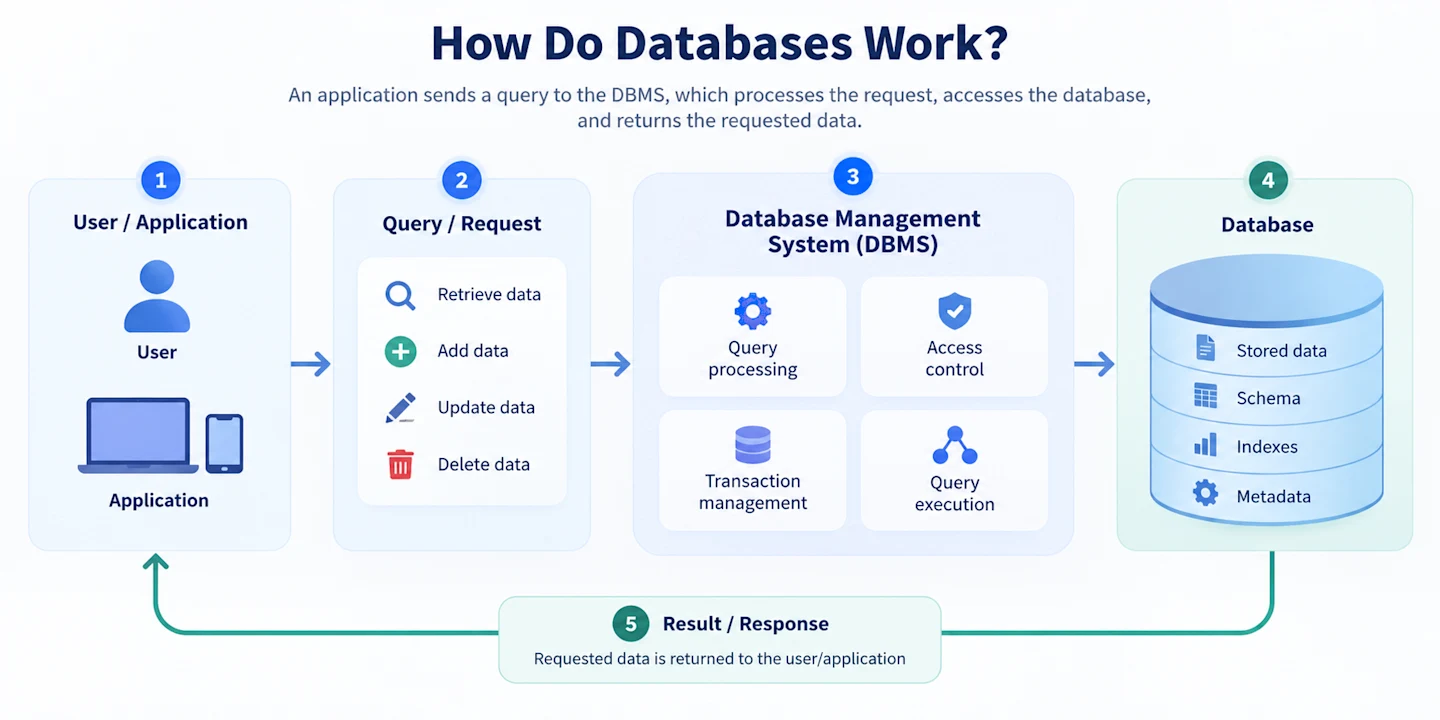
Here is how the process typically works:
Data is stored and organized. The database stores data according to its data model and schema. Depending on the database, this may involve tables, documents, key-value pairs, graphs, or other structures.
A request is sent. A user or application asks the database to perform an action. For example, an e-commerce application may request all available products within a specific category.
The DBMS processes the request. The DBMS interprets the query and determines how to execute it. In a relational database, this may involve processing an SQL query and identifying the tables, indexes, or other database objects needed.
The database engine performs the operation. It accesses the relevant stored data and carries out the requested action. This could involve retrieving existing data, adding new information, modifying a record, or removing data.
The result is completed or returned. For a retrieval request, the matching data is returned to the application. For an operation that changes data, the database records the change and confirms its completion.
For example, when a customer searches for a product on an online store, the application sends a query containing the search criteria. The DBMS processes the query, and the database engine locates matching records. Product names, prices, and availability are then returned for the application to display.
Several mechanisms help databases perform these operations efficiently and reliably. Indexes provide faster paths to specific data, reducing the need to examine every record. Transactions group related operations into logical units of work. For example, a bank transfer may require one account to be debited and another to be credited as part of the same transaction.
Access controls determine which users and applications can access data and what actions they can perform. Data consistency and integrity mechanisms, such as primary and foreign keys, unique and check constraints, transactions, and concurrency controls, help keep data valid and reliable as it changes. For example, a foreign key can prevent a record from referencing data that does not exist, while transaction and concurrency controls help maintain consistent results when multiple operations occur at the same time.
While databases can perform many specific actions, most operations on stored data fall into four fundamental categories. These are commonly grouped under the acronym CRUD.
Database Operations and CRUD
A database operation is an action performed on the data stored in a database. CRUD represents four fundamental operations used to work with that data:
Operation | What it does | Example |
|---|---|---|
Create | Adds new data | Create an order when a customer completes checkout |
Read | Retrieves existing data | Retrieve a customer's order history |
Update | Changes existing data | Update inventory after a product is purchased |
Delete | Removes existing data | Remove a record when it is no longer required |
A single activity can involve several database operations. When a customer places an order, for example, the application may read customer and product information, create a new order record, and update the available inventory.
How these CRUD operations are performed depends on the database system. Relational databases commonly use SQL to perform these operations and interact with stored data.
What Is SQL?
Structured Query Language (SQL) is a standard language used to communicate with relational database management systems. It allows users and applications to send database queries and other instructions for working with data.
SQL can be used to retrieve, insert, update, and delete data. It can also define and modify database structures, such as tables, columns, and constraints.
Some of the most common SQL commands directly correspond to CRUD operations:
SQL command | Purpose | CRUD operation |
|---|---|---|
SELECT | Retrieves data | Read |
INSERT | Adds new data | Create |
UPDATE | Modifies existing data | Update |
DELETE | Removes data | Delete |
For example, this simple SQL query retrieves the names and prices of products in the Electronics category:
SELECT product_name, price
FROM products
WHERE category = 'Electronics';
SQL also includes commands for defining and changing database structures. For example, CREATE can create database objects such as tables, ALTER can modify them, and DROP can remove them.
It is important to distinguish SQL from a database. SQL itself is not a database. It is a language used to interact with relational database systems. Database management systems such as PostgreSQL, MySQL, Microsoft SQL Server, and Oracle Database support SQL.
While these systems share the core SQL language, their exact syntax, features, and extensions can differ.
What Is an Example of a Database?
Now that we have looked at how databases work, consider a simple customer database as an example.
A business can use a customer database to store and manage information about its customers. In a relational database, some of this information could be organized in a Customers table:
Customers
Customer_ID | Name | City | |
|---|---|---|---|
1001 | John Smith | john@example.com | New York |
1002 | Sarah Lee | sarah@example.com | Boston |
1003 | David Chen | david@example.com | New York |
Here, the table groups related customer information. Each row represents a customer record, while each column represents an attribute or field, such as the customer's name, email address, or city.
The Customer_ID can serve as the primary key. It uniquely identifies each customer, even if two customers have the same name or other information.
The business can then query this data based on specific criteria. For example, it could retrieve all customers whose city is New York. The result would include John Smith and David Chen from the sample data above.
However, a database typically contains more than one collection of related data. The same customer database could include an Orders table:
Orders
Order_ID | Customer_ID | Order_Date | Order_Total |
|---|---|---|---|
5001 | 1001 | 2026-08-12 | $125.00 |
5002 | 1002 | 2026-08-14 | $89.50 |
5003 | 1001 | 2026-08-20 | $210.00 |
The Customer_ID in the Orders table connects each order to a customer in the Customers table. For example, orders 5001 and 5003 are associated with Customer_ID 1001, which belongs to John Smith.
Keeping customer and order information in related tables avoids repeatedly storing the same customer details with every order. The database can connect the records when needed, such as when the business wants to retrieve John Smith's customer details along with his order history.
A larger database could include additional related tables for products, payments, and shipments. Together, these tables organize different types of business information while relationships between them make it possible to work with the data as a connected whole.
This is one example of how a relational database organizes information. Other types of databases may use different structures, such as documents, key-value pairs, or graphs.
Real-World Examples of Databases
The customer database above is just one example. Organizations use databases to organize and manage many different types of information.
Some common real-world database examples include:
Database example | What it stores or manages |
|---|---|
Customer database | Customer profiles, contact details, preferences, and account information |
Employee database | Employee records, roles, departments, and other HR information |
Inventory database | Products, quantities, stock levels, and inventory movements |
Banking database | Customer accounts, balances, payments, and transactions |
Healthcare database | Patient information, appointments, clinical records, and treatment data |
E-commerce database | Customers, products, orders, payments, and shipments |
CRM database | Customer interactions, leads, sales opportunities, and account information |
These examples describe databases based on the information they contain and the purpose they serve. They should not be confused with database management systems (DBMSs).
For example, a company might have a customer database that runs on PostgreSQL or Microsoft SQL Server. Here, the customer database is the organized collection of customer data, while PostgreSQL or SQL Server is the DBMS used to store, access, and manage that database.
Common DBMS and database platform examples include MySQL, PostgreSQL, Oracle Database, Microsoft SQL Server, and MongoDB. These systems provide the technology organizations use to create and manage databases.
So, while a database contains the data, a DBMS provides the software capabilities needed to work with and manage that data.
What Is a Database Management System (DBMS)?
A database management system (DBMS) is software used to create, access, manage, modify, secure, and maintain databases. It acts as an interface between the database and the users or applications that need to work with its data.
For example, when an application sends a query to retrieve customer information, the DBMS processes the request, accesses the relevant data, and returns the results. It also controls how data is stored, changed, secured, and maintained.
The main functions of a DBMS include:
Data storage and retrieval: Stores data and provides mechanisms for finding and retrieving it when needed.
Query processing: Interprets and executes queries sent by users or applications.
Database structure management: Allows users to create and modify structures such as tables, schemas, indexes, or collections, depending on the database model.
User and access management: Controls who can access the database and which actions they are authorized to perform.
Data integrity: Applies rules and constraints that help keep stored data valid and consistent.
Transaction management: Coordinates related database operations and helps ensure they complete reliably.
Backup and recovery: Provides capabilities to back up data and restore it after failures or data loss.
Concurrency management: Coordinates access when multiple users or applications work with the database at the same time.
For example, MySQL, PostgreSQL, Oracle Database, and Microsoft SQL Server are relational database management systems (RDBMSs). They organize relational data and use SQL as their primary query language.
MongoDB, on the other hand, is a document-oriented database management system. It stores data in flexible, document-based structures rather than relational tables. These products use different data models and capabilities, but they all provide software for storing, accessing, managing, and controlling data.
Database vs. DBMS
The difference between a database and a DBMS is straightforward: a database is the organized collection of data, while a DBMS is the software used to create, access, manage, and control databases.
Aspect | Database | DBMS |
|---|---|---|
Definition | An organized collection of data | Software used to create and manage databases |
Purpose | Stores related information in an organized form | Provides the capabilities needed to work with and control stored data |
Role | Holds the data | Manages interactions between the data, users, and applications |
Contains/provides | Records and other data structures, depending on the database model | Query processing, access control, transactions, integrity, backup and recovery, and other management capabilities |
Example | A customer, inventory, or employee database | MySQL, PostgreSQL, Oracle Database, Microsoft SQL Server, MongoDB |
Think back to the customer database in the previous section. The customer database contains customer records and related business data. If the organization uses PostgreSQL to manage it, PostgreSQL is the DBMS, while the customer database is the collection of data being managed.
In practice, the terms database and DBMS are sometimes used interchangeably, particularly when referring to database products. Technically, however, they describe different parts of a database system.
What Is a Database Server?
A DBMS provides the software capabilities for managing a database, but it also needs computing resources to run. These resources are provided by the database server.
A database server is a server that hosts a DBMS and database and provides database services to applications, users, or other systems. It supplies the computing, memory, storage, and networking resources needed to process database requests and make data available to connected clients.
When an application sends a request, the database server receives it and the DBMS processes the query or operation. The DBMS then accesses the relevant data and returns the result to the requesting application.
For example, when an e-commerce application requests a customer's order history, the request goes to the database server. The DBMS processes the query, retrieves the relevant records from the database, and returns them to the application.
At a high level, this interaction looks like:
Client/Application → Database Server [DBMS → Database] → Response
A database server does not necessarily have to be a dedicated physical machine. Depending on the database infrastructure, it can run in different environments:
Physical server: The DBMS and database run on physical server hardware.
Virtual server: They run within a virtual machine that uses resources from underlying physical infrastructure.
Cloud-hosted environment: The database runs on computing and storage resources provided through cloud infrastructure or a managed database service.
Regardless of the deployment model, the database server provides the environment needed to run database software, process requests, manage access, and serve data to connected applications.
It is also important to distinguish between a database, DBMS, and database server:
A database is the organized collection of data.
A DBMS is the software used to create, access, manage, and control databases.
A database server provides the computing environment and database services that allow the DBMS and database to serve connected clients.
In short, database ≠ DBMS ≠ database server. They are related parts of a database system, but each has a different role.
Now that we know where databases run, let’s look at how the data within them is structured and organized.
What Is Database Structure?
Database structure refers to how data and related database elements are organized. The structure depends on the database model. For example, relational databases organize data into tables, while other databases may use documents, key-value pairs, graphs, or other structures.
To understand what is in a database and how its elements fit together, we’ll use a relational database as the main example. Its structure provides a clear way to demonstrate how data can be organized and connected.
At a high level, the structure can be represented as:
Database → Schema → Tables → Rows/Records and Columns/Fields
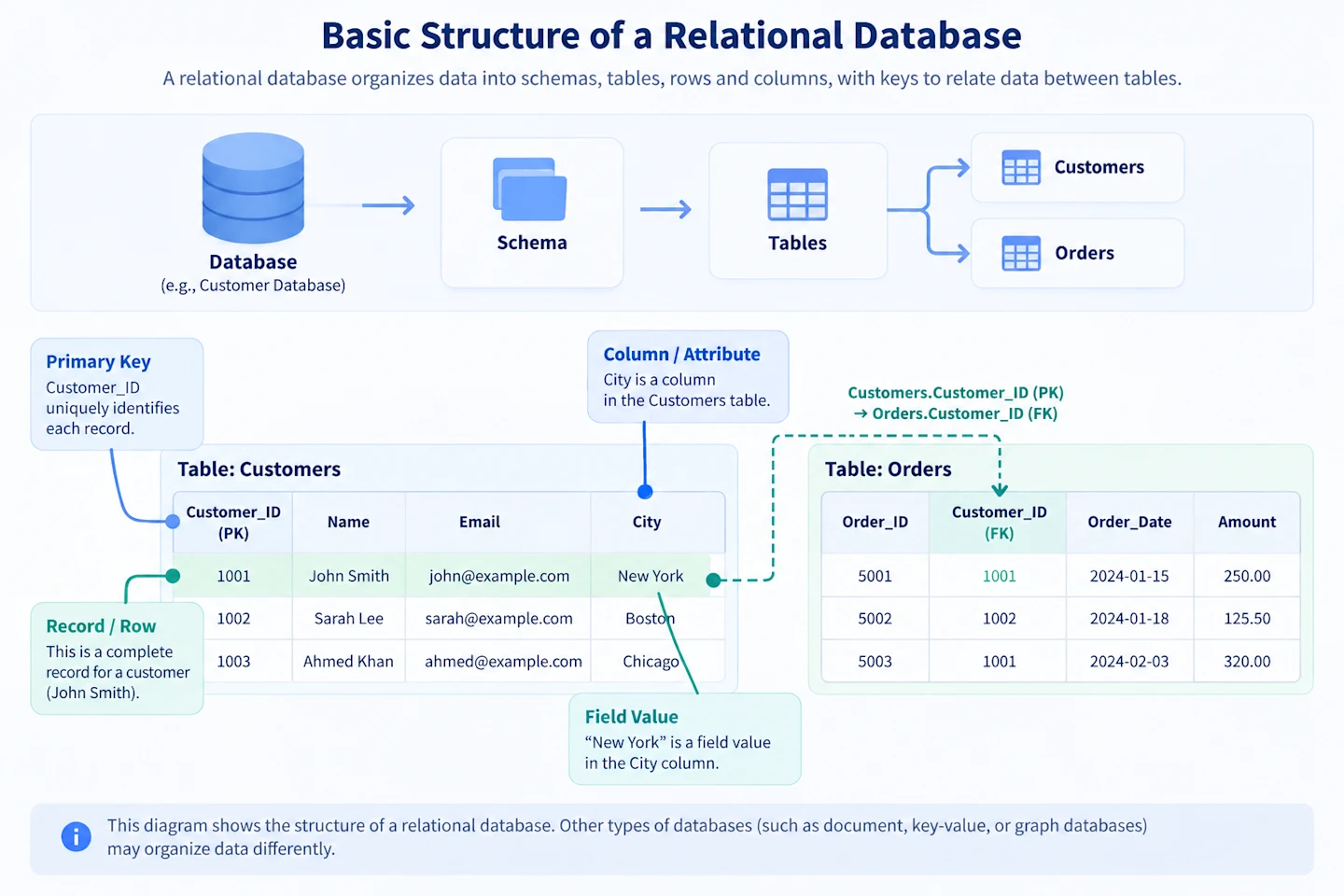
Let’s look at these components in more detail.
Database Tables
A database table, or DB table, is a structure used in a relational database to organize related data into rows and columns. Each table generally represents a particular entity or concept.
For example, the customer database discussed earlier could contain separate Customers, Orders, and Products tables. The Customers table stores customer information, while the Orders table stores information about individual orders.
Within a table, rows represent individual records, while columns represent attributes associated with those records. For example, the Customers table might contain columns for Customer_ID, Name, Email, and City.
Database Records
A database record is a set of related values that describes an individual entity or instance. In a relational table, a record corresponds to a row.
Consider this record from our Customers table:
Customer_ID | Name | City | |
|---|---|---|---|
1001 | John Smith | john@example.com | New York |
This row represents one complete customer record. It brings together the values associated with that customer, including their ID, name, email address, and city.
A table can contain many records, with each row representing another instance of the same type of entity.
Database Fields
While a record brings related values together, database fields represent individual pieces or attributes of data.
In our Customers example, these include:
Customer_ID | Name | Email | City
For a beginner-friendly relational example, you can think of fields as the individual attributes represented by the table's columns. The Name field contains a customer's name, while the City field contains the city associated with that customer.
The terms field and column are often used interchangeably, but they can differ slightly. A column defines an attribute for all records in a table, while a field can refer to a specific value within that column.
Customer_ID | Name | City |
|---|---|---|
1001 | John Smith | New York |
1002 | Sarah Lee | Boston |
Here, City is the column that defines the attribute. New York and Boston are field values for individual customer records.
However, field is also commonly used to describe the attribute itself, which is why you may also see the term “City field.”
Keys and Relationships
Tables can be connected so that related information can be accessed across them. Database keys help establish these relationships.
A primary key uniquely identifies each record in a table. In our Customers table, Customer_ID can act as the primary key because each customer has a unique value.
A foreign key is a field or set of fields in one table that references a key in another table. For example:
Customers
Customer_ID | Name |
|---|---|
1001 | John Smith |
1002 | Sarah Lee |
Orders
Order_ID | Customer_ID | Order_Total |
|---|---|---|
5001 | 1001 | $125.00 |
5002 | 1002 | $89.50 |
5003 | 1001 | $210.00 |
Here, Customer_ID uniquely identifies customers in the Customers table. It also appears in the Orders table, where it can serve as a foreign key that connects each order to the customer who placed it.
These database relationships connect related information without requiring all customer details to be stored again with every order. For example, the database can use Customer_ID to associate John Smith with orders 5001 and 5003.
What Is a Database Object?
A database object is a named structure within a database system used to store, organize, access, or work with data.
In relational database systems, common database objects include:
Tables: Store data in rows and columns.
Views: Present data based on a query without necessarily storing a separate copy of the underlying data.
Indexes: Provide structures that can help retrieve data more efficiently.
Stored procedures: Store sets of database instructions that can be executed when needed.
Functions: Perform defined operations and return results.
Sequences: Generate sequences of values, often used for identifiers.
The specific database objects available depend on the DBMS. For example, relational database systems may support tables, views, indexes, functions, and other object types.
The term object has a different meaning in an object-oriented database. Here, an object represents an entity and can contain both data (attributes) and behavior (methods). For example, an Employee object might contain attributes such as Employee_ID, Name, and Department, along with a method such as calculateSalary().
Therefore, the meaning of database object depends on the database context.
Database Schemas
A database schema is the logical blueprint that describes how database elements are organized. In a relational database, it can define tables, columns, data types, keys, relationships, constraints, and other database objects.
For example, consider the schema for our customer database:
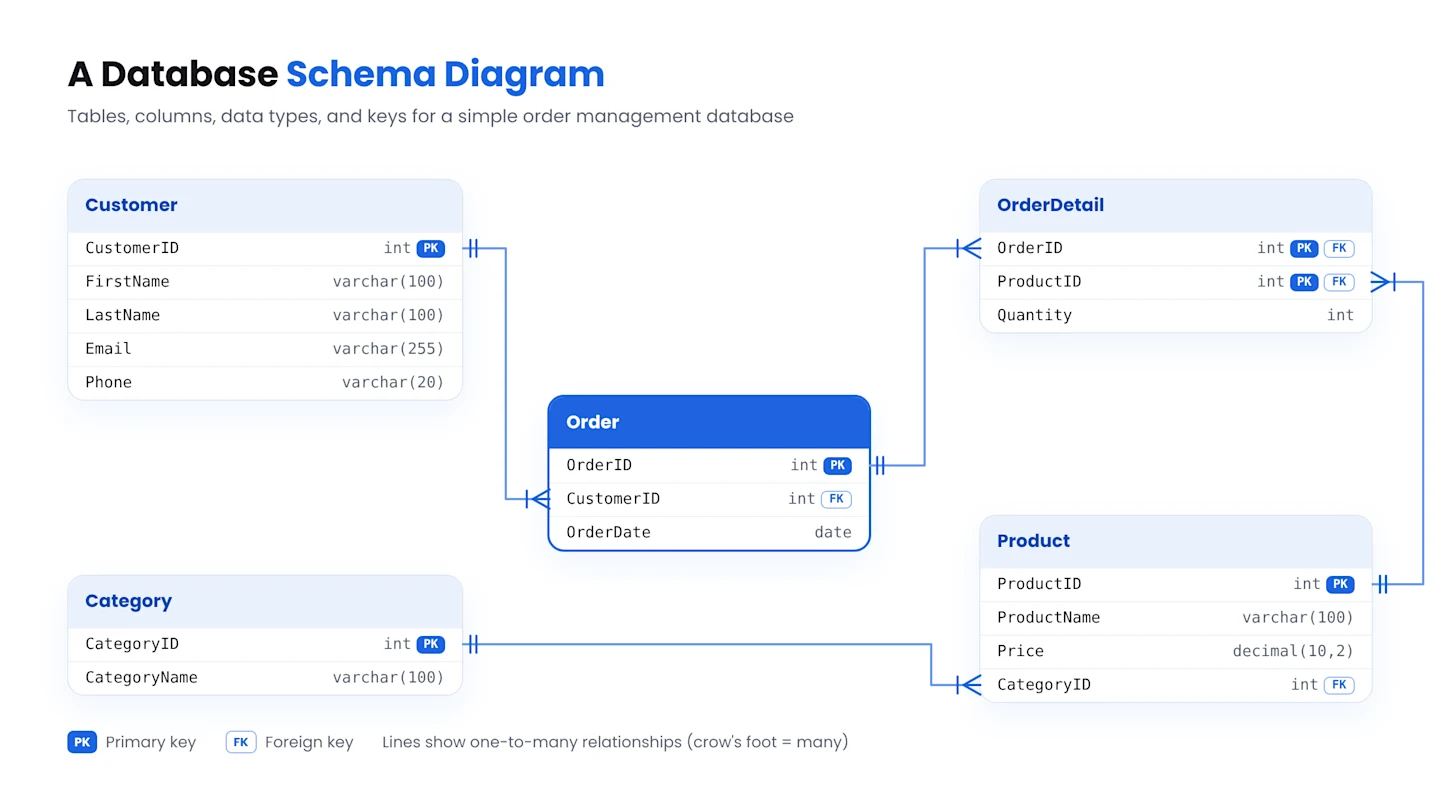
The diagram shows how the database is organized into related tables. The Customers table connects to Orders through Customer_ID. Orders then connect to Products through the Order_Items table, which records which products belong to each order.
The schema also defines elements such as the primary keys (PK) that uniquely identify records and foreign keys (FK) that connect related tables.
In simple terms, the schema defines how a database is structured and how its elements relate to one another, while records contain the actual data stored within that structure. However, not all databases organize data in the same way. These differences give rise to different types of databases, which we’ll explore next.
What Are the Different Types of Databases?
There are many types of databases, each designed around different ways of storing, organizing, deploying, or accessing data.
Databases can be classified according to their data model, architecture, deployment model, or intended workload. For example, relational and NoSQL databases describe how data is modeled, while distributed and cloud databases describe aspects of architecture and deployment.
These categories can overlap. A relational database, for example, can also be distributed, cloud-hosted, or use in-memory processing.
Here is an overview of the major database types:
Database Type | How It Organizes or Manages Data | Common Use Cases | Examples |
|---|---|---|---|
Relational | Organizes data into related tables with rows and columns | Business applications, transactions, ERP, CRM | MySQL, PostgreSQL, Oracle Database, Microsoft SQL Server |
NoSQL | Uses models such as documents, key-value pairs, wide columns, or graphs | Web applications, content, IoT, distributed workloads | MongoDB, Redis, Cassandra, Neo4j |
Object-oriented | Stores data as objects with attributes and methods | Applications using object-oriented data models | ObjectDB |
Hierarchical | Organizes data in a parent-child tree | Directory and legacy systems | IBM IMS |
Network | Connects records through multiple relationships | Complex interconnected data and legacy systems | Integrated Data Store (IDS) |
Distributed | Distributes data across multiple locations or nodes | Distributed and geographically dispersed applications | Apache Cassandra, Google Spanner |
Cloud | Runs or is delivered through cloud infrastructure | Cloud applications and managed database workloads | Amazon RDS, Azure SQL Database |
In-memory | Keeps working data primarily in memory for fast access | Low-latency and real-time workloads | Redis, SAP HANA |
Time-series | Optimized for time-stamped data | IoT, monitoring, telemetry, financial metrics | InfluxDB, TimescaleDB |
Multimodel | Supports multiple data models within one platform | Applications requiring different ways to model data | Azure Cosmos DB, ArangoDB |
The table provides a broad view of the different databases available. Since relational and NoSQL databases represent two major approaches to modeling data in modern applications, let's look at them more closely. For a deeper look at these models, see our complete guide to different types of databases.
Relational Databases
A relational database organizes data into tables made up of rows and columns. Each table typically represents an entity, such as a customer, order, or product. These tables can then be connected through defined relationships.
For example, consider the customer database we used earlier. The Customers table stores customer details, while the Orders table stores their orders. A Customer_ID can serve as the primary key in the Customers table and appear as a foreign key in the Orders table. This creates a relationship between each customer and their orders without requiring the customer's details to be repeated in every order record.
The structure of these tables and their relationships is typically defined through a database schema. The schema can specify tables, columns, data types, keys, constraints, and relationships, helping maintain consistent and accurate data.
To work with this data, relational database systems commonly use SQL (Structured Query Language). SQL allows users and applications to retrieve, add, update, and delete data, as well as define and modify database structures.
Common relational database management systems include MySQL, PostgreSQL, Oracle Database, and Microsoft SQL Server.
NoSQL Databases
NoSQL databases, also called non-relational databases, are an umbrella category for database models that do not rely primarily on the traditional relational table structure.
Instead, NoSQL databases can organize data using documents, key-value pairs, wide columns, graphs, and other models. These approaches can provide flexibility for different data structures, access patterns, and distributed workloads.
Importantly, NoSQL does not refer to one specific database structure. The major NoSQL models include:
Document Databases
Document databases store data in document-like structures, commonly using formats such as JSON or BSON.
For example, a customer document could contain the customer's name, contact details, addresses, and preferences within a single document.
MongoDB is a widely used example.
Key-Value Databases
Key-value databases store data as pairs consisting of a unique key and an associated value. The key provides a direct way to retrieve the corresponding value.
This model is commonly used for workloads such as caching and session management.
Redis is a well-known example.
Wide-Column Databases
Wide-column databases organize data using flexible columns or column families. Different rows can contain different sets of columns.
This model can support large, distributed datasets with particular access patterns.
Apache Cassandra and HBase are examples.
Graph Databases
Graph databases represent entities as nodes and the relationships between them as edges.
For example, a social network can represent users as nodes and connections between users as edges. This makes graph databases useful when relationships are central to how data is accessed and analyzed.
Neo4j is a well-known example.
Relational and NoSQL databases can both support a wide range of modern applications, but they take different approaches to modeling and working with data. Let's compare these differences more closely.
Relational vs. Non-Relational Databases
A relational database organizes data primarily into tables and models relationships between them. A non-relational database uses other data models, such as documents, key-value pairs, graphs, or wide columns.
The main difference between relational and non-relational databases is how data is structured, related, and accessed. Neither approach is inherently better. The right choice depends on the data, workload, and application requirements.
Factor | Relational Databases | Non-Relational Databases |
|---|---|---|
Data structure | Primarily tables with rows and columns | Documents, key-value pairs, graphs, wide columns, and other models |
Schema | Typically predefined and structured | Often more flexible and adaptable to changing structures |
Relationships | Commonly modeled using primary and foreign keys and queried using joins | Vary by model; data may be embedded, linked, or represented directly as relationships |
Query approach | Primarily SQL | Varies by database and data model |
Scalability patterns | Can scale vertically or horizontally, depending on the system and architecture | Many are designed with horizontal distribution in mind |
Data suitability | Well-defined structures and relationships | Varied, evolving, highly connected, or distributed data models |
Typical use cases | Financial systems, ERP, CRM, order management, transactional applications | Content platforms, caching, IoT, social networks, distributed web applications |
Examples | PostgreSQL, MySQL, Oracle Database, Microsoft SQL Server | MongoDB, Redis, Cassandra, Neo4j |
When to Use a Relational Database
A relational database can be a good choice when your data has a well-defined structure and clear relationships.
Consider the customer database used throughout this guide. Customers, orders, products, and payments have defined relationships. A relational model can represent these connections explicitly while supporting constraints, transactions, and complex queries.
Relational databases are commonly used when data integrity, transactional consistency, and relationships between entities are important.
When to Use a Non-Relational Database
A non-relational database can be a good choice when your data and access patterns align more naturally with a document, key-value, graph, or wide-column model.
For example, a content application may benefit from flexible document structures. A social network may use a graph database to navigate complex relationships between users.
Many NoSQL databases are also designed for distributed and horizontally scaled workloads. However, horizontal scalability is not exclusive to NoSQL databases. Similarly, relational databases can support distributed architectures and large-scale workloads.
Ultimately, the choice between a relational and non-relational database depends on factors such as data structure, relationships, query patterns, consistency requirements, scalability needs, and application architecture.
What Are Databases Used For?
Databases are used to store, organize, retrieve, and update information that applications and business processes depend on. They support many everyday digital interactions, from checking an account balance to placing an online order.
Some common uses of databases include:
Customer relationship management (CRM): Storing customer profiles, contact details, interactions, and sales activity.
E-commerce: Managing product catalogs, customer accounts, orders, payments, and shipping information.
Banking and finance: Maintaining accounts, balances, payments, transactions, and other financial records.
Healthcare: Managing patient information, appointments, clinical records, and other healthcare data.
Web and mobile applications: Storing user accounts, preferences, content, and other information applications need to function.
Databases are also widely used for inventory management, ERP, HR, IoT applications, reporting, and analytics. In most organizations, however, data does not reside in a single database. It is often distributed across databases, applications, files, APIs, cloud platforms, and data warehouses.
Organizations therefore need a way to connect these systems and move data between them. Astera Centerprise provides a no-code platform for integrating, transforming, and migrating data across databases and other enterprise systems. It can also help teams automate data pipelines and deliver database data to destinations such as data warehouses.
See Astera Centerprise in Action
Struggling with incomplete datasets? Discover how Astera Centerprise ensures data completeness through automated validation, data profiling, and seamless integration. Book a demo to see how you can achieve accurate and reliable data effortlessly.

Conclusion
A database is an organized collection of data that users and applications can store, retrieve, update, and manage electronically. A DBMS sits between those users and applications and the data, while a database server provides the environment where both run.
How a database organizes data depends on its data model. Relational databases use tables, records, fields, keys, and schemas. Non-relational databases use documents, key-value pairs, graphs, wide columns, and other structures. These differences are what set the major types of databases apart.
Understanding these fundamentals makes it easier to choose the right database for an application and to see how it fits with the rest of your systems. As data spreads across more databases and applications, connecting and integrating it becomes the natural next step. The video above shows how Astera Centerprise approaches that challenge.