

Customer data integration (CDI) is the process of collecting customer data from every system that holds it, such as CRM, ERP, support, billing and marketing tools, and then cleaning, matching and merging it into one accurate, up-to-date record for each customer. That record gives every team the same view of who the customer is and how they've interacted with the business.
Most businesses don't have a customer data problem; they have a customer data *integration* problem. MuleSoft's 2026 Connectivity Benchmark Report found that the average organization runs 957 applications, but only 27% of them are connected. So a customer's history ends up spread across systems that don't talk to each other.
The rest of this guide explains how CDI fixes that and how to do it well.
What is Customer Data Integration?
Customer data integration is a type of data integration that focuses on one entity: the customer. Customer data typically lives in:
CRM: contacts, accounts, opportunities
ERP and order systems: purchases, invoices, shipping addresses
Support desks: tickets, chats, satisfaction scores
Billing and subscription tools: plans, payments, renewals
Marketing automation and web analytics: email engagement, campaigns, site behavior
Each system stores the customer differently. One has "Jon Smith," another has "Jonathan Smith," and a third has just an account number. CDI reconciles those differences and produces a single source of truth for customer data. That source of truth is the foundation of a Customer 360 view.
How Does Customer Data Integration Work?
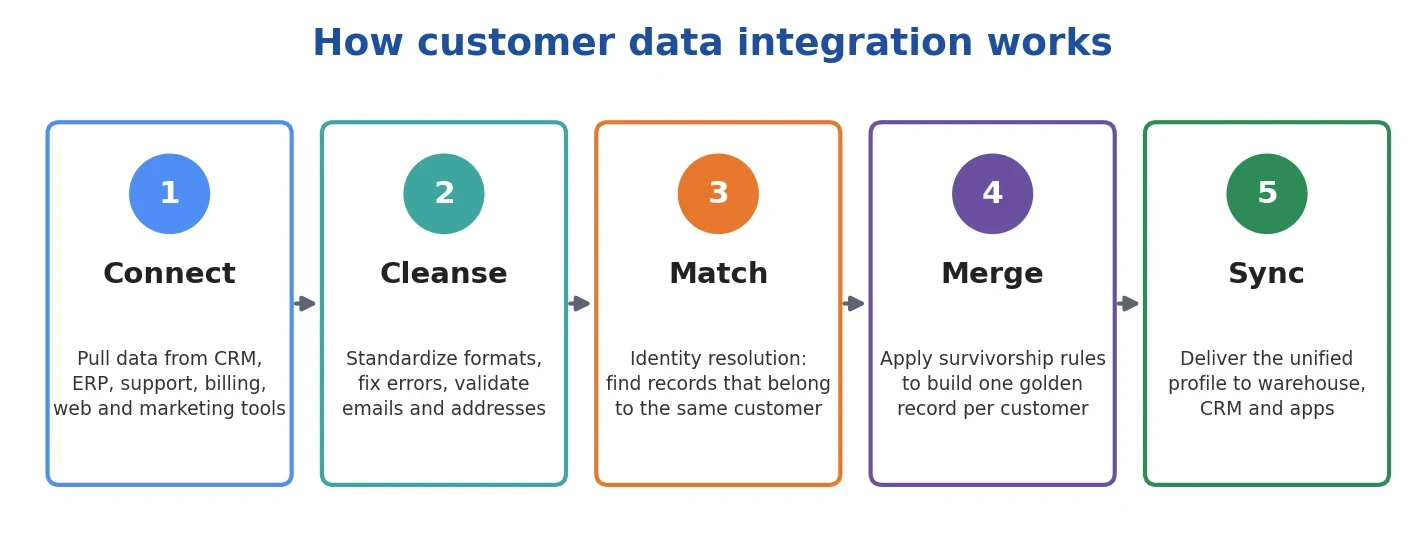
Customer data integration works in five steps: connect to every source, cleanse and standardize the data, match records that belong to the same customer, merge them into a golden record, and sync that record to the systems and teams that need it.
1. Connect to data sources
Extract customer data from each source system through connectors, APIs, database queries or file feeds. Start by listing every system that creates or changes customer data, including spreadsheets and legacy databases.
2. Cleanse and standardize
Fix errors and put every field in the same format: names, addresses, phone numbers, dates and country codes. Validate emails and addresses, and remove obvious junk. This is where most data quality problems are caught. See our roundup of data cleansing tools.
3. Match (identity resolution)
Compare records across systems to find the ones that belong to the same person or company. Matching combines exact rules (same email) with fuzzy rules ("Jon" ≈ "Jonathan," similar addresses) and gives each pair a confidence score.
4. Merge into a golden record
Combine matched records into one golden record. Survivorship rules decide which value wins for each field: for example, the most recent address, the email from the CRM, or the phone number from billing. Learn more about data merging.
5. Sync and activate
Load the unified record into a data warehouse, send it back to the CRM, or expose it through APIs so sales, service, marketing and finance all work from the same data. Keep it current with scheduled refreshes or real-time updates.
Customer Data Integration Requirements
Before you integrate customer data, define what the integration has to do. These requirements apply to most CDI projects:
Data sources: List every system that holds customer data, including CRM, ERP, billing, support, e-commerce, marketing automation and spreadsheets, and the format and access method of each.
Identity matching rules: Decide which fields identify a customer (email, phone, customer ID, name and address) and how strictly records must match. Exact and fuzzy matching give different results.
Data quality standards: Set rules for completeness, formatting and validity, such as required fields, standard address and phone formats, and acceptable value lists.
Data freshness: Decide whether customer records must update in real time, hourly or in daily batches. This drives the integration method you choose.
Security and consent: Define who can see which fields, how personal data is protected, and how consent and privacy rules (such as GDPR or CCPA) apply to merged records.
Ownership and governance: Name who owns the golden record, who resolves conflicts between systems, and how changes are audited.
Scalability: Estimate record volumes and growth so the design doesn’t break as more sources and customers are added.
For related guidance, see our posts on data quality and data governance.
Customer Data Integration Example
Here's identity resolution in practice. Three systems each hold part of the same customer's data, and none of them has the full picture:
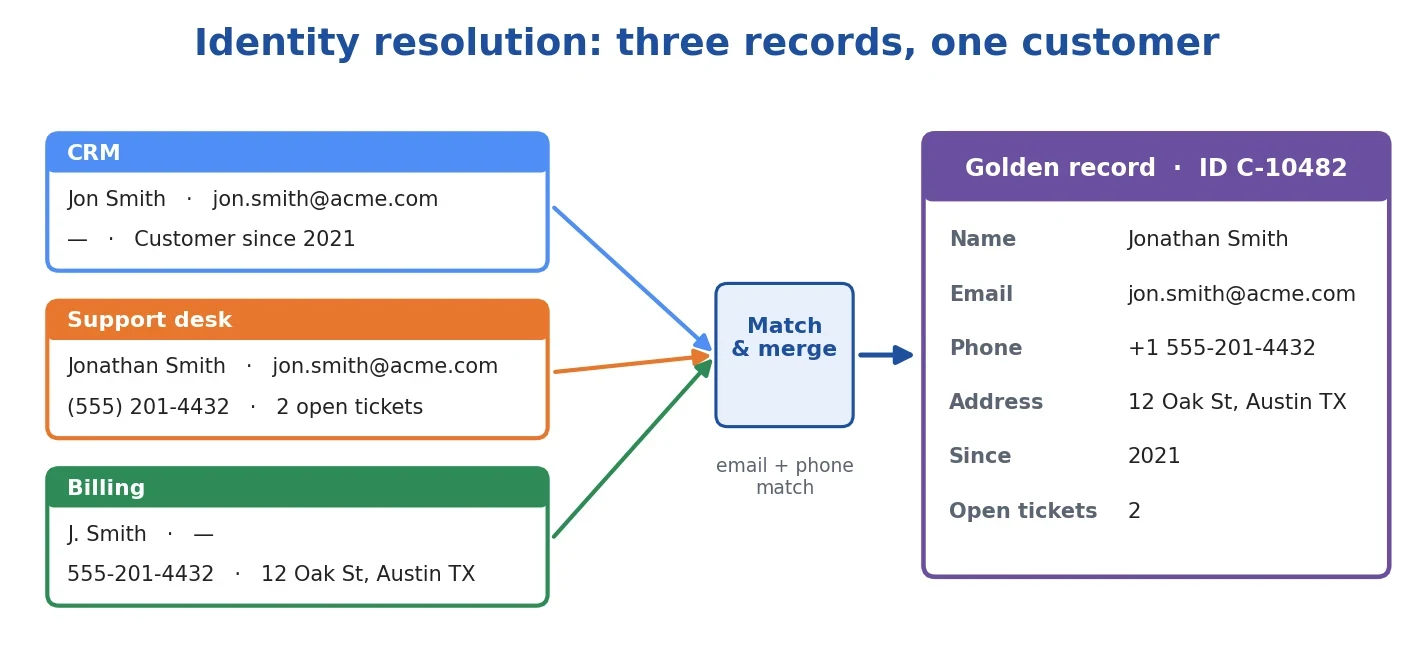
The CRM and support records share an email address, and the support and billing records share a phone number (in different formats). After standardization, CDI links all three and merges them into one golden record with the full name, verified contact details, address, tenure and open tickets. When this customer calls, the agent sees everything. When marketing plans a campaign, this person is counted once, not three times.
Identity Resolution Example: Before and After
Here is how three records for the same customer look across systems, and after integration:
System | Name | Phone | |
|---|---|---|---|
CRM | Jon Smith | jon.smith@example.com | 555-0142 |
Billing | Jonathan Smith | jsmith@example.com | (555) 0142 |
Support | J. Smith | jon.smith@example.com | – |
After matching and merging (golden record):
Name | Phone | Source rules applied | |
|---|---|---|---|
Jonathan Smith | jon.smith@example.com | 555-0142 | Billing name kept as legal name; email matched across CRM and support; phone standardized |
The records are matched on email and phone, merged, and standardized, so every team works from one customer record. (Replace the sample values with your own screenshot if you have one from the product.)
Types of Customer Data Integration
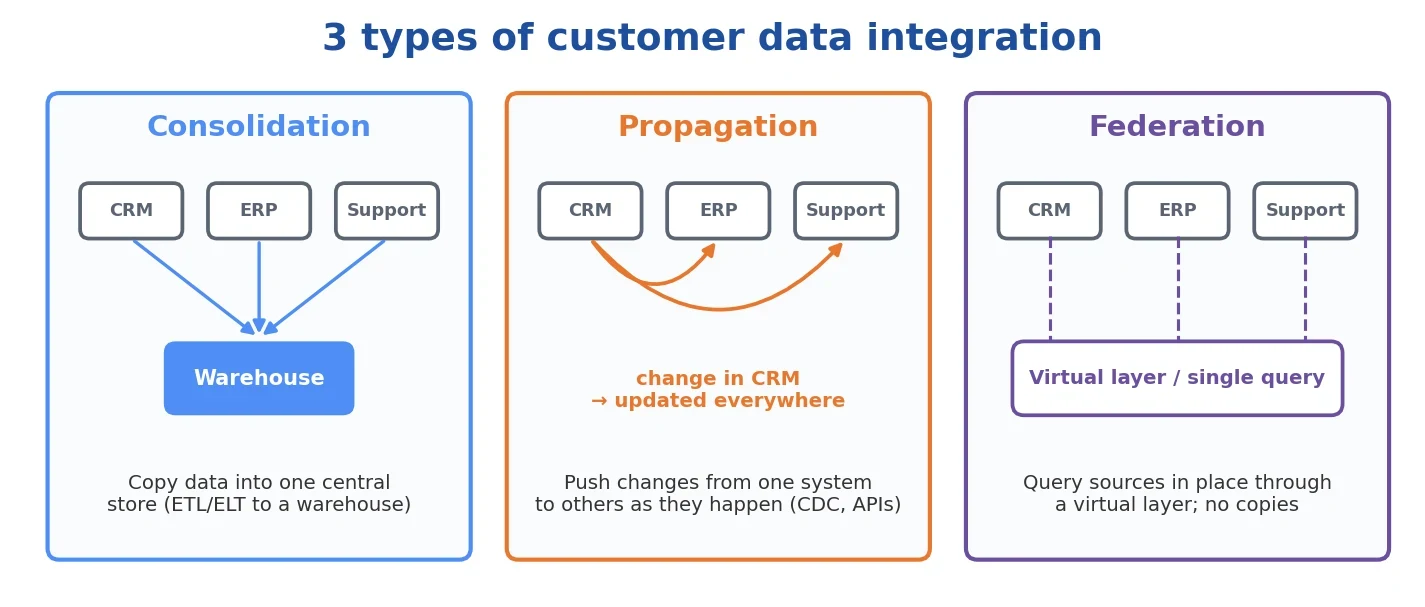
The three types of customer data integration are consolidation, propagation and federation. Most organizations combine them, for example by consolidating for analytics and propagating for operational systems.
Type | How it works | Best for |
Consolidation | Copies customer data from sources into one central store, usually with ETL or ELT pipelines | Reporting, analytics, segmentation, AI and machine learning |
Propagation | Pushes changes from one system to others as they happen, using change data capture (CDC) or APIs | Keeping CRM, billing and support in sync in near real time |
Federation | Queries data where it lives through a virtual layer, without copying it (see data virtualization) | Quick unified lookups when data can't be moved or duplicated |
CDI vs. MDM vs. CDP vs. Customer 360
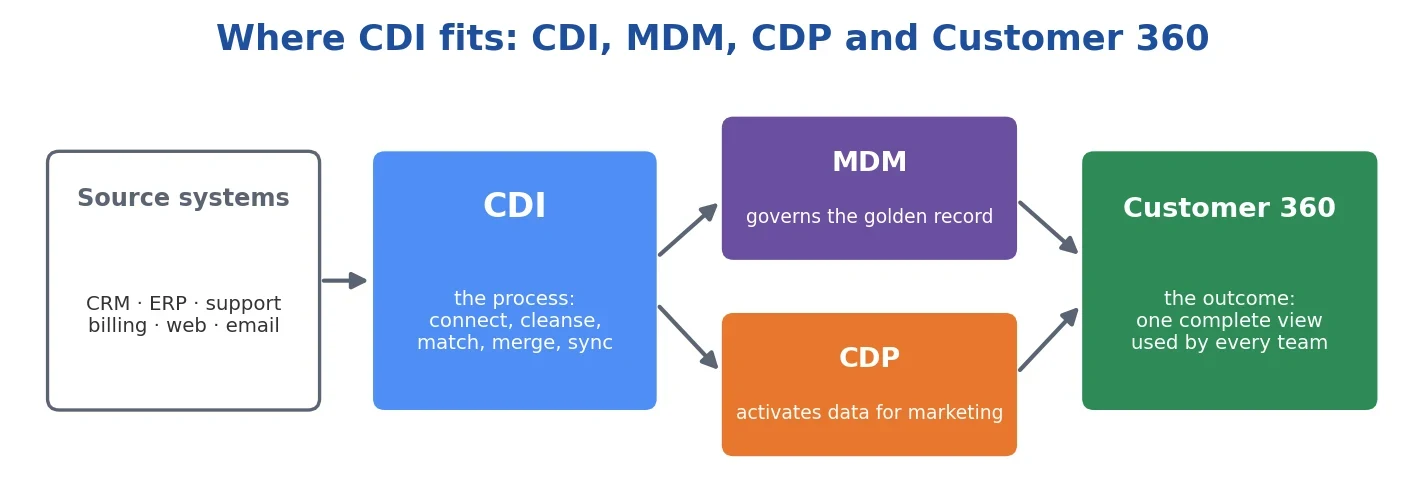
CDI is the process of unifying customer data. Master data management (MDM) governs the resulting golden record, a customer data platform (CDP) activates customer data for marketing, and a Customer 360 is the complete customer view that all of these produce. They work together rather than compete.
What it is | Main users | Key question it answers | |
CDI | A process that connects, cleans, matches and merges customer data | Data and IT teams | "How do we bring customer data together correctly?" |
MDM | A discipline and toolset that governs master records over time | Data governance and IT | "Who owns the customer record, and which values are correct?" |
CDP | A packaged, marketing-focused platform for audiences and personalization | Marketing | "Who should we target, and with what?" |
Customer 360 | The outcome: a complete, shared view of each customer | Every team | "What do we know about this customer right now?" |
Learn more in our guides to master data management (MDM) and Customer 360.
Benefits of Customer Data Integration
One version of the customer for every team. Sales, service, marketing and finance stop arguing over whose numbers are right.
Personalization that holds up. Recommendations can reflect a service call from six months ago, and offers are suppressed for items a customer just returned.
Cross-sell and upsell opportunities. Unified data shows which products sell together and which segments respond on which channels.
More accurate forecasting. Deduplicated customer counts and complete purchase histories lead to better revenue and churn forecasts.
Faster, context-aware service. Agents see the full customer journey and can resolve issues on the first contact.
AI you can trust. In Salesforce's State of Data and Analytics research, data leaders estimate that 26% of their organization's data is untrustworthy, and 89% of those with AI in production have seen inaccurate or misleading outputs. Clean, unified customer data is a prerequisite for useful AI.
Ready to Gain a Holistic Customer 360 View?
Discover Astera Data Pipeline, with its advanced data integration capabilities that can transform your customer understanding.
Customer Data Integration by Department
Customer data integration can benefit various business departments, such as:
Marketing: With customers, it’s all about personalized experiences. So, when your marketing team has access to the complete customer journey, it can create more targeted campaigns. It can pinpoint content, offers, and channels that will resonate most with specific individuals or segments.
Sales: Every seller wants to open a call with context, not small talk. Giving your sales team integrated customer data improves their understanding of each prospect and existing client.
Production: When production teams receive orders, they rely on accurate customer information to determine what to build, when to build it, and how it needs to be configured or packaged. CDI helps by connecting and standardizing customer records across order management, ERP, product lifecycle management, and production scheduling systems.
Logistics: Every step in the supply chain relies on having the correct customer information in the right system at the right time. By integrating customer data, the logistics team can align customer records across warehouse management, transportation management, CRM, and order processing. This leads to faster delivery and satisfied customers.
Finance and Accounting: Your finance team will trust numbers only when the definitions match across systems. With an integrated view of your customers, the finance team will rely on a single version of customer data for reporting and analysis and close the books faster with fewer manual corrections.
Team | What integrated customer data enables |
Marketing | Accurate segments, suppression lists and attribution across channels, plus data enrichment for fuller profiles |
Sales | Opening every call with context: past purchases, open tickets, contract dates |
Customer service | The full history in one screen, fewer transfers and proactive outreach |
Operations and logistics | Correct shipping addresses and delivery preferences, synced between order, warehouse and CRM systems |
Finance | One customer list for billing, revenue reporting and a faster close, with fewer manual corrections |
Customer Data Integration for CRM, Marketing and E-commerce
CRM Data Integration
CRM data integration connects your CRM with billing, support, ERP and marketing systems, so sales and service teams see orders, tickets and payments next to contact details. It prevents duplicate leads and conflicting account records. See our guide to building a Customer 360 view with the Salesforce connector.
Marketing Data Integration
Marketing teams use CDI to combine email, web, ad and CRM data, so campaigns target the right people and measurement isn’t split across tools. Merged records also reduce wasted sends to duplicates and outdated contacts.
E-commerce Customer Data Integration
For online retailers, CDI links web store, payment, shipping and loyalty data to each shopper. This supports accurate order history, returns handling and personalized offers across channels.
Customer Data Integration Challenges (and How to Solve Them)
As important as it is for businesses to integrate customer data into a centralized repository, doing so can be challenging due to multiple reasons, such as data silos, inconsistent formats, and legacy systems that weren’t designed to work together. Collecting information from disparate sources and transforming it into a simple, unified format is one of the biggest challenges in CDI.
Here are five common challenges and how to overcome them:
Developing an integration plan
Challenge: When implementing a customer data integration strategy, the main challenge is integrating data from different customer channels. Organizations have a diverse landscape of disparate data sources, each with unique formats and structures, making the task of creating a unified data model a significant hurdle.
How to overcome: An integration platform that offers built-in connectors for disparate source systems can streamline CDI. For example, Salesforce is considered one of the best Customer Relationship Management (CRM) software. But to extract insights from your customer data from Salesforce, you will need to first enrich it and then visualize it. This is a frequent use case that CDI tools help organizations with.
Data silos and incompatible systems
Challenge: Customer data often resides in disparate systems (e.g., CRM, ERP, marketing automation, e-commerce platforms, customer service systems), each with its own data structure and identifiers. This leads to “silos” that prevent a unified view of the customer. Legacy systems may also lack modern APIs, making integration difficult.
How to overcome: Map a canonical “customer 360” schema first, then use a CDI tool with built-in connectors or APIs to land data in a data warehouse or data lake. Consider setting up change-data-capture (CDC) from source systems so the destination system stays current without full reloads.
Poor data quality
Data collected from disparate sources is seldom clean and analysis-ready. In the case of customer data, this means misspelled names, incorrect addresses, outdated contact information, or multiple entries for the same customer. Duplicate and inconsistent customer records fail the uniqueness and consistency data quality dimensions.
How to overcome: Implement automated data cleansing processes to identify and correct errors, standardize formats, and remove duplicates. Create a “golden record” for each customer for a consistent view across systems and applications. Apply data validation rules at the point of data entry to prevent bad data from entering the system. A no-code CDI tool offers all these capabilities and much more, streamlining customer data quality management.
Handling large data volumes
Challenge: Businesses must manage large volumes of customer information to make critical data readily available to decision-makers whenever needed. However, accumulating, managing, and creating value from large data volumes is hindered by fragmented systems, inconsistent data formats, duplicate records, and a lack of real-time visibility across departments. The growing number of devices and platforms and the constantly declining storage cost have made it trickier to manage and remove historical data from legacy systems. As a result, there’s an unexpected need for high performance and storage capacity.
How to overcome: To tackle this challenge, you’ll have to anticipate the extent of your business growth and the customer information that must be integrated. Then you can opt for a suitable CDI tool to implement the integrations.
Protecting customer data
Challenge: Sensitive customer data often passes through multiple systems during integration, and each transfer or access point increases the risk of exposure if strong controls aren’t in place. Many organizations still rely on legacy systems that lack modern security safeguards, making it harder to ensure data protection. At the same time, businesses must comply with evolving privacy laws that vary across regions and industries. The consequences of a breach can be severe. Recovering lost data is expensive, and the impact of compromised information can lead to lasting damage, eroding customer trust, hurting revenue, and harming a company’s reputation.
How to overcome: Organizations must embed robust security measures across the entire data lifecycle. This includes safeguarding data with strong encryption, whether it’s stored or moving between systems. It also involves implementing necessary access controls based on user roles and requiring multiple forms of authentication. At the same time, establishing a comprehensive data governance framework is also important. Much of this can be easily achieved with a customer data integration solution.
Challenge | Why it happens | How to solve it |
Data silos | Every team buys its own tools. Legacy systems lack modern APIs | Inventory all sources and use a platform with prebuilt connectors for both cloud and legacy systems |
Poor data quality | Typos, outdated contacts, inconsistent formats, duplicates | Cleanse and validate at ingestion, then monitor quality continuously |
Matching the same customer | No shared ID across systems, and names and addresses vary | Combine exact and fuzzy matching, and define survivorship rules up front |
Keeping data current | Batch loads leave records hours or days out of date | Use CDC or event-driven APIs for the systems that need real-time updates |
Scale | Customer and event data grows quickly | Choose tooling that handles high volumes and parallel processing |
Privacy and security | Personal data moves through many systems and falls under regional privacy laws | Encrypt data, apply role-based access, mask sensitive fields and enforce data governance policies |
Customer Data Integration Best Practices
Start with the business goal. Pick 2–3 outcomes, such as fewer duplicate records, faster ticket resolution or better campaign targeting, and define how you'll measure them.
Design the customer data model first. Agree on what a "customer" is (person, account or household) and on the core fields before building pipelines.
Inventory every source. Include spreadsheets, legacy databases and third-party data, and note who owns each one.
Standardize at ingestion. Apply formatting and validation rules as data arrives, not after it's already merged.
Invest in identity resolution. Tune your matching rules on real samples, and review low-confidence matches by hand at first.
Assign data stewards. Give each domain an owner who decides survivorship rules and resolves conflicts.
Build governance and privacy in from day one. Classify sensitive fields, limit access and log changes.
Monitor and iterate. Track match rates, duplicate rates and freshness, and revisit rules as sources change.
Customer Data Integration Solutions: Which Approach Fits?
There are several ways to integrate customer data. Each suits different needs:
Approach | How it works | Best for | Limitation |
|---|---|---|---|
ETL / ELT pipelines | Extract customer data, transform it and load it into a central warehouse | Analytics and reporting on a unified customer view | Often batch-based, so data can lag |
Data integration platform (iPaaS) | Connects applications with prebuilt connectors and workflows | Syncing systems such as CRM, billing and support | Matching and merging logic may need extra tools |
Master data management (MDM) | Creates and governs a master record for each customer | Large organizations with strict governance needs | Longer to implement |
Customer data platform (CDP) | Collects behavioral and profile data for marketing activation | Personalization and campaign targeting | Focused on marketing data, less on ERP or finance |
Data virtualization | Queries data in place without moving it | Quick views across sources without copying data | Performance depends on the source systems |
Many teams combine approaches, for example ETL to consolidate data and MDM rules to govern the golden record. Learn more about ETL vs ELT, master data management and data virtualization, or see data integration tools to compare options.
How to Choose a Customer Data Integration Tool
Look for a tool that covers the whole CDI process, not just data movement:
Connectivity: prebuilt connectors for your CRM, ERP, databases, files, APIs and cloud apps
Built-in data quality: cleansing, validation, standardization and profiling
Matching and deduplication: fuzzy matching, survivorship rules and golden record creation
Flexible delivery: batch ETL/ELT, CDC and APIs, so you can consolidate *and* propagate
Usability: no-code or low-code design, so business and data teams can collaborate
Scale, security and governance: parallel processing, encryption, role-based access and audit logs
Compare options in our list of data integration tools, and read about data integration techniques and data consolidation software.
Customer Data Integration Checklist
Use this checklist to check your own project:
All customer data sources are listed and accessible
Identity matching rules are defined and tested
Data quality rules cover required fields and formats
Freshness requirements are agreed with each team
Duplicate and conflict handling has a named owner
Personal data is protected and consent is tracked
Merged records can be traced back to their sources
Results are monitored, with alerts for failed syncs and rising duplicates
Customer Data Integration Trends
AI is raising the stakes. In MuleSoft's 2026 report, 82% of IT leaders say data integration is one of their biggest challenges in using AI, and 86% say AI agents add complexity rather than value without proper integration. AI agents that serve customers need a unified, trustworthy customer record.
Real-time is becoming the default. CDC and event streaming are replacing overnight batch jobs for operational customer data.
Smarter matching. Machine learning–assisted identity resolution is improving match rates on messy names and addresses.
Zero-copy and federated access. More teams query customer data in place rather than duplicating it across platforms.
Privacy by design. A growing number of privacy regulations make consent tracking, masking and access controls core CDI requirements.
Keep Learning
Foundations: What is data integration? and Single source of truth
Data quality: Data quality, Data cleansing tools and Data merging
The bigger picture: Customer 360 and Master data management
Build a Unified Customer View With Astera
Astera lets you connect customer data from CRMs, ERPs, databases, files and APIs, then cleanse, deduplicate and transform it in one no-code platform, before loading it into your warehouse or back into your business apps. See how teams build a Customer 360 with Astera.
Integrate Customer Data from Disparate Sources
Find out How