

Database integration is the process of combining data from multiple databases and related sources into a single, consistent view. Most businesses keep customer, inventory, financial, and operational data in several systems, such as Oracle, SQL Server, PostgreSQL, a CRM, or a cloud data warehouse. Integrating those databases lets teams report on, analyze, and act on all of that data together instead of switching between silos.
This guide explains how database integration works, the main methods, its benefits and challenges, and what to look for in database integration software.
What is Database Integration?
Database integration combines data from diverse sources to create one consolidated, accurate version of it. These sources include databases, cloud data warehouses, virtual databases, flat files, and applications. The goal is to make data available to multiple stakeholders and client applications without reducing its quality.
Example: a company stores accounting data in an Oracle database and customer data in Salesforce. With database integration, employees can see the combined data from both systems in one place, for example to match invoices to accounts, and get to insights faster.
Database integration vs. data integration vs. database migration
These terms are related and often used interchangeably, but they aren't the same:
Term | What it means |
Database integration | Connecting and combining data from multiple databases so it can be used together, often on an ongoing basis. |
The broader practice of combining data from any source: databases, files, APIs, SaaS apps, and streams. | |
A one-time move of data from one database to another, for example from SQL Server to PostgreSQL. |
Accelerate your data integration projects with a built-in version control system
Accelerate your data integration projects with a built-in version control system

How database integration works
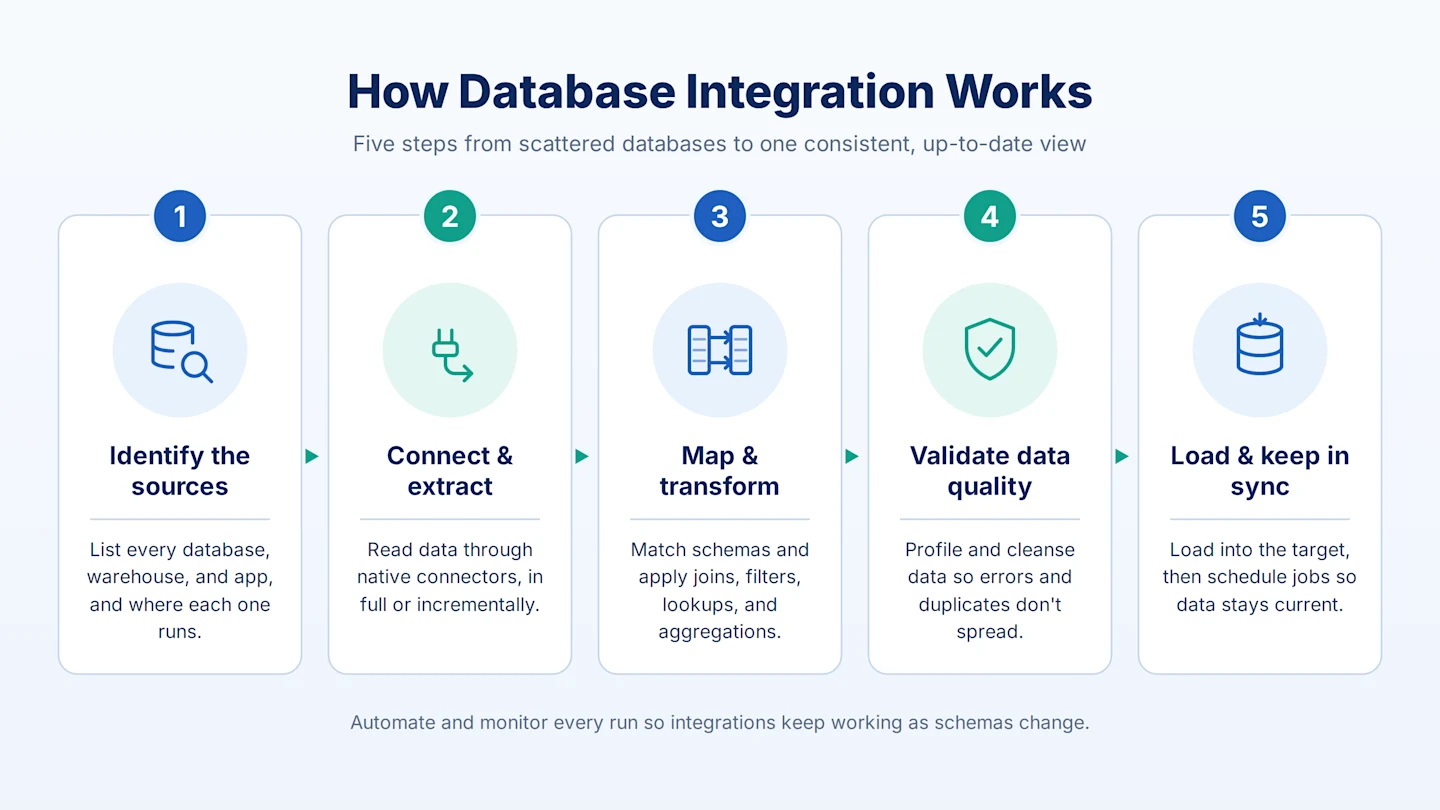
Most database integration projects follow the same basic steps:
Identify the sources. List the databases, warehouses, and applications involved, and where each one runs (on-premises, cloud, or legacy systems).
Connect and extract. Use native connectors or drivers to read data from each source, either in full or incrementally.
Map and transform. Match fields between source and target schemas and apply data transformations such as joins, filters, lookups, and aggregations. See data mapping techniques for more.
Validate data quality. Profile and cleanse the data so errors, duplicates, and inconsistencies aren't carried into the target.
Load and keep in sync. Load the result into the target database or data warehouse, then schedule or automate the job so the data stays current.
Database integration methods
The right method depends on data volume, how fresh the data needs to be, and whether data has to be physically moved. For a deeper comparison, see data integration techniques.
ETL and ELT
ETL (extract, transform, load) transforms data before loading it into the target. ELT loads raw data first and transforms it inside the target system. Both are common for batch database integration. Learn more in ETL vs. ELT and ETL pipelines.
Change data capture (CDC)
Change data capture reads only the inserts, updates, and deletes made in a source database and applies them to the target. It keeps databases in sync in near real time without full reloads.
Data replication
Data replication copies data from one database to another, either continuously or on a schedule. It's often used for backups, reporting replicas, and keeping systems in different locations aligned.
Data virtualization and federation
Data virtualization lets users query multiple databases through one virtual layer without moving the data. It works well for quick access, but less well for heavy transformations or historical analysis.
API-based integration
Some systems expose data through database APIs instead of direct connections. API-based integration is useful when an application doesn't allow direct database access.
Benefits of Database Integration Tools for Business
With big data driving business intelligence and data analytics, the importance of DB integration for effectively using enterprise data cannot be ignored. Thus, using effective software is vital for properly managing database processes. Some key benefits of database integration are:
Gain More Control Over Information
It enables you to manage enterprise data or information from a centralized location. This makes identifying bottlenecks, improving user experience, and reducing delivery time easier.
Ensure Compliance with Regulations
Compliance with national and international operating standards, such as PCI, HIPAA, and GDPR, is necessary for businesses dealing with digital information. Database integration enables centralized management, making ensuring organization-wide compliance easier.
Create a Single Source of Truth
During mergers or acquisitions, companies must integrate their data stored in different locations to create a unified view. Database integration tools help consolidate data from various sources, which is cleansed, transformed, and loaded into the desired target system(s). Businesses can then use their preferred data analysis tools to access this data and drive decision-making.
Integrate Data from Disparate Sources
Integrating data is impossible without joining data from disparate sources – legacy systems, cloud-based databases, and on-premises systems. Every enterprise uses a variety of software. Most of the data this software captures is in siloed systems. It is essential for an enterprise’s Business Intelligence (BI) and forecasting purposes to consolidate all data in a data warehouse.
Automate data management with Astera Data Stack
Automate data management with Astera Data Stack
Common database integration challenges
Schema differences: different databases use different data types, naming, and structures, which makes mapping complex.
Data quality issues: duplicates, missing values, and inconsistent formats spread quickly once systems are connected.
Performance and latency: moving large volumes can strain source systems and slow down jobs.
Security and compliance: sensitive data must stay protected in transit and at rest, with access controls in place.
Legacy systems: older databases may lack modern connectors or APIs.
Database integration best practices
Start with clear goals. Define which reports, applications, or processes the integrated data will support.
Profile data before you integrate it. Use data profiling to understand structure, error counts, and duplicates up front.
Apply data quality rules at every stage, not only at the end. See data quality and data cleansing.
Load incrementally where possible. CDC and incremental loads reduce load on source systems.
Automate and monitor. Schedule jobs, set up alerts for failures, and log every run.
Document mappings and ownership so integrations are easy to maintain when schemas change.
What to look for in database integration software
When comparing data integration tools, look for:
Broad connectivity: pre-built connectors for the databases, warehouses, and applications you use.
No-code design: a visual, drag-and-drop interface that business and IT users can both work in.
Built-in transformations: joins, filters, aggregations, lookups, and expressions without hand-coding.
Performance features: pushdown optimization and incremental loading for large volumes.
Data quality and profiling: validation rules and profiling in the same environment.
Automation: job scheduling and workflow orchestration.
Database Integration with Astera
A comprehensive data integration tool, Astera enables users to connect data from different databases in a drag-and-drop GUI (Graphical User Interface).
The platform has extensive features, such as:
In-built transformations.
Pre-built connectors for modern and traditional data sources.
Job scheduling.
Workflow automation.
These features support two-way integration between various databases, such as SQL, each with its advantages and drawbacks. For example, the benefits of SQL Server over Access are better performance, enhanced scalability, and increased reliability. However, a list of popular connectors in the database integration software include:
Database Integration in a Code-Free Environment
Astera also enables website data integration without writing a single line of code. This helps to unify data from different web pages that act as databases. No-code data integration also helps reduce the risk of errors, manual effort, and IT costs.
User-friendly features like Instant Data Preview allow users to ensure the accuracy of data mappings at every step of the transformation process in real time. Additionally, this enables users to identify errors promptly and nip them in the bud before executing the job.
Database Integration Example: How to Unify Data?
Astera, the leading ETL tool, enables you code-free integration. This reduces the risk of errors, manual effort, and IT costs. You can also ensure the accuracy of data mappings through prompt identification of errors before the job is executed.
The SQL Server ETL example below shows a simple data flow. Here, Order data from PostgreSQL is integrated with SQL Server after applying a condition on Order Date using the Filter transformation.
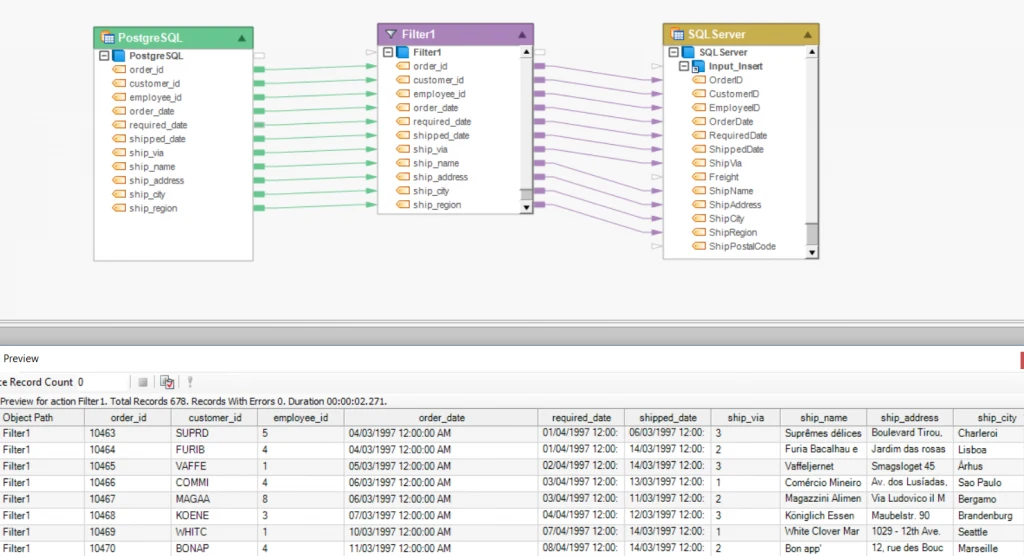
Figure 1: Database integration in Astera
The condition only forwards those records in the target database in which the Shipping Date corresponds to 1997.
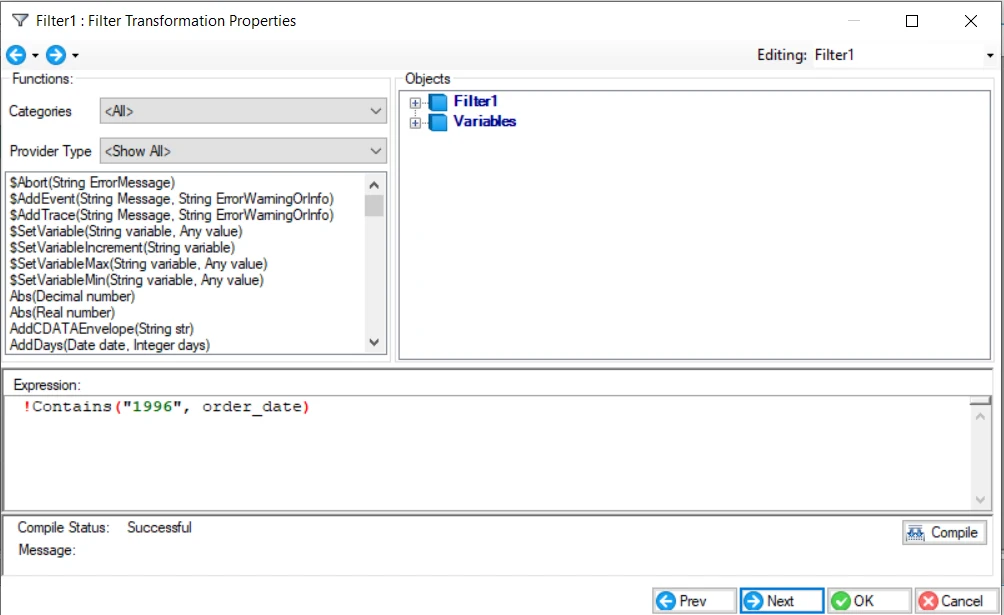
Figure 2: Expression builder
Achieve Improved Performance with Pushdown Optimization
Astera allows users to push data transformation jobs to a relational database to attain high performance and optimal use of database resources. This action generates time savings, optimal use of processing resources, and increased developer productivity.
Astera supports two types of pushdown optimization modes:
1. Partial pushdown optimization mode: The server pushes the transformation to the source or target database, depending on the database provider or transformation.
For instance, figure 3 shows job execution in a partial pushdown mode. The Sales data stored in SQL Server is aggregated concerning the Company Name. It is then routed into three separate files based on the applied conditions.
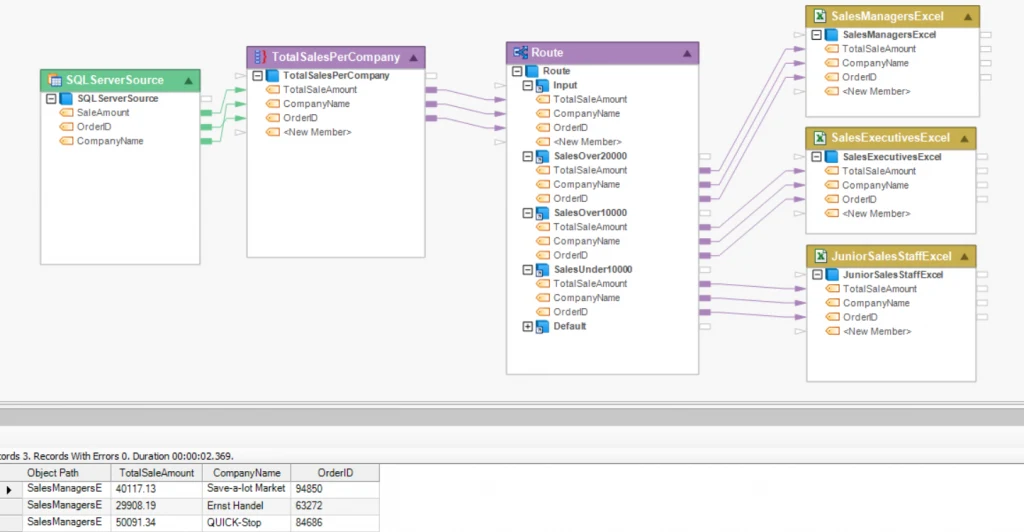
Figure 3: Job execution in partial pushdown optimization mode
2. Full pushdown optimization mode: This mode executes the job from start to end in pushdown mode.
The dataflow below shows job execution in full pushdown optimization mode. Here, the data from SQL Server is filtered concerning Country. It is then and then transferred to the destination database, which is also SQL Server.
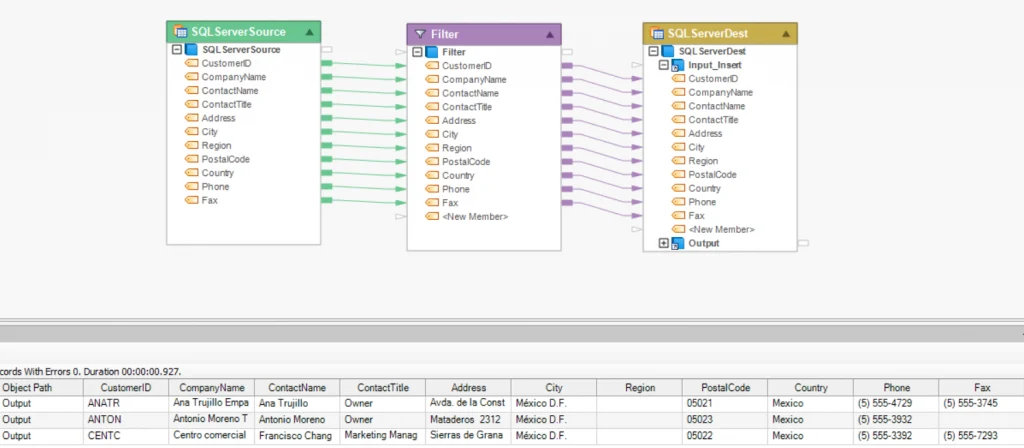
Figure 4: Job execution in full pushdown optimization mode
Ensure Database Integrity during Migration with Data Quality & Profiling
A database integration software with built-in data quality, cleansing, and profiling features in a single environment simplifies the creation and execution of a data migration project.
By applying the data quality rules, you can ensure the validity and consistency of your source data at any point. Moreover, using data profiling, you can get a breakdown of your data in terms of structure, error count, duplicate percentage, etc. These features ensure the accuracy of your database migration.
The example below shows the migration of Order data from SQL Server to PostgreSQL. Before the data is sent to the destination, it is profiled and sorted based on Product ID. The data is also checked for errors in the Quantity field using data quality rules.
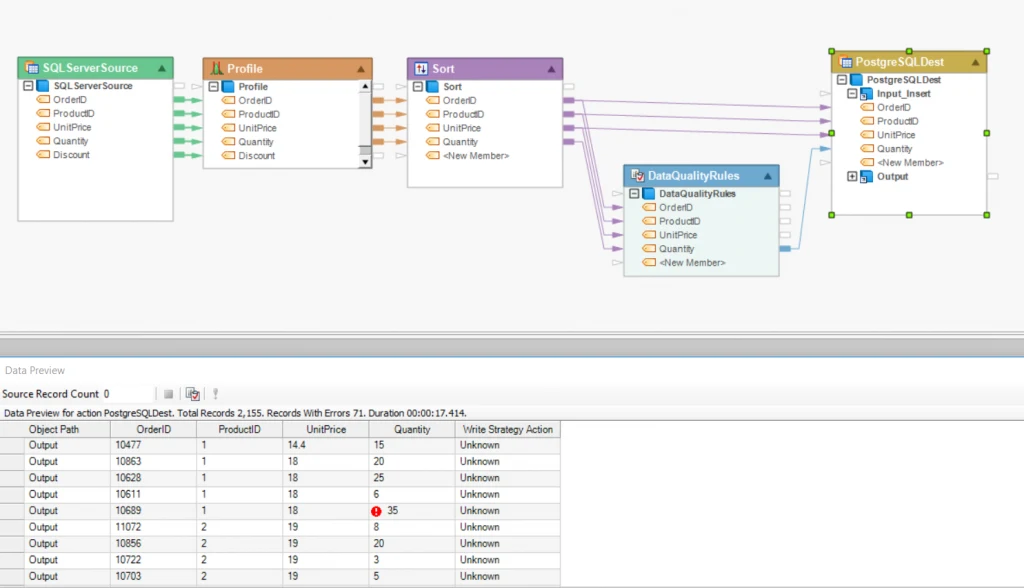
Figure 5: Database migration in Astera
Improve Database Integration Techniques with Astera
The massive rise in data volume and variety makes database integration software an essential tool in the business world. Most enterprises fail in database integration projects because they don’t have the right tools. Or, they are just not offered the proper data integration solutions.
Enterprises have realized that data integrated on a database level can be a huge time-saver. It can speed up the extraction of actionable, data-driven insights. For this purpose, they need integration tools to complete the job. Astera simplifies the database integration journey and offers constant support!
Experience connectivity to a wide range of databases
Experience connectivity to a wide range of databases
Want to experience first-hand how our unified platform simplifies database integration? Request a free trial and see Astera in action.