

LLM observability is the practice of collecting and analyzing data about how a language model application or AI agent behaves, including prompts, responses, tool calls, cost, speed, and errors, so teams can find problems, measure quality, and improve results.
AI agents can now plan tasks, call tools, and work across business systems. That makes them powerful, and it also means a single request can involve many steps that no one sees directly. Observability gives you that view, so you can trust what your agents do and keep making them better.
This guide explains what to track, how to evaluate and test agents, and how to monitor them once they are live. It includes a plain-language table of what to log and a step-by-step evaluation loop that anyone on the team can follow.
What Is LLM Observability?
LLM observability means you can see inside an LLM application well enough to explain what it did and why. For a simple chatbot, that might be the prompt, the response, and how long it took. For an AI agent, it is the full chain of reasoning steps, tool calls, data lookups, and outputs that led to a result.
Good observability answers questions like these:
What happened? Which steps did the agent take, in what order, and with what inputs?
Was it right? Did the output meet the quality bar for this task?
What did it cost? How many tokens, model calls, and seconds did it use?
Where did it go wrong? Which step failed, slowed down, or produced a poor result?
Is it getting better or worse? How do quality, cost, and speed change over time?
AI agent observability applies the same idea to agents specifically. If you are new to how agents are structured, our overview of agentic architecture is a helpful starting point.
The framework you build on also shapes how much you can see. Our guide to choosing an AI agent framework covers what to look for.
How Is Observability Different from Monitoring and Evaluation?
Monitoring tells you that something changed, observability helps you understand why, and evaluation tells you how good the output is. The three work together, and most teams need all of them.
Monitoring | Observability | Evaluation | |
|---|---|---|---|
Main question | Is the system healthy right now? | Why did it behave this way? | Is the output good enough? |
Typical data | Dashboards, alerts, error rates, latency, cost | Traces, logs, inputs and outputs for each step | Test sets, scores, human ratings |
When you use it | Continuously in production | When investigating a problem or improving a step | Before launch, after every change, and on samples in production |
Example | Alert: average response time doubled today | The trace shows a slow database tool call at step 3 | Answer accuracy on the test set dropped from one version to the next |
A simple way to remember it: monitoring is the smoke alarm, observability is the floor plan that helps you find the fire, and evaluation is the inspection that checks whether the building meets the standard.
Why Do AI Agents Need More Than Basic Logging?
AI agents need more than basic logging because one request can turn into many steps. An agent might plan, retrieve data, call two or three tools, check the results, and then write a reply. If you only log the first prompt and the final answer, you cannot see which step caused a problem.
That is why agent observability is built around traces. A trace is the full record of one agent run. Each step inside it, such as a model call or a tool call, is called a span and carries its own inputs, outputs, timing, and status. The idea comes from distributed tracing in software, and the OpenTelemetry project publishes open standards for it, including semantic conventions for generative AI that define common names for model calls, token usage, and related data.
Here is what a trace might look like for a hypothetical invoice-processing agent:
Request: a user asks the agent to match a new invoice to its purchase order.
Plan: the model decides it needs the invoice details and the purchase order.
Tool call: the agent extracts fields from the invoice document.
Tool call: it looks up the purchase order in the ERP system.
Model call: it compares the two and drafts a result.
Approval: a reviewer confirms the match.
Outcome: the record is updated.
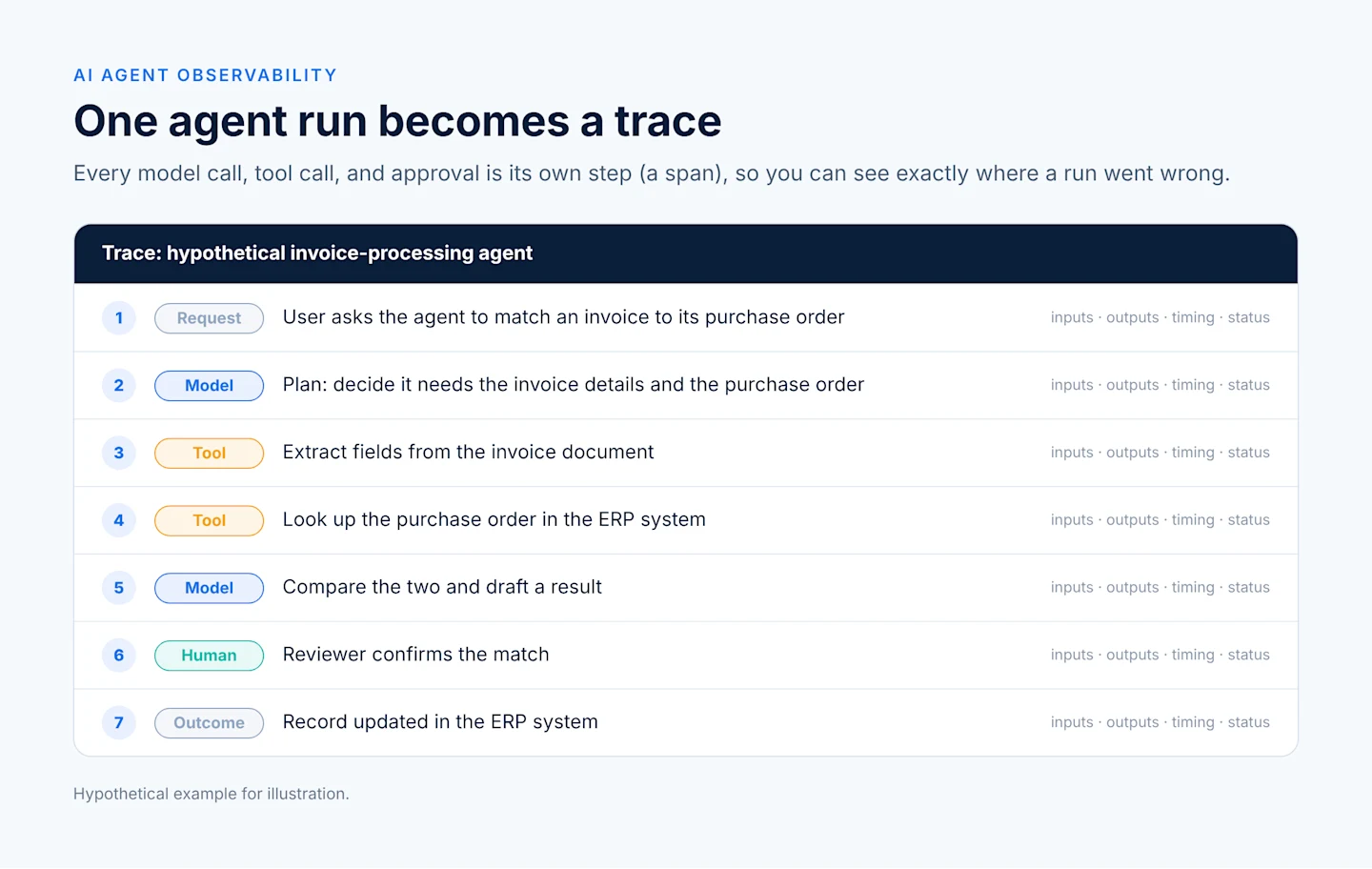
If the result is wrong, the trace shows whether the extraction missed a field, the lookup returned the wrong record, or the model compared them poorly. Each of those has a different fix. For more on how steps like these are chained together, see our guide to agentic workflows.
What Should You Log and Track for an AI Agent?
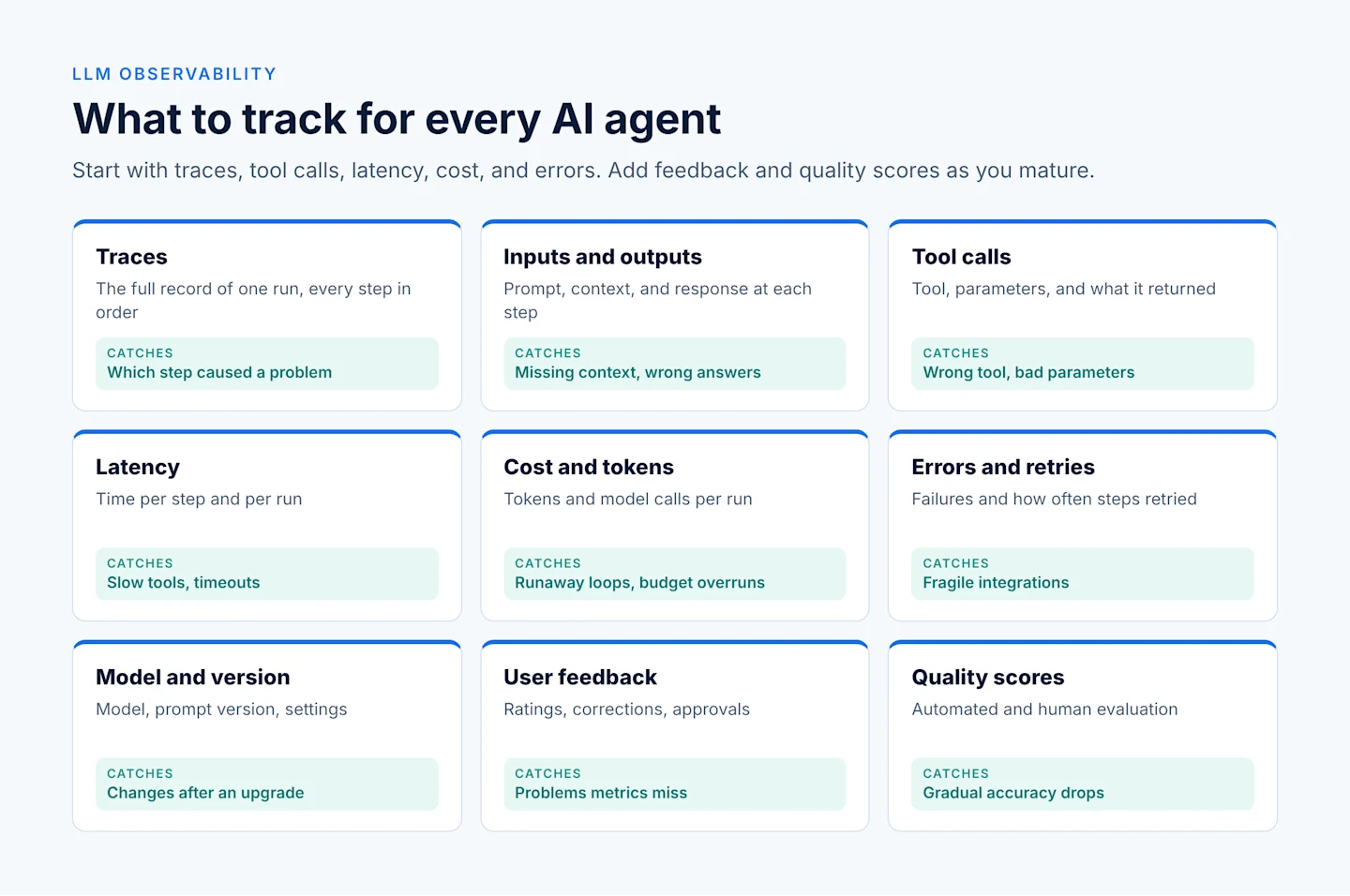
For an AI agent, log the full trace of each run, the inputs and outputs of every step, every tool call, and the latency, cost, errors, and user feedback attached to it. The table below explains each one in plain language and what it helps you catch.
What to track | What it means | What it helps you catch |
|---|---|---|
Traces | The full record of one agent run, from request to outcome, with every step in order | Which step caused a wrong answer or a slowdown |
Inputs and outputs | The prompt, retrieved context, and response at each step | Missing context, unclear instructions, off-topic or incorrect answers |
Tool calls | Which tool was called, with what parameters, and what it returned | Wrong tool, bad parameters, failed or empty results |
Latency | How long each step and the whole run took | Slow tools, slow models, timeouts |
Cost and tokens | Tokens used and model calls made per run | Runaway loops, oversized prompts, budget overruns |
Errors and retries | Failures, exceptions, and how often steps were retried | Fragile integrations and recurring failure points |
Model and version | Which model, prompt version, and settings were used | Quality changes after an upgrade or prompt edit |
User feedback | Ratings, corrections, approvals, and rejections | Quality problems that metrics alone miss |
Quality scores | Results from automated or human evaluation | Gradual drops in accuracy or relevance |
You do not need everything on day one. Start with traces, tool calls, latency, cost, and errors, then add quality scores and feedback as your evaluation process matures.
How Do You Evaluate an AI Agent?
You evaluate an AI agent by running it against a set of realistic test cases, scoring the results with a mix of automated checks and human review, and repeating that test after every change. AI agent evaluation turns "it seems to work" into evidence you can track.
Build a Test Set
A test set is a collection of example requests with a clear idea of what a good result looks like. Include common cases, tricky cases, and cases the agent should refuse or escalate. Real examples from users, with sensitive details removed, make the best test cases. Start small, with a few dozen examples, and grow the set as you learn.
Score with Automated Checks
Some checks are rule-based: did the output follow the required format, include the right fields, or call the expected tool? Others use a second model to grade answers against criteria such as accuracy, relevance, or tone, an approach often called LLM-as-a-judge. Automated scoring is fast and repeatable, but it should be spot-checked by people.
Add Human Review
People are still the best judges of nuanced quality. Have subject experts review a sample of outputs, especially for high-impact tasks. Their ratings also help you calibrate your automated scores.
Run Regression Checks
A regression check reruns the test set whenever you change a prompt, model, tool, or data source. If scores drop, you catch it before users do. Track scores per version so you can compare changes side by side.
Close the Loop
Evaluation works best as a cycle:
Define what good looks like for the task.
Test the agent against your test set.
Score results with automated checks and human review.
Find the failing cases and trace them to the step that caused them.
Improve the prompt, tool, data, or model.
Retest, then add new real-world failures to the test set and repeat.
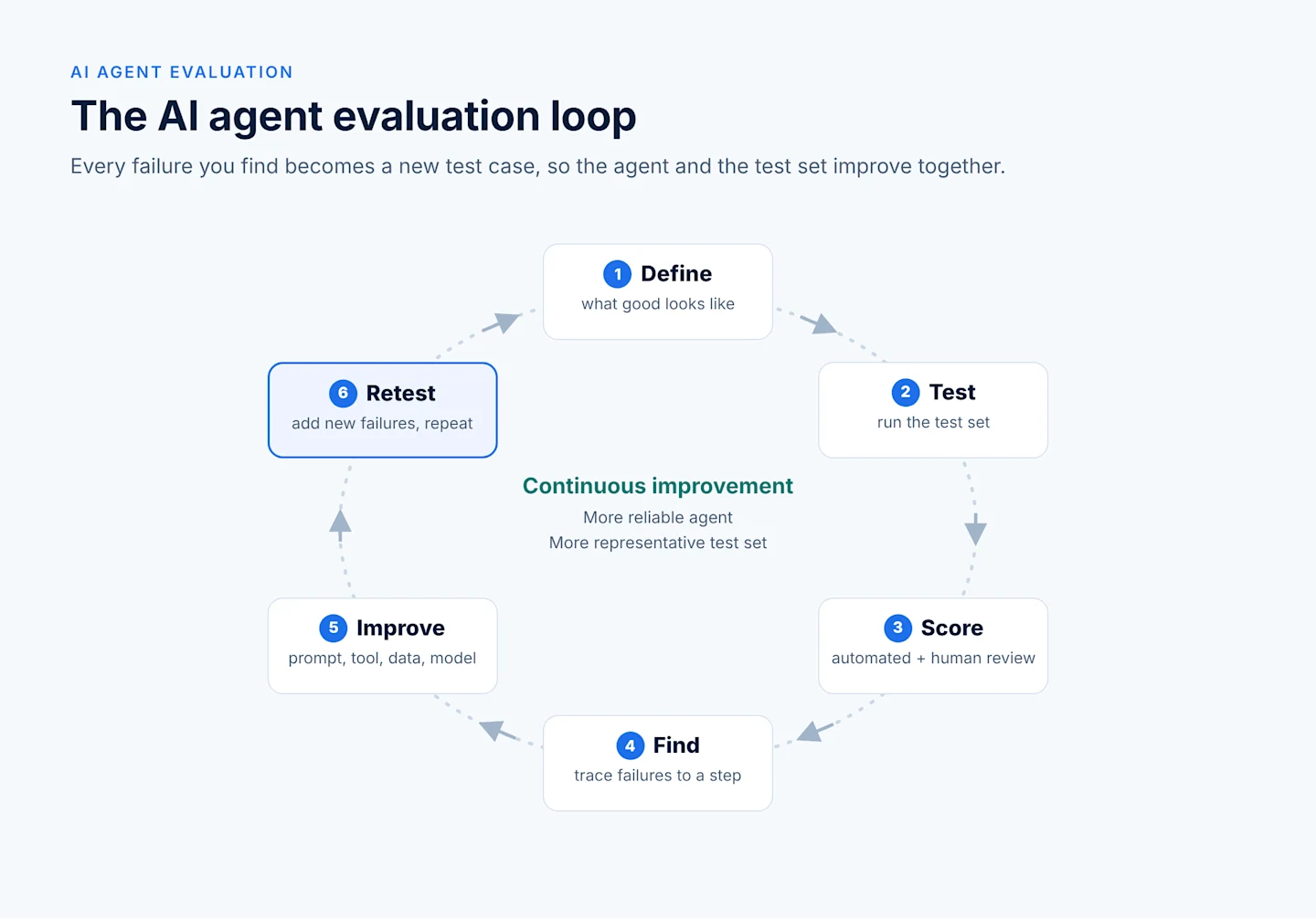
Each pass through the loop makes the agent more reliable and the test set more representative.
How Do You Test an AI Agent Before Launch?
You test an AI agent before launch by running it through realistic scenarios, deliberately trying edge cases and misuse, and then testing it live with a small group before a full rollout. AI agent testing is less about a single pass or fail and more about building confidence step by step.
Scenario Testing
Write scenarios that reflect the real jobs the agent will do, from start to finish. For each one, check the final result and the path the agent took to get there. A correct answer reached through the wrong tool call is still a risk.
Edge Cases and Misuse
Try the inputs that real users and real data will eventually produce:
Missing, incomplete, or badly formatted data.
Ambiguous requests that need a clarifying question.
Requests outside the agent's scope that it should decline or escalate.
Tool failures, timeouts, and empty results.
Instructions hidden in documents or emails, to check resistance to prompt injection.
Live Testing
Once the agent passes scenario and edge-case tests, try it in a controlled live setting. Common approaches include running it in a test environment with real data structures, giving it to a small pilot group, or running it in "shadow mode" alongside the current process so you can compare results without affecting users. Keep human review on for this stage.
Define Launch Criteria
Agree in advance on what "ready" means, for example a minimum score on the test set, no critical failures in edge-case testing, and acceptable cost and response time. Clear criteria make the launch decision easier and give you a baseline for production monitoring. Our step-by-step guide on how to build an AI agent shows where testing fits in the wider build process.
Build Scalable AI Agents—Faster, Smarter, and Without the Guesswork
Want AI agents without weeks of coding or complex setup? Skip the technical hurdles. Astera AI Agent Builder gives you a drag-and-drop interface, powerful integrations, and enterprise-ready performance. No data science degree required.

How Do You Monitor AI Agents in Production?
You monitor AI agents in production by tracking health, cost, and quality signals continuously, setting alerts on the ones that matter, and feeding what you learn back into evaluation. AI agent monitoring keeps a good launch from quietly slipping over time.
Set Useful Alerts
Alert on changes that need a person's attention, such as:
Error or timeout rates rising above a set level.
Cost or token use per run climbing unexpectedly.
Response times getting slower.
A spike in rejected outputs, negative feedback, or escalations.
Unusual tool use, such as an agent calling a tool it rarely needs.
Give each alert a clear owner and a short note on what to check first. Fewer, well-chosen alerts work better than many noisy ones.
Watch for Drift
Drift is a gradual change in how an agent performs. It can come from new kinds of user requests, changes in source data, updates to a hosted model, or edits to prompts and tools. Running your evaluation set on a schedule, and scoring a sample of live traffic, helps you spot drift early.
Build Feedback Loops
Make it easy for users and reviewers to flag a poor result, and connect each flag to its trace. Review flagged cases regularly, fix the root cause, and add the case to your test set. Over time, production becomes your best source of test cases, and your agent improves with real use.
Common Challenges and How to Approach Them
A few challenges come up for almost every team, especially output that varies from run to run and logs that contain sensitive data. All of them are manageable with the right habits.
Non-Deterministic Output
LLMs can give different answers to the same input. That makes exact-match testing unreliable. Instead:
Score outputs against criteria (correct fields, right decision, acceptable tone) rather than exact wording.
Run important test cases several times and look at the pass rate, not a single result.
Lower randomness settings where consistency matters more than variety.
Use structured outputs and tool calls where you can, so results are easier to check.
Does Logging Create Privacy Risks?
Yes, logging can create privacy risks, because traces often contain prompts, documents, and responses with personal or confidential data. Treat logs as sensitive data in their own right:
Mask or remove personal and confidential fields before storing them, where the task allows.
Limit who can view traces, using the same role-based access you apply to the source data.
Set a retention period and delete logs you no longer need.
Know where logs are stored, especially if a third-party tool or hosted service holds them, and check that it meets your data residency rules.
Our guide to agentic AI security and governance covers how logging fits into wider agent controls, and Own Your AI Agents discusses why control over your data and logs matters.
Too Much Data, Not Enough Insight
It is easy to collect everything and review nothing. Decide which questions you need answered, track the signals that answer them, and build one dashboard people actually use.
A Checklist for Getting Started with LLM Observability
Use this checklist to set up observability for your first agent. Each item builds on the one before, so you can start small and add more as you go.
Stage | What to do | You're ready when |
|---|---|---|
Define | Write down what the agent is for and what a good result looks like | The team agrees on two or three quality criteria |
Instrument | Capture a trace for every run, with each model call and tool call as a step | You can open any run and see every step in order |
Track basics | Record latency, tokens, cost, errors, and model and prompt versions | You can see these per run and over time |
Protect logs | Mask sensitive fields, restrict access, set retention | Logs follow the same rules as the source data |
Build a test set | Collect realistic examples, including edge cases and misuse | You have a few dozen cases with expected results |
Evaluate | Score results with automated checks and human review | You have a baseline score for the current version |
Test before launch | Run scenarios, edge cases, and a live pilot | The agent meets agreed launch criteria |
Monitor | Set a few alerts with named owners | Alerts fire on real problems, not noise |
Close the loop | Link user feedback to traces and add failures to the test set | Every fix is followed by a regression check |
How Astera Helps You Monitor and Test AI Agents
Astera builds observability into its AI platform, so you can see, test, and improve agents without adding a separate toolset.
Real-time logging and monitoring. In Centerprise AI, each step is traceable, so you can follow a run from request to result.
Detailed agent logs you own. Logs record who ran an agent, which model it used, token usage, the tools it called, and what it produced or changed. They are append-only, governed by role-based access, and stored in your own environment.
Test before you deploy. Testing AI-generated flows is a built-in step before deployment, and every decision is transparent and traceable during human review.
Predictable runtime execution. Approved workflows run deterministically on schedule, which makes production behavior easier to monitor.
Continuous improvement from traces. The same trace data used for audit helps you find which skill or query produced a wrong answer, and supports automated tests, monitoring, and guardrails in production.
Want to build agents you can see, test, and improve from day one? Join the AI Agent Builder waitlist.
You've Read About AI Agents. Now It's Time to Build Your Own.
Astera simplifies AI agent development for business and technical users alike. With our visual, drag-and-drop builder and ready-to-use templates, AI agents of your own are just a few easy steps away.