

An API is a defined way for one piece of software to request data or actions from another. The Model Context Protocol (MCP) is an open standard that gives AI agents a consistent way to discover and use tools and data sources, so they don't need a custom integration for each one.
The short version: MCP doesn't replace APIs. Most MCP servers call APIs behind the scenes. What MCP changes is who the interface is designed for. APIs are designed for developers who read documentation and write code. MCP is designed for AI agents that need to find out, at run time, what they can do and how.
This guide explains how the two compare, walks through the same request built both ways, and gives you a decision guide for choosing between them. It also covers something most explainers skip: what MCP does and does not solve when your agents need reliable enterprise data.
What Is an API?
An API (application programming interface) is a contract between two systems. It defines which requests you can make, what inputs each one needs, and what comes back. A CRM's REST API, for example, might let you look up a customer, create an order, or update a contact.
APIs are everywhere in enterprise software, and they are precise. A developer reads the documentation, writes code against specific endpoints, handles authentication and errors, and maintains that code when the API changes. For a refresher on how they're designed, see our guide on how to build an API.
What Is MCP?
MCP is an open protocol, introduced by Anthropic in November 2024 as "an open standard for connecting AI assistants to the systems where data lives." It defines a common way for AI applications to connect to external systems, so an agent can ask a server what it offers and then use it, without code written specifically for that pairing.
A useful way to picture it: an API is a specific door into one system. MCP is a standard doorframe, so any agent that knows the standard can walk through any door built to fit it.
How Does MCP Work?
MCP works through a client-server design. An AI application connects to one or more MCP servers, asks each one what it offers, and then calls those capabilities when the model needs them. The official MCP architecture documentation describes three participants:
MCP host: the AI application, such as an assistant, an IDE, or an agent platform. It coordinates everything.
MCP client: a component inside the host that keeps a dedicated connection to one MCP server. A host creates one client per server.
MCP server: a program that provides context and capabilities. It can run locally on the same machine or remotely as a service, and it usually sits in front of an existing system such as a database, file store, or SaaS application.
Each server can expose three kinds of capabilities, which the documentation calls primitives:
Tools: actions the agent can take, such as running a query, creating a ticket, or calling an API.
Resources: data the agent can read for context, such as a file, a database schema, or a record.
Prompts: reusable templates that help the model use the server well, such as worked examples for a query tool.
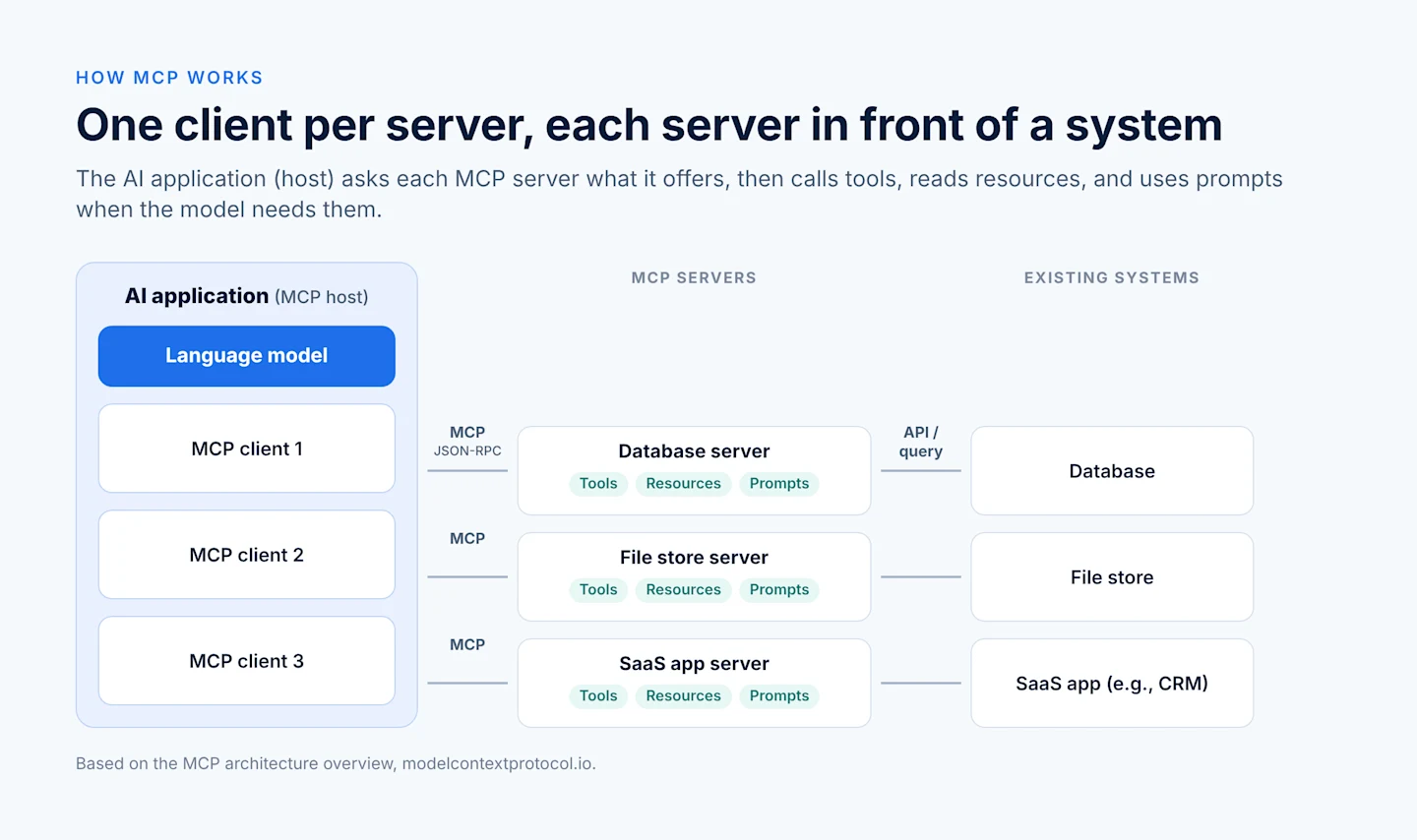
The key difference from a typical API is discovery. A client can ask a server to list its tools, and each tool comes back with a name, a plain-language description, and a schema for its inputs. The model reads those descriptions to decide which tool fits the task. When a server's tools change, it can notify connected clients, so the agent's options stay current without anyone rewriting integration code.
Under the hood, MCP messages use JSON-RPC 2.0. Local servers typically communicate over standard input and output, while remote servers use HTTP, with OAuth recommended for authorization.
MCP vs. API: What's the Difference?
The main difference is that APIs expose one system's functions to developers, while MCP standardizes how AI agents discover and use many systems' functions at run time. The table below compares them side by side.
Traditional API | MCP | |
|---|---|---|
Designed for | Developers writing code | AI agents and the applications that host them |
Scope | One system, one interface | A common protocol across many systems |
Discovery | Developer reads the documentation | Agent asks the server to list its tools, resources, and prompts |
Descriptions | Written for humans, often separate from the API | Plain-language descriptions and input schemas built into each tool, readable by the model |
Integration effort | Custom code for each system and each application | Build or adopt one server per system; any MCP-compatible agent can use it |
Who decides which call to make | The developer, in code | The model, based on the task and the tool descriptions |
Change handling | Code must be updated when the API changes | Server can notify clients when its tools change |
Determinism | Same code, same calls, every time | The model chooses calls, so behavior varies and needs guardrails |
Maturity | Decades of tooling, standards, and security practice | Newer; specification and tooling are still evolving |
Typical use | System-to-system integration, apps, data pipelines | Giving agents access to tools and data across systems |
A practical way to read this table: an API is about how to call a system. MCP is about letting an agent figure out what it can call and when.
Worked Example: The Same Request, Built Two Ways
Definitions only go so far. Here is one request built with direct API integrations and then with MCP. The scenario is hypothetical, but the pattern is common.
The request: a finance manager asks an AI agent, "Which of our top 20 customers have overdue invoices, and what did we last discuss with each of them?" Answering it means reading from three systems: the ERP (invoices), the CRM (customer ranking and contacts), and the support desk (recent conversations).
Built with Direct APIs
A developer reads the ERP, CRM, and support desk API documentation.
They write three integrations, each with its own authentication, pagination, error handling, and field names.
They write orchestration code that calls the CRM first, then the ERP, then the support desk, and joins the results on customer ID.
They decide in advance exactly which calls the agent can make, and expose them as functions the model can use.
When a new question comes up ("...and which of them have open renewal opportunities?"), a developer adds another integration and updates the code.
Result: precise and predictable, but every new system and every new question means more custom code, and that code belongs to one agent.
Built with MCP
The ERP, CRM, and support desk each have an MCP server, either provided by the vendor or built once by your team on top of the existing APIs.
The agent's host connects to all three servers and asks each one to list its tools.
The model reads the tool descriptions, picks a CRM tool to get the top 20 customers, an ERP tool to check overdue invoices, and a support tool to fetch recent conversations.
The host runs the calls through the servers, which apply their own authentication and permissions, and passes the results back to the model to assemble an answer.
When the renewal question comes up, the agent can use the CRM server's opportunity tool if it exists, without new integration code. Other MCP-compatible agents can reuse the same three servers.
Result: far less custom code per agent and per question, but the behavior depends on the model choosing well, and the answer is only as good as the data behind each server.
What This Example Shows
MCP moves the integration work, it doesn't remove it. Someone still builds and maintains each server, and the servers still call APIs.
The payoff grows with reuse. One agent and two systems may not justify MCP. Many agents across many systems usually do.
Data issues don't go away. If "customer ID" means something different in the ERP and the CRM, both approaches give a wrong answer. With MCP, the error is just harder to spot because the model did the joining.
When Should You Use MCP and When Should You Use an API?
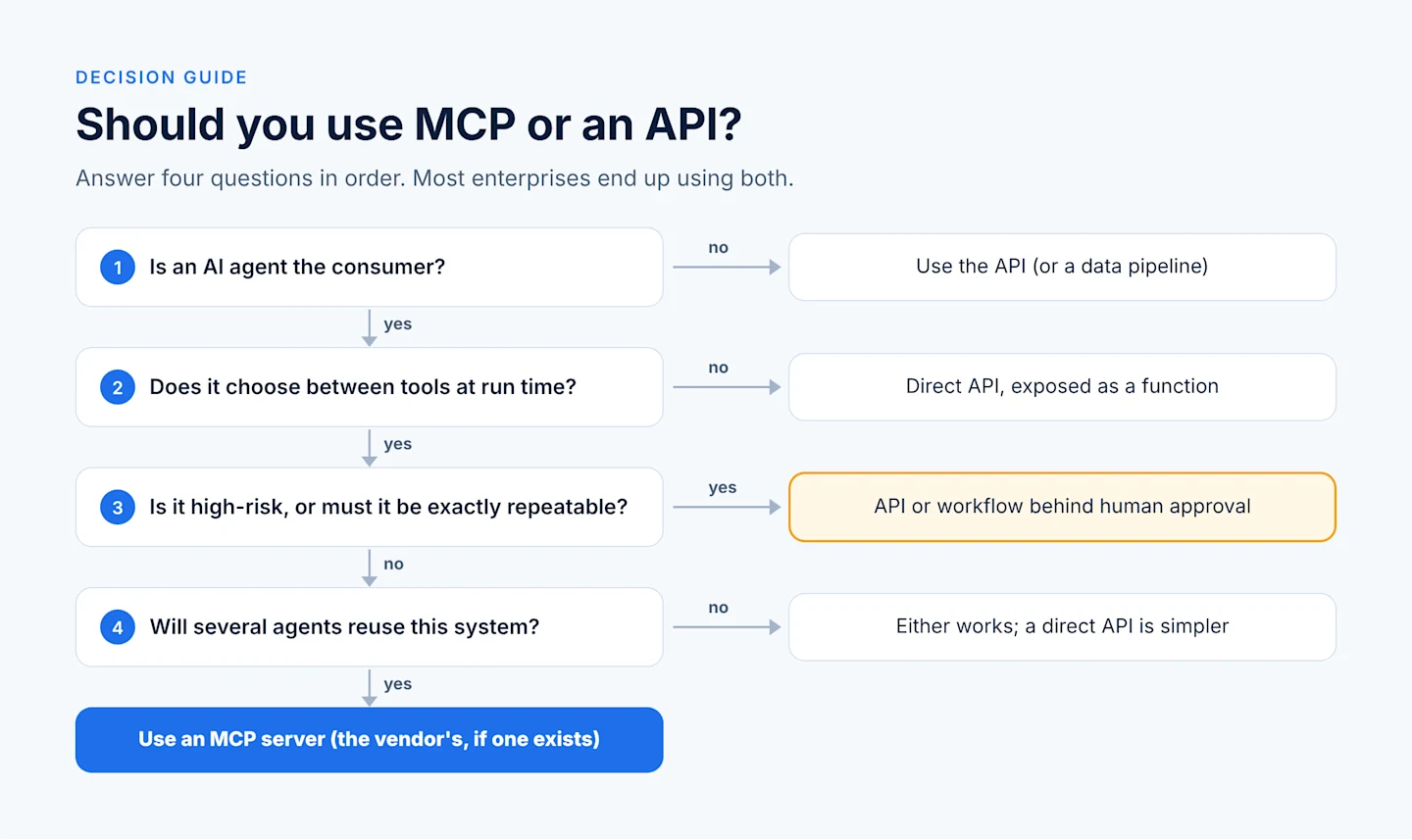
Use a direct API when the consumer is regular software or a single agent with a fixed job. Use MCP when several agents need to discover and use tools across many systems. Most enterprises will use both, often in the same workflow.
Work through these questions in order:
Is an AI agent the consumer?
If not (for example, a scheduled data pipeline or an app backend), use the API. MCP adds nothing for software that doesn't reason about which call to make.
Does the agent need to choose between tools at run time?
If the agent always makes the same one or two calls in the same order, a direct API call or a hard-coded function is simpler and more predictable.
Will several agents or AI applications need the same system?
If yes, an MCP server lets you build the connection once and reuse it. If only one agent will ever use it, the reuse benefit is small.
Is the action high-risk or does it need exact, repeatable behavior?
Payments, deletions, and regulated reporting usually belong behind a deterministic API call or workflow, with an agent requesting it and a person approving it, rather than left to open-ended tool choice.
Does an MCP server already exist for the system?
Many software vendors now publish one. If it exists and meets your security review, adopting it is usually faster than building your own.
Situation | Better fit |
|---|---|
Nightly sync between ERP and data warehouse | API (or an integration pipeline) |
Customer-facing app showing order status | API |
One agent that always looks up a single record type | API, exposed to the agent as a function |
Assistant that answers open-ended questions across CRM, ERP, and documents | MCP |
Several teams building agents on the same internal systems | MCP servers shared across teams |
Agent that can trigger payments or delete records | API or workflow behind human approval, even if the agent is MCP-based |
What Is Tool Calling? (And How It Relates to MCP)
Tool calling, also called function calling, is how a large language model asks to use an outside capability. The model doesn't run anything itself. It produces a structured request, such as "call get_overdue_invoices with customer_id = 1042," and the application around the model runs it and hands back the result.
In plain language, it works like this:
The application describes the available tools to the model: a name, what each one does, and what inputs it needs.
The model decides whether a tool would help with the user's request and, if so, which one and with what inputs.
The application runs the tool, for example by calling an API or querying a database, and checks the request first.
The result goes back to the model, which uses it to answer or to decide on the next step.
That loop is the heart of AI agent tool calling. Function calling in LLMs is supported by most major model providers, but each one has its own format for describing tools.
This is where MCP fits. Tool calling is the model-side mechanism; MCP is a standard for where the tools come from. Without MCP, each application defines its tools in its own code. With MCP, the application can pull tool definitions from any MCP server and hand them to whichever model it uses. In other words, MCP doesn't replace tool calling. It standardizes the supply of tools that tool calling relies on.
For more on how agents decide and act, see our explainers on what AI agents are and agentic architecture.
How Does MCP Help Agents Reach Enterprise Data?
MCP helps agents reach enterprise data by giving them one consistent way to discover and query systems, instead of a custom connector for every pairing of agent and source. That's a real improvement in connectivity. But connectivity is only one part of the problem. The quality, consistency, and meaning of the data behind each server still decide whether the agent's answer is right.
The official documentation is explicit on this point: MCP "focuses solely on the protocol for context exchange" and doesn't dictate how applications use or manage that context. For enterprise teams, that leaves a clear split of responsibilities.
Challenge | Does MCP solve it? | What still needs to happen |
|---|---|---|
A standard way for agents to discover and call tools | Yes | Choose or build servers for the systems that matter |
Reusing one connection across many agents | Yes | Run servers as shared, managed services |
Keeping the agent's tool list current | Yes, via change notifications | Version servers and test changes before release |
Consistent definitions ("customer," "revenue," "active") across systems | No | Align definitions in your data model, warehouse, or semantic layer |
Data quality (duplicates, gaps, stale records) | No | Profile, cleanse, and validate data at the source or in pipelines |
Joining data across systems reliably | Partly (the agent can try) | Pre-integrate key entities so the agent queries one trusted view |
Performance on large data volumes | No | Use queries, aggregates, or prepared datasets rather than raw table dumps |
Deciding who can see what | Partly (servers can enforce it) | Carry user permissions through to each server and source |
Auditing what the agent read and changed | Partly | Log tool calls and results centrally |
The pattern is consistent: MCP standardizes the connection, while data integration, modeling, and quality work determine whether what comes through that connection can be trusted. That's why data teams sit at the center of agent projects. Our post on the roadmap to agentic AI success explains why data integration is the foundation for MCP-based agents, and AI agents and enterprise data covers the data side in more depth.
Is MCP Secure?
MCP can be used securely, but security depends on how servers and clients are built, deployed, and governed. The protocol defines an authorization approach based on OAuth, and the MCP project publishes security best practices that cover risks such as token misuse, overly broad permissions, and untrusted local servers.
With APIs, security teams already have mature habits: gateways, keys, scopes, rate limits, and monitoring. MCP adds a new layer on top, and it deserves the same discipline. Key points to plan for:
Treat every MCP server like a new integration. Review who built it, what it can access, and where it runs before connecting it to production systems. Prefer servers from the system's vendor or your own team.
Grant the narrowest scopes. The MCP guidance recommends starting with minimal, low-risk scopes and asking for more only when a sensitive tool is first used. Avoid "full access" tokens.
Carry the user's identity through. An agent acting for a user should only reach what that user can reach. Servers should validate that tokens were issued for them rather than passing tokens straight through to other APIs, a pattern the specification forbids.
Watch for manipulated inputs. Tool descriptions and tool results become part of what the model reads. A compromised server or a poisoned document can try to steer the agent, so validate tool calls and keep human approval on high-impact actions.
Sandbox local servers. Local servers run with the same privileges as the application that launched them. Install them only from trusted sources and restrict their file and network access.
Log every tool call. Record which agent called which tool, with what inputs, for which user, and what came back. Without this, auditing MCP-based agents is very hard.
Our guide to agentic AI security and governance covers these controls in more depth, including approval patterns by risk level and a practical checklist.
What Does MCP Mean for Data Teams?
MCP shifts part of the agent integration job onto data teams. If agents will query your systems through MCP servers, the questions become: which data should agents see, in what shape, with what definitions, and under whose permissions? Those are data engineering and governance questions, not just AI questions. Good data integration work done now pays off directly in agent accuracy later.
MCP Data Readiness Checklist
Use this checklist before exposing a system to agents through MCP, whether you adopt a vendor's server or build your own.
Area | Question to ask | Why it matters for agents |
|---|---|---|
Scope | Which systems and tables do agents actually need for the first use cases? | Smaller scope means fewer tools to describe and fewer ways to go wrong |
Definitions | Are key terms (customer, revenue, active, overdue) defined the same way across sources? | The model will join and compare data at face value |
Integrated views | Do common questions span several systems? If so, is there one trusted, pre-joined view? | Agents get more reliable answers from one clean view than from joining raw sources themselves |
Data quality | Are duplicates, gaps, and stale records measured and handled? | Bad data leads to confident wrong answers |
Shape | Will tools return summaries or filtered results rather than full tables? | Large raw outputs are slow, costly, and harder for the model to use |
Tool descriptions | Does each tool have a clear name, a plain-language description, and well-defined inputs? | The model chooses tools based on these descriptions |
Permissions | Will each call run with the requesting user's permissions? | Agents should never see more than the person they act for |
Write access | Which tools change data, and do they need approval? | Read-only by default keeps early mistakes harmless |
Logging | Are tool calls, inputs, outputs, and users recorded? | Needed for audit, debugging, and improving the agent |
Ownership | Who owns each server and keeps it in step with the source system? | Unowned servers drift as systems change |
If most answers are "not yet," that's normal. Start with one well-prepared, read-only data source, prove value, and expand from there.
Where Astera Fits
Whether your agents use MCP, direct APIs, or both, they are only as useful as the data they can reach. That's the part Astera focuses on.
With Astera AI Agent Builder, you can connect AI agents directly to your enterprise data sources, including databases, APIs, and files, with Astera's ETL engine doing the heavy lifting on data preparation. That means agents can work from integrated, prepared data rather than raw systems, which addresses many of the gaps in the "what MCP doesn't solve" table above.
Want to build agents on your own enterprise data? Join the AI Agent Builder waitlist.
Next Steps
Pick one use case where an agent needs data from two or three systems.
Run the decision guide to choose between direct APIs and MCP for each system.
Work through the data readiness checklist for those systems before connecting anything.
Apply your security baseline to every server and tool, and log every call.
This article is part of our series on agent connectivity. A complete guide to the Model Context Protocol is coming soon.
Connect AI Agents to Your Enterprise Data. Join the waitlist for Astera AI Agent Builder and be among the first to build agents on your own databases, APIs, and files. Join the Waitlist