

A multi-cloud strategy is a plan for using services from two or more cloud providers, such as AWS, Microsoft Azure, and Google Cloud, so each workload runs where it fits best. Done well, it reduces vendor lock-in, improves resilience, and gives teams access to the best tools on each platform.
Most large organizations are already there. Flexera's 2026 State of the Cloud report found that 73% of organizations run hybrid estates and that multi-cloud adoption grew again this year. The hard part is no longer choosing clouds. It is keeping data, security, and costs under control once workloads are spread across them.
This guide explains what a multi-cloud strategy is, how it differs from hybrid cloud, common architecture patterns, the main challenges, and eight steps to build a strategy — including how to integrate data across clouds.
What is a multi-cloud strategy?
A multi-cloud strategy is an intentional approach to running applications and data across more than one public cloud provider. Instead of committing everything to a single vendor, organizations choose the best platform for each need and manage them as one environment.
For example, a company might:
Run its core applications on AWS for compute and global reach
Use Google BigQuery for large-scale analytics and machine learning
Use Microsoft Azure because it integrates closely with Microsoft 365 and Active Directory
Store customer data in Salesforce and product data in Snowflake
The "strategy" part matters. Many companies end up multi-cloud by accident, through acquisitions or teams choosing their own tools. A multi-cloud strategy replaces that sprawl with deliberate decisions about which workloads go where, how data moves between them, and how everything is secured and governed.
Multi-cloud vs hybrid cloud
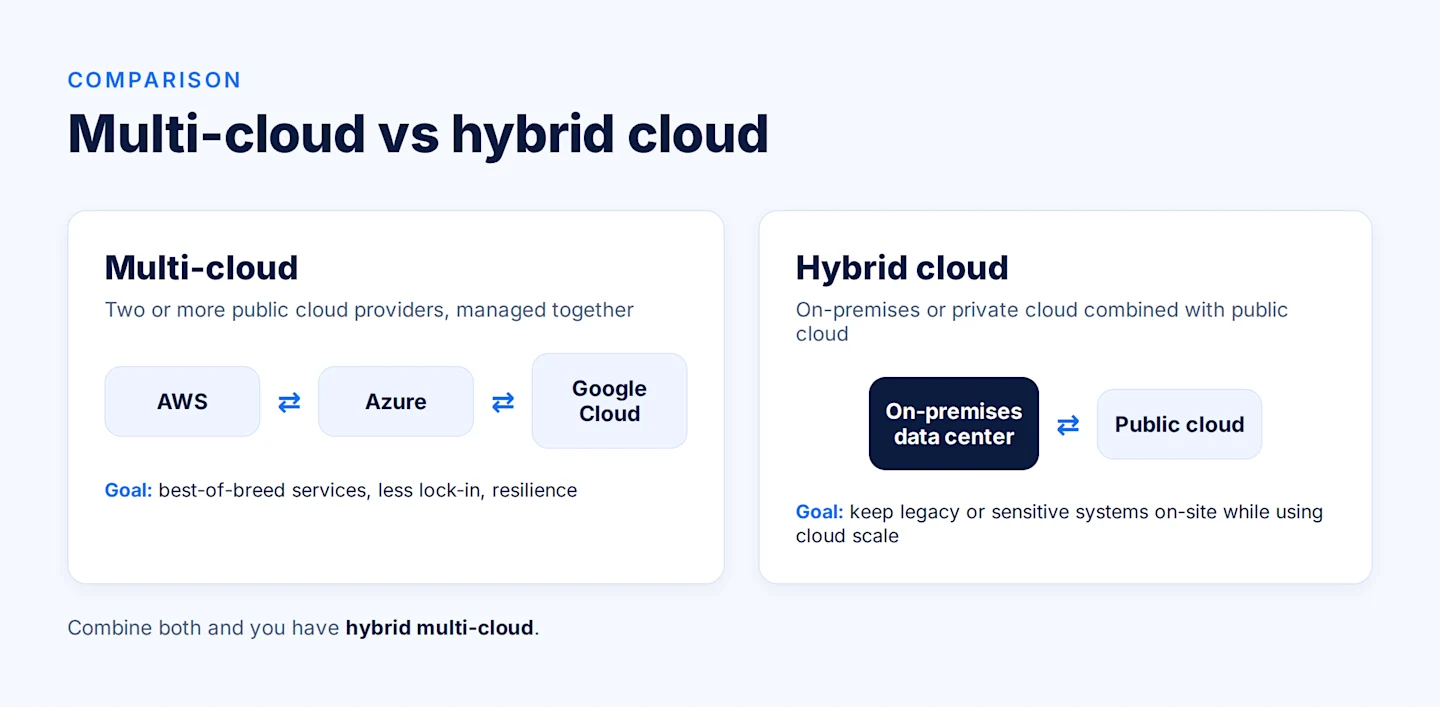
The two terms are often confused, and many organizations use both.
Aspect | Multi-cloud | Hybrid cloud |
Definition | Two or more public cloud providers | A mix of on-premises or private cloud with public cloud |
Example | AWS + Azure + Google Cloud | On-premises data center + AWS |
Main goal | Best-of-breed services, less lock-in, resilience | Keep some systems on-premises while using cloud scale |
Typical driver | Workload fit, cost, regional coverage | Legacy systems, data sensitivity, gradual migration |
Integration focus | Connecting data and services across providers | Connecting on-premises systems with the cloud |
An environment that combines on-premises systems with several public clouds is called hybrid multi-cloud. For more on the on-premises side, see hybrid cloud integration.
Benefits of a multi-cloud strategy
Avoid vendor lock-in
Relying on one provider creates contractual and technical dependency. With multiple providers, organizations can negotiate better terms, switch services when prices or features change, and avoid being stuck with one vendor's roadmap.
Use the best service for each workload
Each provider has strengths: one may lead in AI services, another in analytics, another in enterprise application integration. A multi-cloud strategy lets teams pick the best tool for each job instead of accepting one provider's compromises.
Improve resilience and uptime
Even the largest providers have outages that take down major services for hours. Running critical workloads, or backups of them, on a second provider keeps the business running when one cloud fails.
Optimize costs
Pricing differs across providers for storage, compute, and data transfer. Teams can place each workload where it is most cost-effective, for example low-cost storage on one platform and compute on another — as long as data transfer (egress) costs are planned for.
Meet data residency and compliance requirements
Regulations like GDPR and industry rules may require data to stay in specific countries. Using multiple providers widens the choice of regions and makes it easier to keep sensitive data where it must be, while using public services for less sensitive workloads.
Reduce latency for global users
Placing workloads in the provider region closest to users improves performance, especially for companies serving customers across many markets.
Multi-cloud architecture patterns
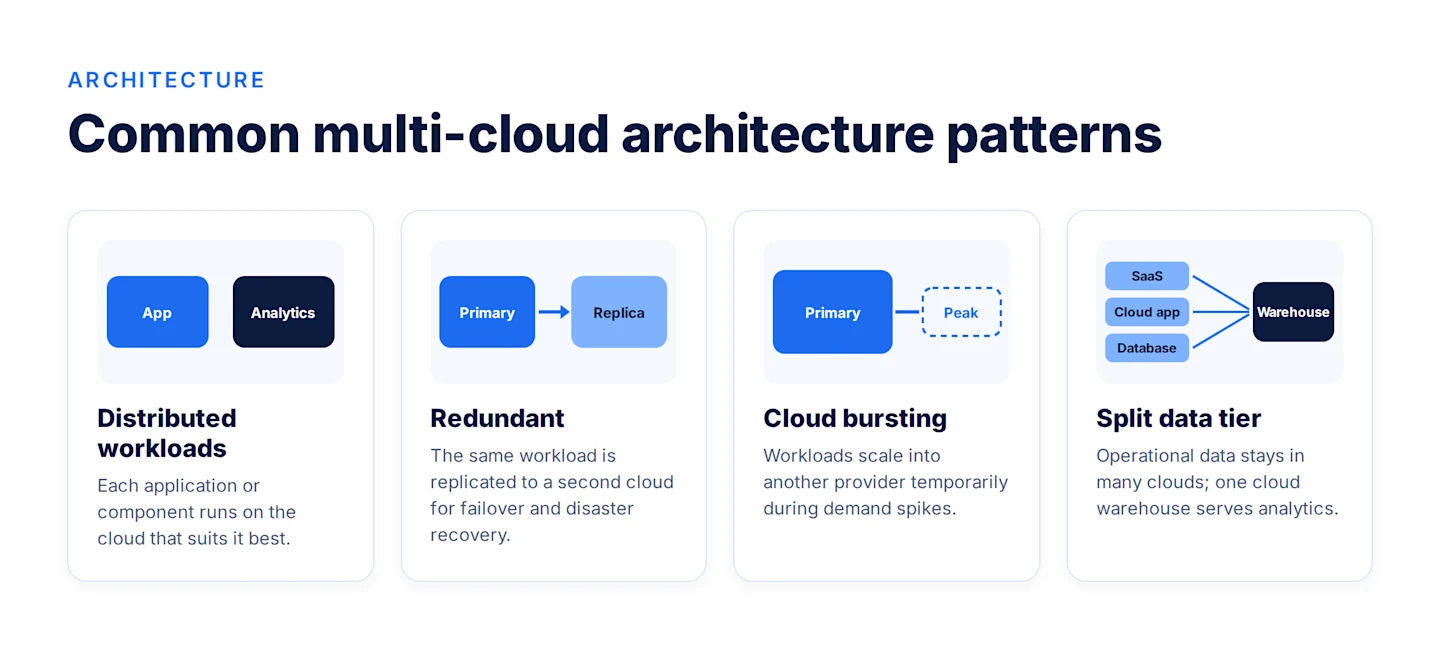
There is no single multi-cloud architecture. These are the most common patterns, and many organizations combine them:
Distributed workloads: different applications or components run on different clouds based on fit, such as the web app on AWS and analytics on Google Cloud.
Redundant (active-passive or active-active): the same workload runs on two clouds, or is replicated to a second cloud, for failover and disaster recovery.
Cloud bursting: a workload runs on its primary cloud and temporarily scales into another provider during peak demand.
Split data tier: operational data lives in one cloud or SaaS application, while a cloud data warehouse such as Snowflake, BigQuery, or Redshift serves as the central analytics layer. Comparing platforms? See BigQuery vs Redshift and Redshift vs Snowflake.
Every pattern depends on one thing: moving data reliably between clouds. That is covered in the multi-cloud data integration section below.
Challenges of a multi-cloud strategy
Data silos and integration: each cloud stores data in different services and formats. Without integration, teams end up with disconnected datasets and conflicting reports.
Security and compliance: more providers mean more identity systems, more configurations, and a larger attack surface. Flexera reports that security and compliance are the top scaling challenge for 53% of organizations.
Cost control: different pricing models, discount programs, and egress fees make spending hard to predict. Flexera estimates wasted IaaS and PaaS spend at 29%.
Governance and visibility: tracking where data lives, who can access it, and how it changes becomes harder across platforms.
Data quality: combining data from many sources introduces duplicates and inconsistencies. Flexera found data quality is the top concern for 40% of organizations scaling AI.
Skills gaps: teams need expertise in several platforms, each with its own tools and terminology.
Latency and performance: moving large volumes of data between clouds takes time and can slow down applications and analytics.
How to build a multi-cloud strategy in 8 steps
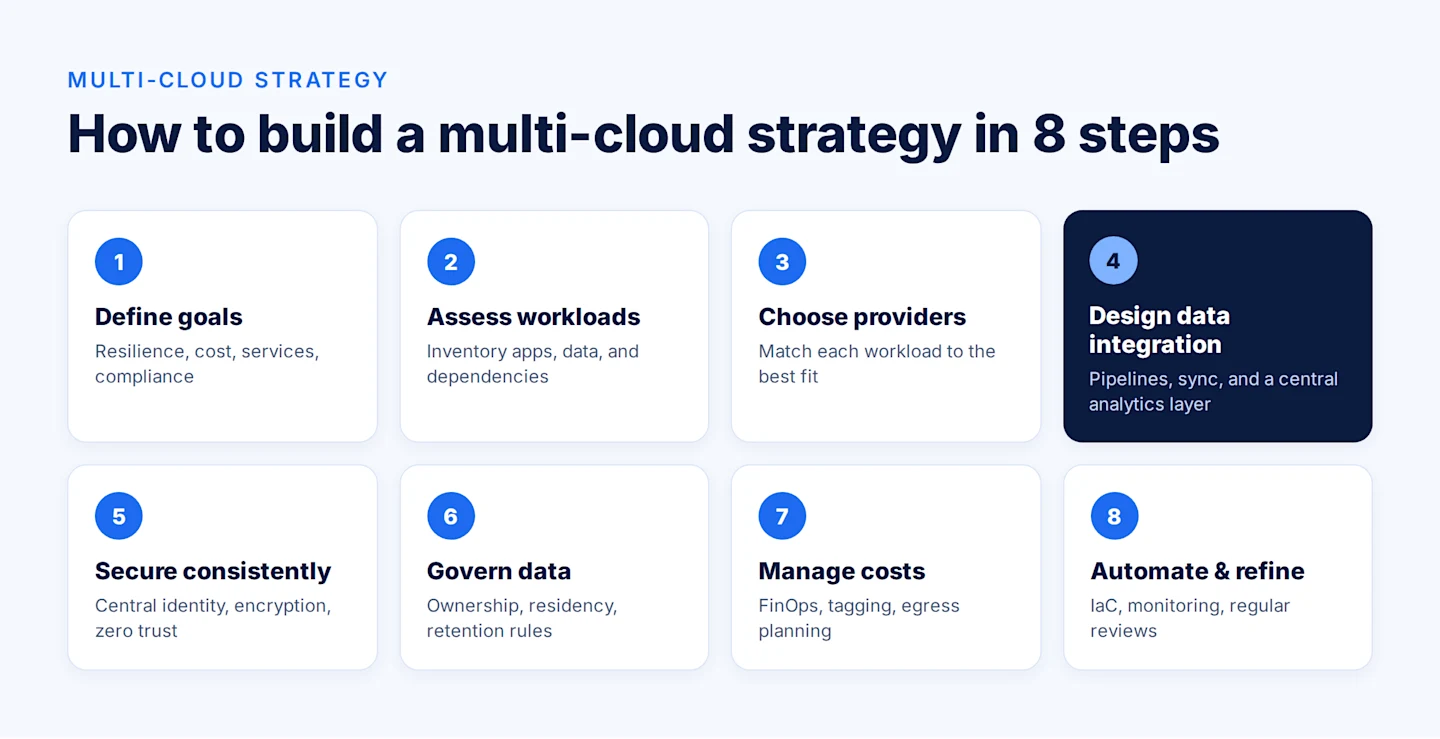
A multi-cloud strategy works best when it is planned in stages rather than assembled one provider at a time. These eight steps take you from goals to a running, well-governed environment.
Step 1: Define business goals
Start with why. Multi-cloud adds complexity, so every provider you add should serve a clear business goal. Common goals include:
Resilience: keep critical services running if one provider has an outage
Cost: lower total spend by placing workloads where they are cheapest to run
Capability: use a specific service, such as an AI platform or analytics engine, that one provider does best
Compliance: meet data residency or industry rules that require certain regions or controls
Flexibility: reduce dependence on a single vendor's pricing and roadmap
Rank the goals and agree on how you will measure them, such as uptime targets, cost per workload, or time to deliver new data products. These measures guide every later decision.
Step 2: Assess workloads and data
Build an inventory of what you run today and where it runs. For each application and dataset, record:
Performance and latency requirements
Data sensitivity and compliance rules
Dependencies on other systems and data flows
Current costs and usage patterns
Who owns it and who uses it
This assessment shows which workloads are good candidates to move, which should stay put, and which data flows will have to cross cloud boundaries. Those cross-cloud flows are the ones your integration layer must handle.
Step 3: Choose providers for each workload
Match each workload to the provider whose services, regions, pricing, and support fit it best. Compare options on:
Strength of the specific services you need (compute, analytics, AI, databases)
Regional coverage for your users and data residency needs
Pricing, including storage, compute, and data transfer (egress)
Compatibility with your existing tools, identity systems, and skills
Keep the number of providers as small as your goals allow. Two well-managed clouds usually deliver more value than four loosely managed ones.
Step 4: Design the data integration layer
This is the step many organizations skip, and it is where multi-cloud strategies most often fail. Decide:
Where the central analytics layer lives, such as a cloud data warehouse like Snowflake, BigQuery, or Redshift
How data moves between clouds, SaaS apps, and on-premises systems: ETL or ELT pipelines, change data capture, APIs, or file transfer
How fresh data must be for each use case: nightly batch, hourly, or near real time
How quality is enforced, with validation and cleansing rules inside every pipeline
How lineage is tracked, so every number in a report can be traced to its source
A well-designed integration layer keeps each cloud from becoming another data silo. (See the next section for approaches and best practices.)
Step 5: Build a consistent security model
Each provider has its own security tools and settings, so consistency is the goal. Put in place:
Centralized identity with single sign-on and multifactor authentication across all clouds
Least-privilege access, giving users and services only the permissions they need
Encryption of data in transit and at rest, with a clear key management approach
Zero-trust principles, verifying every request regardless of where it comes from
Unified security monitoring so threats are visible across all providers in one view
Step 6: Set governance and compliance rules
Define data policies once and apply them everywhere. Your governance framework should cover data ownership, classification (such as public, internal, confidential), retention periods, residency requirements, and access approvals. Map each rule to the regulations that apply to you, such as GDPR, HIPAA, or CCPA, and document how compliance is proven. A data governance strategy keeps these rules consistent as the environment grows.
Step 7: Manage costs with FinOps
Multi-cloud costs are easy to lose track of. Apply FinOps practices from day one:
Tag every resource by team, project, and environment so costs can be allocated
Track spend across providers in one dashboard rather than in separate billing consoles
Plan for egress fees by keeping data processing close to where data lives and moving only what is needed
Use discount programs such as reserved capacity and committed-use plans
Review regularly to shut down idle resources and right-size workloads
Step 8: Automate, monitor, and refine
Manual processes do not scale across several clouds. Use infrastructure as code to deploy environments consistently, automate data pipelines and job scheduling, and set up unified monitoring for performance, availability, and data quality. Then review the strategy on a regular schedule, such as quarterly. Check progress against the goals from Step 1, and adjust workload placement as prices, services, and business needs change.
Multi-cloud data integration: the layer that makes it work
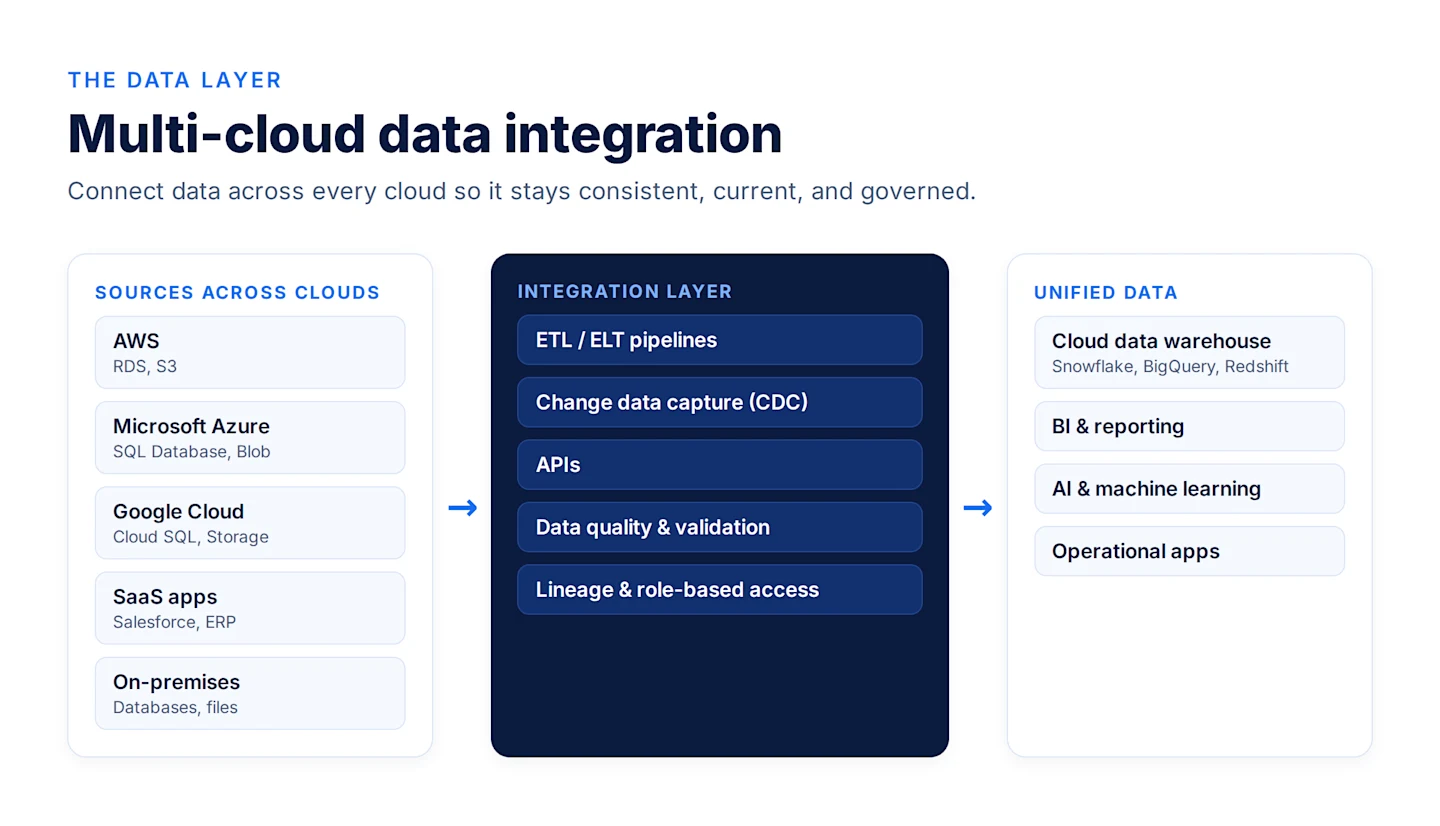
A multi-cloud strategy only pays off if data can move freely between platforms. Otherwise, each cloud becomes another silo, and teams are back to exporting files and reconciling spreadsheets.
Multi-cloud data integration connects data across providers, SaaS applications, and on-premises systems so it is consistent, current, and available wherever it is needed. Common approaches include:
ETL and ELT pipelines that extract data from each source, transform it, and load it into a central warehouse or lake. See what is ETL.
Change data capture (CDC) that replicates only new and changed records between systems in near real time. See change data capture.
APIs that let applications exchange data directly across clouds.
Cloud file and object transfer between storage services such as Amazon S3, Azure Blob Storage, and Google Cloud Storage.
Leverage the power of the cloud with a codeless integration solution
Explore Now
Multi-cloud data integration best practices
Ensure interoperability. Systems across clouds should exchange data continuously, so a change in one is reflected everywhere it matters. Use tools with native connectors rather than custom code for each link.
Keep data portable and visible. Use open formats and document where every dataset lives. Full visibility supports analysis and proves compliance with regulations like GDPR and CCPA.
Build in data quality. High-volume, multi-source environments make errors more likely. Apply validation, deduplication, and cleansing rules in every pipeline to keep data complete, accurate, and consistent.
Track lineage. Record where data came from and how it changed, so teams can trust reports and trace issues quickly.
Minimize data movement. Move only what is needed and process data close to where it lives to control egress costs and latency.
Secure data in transit. Encrypt transfers and restrict pipeline access by role.
For a deeper look, read our guide to cloud data integration.
Multi-cloud management best practices
Use a single pane of glass. Centralize monitoring, logging, and cost reporting so teams see all clouds in one place.
Standardize with infrastructure as code. Define environments in code so they can be deployed consistently on any provider.
Plan and test disaster recovery. Document failover procedures and test them regularly, not just during an outage.
Avoid unnecessary complexity. Each additional provider adds overhead. Add clouds for clear business reasons.
Invest in skills. Train teams on each platform, or use tools that abstract platform differences.
Multi-cloud strategy use cases
Disaster recovery and business continuity: replicate critical systems and data to a second provider.
Data residency: keep regulated data in required regions using whichever provider offers them.
Best-of-breed analytics and AI: run analytics or AI workloads on the platform with the strongest services while operational systems stay elsewhere.
Mergers and acquisitions: integrate acquired companies that run on different clouds without forcing an immediate migration.
Cloud migration: move from on-premises to several clouds in phases. See on-premise to cloud migration and cloud data migration best practices.
How Astera supports your multi-cloud strategy
A multi-cloud strategy is only as strong as the data connecting the clouds. Astera Data Pipeline is an AI-powered, no-code data integration platform that keeps data moving, clean, and governed across AWS, Azure, Google Cloud, SaaS applications, and on-premises systems — without hand-coding a pipeline for every connection.
Astera does not replace your cloud providers or infrastructure tools. It works at the data layer, so the investment in each cloud pays off.
Multi-cloud challenge | How Astera helps |
Data is scattered across clouds and reports don't match | Built-in connectors for Snowflake, Salesforce, Amazon S3, Microsoft Azure, Google Cloud, and more bring data into one analytics layer with ETL and ELT pipelines |
Engineers spend their time maintaining custom scripts | Drag-and-drop, no-code pipeline design lets data teams build and change pipelines without writing code |
Data between systems is out of date | Change data capture (CDC) and event-triggered scheduling keep systems in sync in near real time |
Combined data can't be trusted | Built-in data quality rules and validation catch issues before they reach dashboards or AI models |
Auditors need to know where data came from | Data lineage and role-based access provide a traceable record for GDPR, HIPAA, and internal audits |
Fear of lock-in at the integration layer | One platform works across providers, so moving a workload to another cloud means repointing a connector, not rebuilding pipelines |
Cloud migration is slow | The same pipelines support phased migration from on-premises to one or more clouds |
What it means for each team
IT leaders keep the flexibility they chose multi-cloud for, without recreating lock-in through provider-specific integration tools.
Data and analytics teams build, monitor, and govern every pipeline across clouds from one place, and spend more time delivering insights than fixing scripts.
Data engineers spend less time on maintenance, since pipelines can be built and changed visually in minutes.
Compliance and security teams get consistent lineage, access control, and data quality rules across every cloud.
Finance and FinOps teams reduce point tools and engineering hours, and moving only the data that is needed helps contain egress costs.
Is your multi-cloud data layer ready?
Ask these questions to find the gaps:
Which cloud providers and SaaS apps hold your data, and where does your analytics layer live?
How is data moved between them today: custom code, provider-native tools, or manual exports?
How long does it take to add a new data source or change a pipeline?
How fresh does data need to be for reporting, operations, or AI?
Who owns data quality and lineage, and how would you prove it in an audit?
Are you still migrating systems from on-premises?
If the answers include "custom scripts," "weeks to add a source," or "we can't trace it," your integration layer is holding your multi-cloud strategy back.
Why not just use each cloud's integration tools?
Provider-native tools work best inside their own cloud. A multi-cloud strategy needs an integration layer that connects all of them from one place, applies the same quality and governance rules everywhere, and does not tie your pipelines to a single vendor. Hand-coded pipelines can do the job, but each one becomes something to maintain and depends on the few people who understand it.
See how companies use Astera in our customer case studies.
Get Started with Astera Data Stack to Get Unified Data Access
Begin your journey with Astera Data Stack's 14-day free trial. Seamlessly integrate, manage quality, and govern your data for enhanced business insights.