

There are three types of data marts: dependent, independent, and hybrid. They differ in where the data comes from. A dependent data mart is built from a central data warehouse, an independent data mart pulls directly from source systems, and a hybrid data mart combines both.
This guide explains each type of data mart with examples, compares their pros and cons, and shows how to choose and build the right one.
What is a data mart?
A data mart is a subject-oriented subset of data built for one department or business area, such as sales, finance, or HR. A data warehouse stores enterprise-wide data. A data mart holds only what one team needs. For example, a sales data mart might contain only product, customer, and sales data.
Because they're smaller and focused, data marts draw from fewer sources, such as operational systems, a data lake, a central data repository, or external data. That makes them faster to build and easier to maintain than a full warehouse. For a side-by-side comparison, see data mart vs. data warehouse.
How Do Data Marts Benefit Database Management?
Before we discuss their various types, let’s briefly look at the benefits of data marts and why they are necessary for a data-driven business:
Enable faster data access by retrieving a specific set of data for BI and reporting. As a result, it helps accelerate business intelligence.
They are easier to implement and more cost-effective than building an enterprise data warehouse.
Designed according to the requirements of a particular group of users working in a specific department.
They are comparatively more adaptable than a data warehouse. Any change in the data model can be easily and quickly incorporated into the data mart because of its smaller size.
Allow granular access control rights because of extensive partitioning and segmentation.
In short, they are a lot faster, adaptable, and cost-effective to maintain than a data warehouse. By contrast, data warehouses are created for consolidating data from a myriad of sources (often not in a structured format).
Simplify Data Integration Across Multiple Databases with AI-Driven Automation
Request a Demo
Types of Data Marts
Type | Data source | Pros | Cons | Best for |
Dependent | Central data warehouse | Consistent data, single source of truth, central governance | Needs an existing warehouse; slower to start | Enterprises that need consistency across departments |
Independent | Source systems directly, no warehouse | Fast and cheap to set up; full team control | Data silos and duplication; hard to scale | Small teams or quick, single-purpose projects |
Hybrid | Data warehouse plus other sources | Flexible; adds new sources quickly | More complex to design and govern | Teams that need warehouse data plus new or ad hoc sources |
1. Dependent data mart
A dependent data mart is built from an existing enterprise data warehouse. Data is extracted from source systems, cleansed and integrated in the warehouse through the ETL process, and then loaded into each department's mart. This top-down approach gives every team the same consistent, trusted data.
There are two ways to build a dependent data mart:
Physical data mart: a separate copy of a subset of warehouse data, stored in its own tables or database. It's fast to query but adds storage.
Logical (virtual) data mart: a set of views on top of the warehouse. There's no extra copy of the data, but queries run against the warehouse itself.
Example: a retailer's enterprise data warehouse feeds separate sales, finance, and HR data marts. All three use the same customer and product definitions, so reports match across departments.
2. Independent data mart
An independent data mart is built without a central data warehouse. It pulls data directly from operational systems or external sources, and its analysis runs separately from any other data store. This is common for smaller teams or projects that need results quickly.
The trade-off is scale. As more independent data marts are created, each keeps its own copy of shared data, which leads to redundancy, conflicting numbers, and data silos. Because they read directly from operational files and tables, they also limit how far decision support systems can grow.
Example: a marketing team builds a data mart from its CRM and ad platforms to track campaign performance, without waiting for a company-wide warehouse.
3. Hybrid data mart
A hybrid data mart combines data from a data warehouse with data from other operational sources. It blends the consistency of a dependent data mart with the speed and flexibility of an independent one.
Hybrid data marts are useful when a team needs data that isn't in the warehouse yet, such as when adding a new business unit, product line, or data source. They suit businesses with several databases that need a quick turnaround.
Example: a product team uses finance data from the warehouse plus new usage data from a recently launched app, which hasn't been added to the warehouse yet.
How to choose the right type of data mart
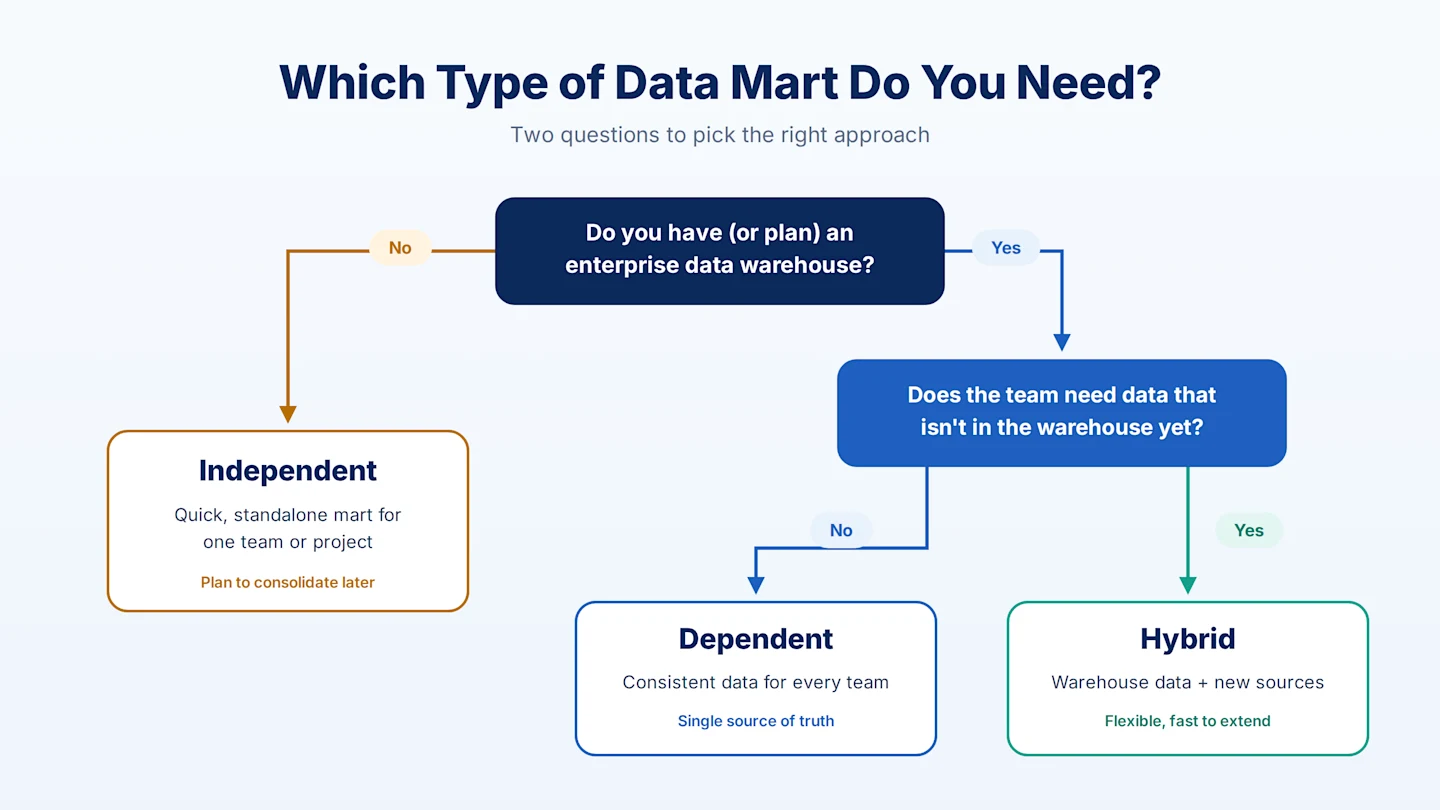
Two questions usually decide it:
Do you have (or plan) an enterprise data warehouse? If not, an independent data mart is the fastest option. Plan to consolidate later so marts don't multiply into silos.
Does the team need data that isn't in the warehouse yet? If not, choose a dependent data mart for full consistency. If yes, a hybrid data mart lets you add the new sources without waiting.
Data mart examples by department
Department | Typical data | Questions it answers |
Sales | Orders, products, customers, regions | Which products and regions drive revenue? |
Finance | General ledger, invoices, budgets | How do actuals compare to budget? |
Marketing | Campaigns, leads, web and ad data | Which channels produce the best leads? |
HR | Headcount, payroll, performance | Where is attrition highest? |
Supply chain | Inventory, suppliers, shipments | Which suppliers cause delays? |
Data mart structure: star and snowflake schemas
Most data marts use a dimensional model. Fact tables hold measurable events, such as sales, and dimension tables describe them, such as product, customer, and date. The two common layouts are the star schema, which is simpler and faster to query, and the snowflake schema, which normalizes dimensions to reduce redundancy. See star schema vs. snowflake schema and our dimensional modeling guide for details.
How to build a data mart in 5 steps
Here's the process at a high level. For design patterns and scalability tips, see our guide to data mart architecture.
1. Design
The first step is to create a robust design. Some critical processes involved in this phase are:
Collecting the corporate and technical requirements.
Identifying data sources.
Choosing a suitable data subset.
Designing the logical layout (database schema) and physical structure.
2. Build/Construct
The next step in the process is to construct the data mart. This includes creating the physical database and the logical structures. In this phase, you’ll build the fact tables, dimension tables, fields, indexes, and access controls.
3. Populate/Data Transfer
The next step is to populate the mart, which means transferring data into it. In this phase, you can also set the frequency of data transfer, such as daily or weekly. This step usually involves:
Extracting source information.
Cleaning and transforming the data.
Loading the data into the departmental repository.
Building the metadata and storing it.
4. Data Access
In this step, the data loaded into the data mart is used in querying, generating reports, graphs, and publishing. The main tasks involved in this phase are:
Setting up a meta-layer and translating database structures and item names into corporate expressions so that non-technical operators can easily use the data mart.
Setting up and maintaining database structures.
If necessary, you can also set up API and interfaces to simplify data access.
5. Manage
The last step involves management and observation, which includes:
Controlling ongoing user access.
Optimization and refinement of the target system for improved performance.
Addition and management of new data into the repository.
Configuring recovery settings and ensuring system availability in the event of failure.
Data Marts in the Cloud
Many organizations now run data marts inside a cloud data warehouse. Instead of a separate server, a data mart is often a dedicated schema or set of views within the warehouse. This makes it easier to scale storage and compute as data grows.
Cloud-based data marts offer:
Elastic scaling and pay-as-you-go costs
On-demand access to data from anywhere
Easier connections to cloud-native sources and destinations
Near real-time analytics when paired with incremental loading
The Bottom Line
A data mart gives each team fast, focused access to the data it needs, at a fraction of the cost and time of a full data warehouse. Astera Data Warehouse Builder helps you design, build, and populate dependent, independent, or hybrid data marts with automated dimensional modeling and no-code data pipelines.
Start a free trial to see how quickly you can build your first data mart.
Streamline Your Data Mart Management
Free Trial