

Agentic AI security is the set of controls that keep AI agents from accessing, changing, or sharing more than they should. It covers who an agent acts for, which data and tools it can use, which actions need approval, and how its activity is recorded and reviewed.
AI agents are moving from pilots into daily operations. They read invoices, update records, answer customers, and trigger workflows across business systems. That is exactly what makes them useful, and it is also why they need a security and governance plan of their own.
This guide explains the main risks, the governance basics, and the controls that matter most. It ends with a practical checklist your business and IT teams can use together, plus approval patterns matched to risk level.
What is agentic AI security?
Agentic AI security protects the systems, data, and people that an AI agent can reach. An AI agent is software that uses a large language model (LLM) to plan steps, call tools, and act toward a goal with limited human direction. If you are new to the concept, start with what AI agents are.
Traditional application security asks whether a user is allowed to do something. AI agent security asks a harder set of questions:
Who is the agent acting for? A specific user, a team, or the business as a whole.
What can it reach? Which databases, documents, APIs, and applications.
What can it do there? Read only, or also create, update, delete, send, or pay.
When does a person step in? Which actions run on their own and which wait for approval.
What is the record? How every prompt, tool call, and result is logged for later review.
Governance is the other half. It sets the ownership, policies, and review cycles that decide those answers and keep them current. Security without governance tends to drift, and governance without security controls stays on paper. Good programs treat them as one effort.
Why do AI agents need different security from chatbots?
AI agents need different security because they do more than answer. A chatbot produces text that a person reads and decides what to do with. An agent can act on that text itself, often across several systems in one run.
Three differences change the security picture:
Agents use tools. They call APIs, run queries, send emails, and fill forms. A wrong answer from a chatbot is a wrong sentence. A wrong decision from an agent can be a wrong record, payment, or message.
Agents access data. To be useful, an agent connects to CRMs, ERPs, document stores, and data warehouses. Each connection widens what a mistake or a manipulated input can expose. Our guide to AI agents and enterprise data covers this in more depth.
Agents take actions in sequence. An agent plans, acts, observes the result, and plans again. Small errors can compound across steps, and a chain of reasonable-looking actions can still end somewhere no one intended.
The practical takeaway: secure the agent the way you would secure a new employee or a service account with real permissions, not the way you would secure a search box. The way you design the agent matters too, and our overview of agentic architecture explains where guardrails fit in the overall design.
What are the biggest security risks of AI agents?
The biggest AI agent risks are excessive permissions, manipulated inputs, data leakage, unreliable tool use, and unmonitored actions. Each one maps to risks named in the OWASP Top 10 for LLM Applications (2025) and the OWASP Top 10 for Agentic Applications for 2026, published in December 2025.
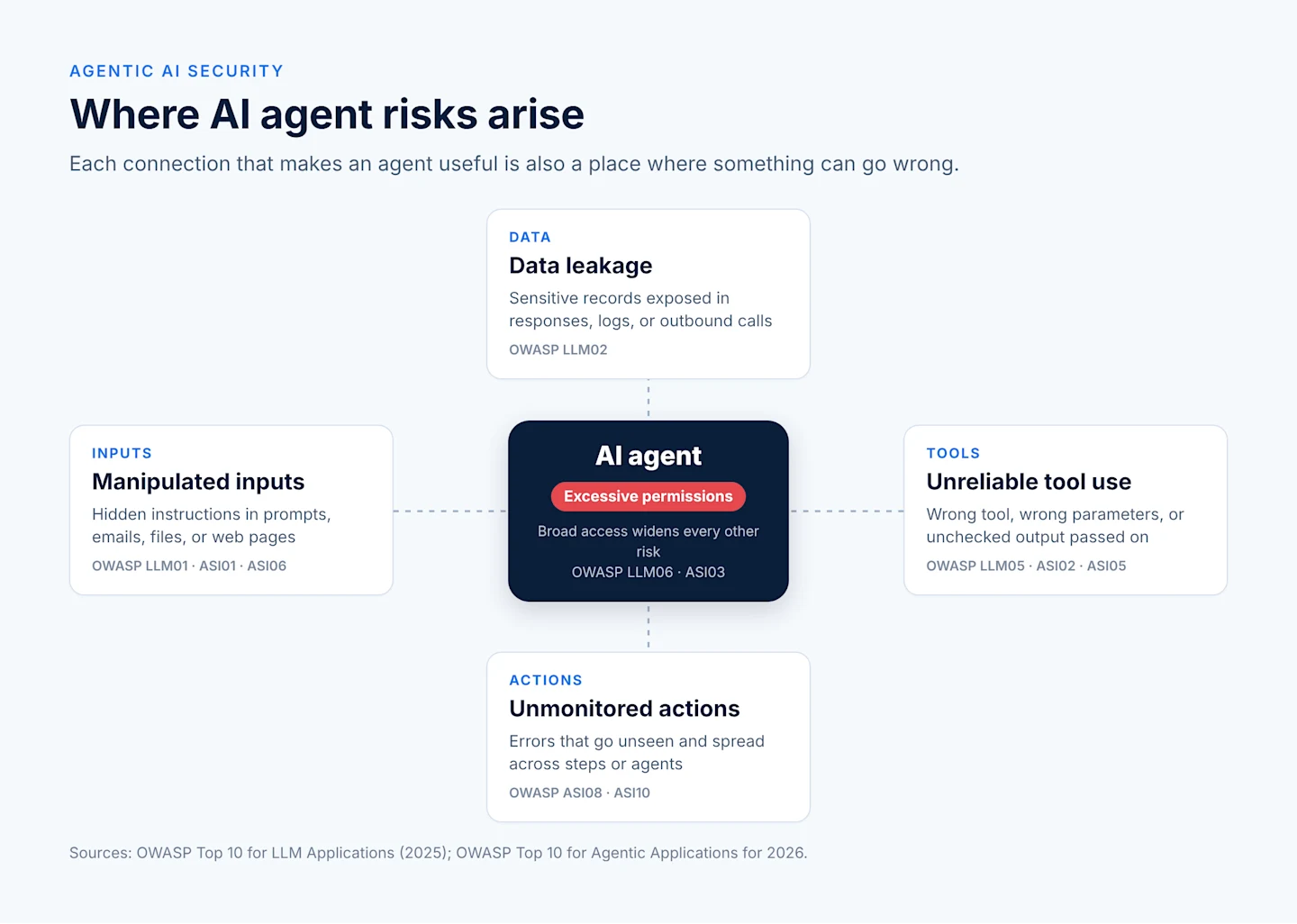
Excessive permissions
An agent is often given broad access during a pilot so it "just works," and that access is never narrowed. If the agent is tricked or makes a mistake, it can do anything its credentials allow. OWASP calls this excessive agency (LLM06) and, for agents, identity and privilege abuse (ASI03).
Manipulated inputs (prompt injection)
Prompt injection happens when text the agent reads carries instructions it should not follow. The text can come from a user, but it can also hide in an email, a web page, a PDF, or a database field the agent processes. Because agents act, a successful injection can redirect a whole task. OWASP lists prompt injection as LLM01 and agent goal hijack as ASI01.
Data leakage
Agents can surface sensitive information to the wrong person, include it in a response, or send it to an outside service. This covers customer records, financial data, credentials, and internal instructions. OWASP tracks this as sensitive information disclosure (LLM02).
Unreliable tool use
Agents can call the right tool with the wrong parameters, call the wrong tool, or treat a confident but wrong model output as fact. Unchecked output passed straight into another system is a known weakness, listed as improper output handling (LLM05) and tool misuse and exploitation (ASI02).
Unmonitored actions
When no one can see what an agent did, small errors go unnoticed and larger ones are hard to investigate. In multi-agent setups, one faulty step can spread to others, which OWASP describes as cascading failures (ASI08).
Risk | Where it shows up | OWASP reference |
|---|---|---|
Excessive permissions | Credentials, API scopes, service accounts | LLM06, ASI03 |
Manipulated inputs | Prompts, documents, emails, web content, memory | LLM01, ASI01, ASI06 |
Data leakage | Responses, logs, outbound calls | LLM02 |
Unreliable tool use | API calls, queries, generated code | LLM05, ASI02, ASI05 |
Unmonitored actions | Multi-step runs, agent-to-agent handoffs | ASI08, ASI10 |
How do you govern AI agents?
You govern AI agents by giving each one a named owner, a written policy for what it may do, an approval process for changes, and a regular audit of what it actually did. The NIST AI Risk Management Framework (AI RMF 1.0), released in January 2023, organizes this work into four functions: Govern, Map, Measure, and Manage. NIST added a Generative AI Profile (NIST AI 600-1) in July 2024 with guidance specific to generative models.
For most teams, AI agent governance comes down to four basics.
Ownership
Every agent needs a business owner who is accountable for its purpose and outcomes, and a technical owner who maintains it. Keep an inventory that lists each agent, its owners, the systems it connects to, and its risk level. An agent without an owner is the one most likely to keep running long after anyone remembers why.
Policies
Write down what each agent is for and what it must not do. A short policy can cover allowed data, allowed actions, prohibited actions, escalation rules, and retention of logs. Keep it in plain language so business owners can review it, not only engineers.
Approvals
Treat agent changes like software releases. New tools, new data sources, wider permissions, and model or prompt changes should go through review before they reach production. Higher-risk agents warrant sign-off from security, data owners, and, where relevant, legal or compliance.
Audit
Schedule reviews of agent activity and permissions, for example quarterly for high-risk agents. Check that access still matches the policy, that approvals happened as designed, and that incidents were handled and learned from.
What are the core controls for securing AI agents?
The core controls for securing AI agents are least-privilege access, a distinct identity per agent, clear data boundaries, guardrails on inputs and outputs, validation of every tool call, and rate limits. They work best in layers, so that if one control misses something, the next one catches it.
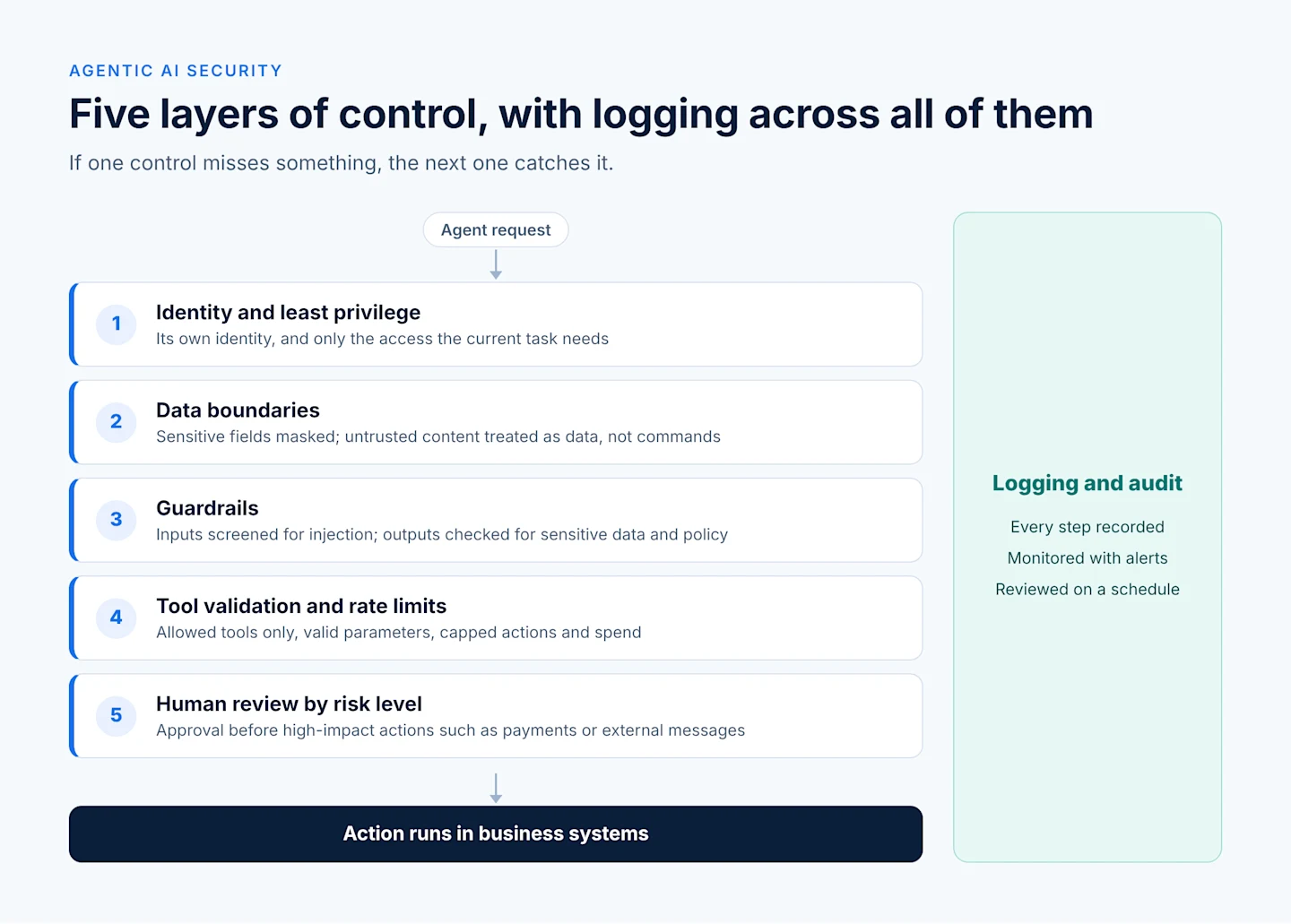
Each layer narrows what a mistake or a manipulated input can do, and logging runs alongside all of them.
Least-privilege access
Least privilege means an AI agent gets only the permissions it needs for its current task, and nothing more. In practice:
Grant read-only access by default and add write access action by action.
Scope API keys and database roles to specific tables, fields, or endpoints.
Prefer short-lived credentials over long-lived keys.
Remove permissions the agent has not used in a set period.
These AI agent permissions should be reviewed whenever the agent's job changes.
Identity
Give each agent its own identity rather than sharing a human user's login or a general service account. A distinct identity makes it possible to grant, limit, and revoke access for that agent alone, and to tell its actions apart in logs. When an agent acts on behalf of a user, it should carry that user's permissions, not exceed them.
Data boundaries
Decide which data an agent may see, which it may change, and which must never leave a given environment. Mask or exclude sensitive fields the task does not need. Separate trusted instructions (your system prompt and policy) from untrusted content (emails, uploads, web pages) so the agent treats the second as data, not commands.
Guardrails
AI agent guardrails are rules that check what goes into and comes out of the model. Input guardrails screen for injection attempts and off-topic requests. Output guardrails check for sensitive data, policy violations, and responses outside the agent's scope. Guardrails reduce risk but do not remove it, which is why they sit alongside the other controls rather than replacing them.
Validation
Validate every tool call before it runs. Check that parameters match an expected format, values fall within allowed ranges, and the action is on the agent's allowed list. Treat model output passed into code, queries, or other systems with the same care as any untrusted input.
Rate limits
Cap how many actions, tool calls, tokens, or dollars an agent can spend in a given window. Rate limits contain the impact of a loop, a bug, or a manipulated run, and they keep costs predictable. OWASP lists this concern as unbounded consumption (LLM10).
What is human-in-the-loop for AI agents?
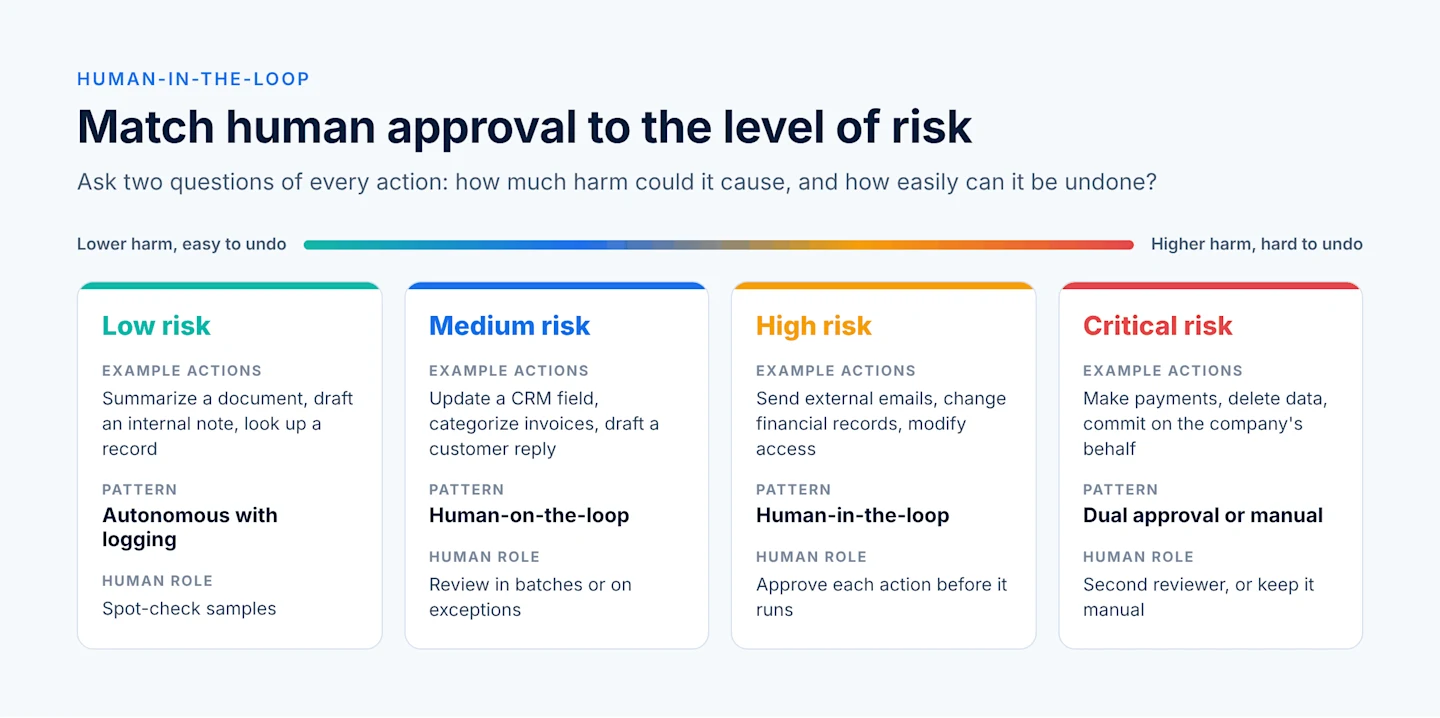
Human-in-the-loop for AI agents means a person reviews or approves certain agent actions before they take effect. The goal is not to approve everything, which slows work and leads to rubber-stamping. The goal is to match the level of human review to the level of risk.
A useful way to decide is to ask two questions about each action: how much harm could it cause, and how easily can it be undone?
Risk level | Example actions | Human role | Pattern |
|---|---|---|---|
Low | Summarize a document, draft an internal note, look up a record | None before the action; spot-check samples | Autonomous with logging |
Medium | Update a CRM field, categorize invoices, draft a customer reply | Review outputs in batches or on exceptions | Human-on-the-loop: monitor and correct |
High | Send external emails, change financial records, modify access | Approve each action before it runs | Human-in-the-loop: approve to proceed |
Critical | Make payments, delete data, sign or commit on the company's behalf | Approve, often with a second reviewer | Dual approval, or keep the action manual |
A few patterns make human review work well in practice:
Show the reviewer the evidence. Display the proposed action, the data it is based on, and the agent's reasoning, so approval is an informed decision.
Set confidence thresholds. Route low-confidence or unusual cases to a person and let routine, high-confidence cases proceed.
Escalate on exceptions. Send anything outside policy, above a value limit, or involving a new counterparty to a human by default.
Revisit the levels. As an agent proves reliable on a task, you can move some actions down a level. When something goes wrong, move them up.
This tiered approach keeps people focused on the decisions that matter, which is where their judgment adds the most value. Our post on agentic workflows shows how review steps fit into a multi-step process.
Should AI agents run on-premises or in the cloud?
AI agents can run securely in the cloud, on-premises, or in a hybrid setup. The right choice depends on where your sensitive data lives, which regulations apply to it, and how much control you need over the model and infrastructure.
Deployment | Good fit when | Points to plan for |
|---|---|---|
Cloud | You want fast setup, elastic scale, and managed services, and your data policies allow it | Data residency, vendor data-use terms, network access to internal systems |
On-premises | Data must stay inside your own environment, or regulations require tight control | Infrastructure, model hosting, and update effort fall on your team |
Hybrid | Some workloads are sensitive and others are not | Clear rules for which data and tasks run where, and consistent controls across both |
Data sovereignty and private AI
Data sovereignty means data is subject to the laws of the country or region where it is stored and processed. For agents, it also raises a practical question: when the agent sends a prompt to an LLM, where does that data go, and is it retained or used for training?
Private AI approaches address this by keeping models and data inside an environment you control, such as an on-premises server or a private cloud tenancy. Many teams combine this with the option to choose their LLM, so a sensitive workload can use a self-hosted model while a low-risk one uses a hosted model.
Whichever deployment you choose, apply the same controls everywhere: least privilege, logging, and human review by risk level. Our article on owning your AI agents discusses the control and privacy trade-offs of building versus renting agents.
How should you log and monitor AI agents?
Log every step an agent takes, monitor those logs for unusual behavior, and keep an audit trail that a reviewer can follow from request to result. Without this record, you cannot investigate an incident, prove compliance, or improve the agent over time.
What to log
The request: who or what started the run, and when.
The context: which data sources and documents the agent read.
The reasoning steps: the plan or intermediate decisions, where available.
Every tool call: the tool, the parameters, and the response.
Approvals: who approved or rejected an action, and when.
The outcome: the final output and any changes made in other systems.
Protect the logs themselves. They can contain sensitive data, so apply access controls, masking, and a retention policy to them as well.
What to monitor
Spikes in tool calls, errors, or spend.
Access to data or tools the agent rarely uses.
Repeated guardrail blocks, which can signal an injection attempt.
Rising rates of human rejections, which can signal a drop in quality.
Set alerts for the patterns that matter most and give someone clear responsibility for responding. Also make sure you can pause or disable an agent quickly. A tested off switch is one of the most valuable controls you can have.
Audit trails
An audit trail ties the logs together into a story a reviewer can follow: this request led to these steps, this person approved this action, and this record changed as a result. Good audit trails support internal reviews, customer questions, and regulatory requests, and they make periodic governance audits much faster.
Agentic AI security checklist
Use this checklist before an agent goes live and at each periodic review. It is written so business owners and IT can work through it together, with a suggested owner for each control.
Control | Question to ask | Suggested owner |
|---|---|---|
Inventory | Is this agent listed with its purpose, systems, and risk level? | AI or platform lead |
Ownership | Does it have a named business owner and technical owner? | Business sponsor |
Policy | Is there a written policy for allowed data, allowed actions, and prohibited actions? | Business owner with security |
Identity | Does the agent have its own identity, separate from human users? | IT / identity team |
Least privilege | Does it have only the permissions its current task needs? | IT / security |
Credentials | Are keys scoped, stored securely, and rotated or short-lived? | Security |
Data boundaries | Are sensitive fields masked or excluded, and is untrusted content kept separate from instructions? | Data owner |
Guardrails | Are inputs screened and outputs checked for sensitive data and policy breaches? | AI engineering |
Tool validation | Is every tool call checked against an allowed list and expected parameters? | AI engineering |
Rate limits | Are there caps on actions, tokens, and spend per run and per day? | AI engineering |
Human review | Is each action assigned a risk level with a matching approval pattern? | Business owner |
Deployment | Does the deployment (cloud, on-premises, hybrid) meet data residency and privacy needs? | IT / compliance |
Model and vendor terms | Do LLM provider terms on data retention and training use meet your policy? | Legal / procurement |
Logging | Are requests, tool calls, approvals, and outcomes logged and protected? | IT / security |
Monitoring | Are alerts set for unusual activity, with a named responder? | Security operations |
Off switch | Can the agent be paused or disabled quickly, and has that been tested? | Technical owner |
Testing | Has the agent been tested against prompt injection and misuse before launch? | Security |
Change control | Do new tools, data, prompts, or models go through review before production? | Technical owner |
Audit | Is there a scheduled review of permissions and activity? | Governance or risk team |
Tip: start with your highest-risk agent and work through the list in a single working session. Gaps you find there are usually present in other agents too.
Common challenges and how to approach them
Most teams run into the same handful of challenges when they secure AI agents. Each one has a practical way forward.
Agents spread faster than governance. Teams across the business may build agents on their own. Start with a lightweight inventory and a short intake form rather than a heavy approval process. Visibility comes first; controls follow.
Approval fatigue. Asking people to approve every action leads to quick, unexamined clicks. Use the risk tiers above so humans review only the actions that warrant it, and give them the context to decide well.
Prompt injection has no complete fix. Guardrails help, but no filter catches every attack. Plan for that by limiting what a manipulated agent could do: least privilege, tool validation, and approvals on high-impact actions.
Permissions creep over time. Access granted for a one-time task often stays. Schedule permission reviews and remove unused access automatically where your tools allow it.
Hard to test non-deterministic behavior. Agents may respond differently to the same input. Build a set of test scenarios, including misuse cases, and run them after every change to prompts, tools, or models.
Unclear ownership across teams. Security, data, and business teams each own part of the picture. A short responsibility matrix, like the owner column in the checklist, prevents gaps. For a wider view of these decisions, see our 7 key considerations for enterprise AI agents.
How Astera approaches agentic AI security
Astera built its AI Agent Builder around one principle: you control the data, so you control the agent. The controls in this guide are easier to apply when the platform you build on supports them from the start.
Agents never exceed their user's reach. Each agent runs under the permissions of the user who invoked it, with role-based, default-deny access down to individual columns, MCP tools, and skills.
Metadata first, data only by choice. By default, the LLM sees schema and structure, not row data. Data is shared only when a user chooses to, and it stays inside your environment. Astera does not train models on customer prompts, content, or outputs.
The model reasons; Astera acts. Tools run inside Astera, never by the LLM itself, and agent-generated Python runs in an isolated sandbox.
Human review built in. Actions that change state or modify production artifacts need user confirmation, and agent output is versioned and editable.
Logging you own. Agent activity, including the user, model, tools called, and artifacts changed, is logged in append-only records stored in your own environment.
Deploy and choose your model. Run with a hyperscaler-hosted model, your own provider account (bring your own key), or a self-hosted model on-premises or in a private cloud, without rebuilding agents.
If you are planning agents for your organization and want governance built in from day one, join the AI Agent Builder waitlist or talk to our team.