

Cha-ching! A new invoice lands in your finance team's stack of documents to process. The team begins the journey of reviewing, verifying, and entering data.
The need for an efficient system becomes clear as invoices pile up. This is where Artificial Intelligence (AI) invoice processing comes into play. AI can boost your finance team's efficiency and ensure your company's financial workflows run smoothly. It can streamline workflows, improve accuracy, and allow your finance team to automate repetitive tasks.
Let's go over why AI invoice processing is a must-have for your financial team.
What is AI Invoice Processing?

AI invoice processing is the use of Artificial Intelligence to automatically read, extract, and process information from invoices. AI can quickly scan and capture details like invoice numbers, amounts, and dates without human intervention. It works by recognizing patterns in the document, even when invoice formats vary, and organizes the data in a system for further use.
For accounts payable teams, AI is the engine that makes end-to-end accounts payable automation possible. Instead of relying on one template per vendor, an AI model understands what an invoice number, due date or line item is, wherever it sits on the page. So new vendors and new layouts don't break the workflow.
AI can sort hundreds of invoices in a matter of minutes. It can be a game-changer for businesses, making them more productive by freeing up employees' to-do lists for only the most important tasks.
Experience AI Invoice Processing with Astera
Astera's no-code AI document processing solution can help you reduce time, cut costs, and boost accuracy.

Why Does Your Finance Team Need AI-Powered Invoice Processing?
AI Accelerates the Design Process
AI can free your finance team of the time-consuming task of template creation. With AI taking over invoice processing, the system does it all, including handling different invoice layouts, extracting data, and more. The best part is that if your chosen AI invoice processing solution has AI extraction capabilities, your finance team doesn't even need to specify the file type/file format that needs to be processed.
AI Lowers Operational Costs
According to Business Insider, around 44% of businesses plan on automating their payable processes due to its cost-cutting benefits. One way AI invoice processing can help your finance team trim the fat on operational costs is by reducing the need for extra hands. The elimination of the manual effort ensures fewer resources are required and empowers your team to focus on other important tasks without the need for additional hires.
AI Boosts Data Privacy & Security
Use of AI can also help your finance team lower the chances of data mishandling and fraud. Automation boosts the security of sensitive information by lowering human touchpoints and ensuring the invoices are processed securely. You can also reduce the risk of compliance issues related to data protection regulations by transferring the task of handling sensitive data to AI.
AI Enables Scalability
Onboarding new vendors? Handling more complex workflows? AI can adapt to it all without requiring a redesign. This helps ensure your finance workflows run smoothly even as your business scales. Your system can accommodate more invoices, vendors, and transactions without any hiccups.
AI-powered Extraction Integrates Smoothly with Existing Systems
Another key perk of AI-driven tools is that they don't disrupt your existing systems. They blend effortlessly into your current workflows. This leaves room for no errors, ensures faster approvals, and gives your team more time to focus on priority tasks.
AI Adapts to Different Invoice Formats
AI can adapt to any file format you throw at it, including digital and scanned PDFs, Excel, delimited files, etc. It takes varied source formats and layouts and converts them into a unified format. This helps ensure consistency across financial processes and simplifies data management. Manual adjustments are no longer necessary, improving consistency across your finance team.
AI-powered Invoice Processing Prevents Payment of Duplicate Invoices
AI-powered invoice processing ensures no duplicate invoice slips through the cracks. Each invoice can be checked against your database to ensure it hasn't already been paid. This system helps strengthen your cash flow system and offers peace of mind and added financial control.
AI vs. OCR vs. RPA
OCR simply converts an image to text. RPA automates repetitive, rule-based clicks but doesn't understand what it's processing. AI goes further: it reads context, adapts to new invoice layouts, and makes judgment calls neither OCR nor RPA can. If your invoice workflow still relies on fixed scripts, see how RPA holds up against true AI-driven automation. To compare tools for the extraction step, see our guide to invoice data extraction software.
AI Invoice Processing with Astera
Astera processes invoices with its AI engine, LLM Generate. It reads an invoice as text, then uses a language model to pull out the fields you need — invoice number, dates, supplier, line items, and totals — and returns them as structured data.
Because it works from what the fields mean rather than from a fixed template, it handles invoices from new vendors and new layouts without a separate setup for each one.
No template per vendor: Template-less extraction reads an invoice even when the layout is one it hasn’t seen before, so onboarding a new supplier doesn’t break the workflow.
Scanned and digital files: Paired with OCR, it reads scanned PDFs as well as digital ones, and handles multi-page invoices whose tables run across pages.
Your choice of model: LLM Generate works with providers like OpenAI and Llama, as well as your own custom model.
Structured output, ready to use: It returns clean, structured data — for example JSON with line items — that you can validate and load into your ERP, database, or files.
Runs as a repeatable workflow: Extraction sits inside an Astera data pipeline, so capture, extraction, validation, and delivery run together on a schedule instead of as manual steps.
The result is an invoice workflow that keeps working as your vendors and formats change.
Steps Involved in AI Invoice Processing Using Astera
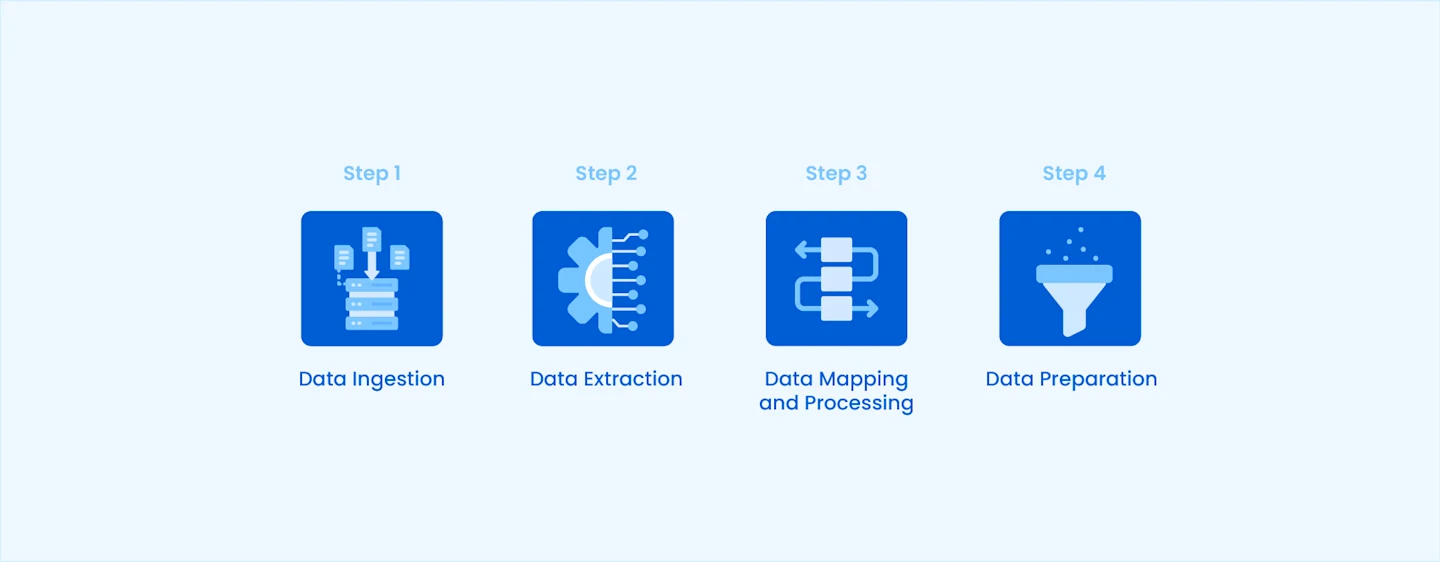
Step #1 Data Ingestion
Ingest the invoice details into the Astera AI invoice processing solution. This process usually just requires you to perform a simple drag and drop and provide the file path. From here, Astera intelligence takes over further tasks.
Once you feed the invoice into the solution, Astera intelligence works its magic by converting the file contents to text regardless of the file type.
Step #2 Data Extraction
Once the data ingestion is complete, you can drag and drop the LLM Generate feature for invoice extraction. All you have to do is input the text from the previous step into LLM along with the prompt to get the output.
Step #3 Data Mapping and Processing
Once the data extraction is completed, the extracted data is passed onto a mapping engine. Here, the data is converted from the invoice format into your preferred structure before continuing to data preparation.
Step #4 Data Preparation
This is the final step in AI invoice processing where you can perform data cleaning and validate the data to ensure that it is accurate and has been extracted correctly.
Summing Up
Cha-ching! Another invoice lands in your finance team's stack of documents. However, this time, your team does not have to go on the journey of reviewing, verifying, and entering data. AI-powered invoice processing can take over all these tasks, making the process smoother and faster. Start a free trial of our AI invoice processing solution today!