

Accounts payable fraud happens when someone uses the AP process to get a company to pay money it shouldn’t. This threat typically involves a fake vendor, an inflated bill, a duplicate payment, or money sent to the wrong bank account. Many of the checks that stop it can run automatically with accounts payable automation.
It is also an incredibly common threat. According to the AFP’s 2026 Payments Fraud and Control Survey, 76% of US organizations faced attempted or actual payments fraud in 2025.
Most AP teams miss these threats because they review invoices one at a time. It is easy to spot a clerical error on a single page, but fraud does not hide in the math of an isolated document. It hides in the gaps between your separate datasets.
Fortunately, every fraud scheme leaves a digital footprint. This guide breaks down eight types of AP fraud, the specific red flags they leave in your data, and the seven manual or automated checks via AP automation software you can run to catch them before a single dollar leaves the building.
What is Accounts Payable Fraud?
Accounts payable (AP) fraud is a deceptive scheme in which an employee, a supplier, or an outside criminal manipulates a company’s vendor records, invoices, or payments to divert its money.
Fraud vs. An Honest AP Mistake
Deception is what separates fraud from an everyday clerical error. In your financial data, an accidental typo that pays an invoice twice looks almost identical to a deliberately resubmitted invoice.
The critical difference? Fraud is built to repeat and designed to stay hidden.
Because they look so similar on paper, the same data checks will often catch both. When an exception is flagged, it should go to a reviewer for a closer look rather than a quick, unverified fix. Knowing which you’re looking at starts with who commits AP fraud, and what it costs when a scheme goes unnoticed.
Who commits accounts payable fraud, and what does it cost?
Accounts payable fraud risk comes from three groups: insiders, outsiders, and vendors. Insiders include AP clerks, approvers, and managers. Outsiders pose as a vendor or an executive, while dishonest vendors overbill or pay kickbacks to someone inside.
For AP, the scheme that matters most is the billing scheme, where the company pays a fictitious, inflated, or otherwise fraudulent invoice. The ACFE’s Occupational Fraud 2026 study found billing schemes in 21% of the 2,402 cases it examined, with a median loss of $90,000.
The longer a scheme runs, the more it costs. In the same study, cases caught within six months had a median loss of $40,000, while schemes that ran for more than five years cost a median of $1,115,000.
That makes early detection your main lever. It starts with knowing what each scheme looks like in your data.
Spot fraud before the payment run
See how AP automation software captures, checks, and routes every invoice, so red flags surface before money goes out.

Types of accounts payable fraud: 8 common schemes
The eight accounts payable fraud schemes below, from vendor fraud to payment diversion, fall into three groups based on where they leave a red flag. The first two hide in vendor master data, the next four in invoice data, and the last two in payment data.
For each scheme, you’ll see how it works, an example, and the red flag a data rule can check. Seven examples are real cases from US Department of Justice (DOJ) announcements, and two are illustrative.
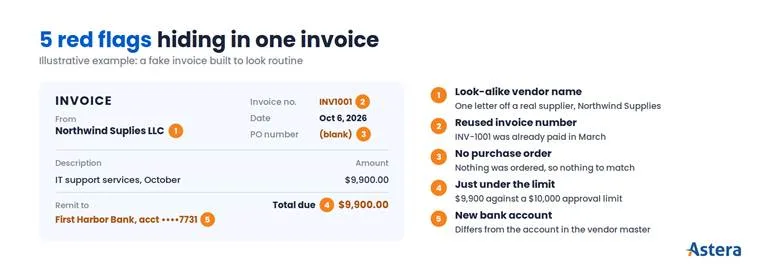
1. Fictitious (shell) vendor fraud
An employee creates a vendor that doesn’t exist, then pays it for goods or services that were never delivered. Because the insider controls the vendor record, the invoices look routine to everyone else.
Example: In 2026, a former assistant treasurer at Bridgestone Americas pleaded guilty to creating a company called “Paymt-Tech, LLC.” He used it to bill Bridgestone for monthly “service charges,” and between 2020 and 2024 the scheme cost the company $14,923,978.57.
In a similar case at Tailored Brands, the parent company of Men’s Wearhouse, an executive submitted and approved invoices from her own fake vendor. She took more than $1.7 million over about eight years before an internal audit caught it.
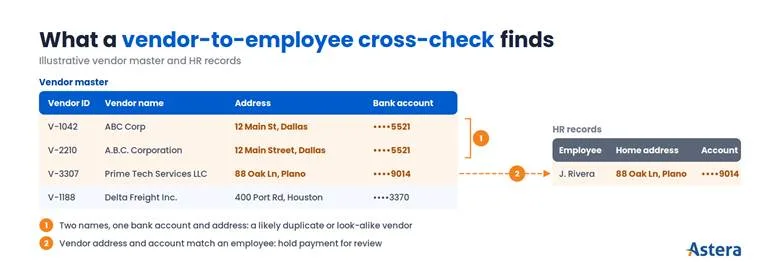
Red flag in the data: The vendor shares a bank account, address, or phone number with an employee, and it has no PO history. The vendor master cleanup and vendor-to-employee cross-check below both catch it.
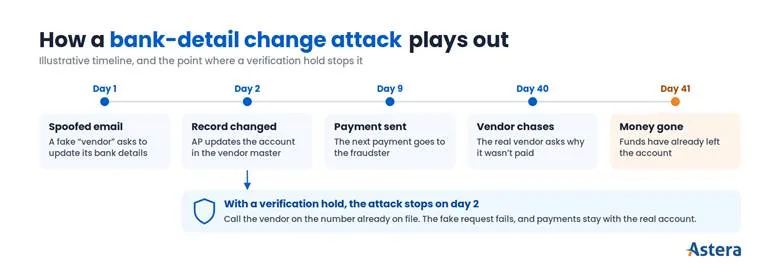
2. Vendor impersonation and bank-detail change fraud
A fraudster poses as one of your real vendors and asks your AP team to send future payments to a new bank account. The next payment goes straight to the fraudster. The real vendor usually notices only when it chases the unpaid invoice.
Example: A Mississippi utility trailer company received spoofed emails that seemed to come from a known supplier. It wired $927,080 to accounts the fraudsters controlled.
Red flag in the data: A vendor’s bank details changed shortly before a payment, usually at the request of an email. Logging every bank-detail change and holding payments until someone verifies it stops this scheme.
3. Duplicate invoice fraud
The same invoice gets paid twice. Sometimes it’s an honest mistake. Other times, someone resubmits the invoice on purpose with one character changed in the invoice number, so it slips past a manual check.
Example: Invoice INV-1001 for $8,400 is paid in March. In April, the same invoice arrives by email as INV1001 and gets entered again.
Red flag in the data: Two invoices share a vendor, an amount, and a close date, with invoice numbers that differ by a dash or a space. A duplicate check that normalizes invoice numbers first catches it.
4. Fake or inflated invoices
A vendor or an employee bills for more than was agreed, or for goods that never arrived. It’s invoice fraud in its plainest form, and some fake invoices are made to look like they came from a real supplier.
Example: In 2023, a procurement manager at a Manhattan company pleaded guilty to paying about 40 fake invoices worth about $4.4 million. The money went to companies with names only slightly different from real suppliers.
Red flag in the data: The invoice has no matching PO or receipt, the price is above the PO, or the vendor name nearly matches a real supplier. Two- and three-way matching and a clean vendor master catch it.
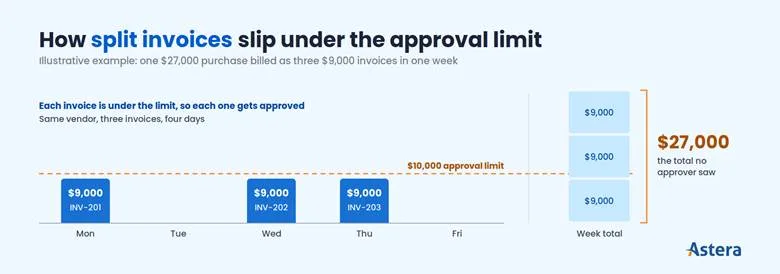
5. Split invoices and threshold avoidance
Someone splits a purchase into several smaller invoices so each one stays under an approval limit. No single invoice looks unusual, so the approver who should see the total never does.
Example: With a $10,000 approval limit, a $27,000 purchase arrives as three $9,000 invoices from the same vendor in the same week.
Red flag in the data: Several invoices from one vendor land just under the approval limit within a few days. Monitoring payment patterns for clusters under the limit catches it.
6. Kickback schemes
An employee steers business to a vendor, approves its padded invoices, and takes a cut of the payments. Each invoice looks normal on its own. The pattern only surfaces when you review several months of invoices together.
Example: In April 2026, a regional president at an industrial explosives company pleaded guilty to having a supplier inflate or fake 373 invoices. Between 2016 and 2023, the company paid that supplier about $2.43 million, and he took about $400,000 of it.
Red flag in the data: One vendor’s prices or volumes keep climbing for months, usually under the same approver. Matching against PO prices and tracking spend trends by vendor catch it.
7. Business email compromise (BEC)
In business email compromise, criminals hack or fake an executive’s or a vendor’s email account. They use it to request an urgent payment outside the normal payment run. Because the email comes from a familiar address, the request often skips the usual checks.
Example: In April 2026, 25 defendants were convicted in a scheme that hacked email accounts and studied how each victim did business. The group then sent payment requests that looked genuine. More than 1,000 victims lost about $215 million.
Red flag in the data: An off-cycle payment goes to a payee that isn’t in the vendor master or has never been paid before. Validation rules before the ERP and payment monitoring both flag it.
8. Check tampering and payment diversion
Someone steals, alters, or forges checks, or quietly redirects supplier payments to their own account. ACFE’s 2026 study found check and payment tampering in 10% of cases, with a median loss of $114,000.
Example: An HR manager who also handled AP at a Spokane Valley small business redirected supplier payments to her own accounts. She took over $1 million between 2023 and 2025 and was sentenced to 33 months in October 2026.
Red flag in the data: A cleared check doesn’t match the check file you issued, or a payment lands in an account that isn’t on the vendor record. Positive pay with your bank and payment monitoring catch it.
See where each scheme enters AP
Follow an invoice through the AP process, from supplier setup to payment, with the checks that belong at each step.
Why does accounts payable fraud detection fail?
Every scheme above leaves a red flag, yet frauds in ACFE’s 2026 study ran a median of 12 months before anyone noticed. Accounts payable fraud detection usually fails because no one checks the data as a whole.
Teams review each invoice on its own, but they rarely compare vendor records, invoices, and payments with each other. Four gaps keep it that way:
Invoice data is trapped in documents. Staff key in PDFs, scans, and email attachments by hand, so those fields never get compared with anything. Automated invoice capture turns those documents into data a rule can check.
Vendor master data is messy. Years of duplicates, outdated bank details, and inconsistent names (“ABC Corp” vs. “A.B.C. Corporation”) give fake and duplicate vendors a place to hide. Good vendor master data management closes that gap.
Systems are siloed. Invoices, POs, receipts, and vendor records often live in different systems, so matching them is manual, partial, or skipped.
Volume beats manual review. A team processing thousands of invoices a month can only spot-check a sample, and schemes survive by staying outside it.
Closing these gaps pays off. ACFE’s 2026 study found that organizations using proactive data monitoring had 53% lower median losses ($70,000 vs. $150,000). They also caught fraud 44% faster, in a median of 9 months instead of 16.
Stop AP fraud at the data layer
Extract, validate, and check invoices against purchase orders before they reach your ERP, with ReportMiner.
How do you prevent accounts payable fraud? 7 data-quality methods
Seven data-quality methods close those gaps by checking vendor, invoice, and payment data before money goes out. They follow the path an invoice takes through AP, from capture to payment, and the table shows which schemes each one targets.
Method | Schemes it stops |
1. Capture invoice data accurately | All of them, because every check depends on clean fields |
2. Validate before data enters the ERP | Fake invoices, BEC payments to unknown payees |
3. Clean and deduplicate the vendor master | Fictitious vendors, look-alike vendors, fake invoices |
4. Cross-check vendors against employees | Fictitious vendors set up by insiders |
5. Detect duplicate invoices | Duplicate invoice fraud |
6. Automate two- and three-way matching | Fake and inflated invoices, kickbacks |
7. Monitor bank changes and payment patterns | Bank-detail fraud, BEC, payment diversion, split invoices, kickbacks |
Where data checks stop AP fraud before payment: extract, validate, check the vendor, find duplicates, match, then pay, with any failed check holding the invoice for review
1. Capture invoice data accurately at the source
Capture the vendor name, invoice number, dates, line items, totals, tax, and bank details from each invoice in a consistent format, instead of retyping them. Accurate invoice data extraction gives every later check reliable fields to compare.
Example rule: An invoice can’t move to approval until every required field is extracted and passes its format check.
2. Apply validation rules before data enters the ERP
Once the fields are captured, check every invoice before it posts. Required fields must be present, the tax ID must be in a valid format, and line items plus tax must equal the total.
The currency must also be approved, and the PO must exist, be open, and belong to the same vendor. Our guide to data validation explains how to design rules like these.
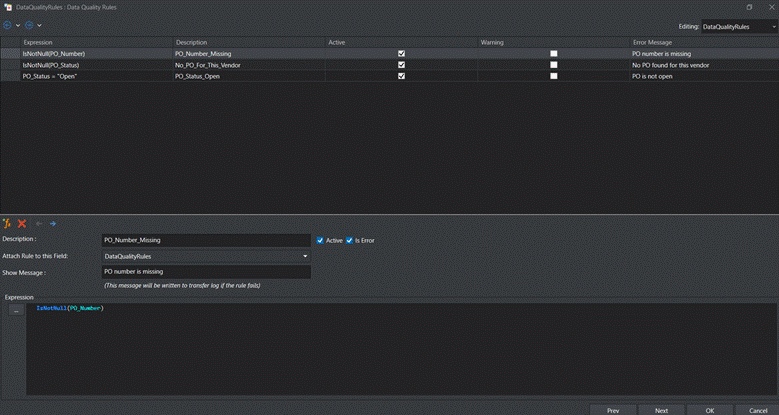
Example rule: Quarantine any invoice that fails a check, with the failed rule attached, so no one quietly fixes it in the ERP. The ReportMiner example near the end of this guide shows three rules like this at work.
3. Clean and deduplicate the vendor master file
Validation checks each invoice, but many schemes hide in the vendor records behind it. Standardize vendor names and addresses (case, punctuation, “Inc.” and “LLC”), merge duplicate records, and deactivate vendors you haven’t paid in a set period. Once names are standardized, look-alike vendors stand out.
Example rule: Flag any two vendors that share a bank account, tax ID, or address. Also flag any new vendor whose standardized name nearly matches an existing one.
4. Cross-check vendor data against employee data
Compare vendor addresses, phone numbers, and bank accounts with HR records, following your company’s privacy and access rules. This check flags possible conflicts of interest and fictitious vendors, like those in the Bridgestone and Tailored Brands cases.
Example rule: Block payment to any vendor whose bank account, address, or phone number matches an active employee record until a second person reviews it.
5. Detect duplicate invoices before duplicate payments go out
Duplicate payments slip through when the same invoice arrives in two slightly different formats. Normalize invoice numbers first. Then compare on vendor, amount, and a date window, not invoice number alone.
Example rule: Block exact matches automatically. Send near-matches (same vendor and amount within 30 days) to a reviewer before the payment run.
6. Automate two- and three-way matching
Match each invoice line against the purchase order and, for goods, the goods receipt. A three-way match confirms the invoice reflects what you ordered and received, at the agreed price.
Example rule: Hold any line whose price differs from the PO by more than your tolerance, or whose billed quantity exceeds the quantity received. There’s no standard tolerance, so set one that fits your spend, such as 2%.
7. Monitor bank-detail changes and payment patterns
Log every change to a vendor’s bank details. Hold payments to the new account until someone verifies the change with a known contact at the vendor.
Then watch the payment file for warning signs: off-cycle payments, round amounts, and first payments to new vendors. Also look for invoices clustered under approval limits and spend that keeps climbing with one vendor.
Example rule: Each month, profile the vendor master for dormant vendors that received payments, and for records the same user both changed and paid.
Good fraud checks start with clean invoice data
Learn how to extract invoice fields and line items accurately from any layout, before they reach your fraud checks.
Which accounts payable fraud prevention controls complement data checks?
Four controls complement data checks: segregation of duties, job rotation, audits with a hotline, and positive pay. They cover what data can’t, such as one person controlling every step of a payment or a check altered after it’s mailed. The AP process guide shows where each fits in the workflow.
Segregation of duties. Separate vendor setup, invoice entry, approval, and payment, so no one person can create a vendor and also pay it.
Job rotation and mandatory vacations. Schemes that need daily upkeep come to light when someone else does the job. ACFE’s 2026 study linked these controls to a 49% lower median loss ($65,000 vs. $128,000).
Regular audits and a reporting hotline. Tips were the most common way fraud was detected, in 43% of ACFE’s 2026 cases. An internal audit uncovered the Tailored Brands scheme.
Positive pay with your bank. Your bank pays only checks that match the check file you issued. This matters because 58% of organizations reported check fraud in the AFP’s 2026 survey.
How does Astera ReportMiner automate AP fraud checks?
Running these checks by hand works for a few hundred invoices a month. Beyond that, they need to run automatically on every invoice, with the same rules each time, a log of every change, and only the exceptions sent to a reviewer. If you're planning that change, our guide on how to automate accounts payable walks through it.
Astera ReportMiner runs these checks at the data layer as it reads each invoice. It holds any invoice that fails a rule before it reaches your ERP.
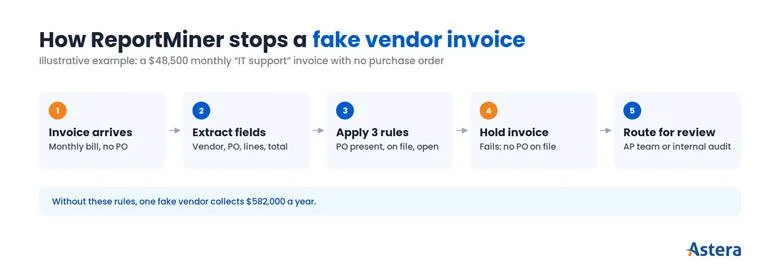
Here’s how that works for the first scheme in this guide, a fictitious vendor. In this illustrative example, a fake vendor sends a $48,500 invoice for “IT support” every month, with no PO behind it.
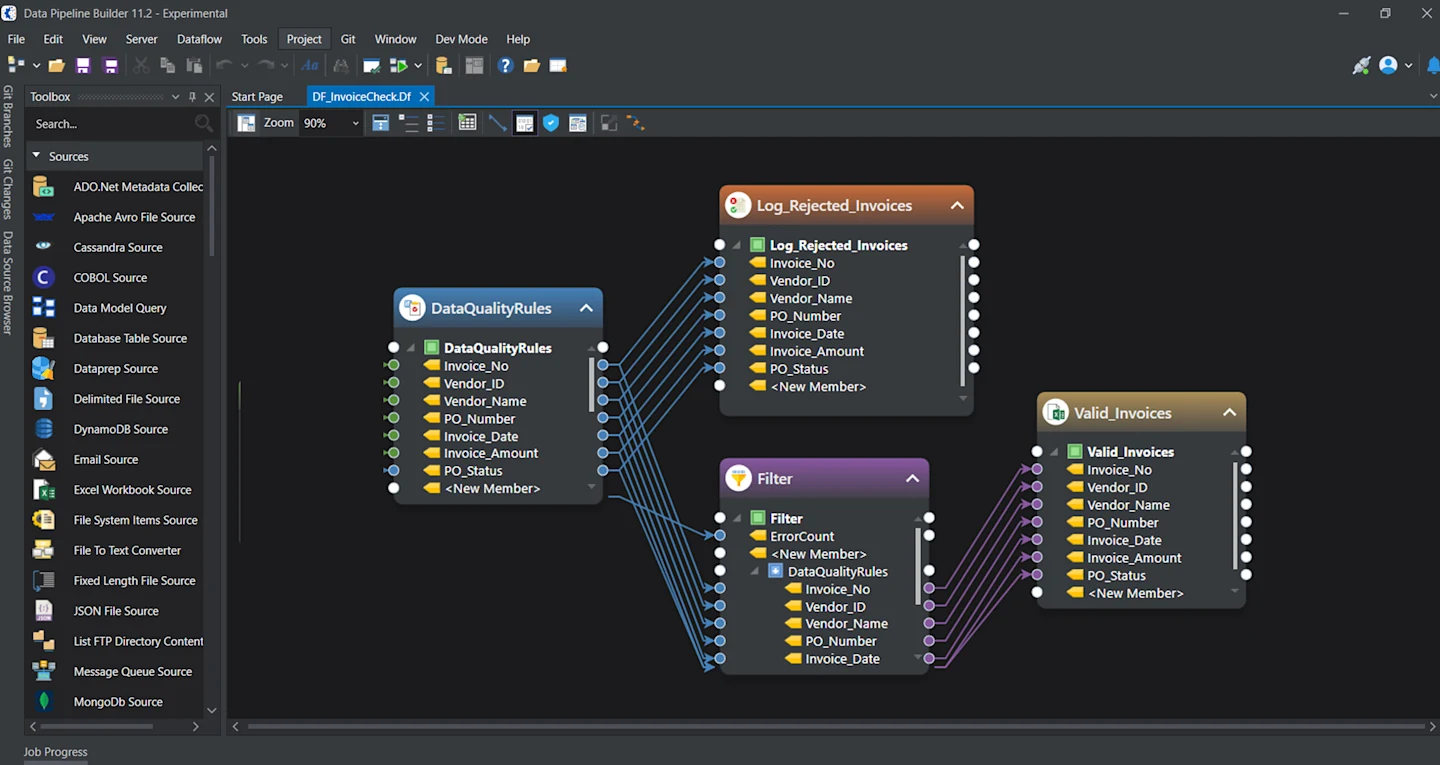
ReportMiner first extracts the vendor name, PO number, line items, and total from the invoice. A data quality rule object then applies three rules: the PO number can’t be blank, a PO must exist for that vendor, and that PO must be open.
If any rule fails, ReportMiner holds the invoice, so it never reaches the payment run.
The invoice validation dataflow in Astera: ReportMiner writes the extracted fields to an Excel file, matches each invoice to open POs, checks it against three rules, and splits the results into valid invoices and a rejection log.
Valid invoices move on to the payment portal, and rejected ones go to a separate queue for the AP team to review. Anything that looks deliberate, such as a vendor with no PO history, goes to internal audit.
Without these rules, the invoice looks routine and gets paid every month. That’s $582,000 a year to one fake vendor. Left running for four years, as the Bridgestone scheme was, it adds up to more than $2.3 million, and every additional fake vendor adds the same again.
ReportMiner applies the same approach at each step between receiving an invoice and loading it into your ERP:
Method | What ReportMiner does |
Capture invoice data accurately | Extracts line items, totals, vendor details, and tax data from PDFs, scanned files, Excel, and Word documents, using OCR for scans and AI-generated or LLM-based extraction for variable layouts |
Validate before the ERP | Applies user-defined validation rules inside the extraction pipeline and reports error counts, null counts, and warnings for each job |
Match to purchase orders | Validates invoices against purchase orders before loading them into financial or ERP systems |
Clean and standardize | Applies cleansing transformations and 200+ built-in functions to standardize names, amounts, and dates |
Run on every invoice | Runs jobs automatically when a file arrives or an email is received, with alerts for errors |
You can also add custom rules for checks specific to your business. Routine checks then run on their own, and your AP team spends its time on the exceptions.
Automation enforces the rules. Your team still owns the controls and reviews the exceptions.
Catch problem invoices before you pay them
Astera extracts and validates invoice data automatically, so duplicate and mismatched invoices are flagged before payment.
Where should your AP team start?
Every scheme in this guide left a trace in vendor, invoice, or payment data before the money went out. The job is to check that data before each payment run, not after it.
Verify bank-detail changes. Hold any payment to a changed bank account until someone confirms it with the vendor.
Cross-check vendors against HR. Compare the vendor master with HR records for shared bank accounts and addresses.
Run duplicate checks early. Check before every payment run, not at month-end.
Once those run cleanly, add matching and validation rules, and give each rule a named owner who reviews its exceptions. Review false positives monthly so your team keeps trusting the flags.