

Invoice capture is a critical part of a business’s accounts payable process, but traditional manual methods can slow down operations and introduce costly errors. As businesses grow, so does the complexity of managing invoices efficiently. This is where automation comes into play—helping businesses streamline their workflows, save time, and reduce human errors.
In this blog, we’ll explore how automated invoice capture can simplify your processes, from data extraction to integration. With the right technology, organizations can ensure faster processing times, improved accuracy, and a more seamless accounts payable workflow.
What is Invoice Capture?
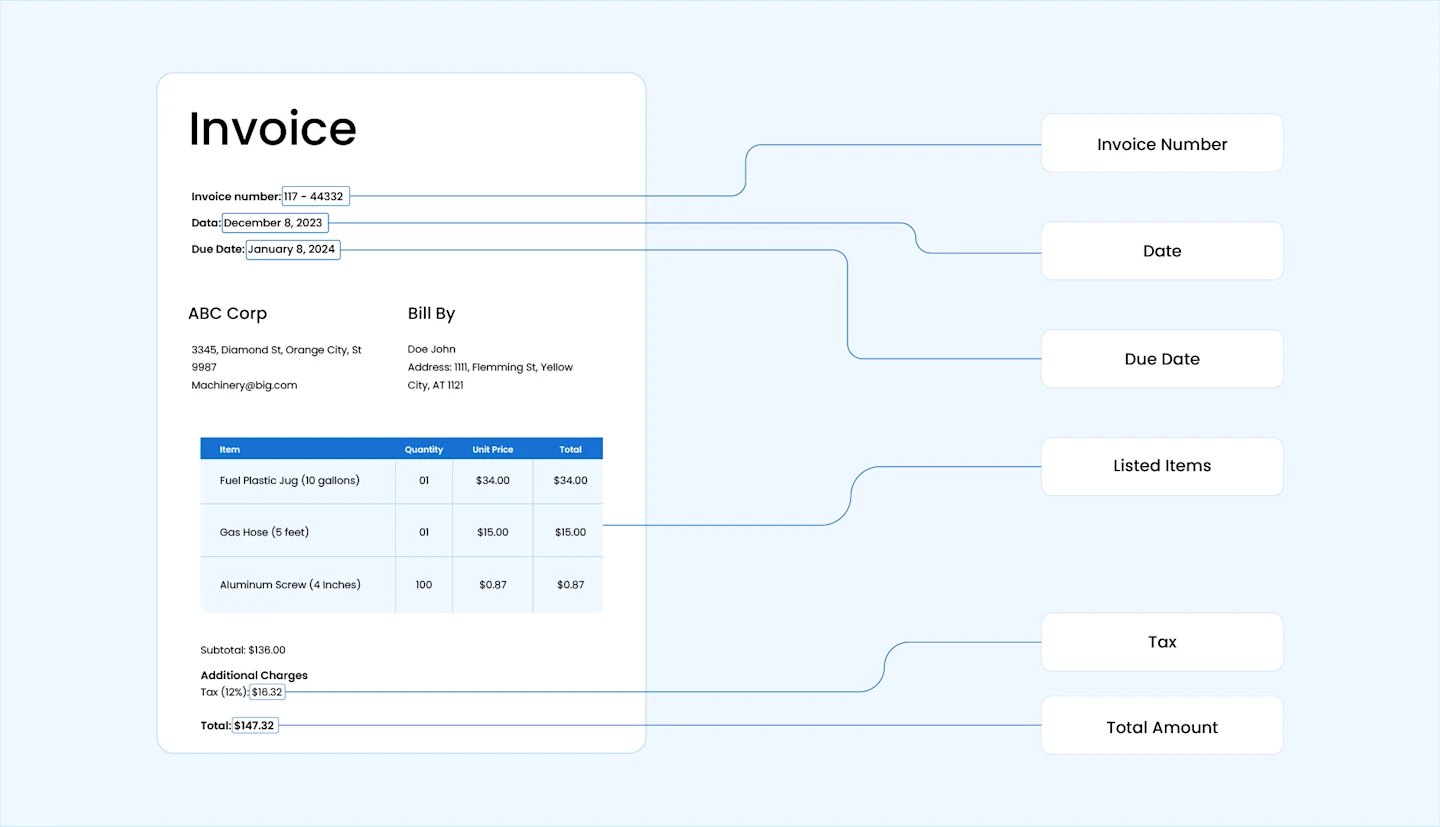
Invoice capture involves pulling essential information from invoices—such as supplier details, reference codes, payment deadlines, amounts, and terms—and converting it into a digital format. It is a key step in automated invoice processing, helping accounts payable teams review, approve, and manage payments efficiently.
Businesses often receive invoices in various formats and layouts from different vendors, such as paper copies, PDFs, or scanned images. Invoice capture solutions can handle this variety by using technologies like Optical Character Recognition (OCR) and Artificial Intelligence (AI) to recognize and extract key data, regardless of the format.
For example, a retail company working with multiple suppliers may receive invoices with different layouts—one listing total amounts at the top and another at the bottom. An invoice capture tool standardizes this data, integrates it into the company’s ERP, and ensures that all invoices are processed accurately and on time.
Problems with Manual Invoice Capture
Traditionally, businesses capture invoice data manually. Employees would carefully review each invoice, extract key information such as vendor names, invoice numbers, dates, amounts, and payment terms, and input this data into ERP systems. While this approach worked for smaller businesses with a manageable volume of invoices, it became increasingly time-consuming and error-prone as the number of invoices grew.
Some challenges of the manual approach include:
Time-Consuming: Manually handling invoices requires significant time and effort, from verifying details to entering data into systems. This process delays approvals and payments, causing disruptions in cash flow and slowing down business operations. According to research, 41% of accounts payable teams report that longer cycle times are a major barrier to success, making the entire workflow less efficient.
High Risk of Errors: Human error is a constant risk with manual data entry. A staggering 68% of businesses encounter errors in more than 1% of their invoices, leading to overpayments, missed discounts, and payment discrepancies. These mistakes can disrupt cash flow, require time-consuming corrections, and strain relationships with suppliers.
Increased Operational Costs: The costs of processing invoices manually can quickly add up. On average, it can cost up to $16 per invoice, according to the Institute of Finance & Management. In contrast, automated processes can reduce this cost to as little as $3 per invoice, freeing up resources that could be better spent elsewhere in the business.
Calculate your savings
See how much time and cost automated invoice capture could save your team.

Lack of Real-Time Visibility: When invoices are processed manually, it’s hard to get a clear, up-to-date view of where things stand. Data is often stored across various systems or in physical files, making it difficult to track invoice statuses in real-time. As a result, 22% of accounts payable teams report struggling with a lack of visibility, leading to delays, missed deadlines, and poor financial forecasting.
Limited Scalability: Nearly 50% of invoices are still paper-based, making it difficult for businesses to scale their operations efficiently as they grow. Relying on manual methods can lead to delays and inefficiencies as the volume of invoices increases. Research from Ardent Partners shows that automated invoicing can reduce costs by 50% to 80%, making it clear that automation is key to managing larger volumes effectively and supporting business growth.
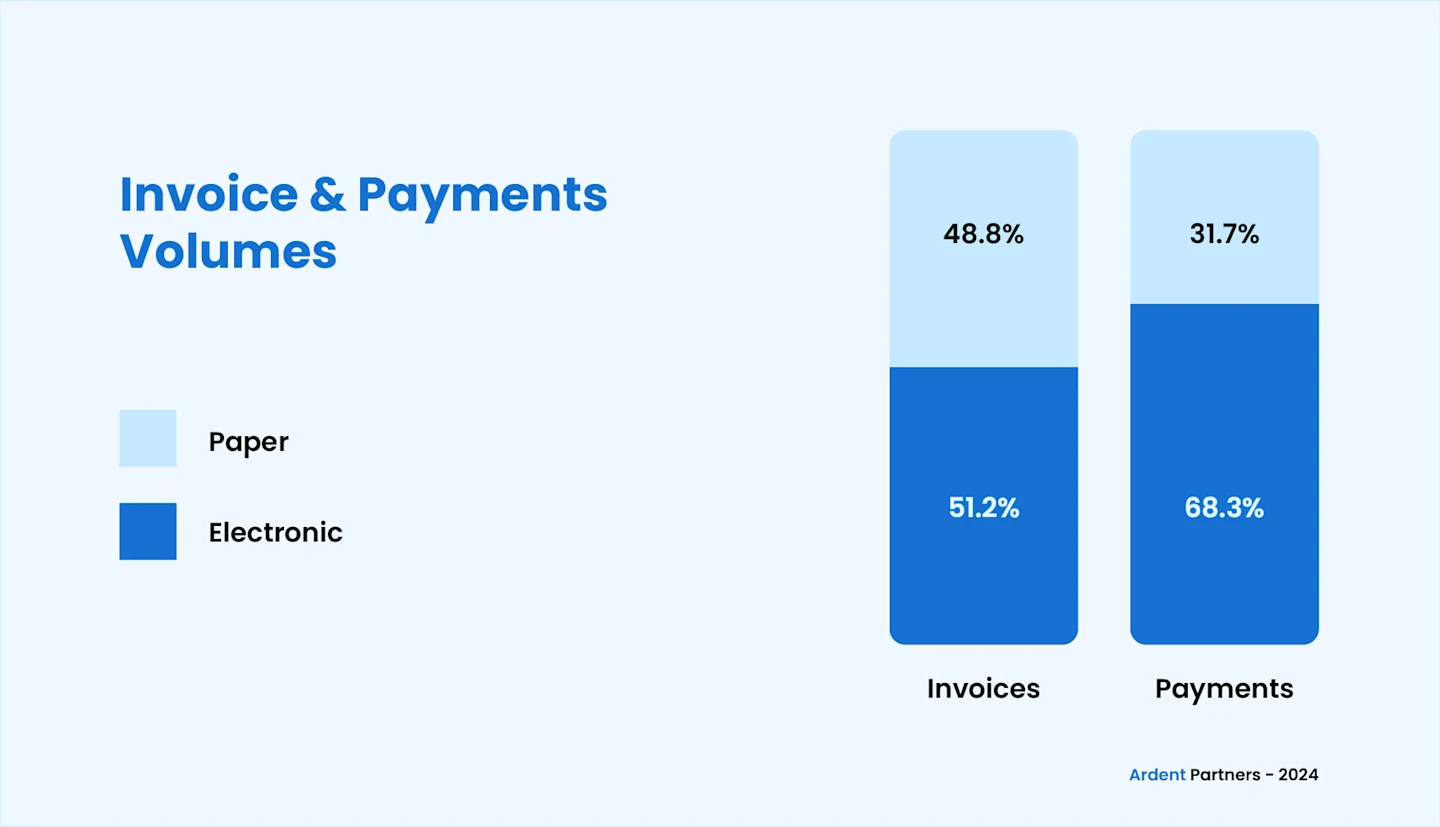
Figure: Invoice and Payment Formats
How Automated Invoice Capture Solves These Problems
Automated invoice capture addresses these challenges by using advanced technologies like OCR and AI to extract and process data from invoices automatically, regardless of format. These systems can automatically extract key information from invoices—whether in paper, PDF, or electronic format—and directly input it into ERP systems. This reduces the need for manual data entry, speeding up the invoice processing cycle and minimizing errors.
Aspect | Manual Invoice Capture | Automated Invoice Capture |
Processing Time | Slow, time-consuming, as data is entered manually. | Fast, as data is extracted and processed automatically. |
Accuracy | Prone to human error, leading to incorrect data entry and discrepancies. | High accuracy with minimal risk of errors, as the system extracts data directly from invoices. |
Costs | High operational costs, with expenses up to $16 per invoice due to manual labor and paper handling. | Lower operational costs, reducing expenses to as little as $3 per invoice. |
Scalability | Difficult to scale with increasing invoice volume, as manual processes become inefficient. | Easily scalable to handle increased volumes without impacting efficiency or accuracy. |
Visibility | Limited visibility into invoice status and processing, leading to delays and poor cash flow management. | Real-time tracking and visibility, enabling better decision-making and cash flow management. |
Benchmarks: Ardent Partners reports that best-in-class AP teams process invoices at a 78% lower cost per invoice than their peers.
Benefits of Automated Invoice Data Capture
Automated invoice capture simplifies the invoicing process, saving time and reducing errors. It enhances efficiency, improves accuracy, and strengthens vendor relationships. Here are some key benefits:
Faster Processing Times: With automation, the time it takes to process invoices is significantly reduced. Where manual processing can take hours, automated systems can capture, verify, and upload invoice data instantly. In fact, automation can accelerate invoice processing time by up to 82%, speeding up approval workflows and ensuring faster payment cycles.
Lower Invoice Exception Rate: Automated invoice capture reduces the number of invoices that need special attention or corrections. This helps AP teams avoid delays caused by exceptions, such as missing or incorrect details. By minimizing these issues, businesses can take advantage of early-payment discounts and maintain smooth operations.
Improved Vendor Relationships: Automation ensures timely payments and accurate invoicing, leading to stronger relationships with vendors. By ensuring that invoices are processed promptly and accurately, businesses can maintain trust and reliability with suppliers, which may also open opportunities for better payment terms or discounts.
Capture and Process Data from Hundreds of Invoices in Minutes
Automate invoice data capture with Astera's AI-powered document processing solution. Whatever the format or structure, Astera simplifies the process for you.
How Invoice Capture Automation Works
Invoice capture automation simplifies the process of extracting, validating, and processing invoice data. Here’s a clear step-by-step breakdown:
Invoice Collection: Invoices are gathered from every channel into one place, so each one is captured regardless of how it arrives. (See Invoice capture channels below.)
Invoice Scanning and Digitization: For paper invoices, the system scans and digitizes them so the data can be captured. See invoice scanning for how that works in detail.
Data Extraction: The system automatically extracts critical details such as invoice numbers, dates, vendor names, line items, amounts, and payment terms. Advanced AI-based tools enhance accuracy by identifying and interpreting even unstructured data.
Data Validation and Verification: Extracted data is checked against predefined business rules to ensure accuracy. This includes flagging duplicates, matching purchase orders, and verifying key details like totals and payment terms. Any discrepancies are highlighted for review.
Approval Process: After validation, invoices are directed through automated workflows for approval. The system notifies the appropriate stakeholders, enabling faster approvals while maintaining compliance with internal processes.
Data Integration: Approved invoices are seamlessly integrated into accounting systems, ERP platforms, or other financial tools for further processing and payment, eliminating the need for manual data entry.
How to automate invoice data entry
Invoice data entry is the part AP teams feel most: someone reading each invoice and typing the vendor, dates, line items, amounts, and tax into the ERP. At a few invoices a day it’s tedious; at hundreds it’s slow and error-prone. Automation removes the typing i.e., the capture workflow above reads each invoice and writes the fields into your ERP directly. This way your team just reviews exceptions instead of entering data. Astera handles this in one no-code flow.
Invoice capture channels
AP teams receive invoices through several channels, and good capture software handles all of them in one place:
Email: invoices arrive as PDF or image attachments, which the system picks up and processes automatically.
Paper and scans: paper invoices are scanned and digitized before capture.
PDF and digital files: structured and unstructured PDFs, plus formats like Excel, are read directly.
EDI: trading partners send invoices as structured EDI messages, most commonly the EDI 810 (invoice) transaction.
Supplier portals: some vendors submit through a portal the system can pull from on a schedule.
Bringing every channel into one capture step is the foundation of accounts payable automation, so nothing is keyed by hand regardless of how it arrived.
Key Features of Invoice Capture Technology
Modern invoice capture technology streamlines the entire invoicing process by combining advanced tools with intelligent automation. Here are some stand-out features that an invoice capture system offers:
Multi-Source Invoice Collection Collects invoices from various formats, such as PDFs, emails, scanned documents, and electronic invoices, ensuring seamless input from multiple channels. For paper and scanned documents, invoice scanning software handles the digitization step before capture.
Intelligent Document Processing (IDP) Leverages AI and machine learning to intelligently extract, classify, and validate invoice data, regardless of format or complexity. By learning from patterns over time, it enhances accuracy and efficiency, ensuring seamless and reliable invoice capture. Capture is only half the job. Learn how invoice data extraction turns captured fields into ERP-ready data.
Touchless Processing Automates the end-to-end invoice processing workflow, from data extraction to validation and integration, minimizing manual intervention.
Automatic Invoice Matching Matches invoice data with purchase orders (PO) and receipts for a seamless three-way matching process, reducing processing time and discrepancies.
Human-in-the-Loop Validation Combines automation with human oversight to handle exceptions or complex cases, ensuring data accuracy and maintaining control where needed. This balance enhances trust in the system while allowing for continuous process improvement.
Get Started with Invoice Capture using Astera
Astera makes invoice capture simple, fast, and error-free. Our user-friendly platform leverages intelligent automation to help businesses reduce manual efforts, improve accuracy, and enhance efficiency across the accounts payable team.
With Astera, you can:
Reduce Errors by 97%: Minimize mistakes in your accounts payable processes through AI-driven automation that ensures accurate invoice capture and validation.
Process Invoices 8 Times Faster: Accelerate your invoice processing times significantly, improving efficiency and reducing delays in approval and payment cycles.
Extract Data 90% Faster: Speed up data extraction from invoices using advanced automation, ensuring quicker turnaround and a more efficient accounts payable workflow.
Ready to streamline your invoice capture process? Contact us today to see how Astera can help you improve accuracy, boost efficiency, and reduce costs.
Capture every invoice format automatically
See how Astera captures, extracts and validates invoices from any vendor.