

Many invoice problems don't start in accounts payable. They start earlier, when someone buys without a purchase order or a delivery goes unrecorded. AP is simply where those gaps become visible, usually as an invoice that can't be paid.
That's why it helps to see the accounts payable process end to end. It's how a business receives, checks, approves, pays, and records the bills it owes suppliers. It also sits inside the wider procure-to-pay lifecycle, which starts with the decision to buy. Mapping the process end to end is also the first step in any AP automation project.
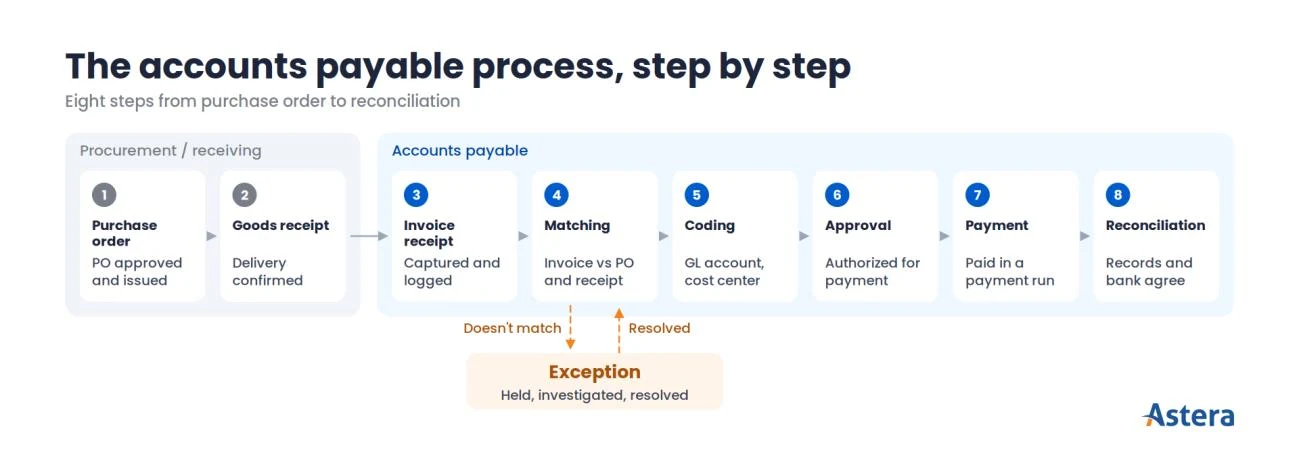
Exact workflows vary by organization, but the end-to-end AP workflow fits into eight steps, from purchase order to reconciliation. Each adds a check that protects the business, and each is a place where an invoice can stall.
This guide follows one invoice through all eight steps, then shows what happens when it doesn't match. It closes with the controls that keep the process safe and the measures that show whether it's working.
What is the accounts payable process?
Accounts payable has two related meanings. It's the money a business owes suppliers for goods and services bought on credit, recorded as a liability on the balance sheet. It's also the process for managing those bills, which is the focus of this guide.
That process exists to make sure every bill is genuine, correct, and authorized before it's paid. When it works, it protects cash by paying the right amount at the right time, and it keeps supplier relationships healthy.
It also keeps the books accurate at month-end, with each payment recorded in the right period. And it leaves an audit trail of who checked, approved, and paid each invoice.
Because those checks repeat for every invoice, the process is also called the accounts payable cycle. “Full-cycle AP” means running that cycle end to end.
Where the cycle begins depends on the organization. Some start it at the purchase order, others at invoice receipt.
Where AP fits in procure-to-pay
That choice reflects where AP sits in a larger picture. Procure-to-pay (P2P) is the full lifecycle from identifying a need to paying for it. It covers requisition, sourcing, purchasing, receiving, invoicing, payment, and recording, and AP is its financial part.
Procurement and the teams receiving goods usually own the early steps. AP takes over when the invoice arrives.
The two halves depend on each other more than the handoff suggests. When a purchase order or receipt is missing or wrong, the problem rarely shows up until AP tries to match the invoice. That's why this guide starts with purchasing and receiving.
Accounts payable vs accounts receivable
It also helps to see AP from the other side of the transaction. Accounts payable is money your business owes its suppliers, while accounts receivable (AR) is money your customers owe your business.
One company's receivable is its customer's payable, so the two processes mirror each other. AR issues invoices and collects payment, while AP checks invoices and pays them.
The accounts payable workflow, step by step
A typical accounts payable process. Exact steps vary by organization.
With that context, here are the steps in order. The accounts payable process steps start with the purchase order and goods or services receipt. Then come invoice receipt, matching, coding, approval, payment, and recording and reconciliation.
Procurement and receiving usually own steps 1 and 2, while AP and accounting own steps 3 to 8.
People often use “AP process” and “AP workflow” interchangeably, but some teams draw a line. The process is what has to happen to pay a bill correctly. The workflow is how a particular team routes that work through people and systems.
The steps below describe the process; your workflow decides who does each one, and in which system. Each step builds on the one before it, starting with the order itself.
1. Purchase order creation
A purchase order (PO) is the buyer's authorized order to a supplier. It fixes the item, quantity, price, and payment terms before money is committed.
It starts with a need. A requester submits a purchase requisition, the budget owner approves it, and procurement issues the PO, ideally to an agreed supplier under an existing contract.
For AP, the PO matters because it's the reference every invoice is checked against. When people buy without one, the invoice arrives with nothing to match.
Raising an “after-the-fact” PO to cover the purchase doesn't fix this, because it skips the pre-approval the PO was meant to provide. So the control here is simple: spending is approved before anyone places the order.
2. Goods or services receipt
Once the order is placed, the business needs to confirm what actually arrived or what work was done. For goods, the receiving team checks the delivery and records a goods receipt note (GRN) showing the quantity and condition.
For services, confirmation comes from the requester's sign-off, an approved timesheet, or a milestone acceptance.
This step is easy to treat as paperwork, but it's what the invoice will later be checked against. A missing, late, or incorrect receipt makes the match in step 4 fail, even when the invoice is correct. That's why the person recording receipt shouldn't be the person who pays the invoice.
3. Invoice receipt and capture
With the order and receipt on record, accounts payable invoice processing begins when the supplier's invoice arrives. It can come on paper, as a PDF by email, through EDI (electronic data interchange), or via an e-invoicing portal.
AP records the key details in the accounting or ERP system. These include the supplier, invoice number and date, line items, amounts, tax, payment terms, and PO number.
Many teams now capture this data automatically rather than keying it. Our guide to automated invoice processing explains how.
This is also where invoices commonly go astray. They reach the wrong inbox, lack a PO number, are keyed incorrectly, or were already entered.
Three controls help catch these problems early:
A single intake point for supplier invoices.
A duplicate check on supplier, invoice number, and amount.
Confirmation that the supplier is in the vendor master, the approved list of suppliers and their details.
Stop keying invoice data by hand
Astera extracts vendor names, line items, and totals from PDFs and spreadsheets automatically. It then sends the data straight to your ERP.

4. Invoice matching
Matching is where the earlier steps pay off. It confirms that the invoice agrees with what was ordered and received, at one of three common levels:
Two-way match:
compares the invoice with the PO.
Three-way match:
adds the goods receipt, so the business pays only for what arrived.
Four-way match:
adds an inspection or acceptance record.
Organizations choose the level by risk and invoice type, and three-way matching is common for goods bought on a PO.
Small differences are normal, so policy sets a tolerance for them, such as a few dollars of rounding. Anything outside it becomes an exception for a person to resolve, such as a price or quantity difference, a partial delivery, or a missing receipt. Exceptions get their own section after the eight steps.
5. Coding and GL assignment
Once an invoice matches, it needs to land in the right place in the books. Coding assigns it to the correct general ledger (GL) account, cost center, project, and tax treatment.
The general ledger is the company's master record of financial transactions. A cost center is the department or unit that carries the cost.
AP usually does the coding, sometimes with input from the requester or approver. Coding errors are easy to miss because nothing fails visibly: a wrong account or cost center, an unclear split across departments, or incorrect tax.
A list of valid codes and a second look at higher-value invoices keep them in check.
6. Approval
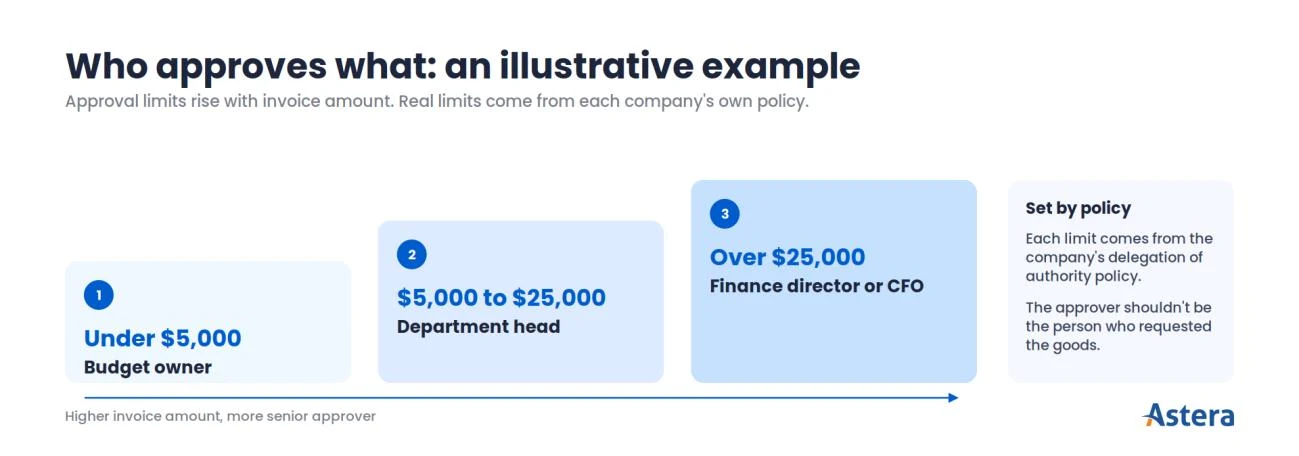
With the invoice matched and coded, someone with authority confirms it's valid and can be paid. A delegation-of-authority policy sets who can approve what, usually by amount.
Here's an illustrative example only: a budget owner approves invoices under $5,000, and a department head approves $5,000 to $25,000. The finance director or CFO approves anything larger. Real limits come from each company's own policy.
Where approval sits in the sequence varies. Some teams code and approve in one step. A PO invoice that matched within tolerance may need no separate approval, because the PO was approved up front.
Approval is also where invoices tend to wait. They stall when an approver is away or unclear, or when they sit across several review levels. The controls are approval limits by amount, a named backup approver, and an approver who didn't request and receive the goods.
7. Payment execution
Approved invoices then go into a payment run, a batch of payments released together. The run is scheduled by due date, payment terms, and cash position.
“Net 30” means payment is due 30 days after the invoice date. “2/10 net 30” offers a 2% discount for paying within 10 days, with the full amount due at 30. The aim is to pay on the right date, not as early or as late as possible.
Payments go out by ACH, wire, virtual card, or check. Remittance advice tells the supplier which invoices each payment covers.
Because this is the step where money leaves the business, the risks are sharper. They include paying early for no benefit, paying late and incurring fees or supplier friction, and paying the wrong bank account. Two controls apply: the person releasing the payment run didn't enter the invoices, and supplier bank details are verified before money moves.
8. Recording and reconciliation
Paying the invoice isn't the end of the process. The payment is recorded, and the liability is cleared in the AP subledger, the detailed record of what the company owes each supplier.
Accounts payable reconciliation then checks that the records agree in three ways:
Subledger to general ledger:
the total owed to suppliers in the AP subledger matches the AP balance in the GL.
Payments to bank:
every recorded payment left the bank account, for the right amount.
Supplier statements:
each supplier's list of open invoices matches yours. This surfaces missing invoices and unapplied payments.
At month-end, teams also accrue for goods received but not yet invoiced, so expenses land in the right period.
When reconciliation happens less often than volume and risk warrant, mismatches surface late, often during the close. It's the last chance to catch what the earlier steps missed.
How the workflow varies
In practice, few teams follow these eight steps exactly. The model is a teaching framework, not a standard, and other guides describe the same work in six or seven steps. Real workflows differ in two common ways:
Non-PO invoices.
Rent, utilities, subscriptions, and legal or professional fees skip steps 1 and 2 and the PO match. They're checked against a contract or approved by the budget owner instead.
Order and number of steps.
Some teams combine coding and approval. Others add supplier onboarding, tax validation, or a separate payment approval.
Example: one invoice through the process
The steps are easier to see in action, so here's one order followed from start to finish. In this illustrative example, Northwind Co., a fictional company, is expanding its operations team. It needs 12 standing desks at $1,000 each, on net 30 terms.
Step | What happens to the order |
|---|---|
Need | The operations manager requests 12 desks, and the budget owner approves the request. |
1. PO | Procurement issues PO #4512: 12 desks × $1,000 = $12,000, net 30. |
2. Receipt | The office team receives 12 desks, checks them, and records a goods receipt for 12 units. |
3. Invoice | The supplier emails invoice #INV-889 for 12 desks and $12,000, quoting PO #4512. AP logs it and confirms it isn't a duplicate. |
4. Match | Invoice, PO, and receipt agree: 12 = 12 = 12 at $1,000 per unit. The three-way match passes. |
5. Coding | Coded to office furniture and equipment, operations cost center. Whether it's expensed or capitalized depends on company policy. |
6. Approval | The PO was pre-approved and the match passed. Depending on company rules, it proceeds, or the operations director confirms it. |
7. Payment | Scheduled in a payment run before day 30 and paid by ACH. The supplier receives remittance advice. |
8. Reconciliation | The payment is matched to the bank statement, and the liability is cleared in the AP subledger. At month-end, the subledger agrees with the GL. |
That's the normal path. Now change one fact: the invoice bills for 12 desks, but the goods receipt shows 10. The three-way match fails, so the invoice shouldn't move on to payment.
AP places the invoice on hold and checks with the receiving team. Receiving confirms that two desks are on backorder.
AP then has two options. It can ask the supplier for a corrected invoice for 10 desks ($10,000). Or, if policy allows, it can pay for the 10 received and hold the balance until the rest arrive.
Only after the difference is resolved does the invoice return to matching and continue to payment.
That pause is normal and protective, because it stops Northwind paying $2,000 for desks it never received. In AP terms, the invoice has become an exception.
What happens when an invoice doesn't match
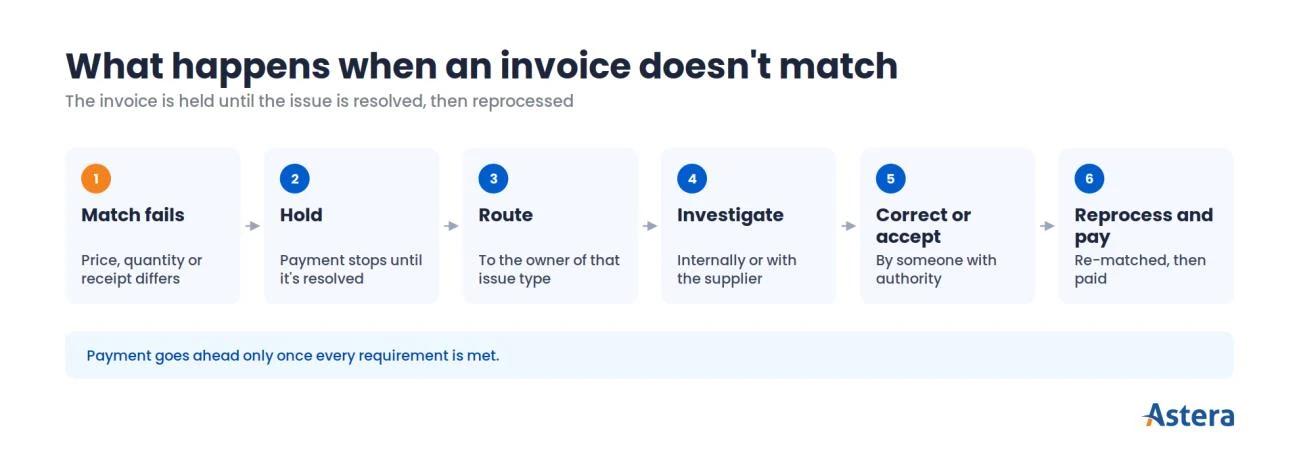
Northwind's invoice is a typical exception: an invoice that can't follow the normal path. Something doesn't agree or a rule is broken, so the invoice is held until a person investigates and resolves the issue.
On the normal path, by contrast, a complete invoice that matches within tolerance moves through coding and approval to payment with no investigation.
Exceptions matter because each one adds research, handoffs, and often a conversation with the supplier. And they're common.
In Ardent Partners' AP Metrics that Matter in 2026, nearly one in five invoices (19.9%) needed manual exception handling before payment. Best-in-Class teams held that rate to 11.8%.
Exception | Example | Usually resolved by |
|---|---|---|
Quantity mismatch | Invoice for 12 units, receipt for 10 | Receiving confirms; supplier issues a credit note or corrected invoice |
Price mismatch | Invoice at $1,050 per unit, PO at $1,000 | Procurement confirms the agreed price; PO amended or supplier corrects |
Missing or invalid PO | No PO number, or PO already closed | Requester or procurement confirms the purchase; PO raised per policy or routed as non-PO |
Missing receipt | Goods arrived but weren't recorded | Receiving or requester records the receipt |
Possible duplicate | Same supplier, number, and amount already entered | AP confirms and rejects the duplicate |
Supplier data issue | Supplier not in the vendor master, or bank details differ | Vendor master team verifies through the supplier change process |
Coding issue | Unclear cost center or account | Budget owner or accounting confirms |
Tax discrepancy | Wrong tax rate or amount | Tax or accounting reviews; supplier corrects |
Approval or policy issue | Amount exceeds the approver's limit, or a contract is missing | Routed to the correct approver; documents obtained |
The causes vary, but resolution usually follows the same path. The invoice goes on hold and is routed to whoever owns that type of issue, who investigates internally or with the supplier.
The issue is then corrected, or accepted within policy by someone with authority. The invoice is reprocessed, and payment proceeds only once every requirement is met.
Handling each exception well matters, but so does keeping them from piling up. Three practices help:
The right person accepts a variance.
A price difference above tolerance should be accepted by someone with authority. That's usually procurement or the budget owner, not the AP specialist processing the invoice.
Exceptions are tracked by type.
Recurring types point to an upstream fix. Frequent missing receipts, for example, signal a receiving problem.
Holds have a clock.
Unresolved exceptions can push payments past due dates. So teams set target resolution times and escalate aging holds.
Many AP systems flag exceptions automatically and route them to the right person. Our guide to automated invoice processing describes how.
Spend less time chasing exceptions
Astera flags mismatches automatically and routes each exception to the right person. Your team investigates only what needs a decision. Book a demo to see it on your invoice types.
Accounts payable procedures and internal controls
Exceptions catch problems with individual invoices. Accounts payable procedures and controls protect the process as a whole, because AP moves company money to outside parties. Every step includes a check, and together they ensure the business pays only for what it ordered and received.
They also ensure payment goes only to the right supplier, only once, and only with proper authorization.
Control | What it does | Where it sits |
|---|---|---|
Segregation of duties | Ensures no one person can create a supplier, enter an invoice, and release payment | Steps 1–8 |
Approval authority | Sets who can approve what, up to which amount (delegation of authority) | Steps 1 and 6 |
Two- or three-way matching | Confirms the invoice agrees with what was ordered and received | Step 4 |
Duplicate invoice checks | Stops the same invoice being paid twice | Step 3 |
Vendor master controls | Limits who can add or change supplier records; requires supporting documents | Before step 3, ongoing |
Bank-detail change verification | Confirms bank-detail changes through a known contact, not the channel that asked | Vendor master, before step 7 |
Payment authorization | A separate person approves the payment run before release | Step 7 |
Reconciliations | Catch errors and unrecorded items after the fact | Step 8 |
Access controls | Limit system permissions to what each role needs | System-wide |
Audit trail and document retention | Record who did what and when; keep invoices, approvals, and payment records | System-wide |
These controls also support a clean month-end close, and for public companies they carry regulatory weight. In the US, Section 404 of the Sarbanes-Oxley Act (SOX) requires management to assess and report on internal control over financial reporting.
SOX doesn't list specific AP controls. Still, segregation of duties, approval records, and audit trails commonly support compliance. Private companies aren't subject to SOX 404, though the same controls are good practice for any business.
Errors vs fraud
It helps to be clear about what these controls defend against. An error is an accidental mistake, such as entering the same invoice twice, keying the wrong quantity, or coding to the wrong account.
Fraud is intentional deception, such as a fictitious supplier set up to receive payments, or someone impersonating a real supplier to change bank details. An inflated or fake invoice is fraud too.
Matching, duplicate checks, vendor master controls, and segregation of duties reduce both. But fraud is deliberate and adapts to the controls in place, so it also needs its own monitoring. See our guide to AP fraud prevention.
How to measure the accounts payable process
Controls tell you whether the process is safe; KPIs tell you whether it's working well. Measuring the accounts payable process means tracking a handful of KPIs against your own baseline. The six below each map to the steps they reflect.
KPI | What it measures | Steps | What a high or low reading may indicate |
|---|---|---|---|
Invoice cycle time (processing time) | Days from invoice receipt to approval for payment (definitions vary) | 3–6 | Long cycles point to stuck approvals, frequent exceptions, or slow intake |
Exception rate | Share of invoices that need manual intervention to resolve an issue | 3–6, mostly 4 | High rates often signal PO, receipt, supplier data, or coding issues |
First-pass match rate | Share of PO invoices that match the PO and receipt on the first attempt | 4 | Low rates suggest PO or receiving discipline needs work |
Touchless rate | Share of invoices with no manual touch from capture to approval | 3–6 | Low rates mean many manual steps; high-risk invoices should still get human review |
Cost per invoice | Total AP cost (staff, systems, and overhead) divided by invoices processed | All | High cost can reflect manual effort, rework, or low volume; compare like for like |
Days payable outstanding | Average days the company takes to pay suppliers | 7, company-wide | A finance-level measure, explained below |
Two definitions are worth knowing. In Ardent's definition, an exception is any invoice that needs manual intervention. That includes coding errors, missing information, and approval bottlenecks, not only failed matches.
First-pass match rate and touchless rate also measure different things. First-pass match covers step 4 only, while touchless (straight-through) rate covers steps 3 to 6. An invoice can match first time and still need a manual touch for coding or approval.
How do your numbers compare with other teams? For context, here are the latest benchmarks from Ardent Partners' AP Metrics that Matter in 2026. They come from The State of AP 2026: AI Rising, a survey of 194 AP, finance, and P2P leaders.
“Best-in-Class” means the 20% of enterprises with the lowest invoice processing costs and shortest cycle times.
KPI | Average | Best-in-Class |
|---|---|---|
Cost per invoice | $9.90 | $2.67 |
Exception rate | 19.9% | 11.8% |
On average, an invoice took 11.6 days to process. Only 38.3% of invoices went straight through, with no manual touch.
Source: Ardent Partners, AP Metrics that Matter in 2026 (Aug 2026).
The same research points back to steps 1 and 2. Best-in-Class teams link 85.1% of invoices to a purchase order, against 46.9% for everyone else.
Ardent calls cycle time “invoice processing time.” Your figures will depend on industry, invoice mix, and how each metric is calculated.
Treat these figures as reference points from one survey, not targets. Your own trend over time is the more useful comparison.
Days payable outstanding, explained
One measure works differently from the rest. DPO reflects company-wide payment strategy rather than AP efficiency, so it's read differently too.
Days payable outstanding (DPO) estimates how many days, on average, a company takes to pay its suppliers. The standard formula uses average accounts payable:
DPO = (Average accounts payable ÷ Cost of goods sold) × Number of days in the period
Here, average accounts payable = (opening AP + closing AP) ÷ 2.
Some companies use ending AP instead of the average. Others use total purchases instead of cost of goods sold, which is common for service businesses. Comparisons only work when the method is consistent.
A higher DPO isn't automatically better. Paying later keeps cash in the business longer. But paying later than agreed brings late fees, lost early-payment discounts, and strained supplier relationships.
A lower DPO isn't automatically worse either. Paying early makes sense when a discount is worth more than holding the cash. The goal is timing that fits contract terms, cash needs, and supplier relationships.
For context, The Hackett Group's 2025 Working Capital Survey reported DPO of 59 days for the 1,000 largest US public nonfinancial companies. Those companies have unusual negotiating power, and DPO varies widely by industry. So the figure isn't a target.
See what your AP process costs today
Enter your invoice volume and team size to get a cost-per-invoice estimate. Then see where automation closes the gap.
How to improve the accounts payable process
Accounts payable process improvement works best when each change targets the step where a problem starts. That's often earlier than the step where it shows up. Five process-level improvements cover most of the opportunity:
Fix problems where they start (steps 1–2).
Require POs for purchases that should have them, and record receipts promptly. Many matching exceptions begin upstream, long before the invoice arrives.
Give suppliers one clear way to submit invoices (step 3).
A single intake address or portal reduces lost and incomplete invoices. Make required fields, such as the PO number, part of it.
Write down approval rules before invoices arrive (step 6).
Set clear limits by amount and budget owner, and name a backup approver. That keeps invoices from waiting on the wrong person.
Measure exceptions by type and fix the top causes (step 4).
Track your exception rate against your own baseline. Use external benchmarks as context rather than a target.
Match reconciliation frequency to volume and risk (step 8), and plan payment timing (step 7).
High-volume or higher-risk accounts may justify weekly or even daily reconciliation. Monthly can be enough at lower volumes. The aim is to catch mismatches before they affect the close or a payment run. Scheduling payments by terms and discounts also aligns AP with cash management.
If you're ready to see what automation can change at each of these steps, our AP automation guide walks through it.
Where automation fits (and how Astera helps)
Automation builds on those process fixes rather than replacing them. It doesn't change what the accounts payable process is, only how some steps are carried out.
The biggest shifts are in invoice capture (step 3), matching (step 4), and routing invoices to the right people (step 6). The controls, approvals, and judgment calls described above still apply.
Astera's AP automation uses AI to extract invoice data, such as vendor names, line items, and totals. It works across formats, including PDFs and spreadsheets. For paper-heavy vendors, AP invoice scanning software digitizes documents before extraction.
It extracts the data through invoice data extraction, then matches it against purchase orders and sends it to your ERP. In terms of the steps above, that's invoice capture (step 3) and matching against the PO (step 4).
Teams that want to plan the change step by step can start with our guide on how to automate accounts payable. Or you can see how it works directly.
Ready to reduce manual work in your AP process?
Astera extracts invoice data, matches it against purchase orders, and sends it to your ERP. That covers steps 3 and 4 without manual entry. Book a demo to walk through it on your own invoice formats.