

Three-way matching in accounts payable is a check that compares a supplier invoice with the purchase order (PO) and the receiving record. It confirms you're paying for what you ordered and what actually arrived. If the three agree, or differ only within a tolerance your company allows, the invoice moves on to approval and payment.
Three-way matching (often written 3-way matching) is commonly done line by line, although the rules vary by system and company. It's also one of the core checks that AP automation tools run at scale. The mechanics are the same whether you match by hand or set up software to do it.
The definition is the easy part. The hard part is knowing which field to check against which document, how much difference to allow, and which record to fix when they disagree. This guide walks through each one with a worked example, then covers when two-way or four-way matching is a better fit.
What is three-way matching in accounts payable?
Three-way matching answers three questions before you pay an invoice. Did we order it? Did we receive it? Are we being billed the right amount? The PO answers the first, the receiving record answers the second, and comparing both with the invoice answers the third.
"Match" doesn't mean the numbers are identical. It means the invoice agrees with the other two records within the tolerances your company has set. A few cents of rounding on a unit price can pass if your policy allows it. Two units billed but never received usually won't.
Three-way matching is one type of PO matching, where an invoice is checked against the purchase order it bills. Two-way and four-way matching are the other common types. We compare all three later in this guide.
Where three-way matching fits in the AP process
In a typical accounts payable process, the invoice arrives and gets captured, matching runs, the invoice goes for approval, and then it's paid. That order isn't fixed. Some teams match before approval, some do both at once, and some re-run the match when a late receipt comes in.
What a successful match tells everyone downstream stays the same: the invoice reflects an authorized order and a recorded delivery. That's what lets it move on under your approval and payment rules.
The three documents in a three-way match
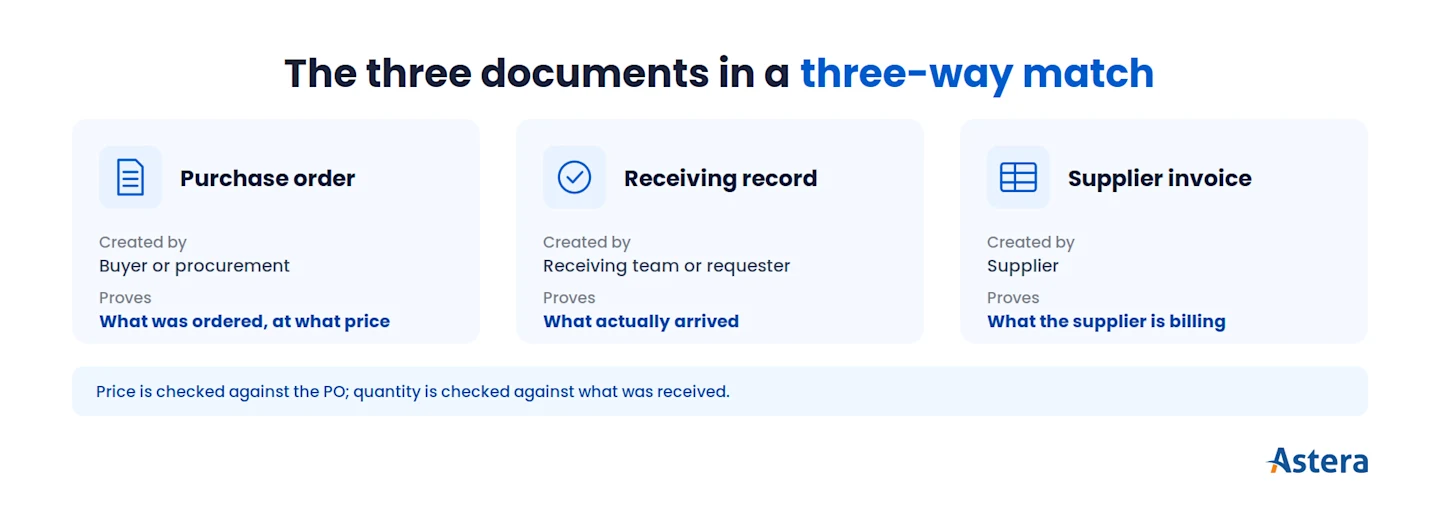
A three-way match uses three records, and each usually comes from a different party: the buyer's purchase order, the receiving record, and the supplier's invoice. Each proves something the other two can't, so you need all three.
Purchase order (PO). The PO is the buyer's approved order. It lists the items, quantities, agreed unit prices, and terms. Procurement or the requester creates it, usually after an internal approval (see our guide to purchase order processing). A PO proves what was agreed, not what arrived.
Receiving record. This records what physically arrived: which items, how many, and when. You'll also see it called a goods receipt, a goods received note (GRN), or a receiving report. The receiving team or the requester posts it. For services, some companies use a service confirmation instead.
Supplier invoice. This is the supplier's request for payment. It lists what they're billing for and at what price, plus tax and any extra charges. On its own, it only proves what the supplier says you owe.
Document | Created by | What it proves |
Purchase order | Buyer or procurement | What was ordered, and at what agreed price |
Receiving record (goods receipt, receiving report) | Receiving team or the requester | What was actually received |
Supplier invoice | Supplier | What the supplier is billing |
The check is strong because these records come from different people. If one record has an error, it's likely to show up against the other two. That's also why many companies keep ordering, receiving, and paying with different people, a principle called segregation of duties.
How the three-way matching process works
The three-way matching process checks each invoice line against its PO line and the receipts posted for it. Tolerances then decide whether the line passes. Here's the detail most explanations skip: not every field is compared with every document.
Field on the invoice line | Compared with | What a difference may mean |
Item or description (or item code) | PO line | Wrong item billed, or an item substituted |
Unit price | PO unit price (the receiving record usually carries no price) | A price change not reflected on the PO, or a billing error |
Quantity billed | Quantity received (the PO quantity sets the ordered ceiling) | A short delivery, a backorder, or a receipt not yet recorded |
Unit of measure | PO and receipt | Billed per box, ordered per unit |
Line amount, tax, and extra charges (freight, fees) | PO terms or tax and freight rules, depending on system and policy | Charges not agreed on the PO, or a tax calculation difference |
In short, price is checked against the PO, and quantity is checked against what was received. Whether totals, freight, tax, and other charges get matched, and how, depends on your system and policy.
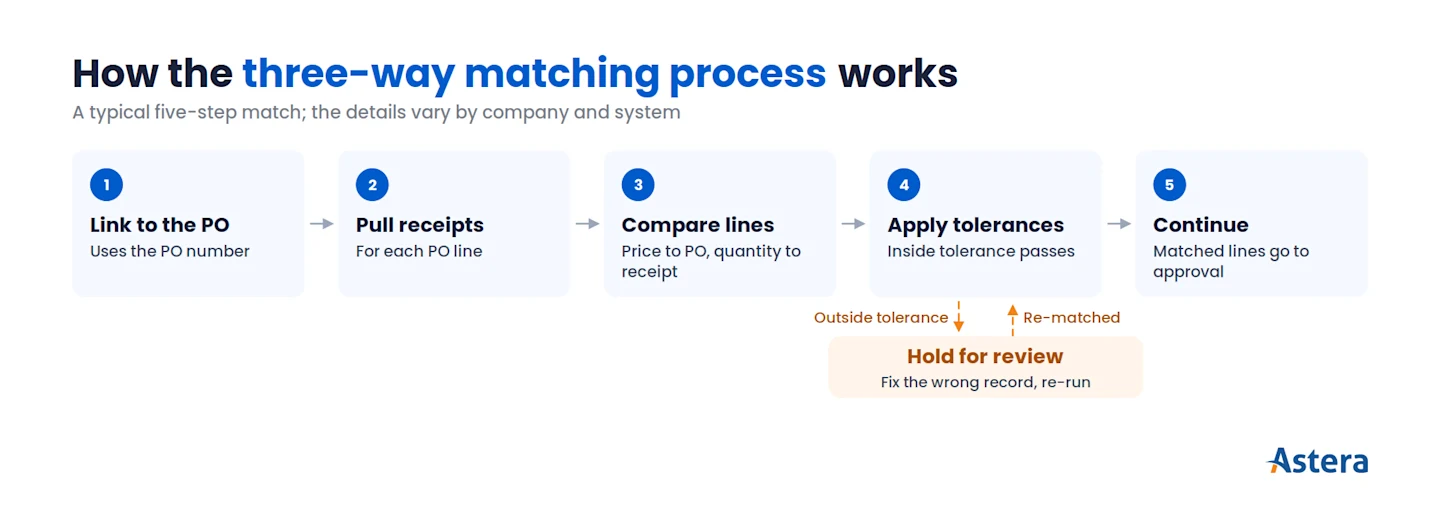
A typical three-way match follows five steps. The details vary by company and system, but the logic is the same.
Link the invoice to its PO. The PO number on the invoice is the usual link. An invoice without one can't be PO-matched and takes a different route, covered later in this guide. Accurate invoice data matters from this first step, which is where automated invoice processing helps.
Pull the receipts. Find the receiving records for each PO line. If nothing has been received yet, the line can't pass.
Compare the lines. Check unit price against the PO and quantity billed against quantity received. Totals, tax, and charges follow your system rules and policy.
Apply tolerances. Differences inside tolerance pass. Anything outside tolerance flags the line.
Record the outcome. A matched invoice moves on to approval and payment. A mismatched invoice stays on hold until someone resolves the difference.
Partial deliveries are common, and systems handle them with a running count. When several receipts or invoices relate to one PO line, the system typically tracks the totals. A second invoice for a split shipment is checked against what's been received but not yet billed.
Some teams match at the header level instead, comparing invoice totals with PO totals rather than each line. It's faster, but it can hide errors that cancel out. One line billed $300 too high and another billed $300 too low still add up perfectly.
Start every match with clean invoice data
Our invoice capture guide explains how invoice numbers, line items, and amounts are extracted and validated before matching begins.

Matching tolerances: how much difference is acceptable?
Step 4 is where most of the judgment sits. A matching tolerance is how much difference your company allows between the invoice and the PO or receipt before a line is flagged. It lets small, explainable differences through and holds the ones a person should look at.
Tolerances usually take one of three forms:
A percentage, such as a unit price up to a set percentage above the PO price.
An amount, a maximum difference in dollars or units.
Both, where going over either limit flags the line. A 1% limit on its own can be too loose for a $40,000 machine and too tight for a $3 part. That's why some policies pair it with a dollar cap.
Finance and procurement set tolerances as policy, often by vendor, item, or category. Some systems allow under-billing by default and only flag over-billing. Others can flag low invoices too, which helps when a low amount points to a missed line or a pricing error.
There's no standard number. Figures like 2% or $50 in vendor guides are one company's policy, not a rule, and some ERP systems start with zero tolerance until you set your own.
It's a practical trade-off. Zero tolerance holds invoices over rounding differences and fills the queue with items nobody needs to review. A loose tolerance lets real overcharges slip through.
The goal is a level you've chosen on purpose, written into policy, and revisited when exception patterns or supplier prices change.
A three-way matching example
One order is enough to show both outcomes: a difference that passes and an exception that doesn't.
Hypothetical example. The tolerance used here is for illustration only.
A company issues PO 4471 for 50 office chairs at $200.00 each, for a total of $10,000. Its policy lets the invoiced unit price be up to 2% above the PO price. The quantity billed can never be more than the quantity received.
Scenario A: a difference that passes
All 50 chairs arrive, and receiving posts the receipt. The supplier then invoices 50 chairs at $203.00 each, a total of $10,150.
Check | PO | Receipt | Invoice | Result |
Item | Office chair | Office chair | Office chair | Match |
Quantity | 50 | 50 | 50 | Match |
Unit price | $200.00 | Not listed | $203.00 | 1.5% above PO, within 2%: passes |
The $3.00 difference per chair is 1.5% above the PO price, so the line passes and the invoice moves on to approval. Passing doesn't make the $150 disappear, though. It's recorded as a price variance.
In AP, the difference between the PO price and the invoice price is usually called an invoice price variance (IPV). Strictly, purchase price variance (PPV) compares the PO price with an item's standard cost, but many teams use PPV for both. Which account the $150 posts to depends on your costing method.
Scenario B: an exception
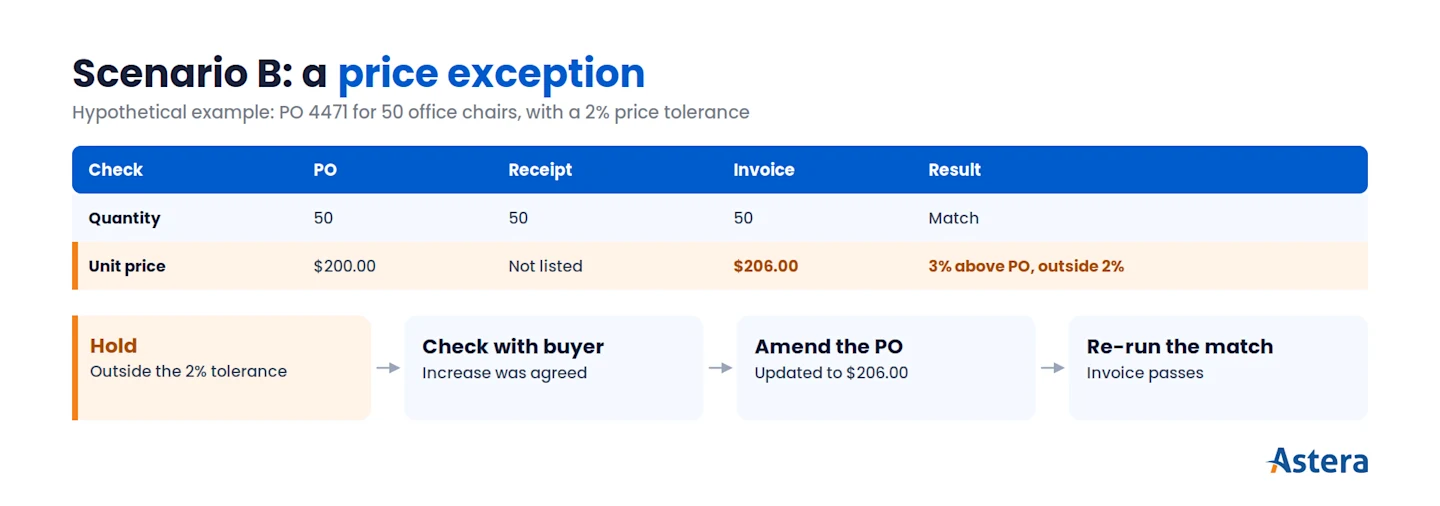
Now change one fact. All 50 chairs arrive, but the supplier invoices them at $206.00 each, a total of $10,300.
Check | PO | Receipt | Invoice | Result |
Quantity | 50 | 50 | 50 | Match |
Unit price | $200.00 | Not listed | $206.00 | 3% above PO, outside 2%: exception |
The quantity matches, but the $6.00 difference per chair is 3% above the PO price. That's outside the 2% tolerance, so the invoice goes on hold. AP checks with the buyer before going back to the supplier.
The buyer confirms the supplier announced the increase last month and procurement agreed to it. Nobody updated the PO. So here the PO is the wrong record, and the buyer amends it to $206.00 under the company's change policy.
With the PO fixed, the match is re-run and the invoice passes. If the buyer hadn't agreed to the increase, the fix would go the other way: a corrected invoice or a credit memo from the supplier.
One amendment like this is a normal fix. But if amending POs after the invoice arrives becomes routine, you have a procurement problem, not a matching one. It's also the after-the-fact purchasing pattern internal audit tends to flag, so track how often it happens.
What happens when the documents don't match?
Scenario B is a typical exception: an everyday difference that needs a person to decide which record is right. Until someone does, the invoice (or only the affected lines) stays on hold. Exceptions are a normal part of buying on POs, and many have simple causes, like a receipt nobody has entered yet.
The table shows the common exception types and how they're usually resolved. Who investigates varies by company, so treat the third column as common practice, not a rule.
Exception | Common cause | Usually investigated by | Typical resolution |
Price above PO (outside tolerance) | Price change not updated on the PO; billing error | AP with the buyer or procurement | Corrected invoice or credit memo; or the buyer amends the PO if the new price was agreed |
Quantity billed exceeds quantity received | Short shipment, backorder, or receipt not yet entered | AP with receiving | Wait for or post the receipt; corrected invoice or credit memo; partial payment if policy allows |
No receipt recorded | Goods arrived but weren't logged; services with no confirmation step | AP with receiving or the requester | Record the receipt (or service confirmation), then re-match |
Item or unit-of-measure mismatch | Substitution; billed per box, ordered per unit | AP with procurement | Clarify with the supplier; correct the document that's wrong |
Charges not on the PO | Freight, fees, or surcharges | AP with procurement | Accept under policy, or ask the supplier to remove them |
Three habits keep exception handling clean, whatever the cause.
Find the record that's wrong, then fix that record. Any of the three can be the problem. The supplier may have billed the wrong price. But receiving may have missed a pallet, or a buyer may have agreed a new price without updating the PO.
Forcing a match by editing whichever record is easiest only hides the real error.
Let the right person accept a variance. If a difference is real and acceptable, an authorized approver signs off under policy, not whoever happens to be processing the invoice. That keeps the control intact and shows who made the call.
Re-run the match. After the fix, match the invoice again before it moves on. That confirms the fix worked and that no second difference was hiding behind the first.
Teams often track the share of invoices that match on the first try, called the first-pass match rate. Much of that rate is decided before AP ever sees the invoice.
The rate goes up when three things happen. Receiving posts receipts the day goods arrive. Buyers update the PO as soon as a price change is agreed. And suppliers put the PO number on every invoice. When the rate drops, check those three first.
See what automating AP changes
Ten benefits finance teams see from automating accounts payable, including automatic matching of invoices to receipts and purchase orders.
Two-way vs. three-way vs. four-way matching
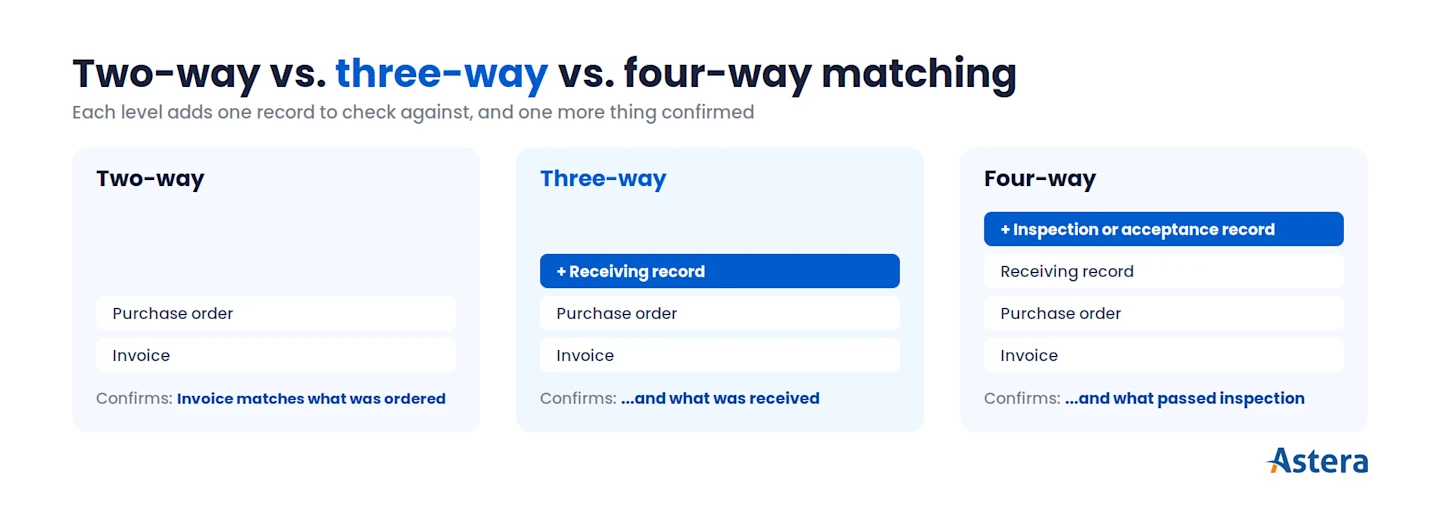
Every exception takes someone's time, so the level of matching should fit the risk of the purchase. The three common levels differ by how many documents the invoice is checked against. Three-way matching adds the receiving record to two-way matching, and four-way matching adds an inspection or acceptance record on top.
Two-way matching in accounts payable compares the invoice with the PO only. Definitions vary a little between systems. Some two-way checks compare price only, while others also confirm that the quantity billed doesn't exceed the quantity ordered.
| Two-way | Three-way | Four-way |
Documents | Invoice + PO | Invoice + PO + receiving record | Invoice + PO + receiving record + inspection or acceptance record |
Confirms | The bill matches what was ordered | ...and what was received | ...and what passed inspection or was accepted |
Often used for | Purchases with no meaningful receipt step, or lower-risk spend | Goods bought on a PO with a receiving step | Items that must pass quality inspection before acceptance |
Trade-off | Fewer documents, less assurance | More assurance; depends on timely receipts | Most assurance; depends on inspection records |
Companies pick the level based on risk, value, and whether a receipt or acceptance record exists. Many set it by vendor or item rather than once for everything. Practice varies: in APQC's Open Standards Benchmarking (1,489 organizations, accessed October 2026), the median organization approves 28% of invoice line items through three-way matching.
One rule holds whatever level you choose: three-way matching is only as good as your receiving. If receipts get posted days after goods arrive, every invoice waits on a missing record. Fix receiving first, then extend three-way matching to more spend.
When three-way matching isn't the right check
Some invoices don't fit three-way matching at all. Spotting them saves AP from chasing receipts that will never exist.
Non-PO invoices. Rent, utilities, and many professional fees come without a purchase order, so they can't be PO-matched. They go through an approval workflow instead.
Services. A consulting project or a maintenance contract may have no receiving record. Some companies use a service confirmation or acceptance record instead. Others use two-way matching plus approval.
Evaluated receipt settlement (ERS). Some buyers agree with selected suppliers to settle from the PO and the goods receipt, without a supplier invoice at all. ERS replaces the three-way match rather than improving it.
What three-way matching protects against (and what it doesn't)
Where three-way matching does apply, it covers a specific set of risks. It helps catch invoices that don't agree with what was ordered and received, which reduces the risk of:
paying for goods that weren't received;
paying more than the agreed price;
paying for more than was ordered;
paying for the wrong item.
It also leaves a record of what was checked, against which documents, and who accepted any variance.
The limits matter as much as the protections. Three-way matching catches differences between the PO, the receipt, and the invoice, whatever the cause. It isn't built to spot schemes where the documents themselves are fake, like a fictitious supplier backed by a fabricated or collusive receipt.
It also doesn't cover changes to a supplier's bank details, which belong to vendor master controls. And it can't check invoices with no PO.
Duplicate invoices need their own check, too. Matching may stop some duplicates if the system tracks how much has already been invoiced on each PO line. But it isn't built to catch the same invoice entered twice under a slightly different number.
Three-way matching is one control among several. It confirms an invoice agrees with what was ordered and received. Vendor checks, duplicate detection, approvals, and segregation of duties cover the rest.
How automation supports three-way matching
Automation doesn't change what a three-way match checks. It changes how fast the data is ready and how quickly mismatches reach the right person. The system captures invoice lines, links them to the PO and receipts, and applies your comparison rules and tolerances. Only the exceptions go to people.
That makes data capture the step to get right first. A match is only as good as the invoice lines it compares, and a misread quantity looks exactly like a short shipment. Accurate invoice capture of line items, quantities, and unit prices keeps those false exceptions out of the queue.
Astera's AP automation solution handles capture and the checks that follow. Its AI extracts invoice data from PDFs, scans, and other formats without vendor templates. It then validates totals, taxes, PO numbers, and line items against purchase orders and goods receipts (GRNs). Mismatches trigger real-time email alerts. Invoices can then follow approval chains based on your business rules, and validated data goes into your ERP or accounting system.
If you'd rather build your own matching logic, Astera Data Pipeline gives you the building blocks as no-code transformations. A database lookup pulls the PO and receipt lines for each invoice line. An expression compares prices and quantities against your tolerances. Data quality rules flag any line that fails a check, and a route transformation sends those lines down a separate path for review. Scheduled jobs and workflows run the whole flow without manual steps.
Whichever route you take, your company still owns the matching policy: which invoices to match, what tolerances to allow, and who can approve a variance.
To plan the rollout, see our guide on how to automate accounts payable.
For the bigger picture of how matching fits with capture, approval, and payment, see our guide to AP automation.
Cross-check invoices against POs and receipts
See how Astera validates invoice line items against purchase orders and goods receipts, and flags discrepancies for review.