

Accounts payable (AP) automation is on the rise as finance teams are realizing the benefits of AP automation solutions currently on the market. Teams that achieve partial automation in their AP processes are seeing considerable benefits in terms of time, cost, and efficiency.
With vendors now integrating AI technologies into their software solutions, the potential AP automation benefits promise to change the face of accounts payable altogether.
What is Accounts Payable Automation?
Accounts Payable (AP) automation refers to the use of different technologies, such as AI, to automate the processes involved in paying invoices by reducing most or all manual tasks. The goal is to manage the full cycle accounts payable process with minimal to no human oversight. In the simplest of terms, these are the steps involved in the AP process:
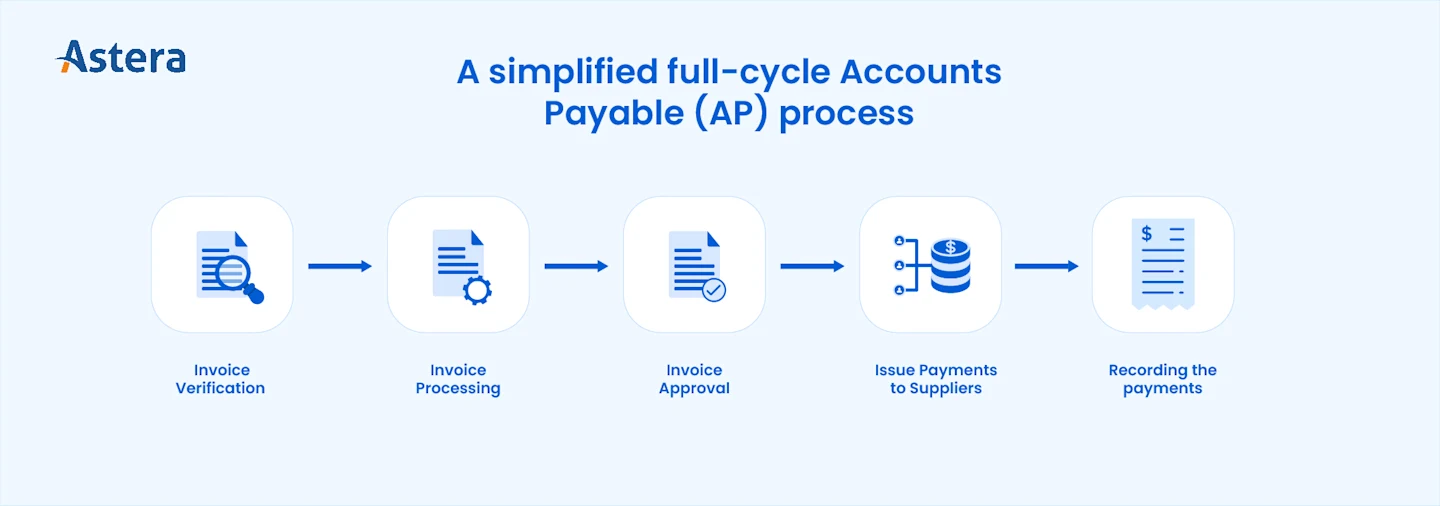
In other words, AP automation enables timely, accurate, efficient, and compliant processing of large volumes of financial transactions and invoices between an organization and its vendors or suppliers.
The Current State of Automation in Accounts Payable (AP)
Automation has been slowly making its way into accounts payable with the recent years proving fruitful for organizations that have implemented automation in small or large measures. Here's a brief look at the current state of AP automation:
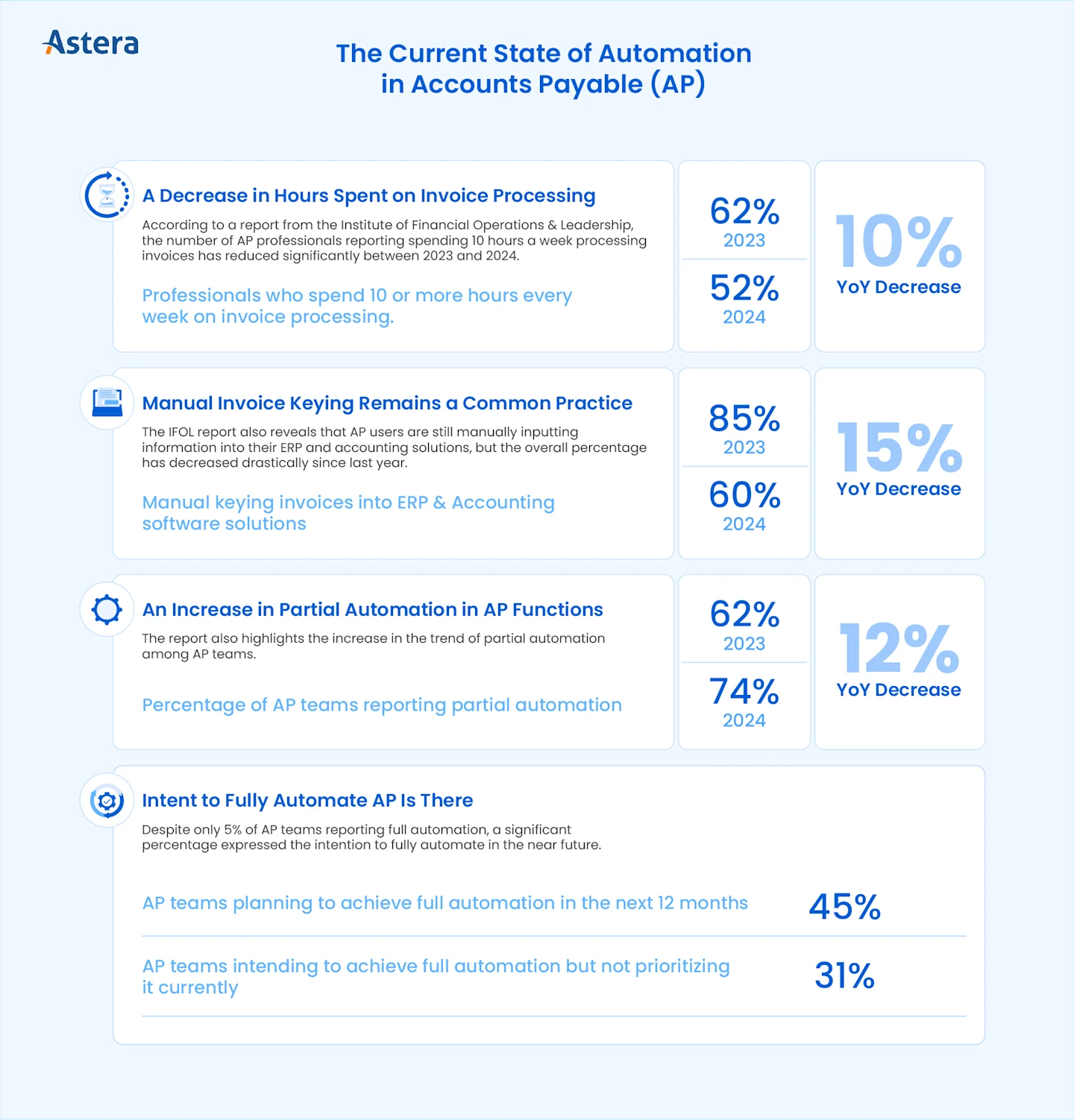
Invoice processing hours continue to fall year over year as more AP teams automate — see how invoice processing works.
The 10 Benefits of AI-Powered AP Automation
AP automation solutions featuring AI technologies offer a host of benefits for enterprises and SMBs alike. In addition to the more obvious ones, such as increased accuracy and cost reductions, AP automation can also improve data-driven decision-making, supplier relationships, and cash flow visibility. Let's look at all the benefits of AP automation:
1. Enhanced Accuracy
According to PYMNTS, 85% of CFOs believe AP automation leads to more accurate processes. Plus, 47.1% of AP professionals consider data errors and discrepancies causing process delays for approvers and stakeholders as one of the biggest AP challenges.
AP automation enhances accuracy by eliminating manual data entry, significantly reducing human error. This minimizes mistakes in keying invoice details, amounts, and supplier information. AI-powered Optical Character Recognition (OCR) captures invoice data accurately, ensuring records are consistent and correct.
2. Increased Efficiency
The top challenge teams face with their current accounts payable processes is the extensive manual data entry work. IFOL reports that 51.4% of AP professionals consider it as their biggest challenge. The same study also reports that 71% of AP professionals want to automate to speed up the payable process. However, according to PYMNTs, 85% of financial leaders agree that AP automation can improve the efficiency of current AP processes.
By automating their accounts payable, teams can streamline their processes, allowing invoices to be processed faster and reducing the time required for invoice approval and payment. This also frees up resources to focus on higher-value tasks.
3. Cost Savings
Cost savings remain one of the primary reasons for AP automation, especially for teams handling large volumes of invoices. With 80% of businesses anticipating growth in the volume of payments made through their AP systems in the coming years, AP automation can result in significant cost savings. For instance, reducing manual processes helps companies save on manual labor and avoid late payment penalties, considering that 80% of businesses regularly receive late payments.
4. Fraud Detection & Reduction
Payments fraud is the norm rather than the exception. According to the 2026 AFP Payments Fraud and Control Survey, 76% of US organizations experienced attempted or actual payments fraud in 2025. Checks remain the most-targeted payment method: 58% of organizations reported check fraud, more than reported ACH or wire fraud. Business email compromise (BEC) hit 74% of organizations, often as fake vendor requests to change bank details. Yet only 17% of organizations use AI to fight payments fraud. AP automation addresses both risks. Moving vendors from paper checks to electronic payments removes the most-targeted payment method. Automated controls flag duplicate invoices, unusual payment patterns, bank-detail changes and invoices with no matching purchase order or goods receipt.
5. Time Savings
According to the IFOL report, 50% of the finance teams spend more than 10 hours every week on processing invoices and issuing payments, while 30% spend 6-10 hours. Goldman Sachs estimates that AP automation can result in 70-80% time savings on average. This is because automation eliminates repetitive tasks, which also empowers AP teams to focus on more strategic activities. Plus, the higher accuracy also leads to fewer errors, which means even with partial automation, AP teams spend less time on proofing and reviewing invoices and payments.
6. Large Invoice Volumes & Scalability
The total volume of invoices processed by an AP team can depend on the nature and size of the business, but the increasing invoice volume is a pain point for finance teams. The need for AP automation becomes more evident, with PYMNTS reporting that 80% of companies are anticipating an increase in the volume of invoice payments. With AP automation, finance teams can ensure scalability without worrying about additional costs and resources.
7. Improved Vendor Relationships
According to the IFOL report, 41.4% of AP professionals report damage to vendor relationships due to the delays caused by manual invoice processing. Similarly, 38.6% report delays in delivery from suppliers and vendors. In other words, a vicious cycle of delays from and on both ends. With AP automation, AP teams can eliminate delays which in turn improves vendor relationships while also ensuring timely payments and subsequent timely delivery of goods or services.
8. Risk and Compliance
60% of finance leaders want to automate their AP function to increase controls and reduce risk, while 64% are expecting AI to mitigate risk and improve compliance in their AP processes. Automation of invoices improves tracking and reporting, which in turn simplifies compliance with financial regulations. Since automation streamlines the retrieval and storage of all invoices and payment records, businesses can improve preparedness for audits without the need for extensive manual record-keeping.
9. Increased Visibility & Cash Flow Optimization
37% of financial leaders want to automate AP to increase visibility across the invoice process, while 22.9% report that lack of visibility is their biggest AP challenge currently. AP automation delivers real-time visibility into outstanding payables, helping finance teams manage cash flow more effectively by automatically scheduling invoice payments based on their cash position.
Automated AP combined with real-time data analysis also helps organizations identify irregularities, trends, and opportunities across their AP function. With increased visibility into their cash flow, AP teams can also support proactive decision-making for optimized capital allocation strategies.
10. Automated Invoice Matching
Automation can also help AP teams automatically match invoices to receipts and purchase orders, ensuring greater transparency while also confirming that the company only pays for the goods or services it ordered and received. Commonly known as the three-way match, it's a common accounting practice that is otherwise done manually or often not at all if the invoice volume is too high. By automating this process, AP teams can easily flag overspending and even identify fraudulent payments.
Bonus Benefit: Less Stressful AP
Manually processing invoices can be stressful considering the time-sensitive nature of the task as well as the potentially huge room for error. Automating accounts payable can also help financial leaders make invoice processing much less stressful for their employees. In fact, the IFOL study found that the biggest issue finance leaders face due to delays in manual AP processing was the stress on their team, with 64.3% citing it as the core issue they face.
A less stressful AP process not only improves employee well-being but also helps redirect resources toward more strategic initiatives and higher-order tasks.
Explore Astera’s AP automation solution, or book a personalized demo to see it in action.
Book a personalized demo here →
How to Calculate AP Automation ROI
Before you invest in AP automation, it helps to estimate what it could save your team. Start with this formula:
Annual savings = Invoices per year x (Current cost per invoice - Automated cost per invoice) + Early-payment discounts captured + Late fees avoided
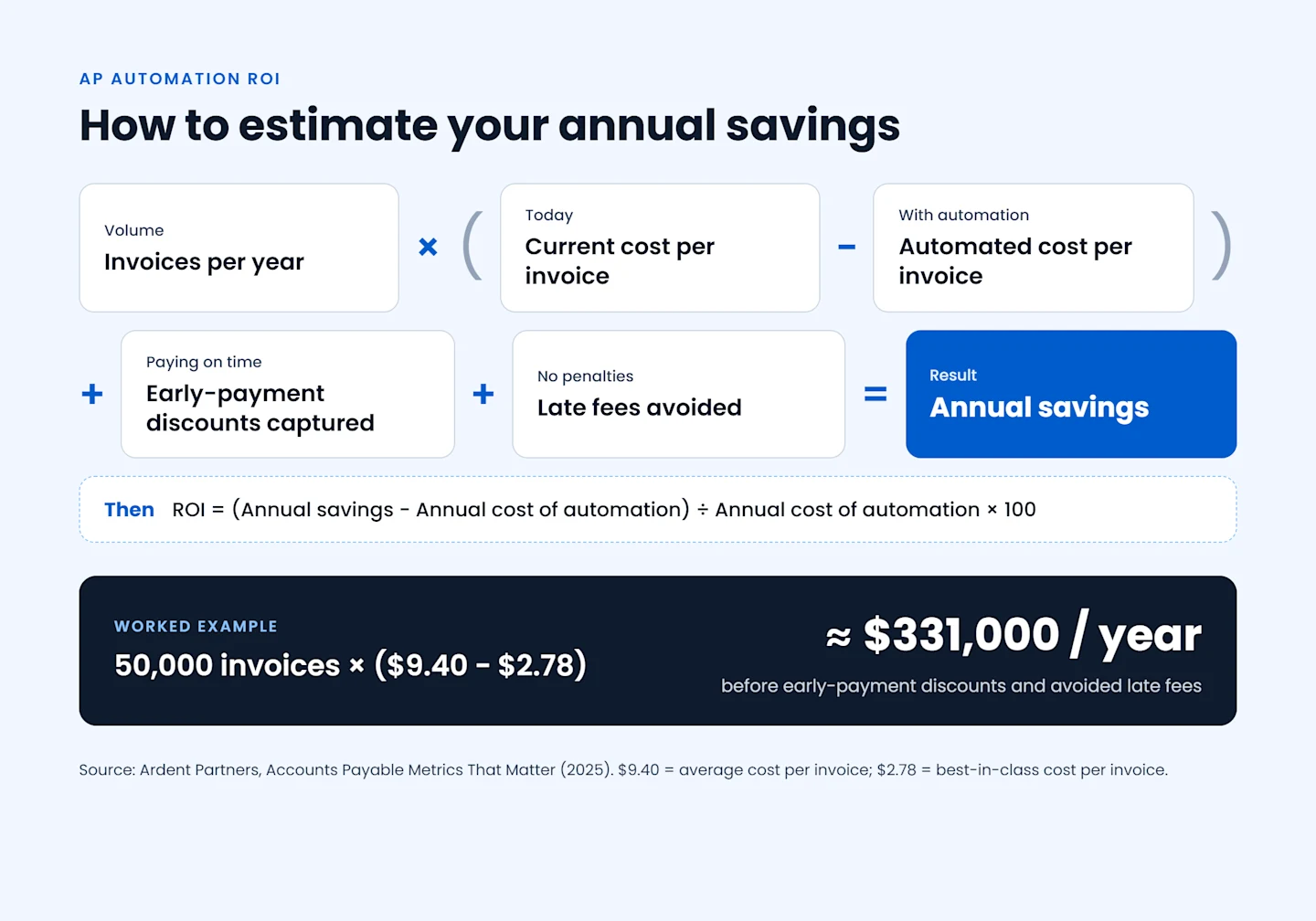
Then compare those savings with what the solution costs you each year, including subscription, implementation, and training:
ROI (%) = (Annual savings - Annual cost of automation) ÷ Annual cost of automation × 100
A Worked Example
According to Ardent Partners' 2025 Accounts Payable Metrics That Matter report, the average cost to process an invoice is $9.40, while best-in-class AP teams spend just $2.78. A team processing 50,000 invoices a year at the average cost spends about $470,000 on invoice processing. If automation brings its cost per invoice down to the best-in-class level, the team saves about $331,000 a year, before counting early-payment discounts and avoided late fees.
What Real Results Look Like
Your results will depend on your invoice volume, the share of invoices that arrive in a digital format, how many approval steps you have, and how much of the process you automate. Teams that automate the full cycle, from capture to payment, see bigger gains than teams that automate one step. Use our cost savings calculator to plug in your own numbers.
For a real-world example, see how GaP Solutions cut the time to process one invoice from up to 24 hours to about three minutes, a 99.79% reduction.
Industries That Benefit Most from AP Automation
AP automation helps almost any business, but some sectors gain more than others because of high transaction volumes, complex vendor networks, or strict regulatory requirements:
Financial services: Banks, lenders and insurers handle large volumes of vendor invoices under tight audit and compliance rules. Automated controls and complete audit trails make reviews faster and reduce risk.
Healthcare: Hospitals and providers pay many suppliers for equipment, drugs and services. Automation keeps payments on time, which protects supply continuity, and supports regulatory compliance.
Technology: Fast-growing tech companies add vendors and subscriptions quickly. Automation lets AP scale with the business without adding headcount.
Logistics: Carriers and 3PLs receive invoices in many formats from many partners, often with surcharges that need checking. Automated extraction and matching catch billing errors before payment.
Manufacturing: High purchase order volumes make three-way matching essential, and automating it prevents overpayments for goods not received.
Retail and e-commerce: Seasonal peaks bring spikes in supplier invoices. Automation absorbs the extra volume without delays.
How to Get Started with AP Automation
You don't need to automate everything at once. Most teams start with the most time-consuming step, usually invoice capture and data entry, and expand from there:
Map your current process. Document how invoices arrive, who approves them, and where delays and errors happen.
Set a baseline. Record your cost per invoice, processing time and error rate so you can measure the impact. Keep tracking the same AP KPIs after go-live so you can see what has changed.
Automate capture first. Use AI-powered extraction to pull invoice data automatically, whatever the format. See invoicing made simple for how this works.
Add matching and approvals. Automate three-way matching and route exceptions to the right approver.
Integrate with your ERP. Send validated data straight to your accounting system to remove re-keying.
For a detailed walkthrough, read our step-by-step guide to automating accounts payable. If you're still choosing a tool, compare the best AP automation software on the market.
Make the Most of AP Automation with Astera
The benefits of AP automation go beyond these ten, but organizations only realize them fully when they automate the whole process. Plenty of solutions automate one or two steps of invoice processing; very few offer holistic, AI-powered AP automation tailored to your enterprise's needs. That's where Astera comes in.
Astera's automated document processing solution is built to help enterprises get the most from their AP function, from capturing invoices in any format to validating data and loading it into your ERP, with no code required.
Seeing is believing. Schedule a demo with our team to see how Astera can transform your AP for the better, and for good.