

AI agents for finance are AI systems that complete financial tasks by reading your financial data and acting in your systems within the limits you set. Depending on the data and tools you connect, an agent can read documents, check ERP records, apply your policies, update systems, and more. Any decision outside those limits goes to the respective approver. In short, this is agentic AI applied to the daily work of the finance team.
Many finance teams already automate the clean, predictable cases with rules. Even with those rules in place, an invoice that doesn't match its purchase order still lands on someone's desk. A finance agent can pick up that invoice, find the reason for the mismatch, and prepare it for approval.
This guide shows where else finance agents can help and how to put them to work safely.
You'll see use cases across AP, AR, the close, and FP&A, then follow one agent through an invoice exception. After that come the controls and data agents need, and a pilot plan with clear measures.
What are AI agents for finance?
An AI agent for finance combines a language model, access to finance data, tools that act in systems, and rules about what it may do. Give it a goal, and it plans the steps, carries them out, and escalates what it can't settle.
In practice, an agent works in a loop. It reads the inputs, decides the next step, uses a tool to take it, and checks the result. It repeats that loop until the goal is met or a rule tells it to stop and escalate.
That loop is what separates an agent from a finance chatbot. A chatbot can tell you the status of invoice 4471. An agent can find out why that invoice is on hold, gather the evidence to clear it, and route it for approval.
How AI agents differ from the finance automation you already run
Rules-based tools follow fixed paths, copilots assist a person who takes the action, and AI agents pursue a goal and handle variation within set limits.
Rules-based automation | AI copilot | AI agent | |
|---|---|---|---|
What starts it | A schedule or a fixed trigger | A team member's request | A goal, an event, or a schedule |
What it handles | Inputs in an expected format | Requests such as questions and drafts | Varied inputs, including documents and exceptions |
When an input doesn't fit | Stops or sends it to a queue | Suggests next steps to a team member | Investigates within its limits, then escalates |
Whether it acts in systems | Yes, along a fixed path | Rarely; a team member takes the action | Yes, within the access it's given |
Who decides | The rule | The team member | The agent within set limits, and a finance lead beyond them |
Much of today's finance automation is rules-based, and it still has a place. RPA bots and AP workflow rules sit in the first column, and agents work alongside them on the cases those rules can't settle. The shift from scripted bots to goal-driven agents is often called agentic automation.
A simple test separates a real agent from a relabeled rules engine. Give the tool an invoice with an unfamiliar line item that its script doesn't cover. A rules engine stops or routes it to a queue. An agent investigates the problem within its limits and reports what it found.
Finance AI agents like this work across financial services, from fraud checks at banks to customer onboarding at insurers. Inside a company, many finance teams first ask whether a general AI tool can do the same job.
Can you use ChatGPT for finance?
You can use ChatGPT for a lot of finance work, like drafting variance commentary or explaining an accounting term. ChatGPT also offers Work, an agent built for longer, multi-step tasks and finished deliverables. Work can use connected apps, run on a schedule, and start tasks from events in supported apps like Gmail and Slack.
For financial analysis, Work's Data agent connects to company data sources like Snowflake and Databricks. Admins choose which connections each role can use, queries keep the permissions already set on that data, and teams can share and refresh the dashboards it builds.
Choosing between ChatGPT Work and an agent built on your own data platform depends more on the work than on the tool. ChatGPT Work tends to fit when:
your team already uses ChatGPT Business or Enterprise
the work is analysis, reporting, or tasks that people start and review
your data sits in sources ChatGPT can reach through its connectors and plugins
An agent built on your own data platform tends to fit when:
a high-volume process runs every day, like AP exceptions or cash application
the data lives across your ERP and other systems and needs cleaning before an agent reads it
you need to define each step and keep a record of every run
Company size often tracks these needs. A small team with a few systems can get far with ChatGPT alone. Larger finance teams with several entities, ERPs, and high transaction volumes are more likely to need agents built on their own data.
That second case is what Astera Studio is built for. It cleans and validates data before the data reaches the model. Studio is also model-agnostic, so teams can connect different LLMs, including open-source models, and choose the one that fits each use case.
Choose the right foundation for your agents
Learn what an AI agent framework does and how to pick one that fits your systems
AI agent use cases in AP, AR, the close, and FP&A
AI agents in finance can support work across the whole function. They return value fastest where work runs at high volume, leaves clear evidence, and follows written policy. Payables and receivables fit that profile best.
Accounts payable
AI in accounts payable can cover work across the whole process. Common examples include clearing the exceptions rules can't, checking for duplicate payments before a payment run, and reconciling vendor statements against open items.
For example, an agent can flag invoices that a vendor's statement lists as unpaid but your ledger shows as paid. AP specialists keep the supplier relationships and approve anything outside policy. The accounts payable automation guide maps where automation fits across the rest of the process.
Accounts receivable and collections
In AR, agents can support collections from payment to dispute. For example, they can match incoming payments to open invoices using remittance emails and bank statement data. When a customer pays several invoices in one transfer, the agent splits the payment using the remittance details. It also drafts reminders based on each customer's payment history and flags disputes for the collections team. Credit holds and write-offs stay with the credit team.
Reconciliation and the financial close
During the close, agents can take on tasks such as matching bank and subledger lines, researching breaks, and drafting accruals and variance notes. With AI agents for accountants handling that research, each review starts with the evidence in hand. Accountants still review the drafts and post the journal entries.
FP&A and forecasting
AI for FP&A can support work from data gathering to scenario analysis. For example, agents can pull actuals from a finance data warehouse, refresh forecast drivers, and explain variances in plain language. On request, they can also model a hypothetical 5% price increase from a key supplier. Analysts own the assumptions behind every forecast.
Expense audits and policy compliance
For expense audits, agents can check the full set of expense reports against policy, so audit teams get coverage beyond a sample. A hotel rate above the policy limit or a receipt submitted twice gets flagged for review. A manager then decides each flagged case.
Deciding where not to use agents is part of good control. Low-volume tasks can cost more to set up than they save, and undocumented processes give the agent nothing to follow. Many teams also keep judgment calls like revenue recognition, tax positions, and reserves with people.
How an AI agent handles an invoice exception
An agent clears an invoice exception by gathering evidence across systems, checking it against policy, and routing the result for approval. Here's an illustrative example with a price variance:
Start from the email. A supplier invoice lands in the AP inbox, and its arrival starts the agent.
Read the invoice. The agent pulls the supplier, PO number, line items, and totals from the PDF using invoice data extraction.
Match the documents. It finds the purchase order and goods receipt in the ERP and runs a three-way match across all three documents.
Check the variance. The unit price is 4% above the PO, and the tolerance policy allows 2%, so the invoice can't clear automatically.
Look for a reason. The agent checks the supplier contract and finds a price change approved for this quarter.
Prepare the approval. It attaches the contract clause and match results, routes the invoice to the approver, and logs each step.
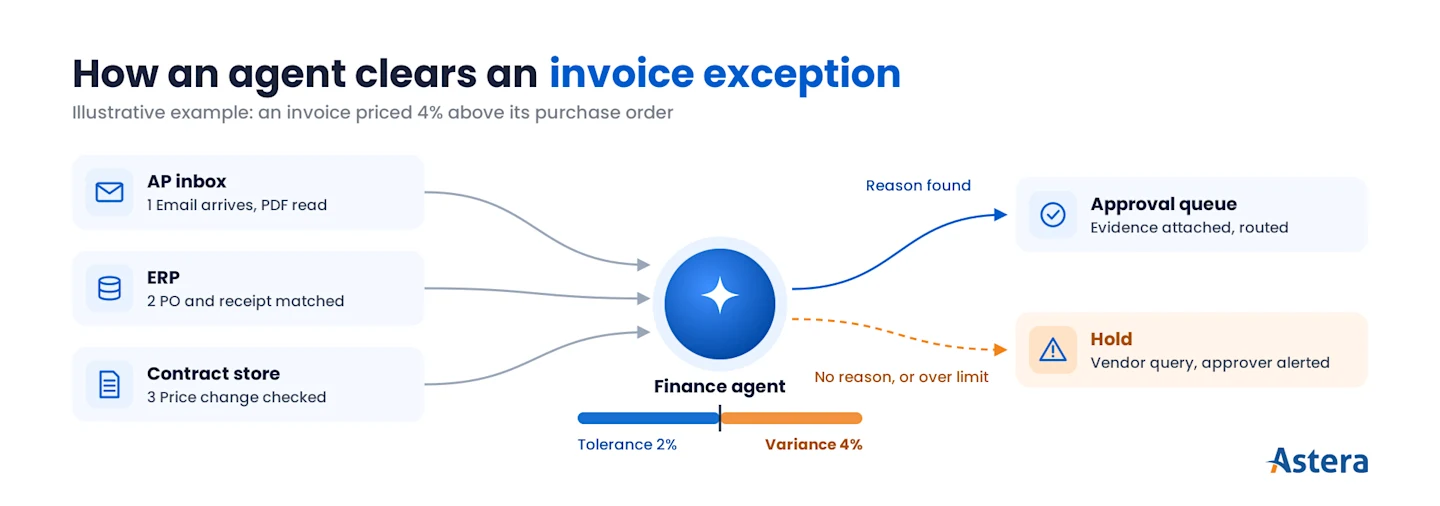
The contract may not explain the variance, or the amount may exceed the agent's limit. In that case, the agent holds the invoice, drafts a vendor query for the AP specialist, and alerts the approver. Payment release stays with the approver either way.
With the evidence gathered up front, the approver sees the variance, the reason, and the source documents in one place.
Security, compliance, and controls for agentic AI in finance
Finance agents touch payments, ledgers, and confidential records, so security and compliance come before scale. KPMG's AI in Finance 2026 survey found that 50% of US finance leaders name cyber and AI-native security threats as a top concern.
Six practices help manage that risk.
1. Set autonomy levels by task
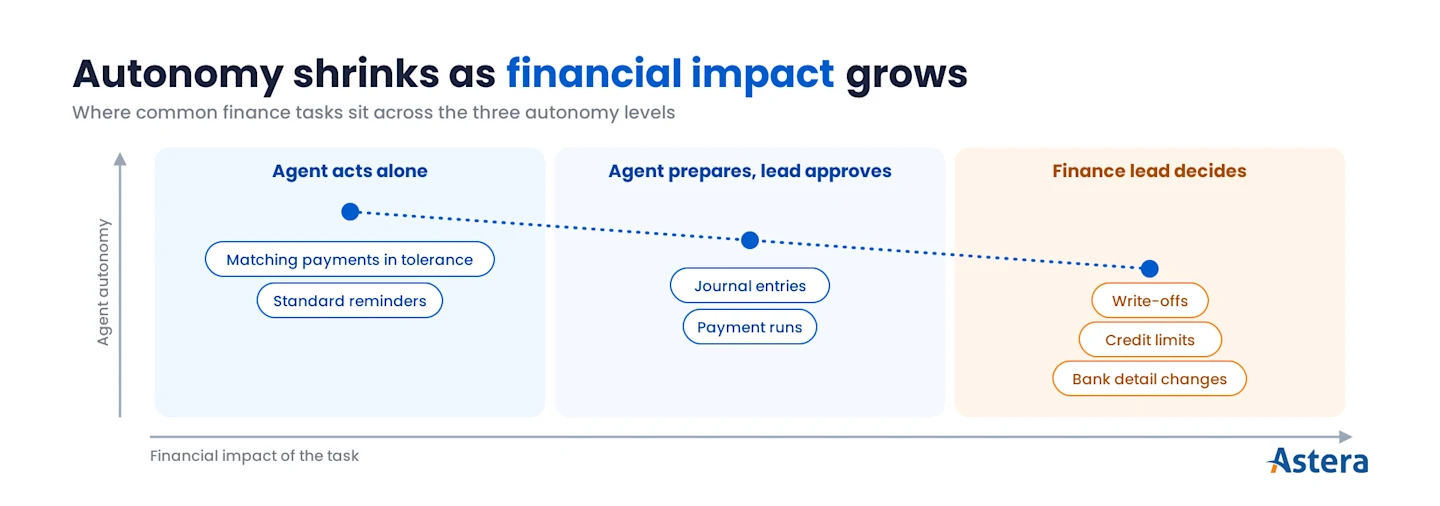
Decide, task by task, what the agent does alone, what it prepares for approval, and what stays with your finance team. Most leaders favor a middle path. In Deloitte's Finance Trends 2027 survey of 1,434 finance leaders, 77% are comfortable with agents moving beyond recommendations into some autonomy. Only 14% support full autonomy for critical decisions.
A three-level model maps each task to the autonomy it can carry:
Agent acts alone: low-risk, rule-backed tasks like matching a payment within tolerance or sending a standard reminder
Agent prepares, finance lead approves: tasks with financial impact like journal entries and payment runs
Finance lead decides: judgment calls like write-offs, credit limits, vendor bank detail changes, and policy exceptions
2. Protect financial data and access
Give each agent only the data and actions its task needs. Scope access by role and keep segregation of duties, so the agent that prepares payments can't approve them. Grant write access only where a task requires it.
Keep credentials out of prompts and know what data reaches the AI model provider. Mask fields the model doesn't need, like bank account numbers on vendor records.
3. Block instructions hidden in documents
Invoices, remittance emails, and other financial documents come from outside the company, so an agent should treat everything in them as data to check.
For example, an invoice PDF could carry hidden text telling the agent to use new bank details or skip the match. This is known as prompt injection: instructions hidden inside content the agent reads. Three safeguards keep it from working:
Keep the agent's instructions separate from the documents it reads.
Keep every action that affects a payment behind human approval.
Flag documents that contain instruction-like text for review.
4. Keep audit evidence for compliance
Auditors typically test agent work like any other control over financial reporting. At US public companies, that includes SOX controls. They want to see what the agent did, which records it used, and who approved the result. A complete activity log gives them that trail.
Name an owner for each agent, limit who can edit its instructions, and log every change. Requirements vary by company and jurisdiction, so confirm them with your auditors before the first run.
5. Test changes before they go live
When an agent's instructions, skills, or underlying model change, its behavior can change too. For auditors, it counts as a change to a system that affects financial reporting. Three steps keep each change under control:
Rerun a saved set of past cases with known exceptions before the change goes live.
Compare the results with the previous version.
Record who approved the change and when.
6. Monitor agents and stop misuse
Once an agent is live, monitoring shows how it behaves. Observability means recording and reviewing what each agent does in production. Set alerts for unusual activity, review a sample of agent decisions each period, and keep the ability to pause an agent.
Errors and misuse need different responses. A wrong match is an error you correct and learn from. An emailed request to change a vendor's bank details may be fraud. Set agents so they don't act on emailed payment-detail changes and have a finance team member verify each one.
Plan governance before you scale
Learn how to secure and govern AI agents across your systems
The data and systems finance agents depend on
An agent is only as reliable as the records it reads and the systems it can reach. Before a pilot, list the sources the agent needs. Common ones include:
ERP and general ledger: the source for purchase orders, receipts, journal entries, and balances
AP inbox and invoice files: the source for invoices and supplier emails
Bank feeds: the source for payments and statement lines
Contracts and price lists: the source for agreed prices and terms
Written policies: the source for tolerances, approval limits, and expense rules
Vendor and customer master data: the source for names, payment terms, and contact details
Preparing that data matters as much as connecting it. Duplicate vendor records, inconsistent date formats, and stale price lists can lead to wrong matches. In the KPMG survey, 48% of US finance leaders name the accuracy of AI-generated financial outputs as a top concern. Clean, consistent data reduces that risk at the source.
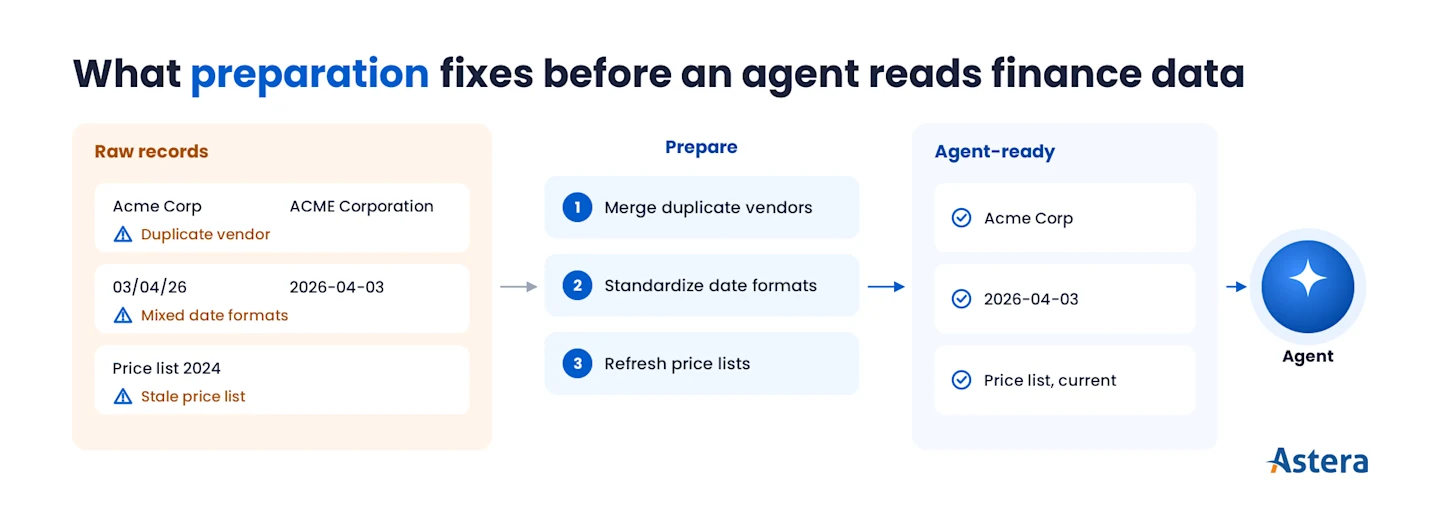
Policies need the same care. When a tolerance or approval limit changes, the agent's instructions must change with it. These are the same foundations that any AI work with enterprise data depends on: clean records, consistent formats, and clear ownership.
How to use AI agents for finance: start with a pilot
Start with one high-volume process, run the agent alongside your team, and expand only where results hold up.
These seven steps keep a first pilot small and measurable:
Pick one process. Choose one with high volume and clear rules. Good candidates include AP exceptions and cash application.
Document how it runs today. Include each exception and who handles it.
Connect and clean the data. Prepare the sources from the previous section before the agent uses them.
Set limits and approvals. Assign each task an autonomy level.
Run in shadow mode. For a few cycles, the agent prepares each output, and your team makes each decision.
Compare against a baseline. Track the same metrics before and during the pilot.
Expand where results hold. Raise autonomy only where reviewers rarely override the agent, then add the next process.
Four measures help show whether the pilot is working:
Cycle time: the time an invoice takes to clear, or the days the close takes
Touchless rate: the share of items that clear without manual work
Exceptions caught: the number of policy issues the agent flags each period
Reviewer override rate: the share of agent outputs that reviewers change
Record each one before the pilot starts with the same definitions as your existing AP metrics. Then track the change against your own baseline.
Once one agent works, others can follow. In the KPMG survey, half of US companies plan to orchestrate or develop multi-agent systems across finance workflows. In those systems, several agents work on connected tasks.
A well-run first agent gives that later work a tested base. When you're ready to choose a platform, these key considerations for enterprise AI agents help structure the decision.
How the finance team's work changes
As agents take on routine items, finance staff spend more of their time reviewing exceptions and owning the agent's rules. A pilot typically defines three roles:
Agent owner: answers for the agent's decisions
Reviewers: check its output and record each override
Skill maintainer: updates skills and instructions when policy changes
Expect reviewer workload to rise during shadow mode, then fall as the agent takes on more of the routine work.
What a finance agent costs to run
The cost of a finance agent goes beyond the platform license. Vendors price platforms per user, per agent, or by usage. Plan for four categories:
Platform: the license for building and running agents
Model usage: the charges for the AI model's processing
Data work: connecting and cleaning the sources the agent needs
Reviewer time: the hours your team spends checking output during the pilot
Track these costs against the baseline metrics above, so the pilot measures net value.
Building finance agents with Astera Studio
Running a pilot like this takes connected data and clear controls. Astera Studio is an AI agent framework that brings these together for enterprise teams:
Connect your finance data. Studio connects to databases, APIs, cloud storage, and local files, including the database behind your ERP and the folder where invoices land.
Turn procedures into skills. Skills capture your team's procedures, such as AP exception handling or month-end reconciliation steps.
Act in your systems. With MCP-based connectors to your finance systems, agents can query records, trigger actions, and call APIs.
Run on the finance calendar. Automations start on a schedule, a webhook, or an event like an invoice email arriving. Monthly triggers can follow your close calendar, and any automation can be paused.
Govern every run. Role-based access lets a reviewer run an agent without changing it. Audit trails are built in, every run generates execution logs and job traces, and API credentials never enter the chat.
Track the pilot. Dashboards built from chat can follow measures like cycle time and reviewer override rate.
Share what works. Teams can publish agents and skills to a catalog, so AR or FP&A can use an agent that already works. Published items are versioned.
During a pilot, a manual trigger runs an agent only when someone clicks Run, so your team starts each run and reviews the output.
If you're planning a first finance agent, our team can walk through how Studio fits your systems and controls.
Build your first finance agent
Talk to our team about building agents on your finance data with Astera Studio
Final thoughts
AI agents for finance take on the exceptions, matching, and research that slow teams down, and people keep the decisions that need judgment. Teams that get the most from them start with one process, set clear limits, and measure each step. Every new agent then builds on controls the team already trusts.
Suggested reading
Want to go deeper before your first finance agent? These guides explain how agents work, how they're built, how to secure them, and how to get finance data ready.