

A database schema (often shortened to DB schema) is the blueprint of a database. It defines which tables exist, what columns each table holds, the data type of every column, and how the tables relate to one another through keys and constraints. Schemas are usually drawn as a schema diagram, so developers, analysts and business users can see the structure at a glance before anyone writes a query.
In this guide, you'll learn the three types of database schema, see a DB schema diagram and a worked SQL example you can adapt, and get the best practices that keep a schema fast, consistent and easy to change.
What Is a Database Schema (DB Schema)?
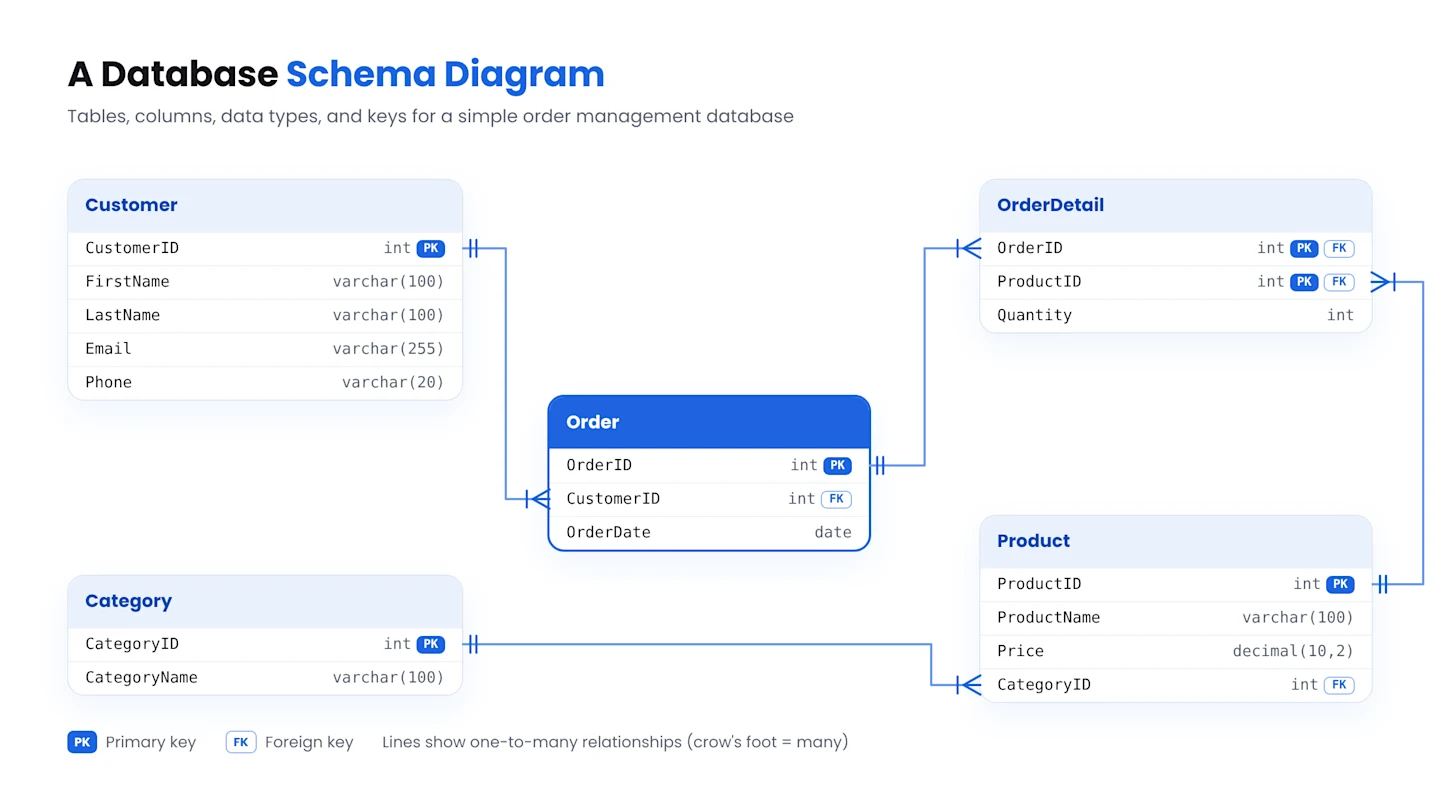
A database schema, or DB schema, is an abstract database design representing how your data is stored in a database. Database schemas can be visually represented using schema diagrams, such as the one below:
The terms "database schema" and "DB schema" mean the same thing. Both refer to the structure that sits underneath the data, not the data itself.
A database schema diagram visually describes the following:
The structure and organization of your data
Different elements within the database — such as tables, functions, field names, and data types — and their relationships
Database schemas are at the heart of every scalable, high-performance database. They're the blueprint that defines how a database stores and organizes data, its components' relationships, and its response to queries.
Database schemas are vital for the data modeling process. They provide a framework for how a database's elements relate to each other and work together.
Well-designed database schemas help you maintain data integrity and improve your database's effectiveness. Let's explore how they work, their types and benefits, and how you can build them correctly.
Database Schema vs. Database Instance
A few key differences distinguish a database schema and a database instance from each other, which are as follows:
A database schema is the blueprint that describes the organization, structure, and element relationships within the database. To understand what is a database, think of it as the broader system that stores and organizes data, while the schema defines how that data is structured. In contrast, a database instance is a sample taken from a database at a particular point in time.
Secondly, a database schema is a framework and doesn't contain any data itself. In contrast, a database instance is a snapshot of the entire database and its contents.
Lastly, a database schema doesn't change frequently over time, but a database instance can vary depending on the moment a data team obtains it.
Types of Database Schemas
There are different types of schemas within the context of databases:
1. Conceptual Schema
A conceptual schema provides a high-level view of the essential entities, attributes, and relationships within a database system. Instead of deep diving into specific details about entities such as tables, columns, and views, conceptual schemas abstract specific implementation details and focus on the business meaning of the data.
A conceptual schema helps you understand your data's underlying structure. It lets you spot discrepancies or issues before they affect data applications, analytics, or insights.
2. Logical Schema
A logical schema provides basic details about the data. Unlike a conceptual schema, a logical schema also describes specific objects like tables and columns and isn't limited to abstract concepts.
Logical schemas help you ensure that your data is organized and stored effectively. Since these schemas detail the relationships between entities, they're even more helpful than conceptual schemas for identifying issues.
3. Physical Schema
A physical schema is the most elaborate of all three schemas, providing the most detailed description of data and its objects — such as tables, columns, views, and indexes.
Unlike a logical schema, a physical one offers technical and contextual information. It describes the storage media each table in a database uses and any associated constraints, enabling developers to choose the appropriate storage media for each table.
Database Schema Example: Diagram and SQL
To make this concrete, here is a simple DB schema for an online store. It has five tables: customers place orders, each order has one or more order items, and each item points to a product that belongs to a category.
The same schema in SQL:
CREATE TABLE categories (
 category_id INT PRIMARY KEY,
 name VARCHAR(100) NOT NULL UNIQUE
);

CREATE TABLE products (
 product_id INT PRIMARY KEY,
 category_id INT NOT NULL REFERENCES categories(category_id),
 name VARCHAR(150) NOT NULL,
 price DECIMAL(10,2) NOT NULL CHECK (price >= 0),
 stock_qty INT NOT NULL DEFAULT 0
);

CREATE TABLE customers (
 customer_id INT PRIMARY KEY,
 full_name VARCHAR(150) NOT NULL,
 email VARCHAR(255) NOT NULL UNIQUE,
 created_at TIMESTAMP DEFAULT CURRENT_TIMESTAMP
);

CREATE TABLE orders (
 order_id INT PRIMARY KEY,
 customer_id INT NOT NULL REFERENCES customers(customer_id),
 order_date DATE NOT NULL,
 status VARCHAR(20) NOT NULL DEFAULT 'pending'
);

CREATE TABLE order_items (
 order_item_id INT PRIMARY KEY,
 order_id INT NOT NULL REFERENCES orders(order_id),
 product_id INT NOT NULL REFERENCES products(product_id),
 quantity INT NOT NULL CHECK (quantity > 0),
 unit_price DECIMAL(10,2) NOT NULL
);

CREATE INDEX idx_orders_customer ON orders(customer_id);
What this example shows:
Primary keys (customer_id, order_id and the others) give every row a unique identity.
Foreign keys (REFERENCES) enforce relationships, so an order can't point to a customer who doesn't exist.
Constraints (NOT NULL, UNIQUE, CHECK, DEFAULT) protect data quality at the schema level.
Normalization keeps product details in one place. order_items stores unit_price separately so past orders keep the price that was actually paid.
Indexes on frequently filtered columns, such as orders.customer_id, speed up common queries.
This is a logical and physical schema. The conceptual version would simply say: "Customers place Orders; Orders contain Products; Products belong to Categories."
What are Database Schemas Used for?
Database schemas serve multiple purposes, some of which include:
Database schemas are the data models that applications interact with. Applications can query and manipulate data in a structured way using schemas. For developers, schemas serve as documentation describing the database's structure. The availability of detailed information equips developers to understand how they should interact with the database, write queries, and adhere to best practices
Database schemas help maintain the consistency and reliability of data backups. Their clear, well-defined structure simplifies data restoration while enhancing the accuracy of backups. Similarly, database schemas also assist with disaster recovery. When dealing with corrupted or lost data, a well-designed schema can help restore a database to its original condition and maintain data integrity.
Data analysis and report generation become easier thanks to the structured format that database schemas provide. In data warehousing, schemas help define the structure of data marts and warehouses and aid in complex querying and aggregations that are needed for business intelligence tasks.
A Shorter Path to Your Database Schema
Find out how Astera can simplify and accelerate database schema design — with no coding required.

What is Database Schema Design?
Database schema design is creating an outline or a plan that defines how data will be stored, accessed, and managed in a database. It involves specifying the tables, their fields, data types, relationships, constraints, and other characteristics that determine how data will be stored, accessed, and used within the database.
A database schema diagram can be either visual or logical, and these are the most frequently used database schema designs:
Relational Model
A relational model also arranges data in rows and columns in tables like a flat model. However, you can show relationships between entities in a relational model.
As an example, consider a table containing student records. Each row can represent an individual student, and each column can include an attribute, as seen below:
StudentID | Name | Age | Gender | GPA |
|---|---|---|---|---|
1 | Alice Johnson | 22 | Female | 3.8 |
2 | Bob Smith | 23 | Male | 3.5 |
3 | Carol Williams | 21 | Female | 3.9 |
4 | David Brown | 20 | Male | 3.6 |
5 | Eva Davis | 22 | Female | 3.7 |
Hierarchical Model
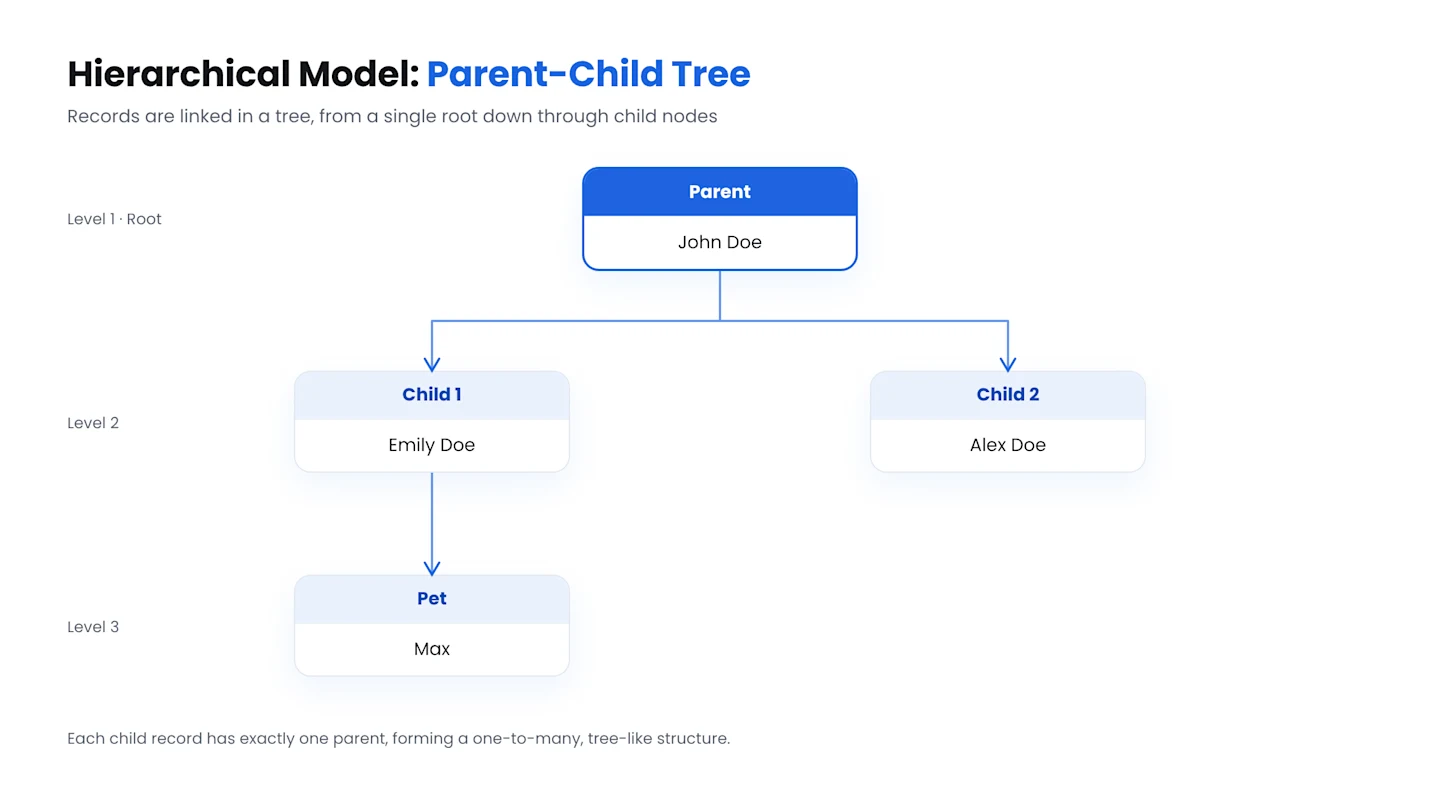
A database schema following a hierarchical model will have tree-like structures, with child nodes attached to parent nodes.
Such a model helps store nested data, i.e., a data structure with one or more structures of identical or varying types.
For example, a dataset listing families in a neighborhood can have parents' names in the parent node and children's names in the child nodes. An entry in such a dataset could look like this:
Flat Model
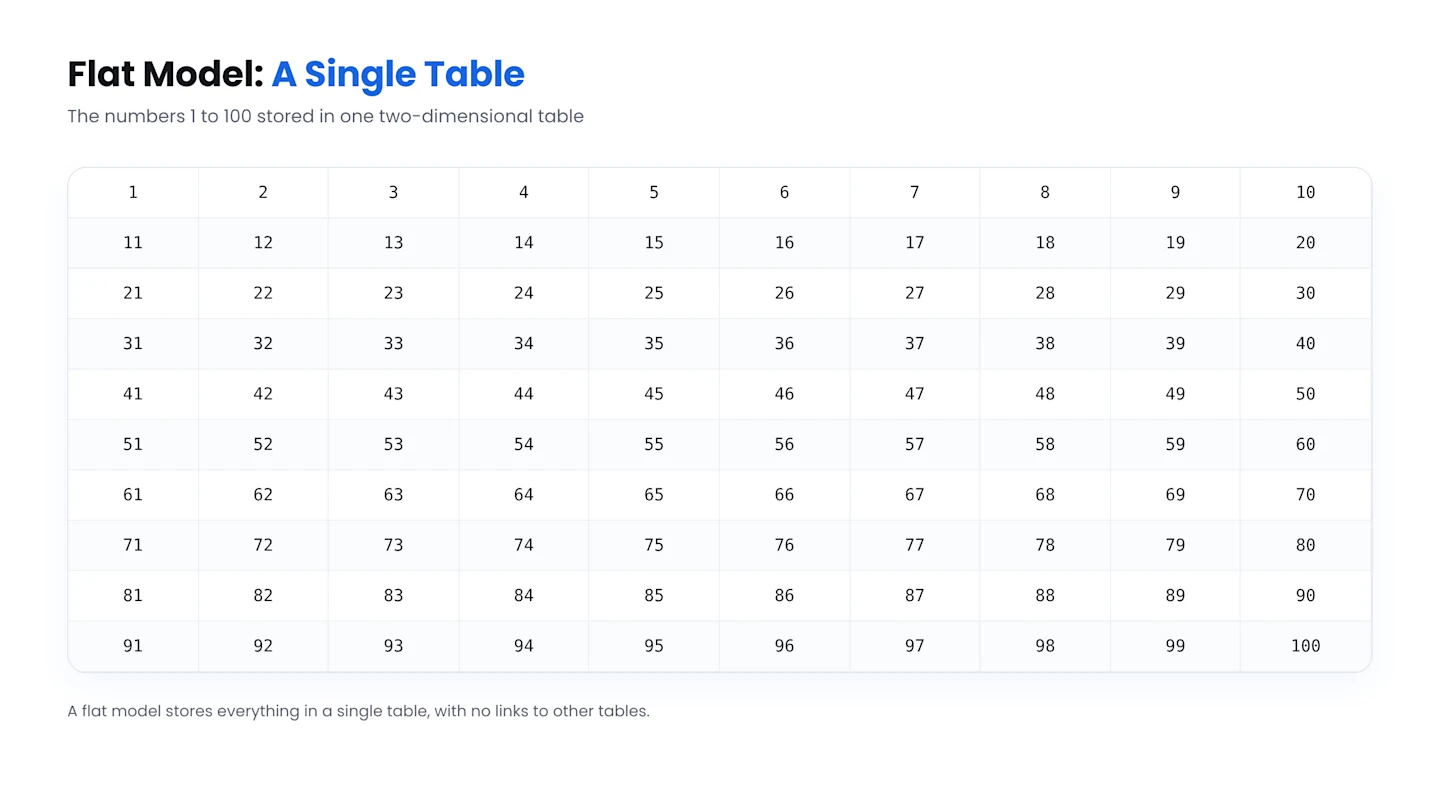
A flat model arranges data more simply, typically in a single or bi-dimensional array.
This model works best for straightforward data that lacks complex relationships and can be arranged tabularly.
A spreadsheet is an excellent example of a flat model as it arranges data simply into rows and columns. As another example, simple data (numbers 1–100) arranged tabularly will look like this:
Star Schema
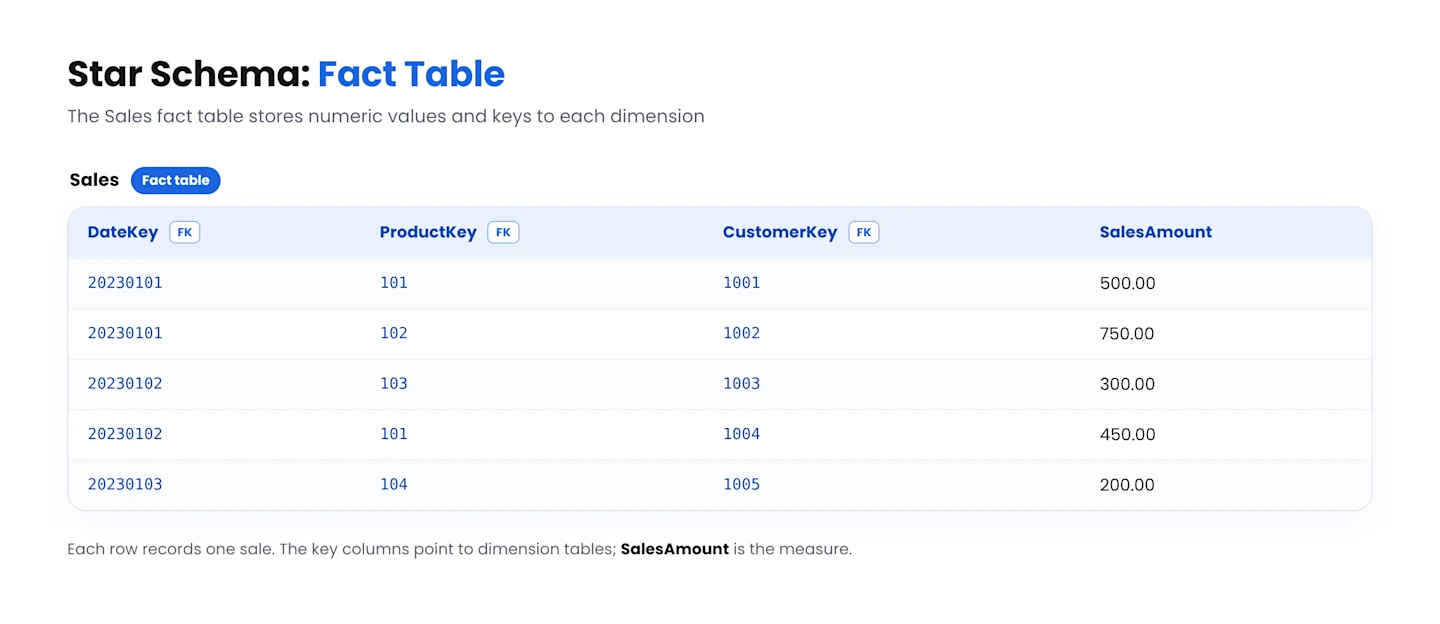
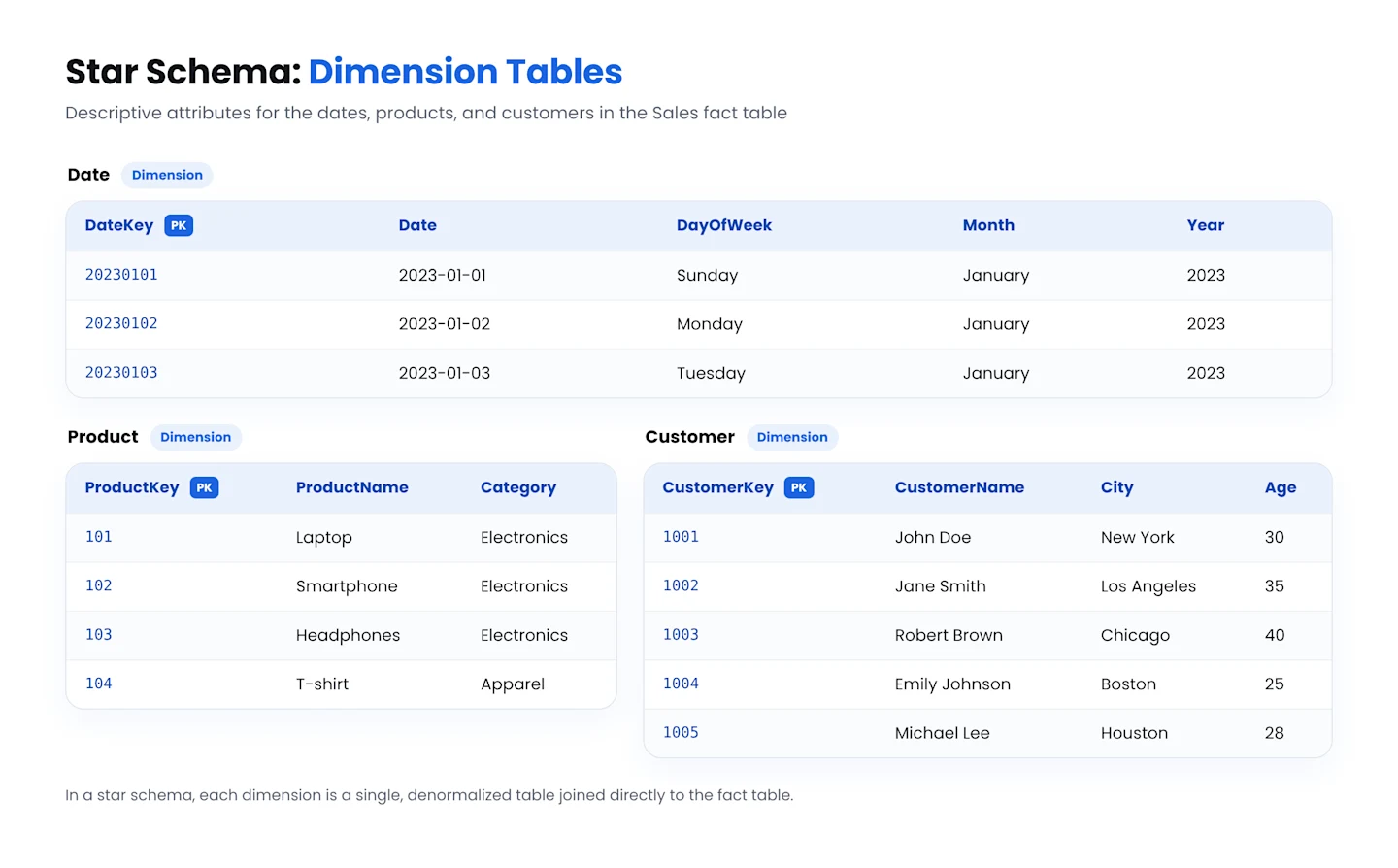
A star database schema sorts data into ‘dimensions’ and ‘facts.’
A dimension table will contain descriptive data, whereas a fact table will have a numerical value, as shown below:
Here,
The Fact Table “Sales” contains numerical measures, such as sales amounts and the foreign keys to related dimension tables.
The Dimension Tables contain descriptive attributes related to the measures. “Date Dimension” contains information on dates.
“Product Dimension” contains information on products
“Customer Dimension” includes information on customers
The Fact and Dimension Tables are joined via foreign key relationships.
Snowflake Schema
In a snowflake schema, each table typically represents a single-dimension attribute.
A snowflake database schema provides a logical representation of the data.
Dimension tables are normalized/divided into multiple related tables, each containing a subset of the attributes.
Relationships between dimension tables form a hierarchy, with a separate table representing each level of the hierarchy.
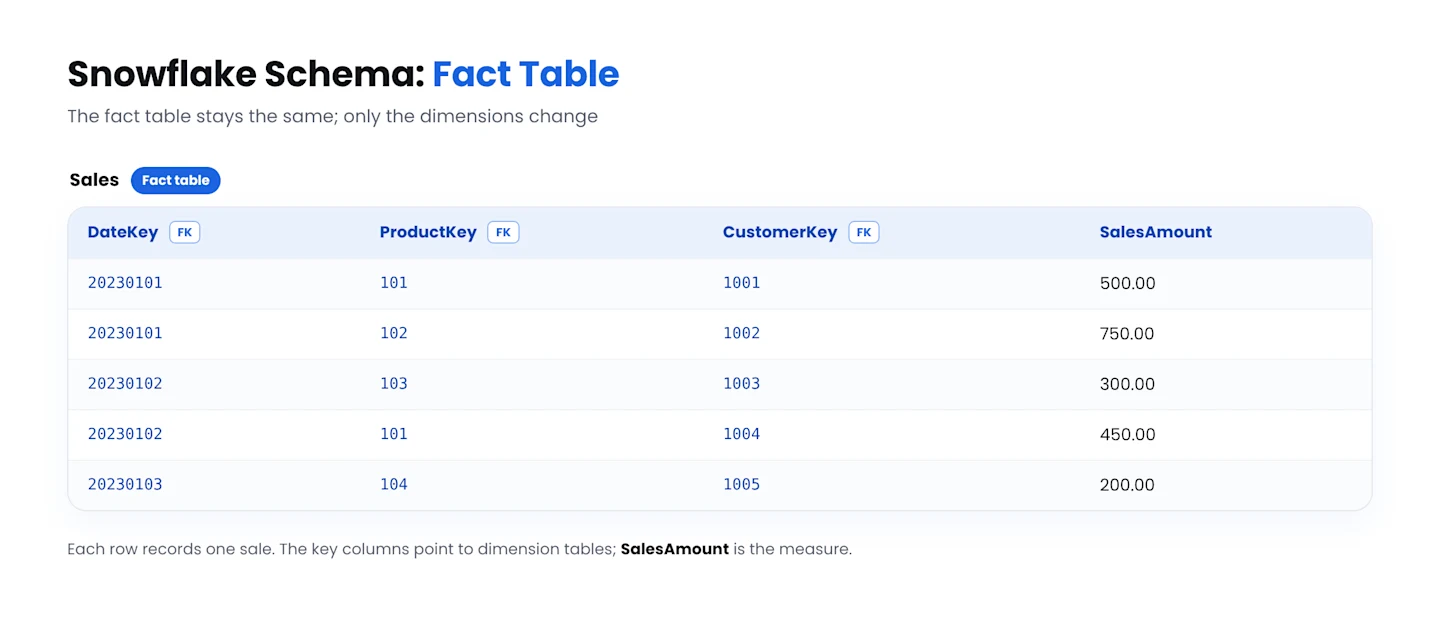
Note that the snowflake schema has a more normalized approach than the star schema. This approach can save storage space and improve data integrity but results in comparatively more complex queries.
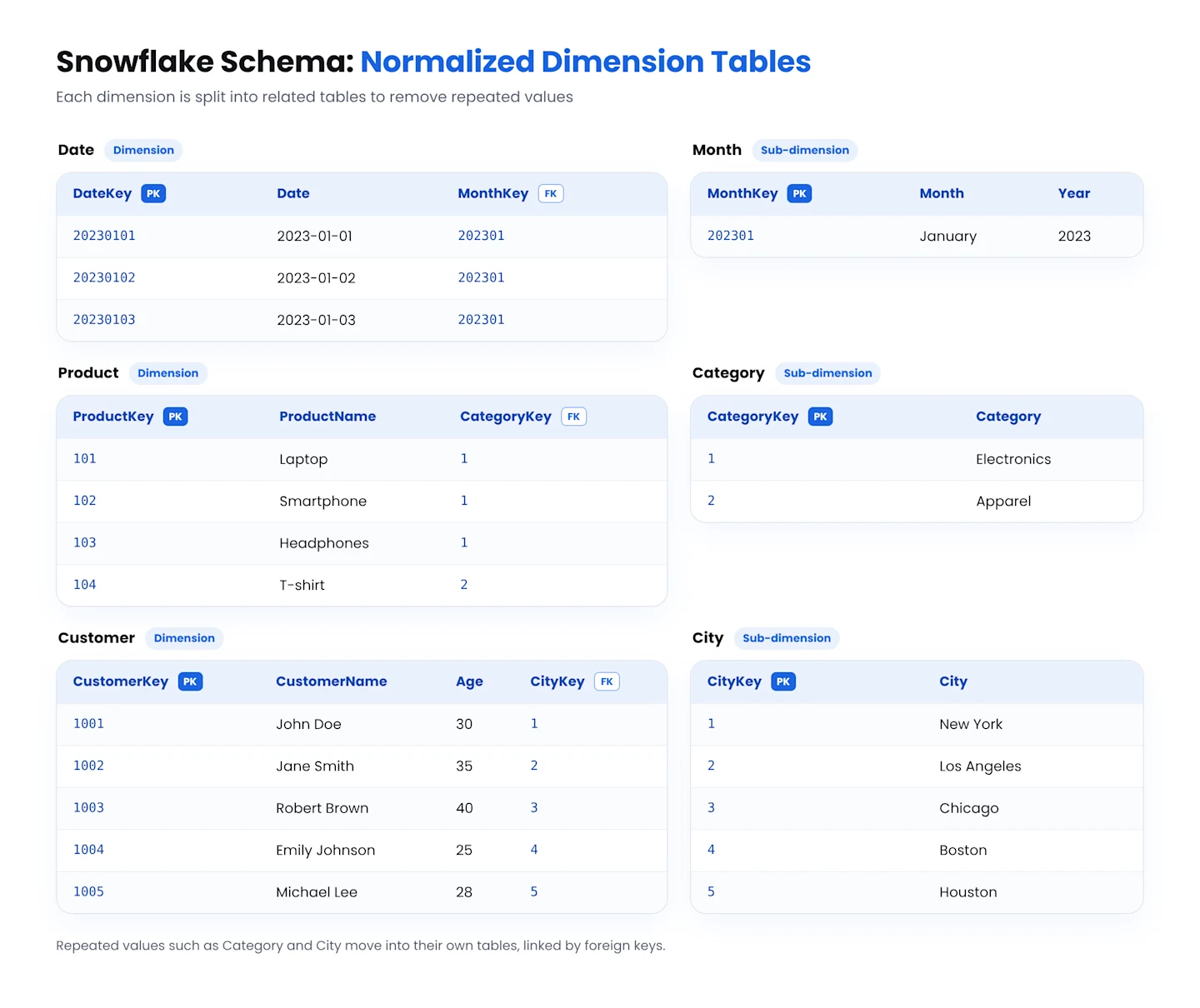
In this example:
The Fact Table “Sales” is hierarchically connected to multiple dimension tables — Date Dimension, Product Dimension, and Customer Dimension.
Each dimension table can be normalized further, which will create a snowflake-like structure with branches connecting to additional tables, as seen below:
In this structure,
The Fact Table “Sales” is at the center of the schema.
Each Dimension Table connects to the Fact using its respective foreign keys.
This is a relatively straightforward example of a snowflake schema. As more tables branch out from the dimensions, the schema’s complexity will increase accordingly.
Network Model
The network database schema organizes data into sets and relationships, which facilitates complex interconnectedness between data and different data points.
This structure is ideal if you want to model many-to-many relationships.
This schema aligns closely with real-world use cases, where you can find multiple relationships between multiple entities, as seen in the example below:
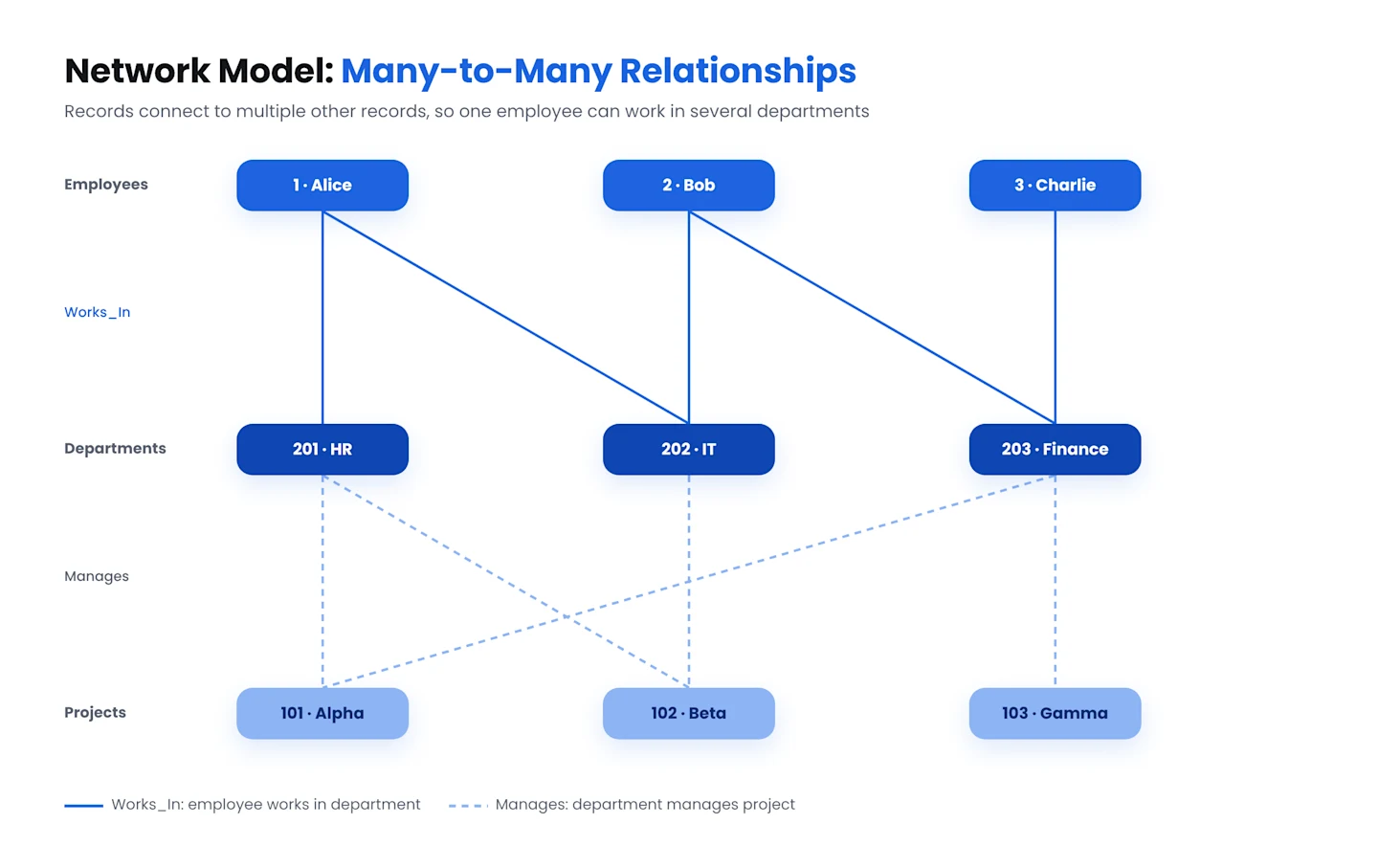
Among the entities in this scenario:
The Employees set contains employee records, each with a unique EmployeeID and EmployeeName.
The Departments set contains department records, each with a unique DepartmentID and DepartmentName.
The Projects set contains project records, with a unique ProjectID and ProjectName assigned to each.
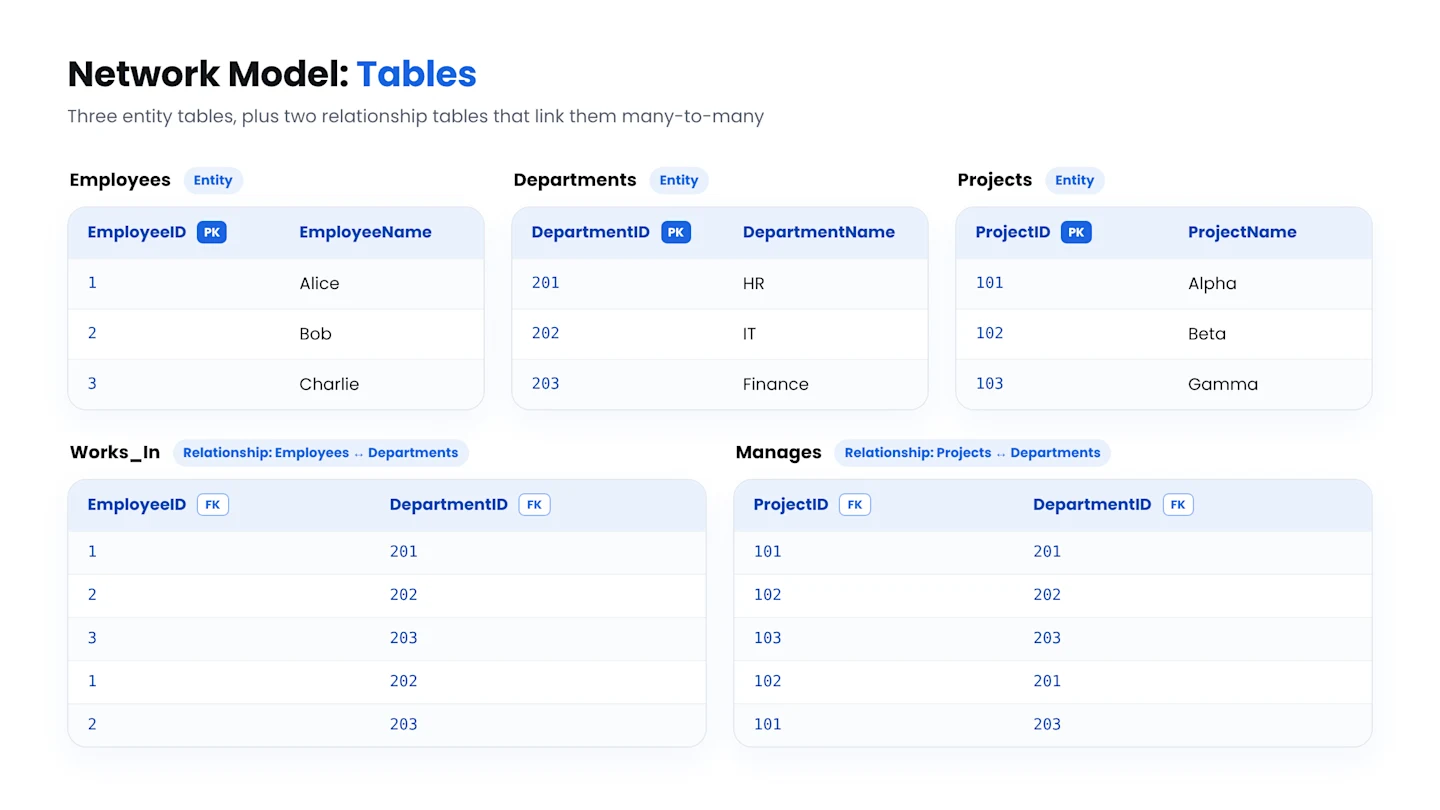
Similarly,
The Works_In table depicts many-to-many relationships between the employees and departments and shows which departments the employees work in.
The Manages table features many-to-many relationships between projects and departments and shows which projects are managed by which department.
Benefits of Database Schemas
A database schema offers several benefits:
1. Ensuring Data Integrity
While designing a database schema, you can configure primary and foreign keys and other constraints to define relationships between tables and clearly ensure referential integrity. For instance, in a relational database, one table’s primary key will refer to another table’s foreign key, keeping related data consistent across tables.
Primary keys also guarantee that each record in a table is uniquely identifiable, minimizing data duplication.
Similarly, check constraints keep data values compliant with specified conditions, preventing incorrect data entry. When applied to required fields, constraints can help you ensure data completeness by mandating the provision of essential data.
With these keys and constraints, a database schema specifies the data type allowed in each column (e.g., whether it’s an integer, a string, or some other data type) and its expected format (e.g., date format, number of decimal places, etc.).
These rules minimize the chances of errors as data is entered into the relevant tables, thereby maintaining data integrity and giving the database a consistent structure
2. Faster Data Retrieval
Well-designed schemas define relationships between database tables, optimizing queries and improving performance in a few different ways:
Configuring foreign keys helps a database determine how one table is related to another. The database then uses foreign keys to look up and match critical values rather than scanning whole tables.
The database query optimizer can use the relationships defined in the schema to create more efficient execution plans. The optimizer also uses well-defined relationships to determine the right data retrieval methods, such as the order of table joins and which indexes it should use.
Relationships are used to configure views that can precompute and store the results of elaborate joins. This process creates ready-to-use datasets, minimizes the need for repetitive computation, and accelerates read operations.
3. Enhancing Security
While designing a database schema, you can incorporate permissions and access levels for various roles or users. This idea limits access to sensitive data to authorized users only. It also mitigates the risk of breaches and misuse.
4. Offering Scalability
Scalability is one of the hallmarks of a correctly designed schema. Database schemas are built with scalability in mind to accommodate expanding data requirements and increases in data volume.
You can introduce new relationships, tables, and columns into the schema without disrupting functionality.
5. Simplifying Updates
A clear database schema design simplifies data updates and other database management processes such as schema modifications, backups, performance optimization, and data integrity checks. You can quickly determine which columns or tables to update or modify while keeping the process compliant with your data integrity rules.
6. Enhanced Interoperability
A standardized schema facilitates interoperability between various applications and systems across an organization.
Smooth, hassle-free data integration between disparate systems is crucial, especially for data-driven enterprises. Enhanced interoperability ensures everyone works with the most up-to-date version of their required data.
Best Practices
Following these best practices ensures that your database schema performs as intended:
1. Understand Your Requirements
Start by outlining your requirements and goals. These can vary depending on your business model, the application(s) of the database, and the data it’ll store and manage.
Clarifying objectives and applications early lets you build a schema that aligns with your requirements. It also enables engineers, analysts, and other technical stakeholders to work with data confidently.
2. Follow Proper Naming Conventions
Your naming conventions can impact database queries’ performance and quality, and here are some tips to keep in mind:
Keep column and table names concise since longer names consume more disk space. Simpler, to-the-point names work best — for example, ‘StockItems’ instead of ‘ItemsinStock.’
Avoid including quotes, spaces, hyphens, or other special characters. These can complicate the querying process or lead to errors and invalid communication.
When naming columns, specify data types and ensure that the data type you choose supports the full range of values for the corresponding data set.
Spellcheck and proofread when specifying field names. If not corrected, typos and errors in field names can cause errors down the line.
3. Implement Access Control and Authentication Measures
You can reduce data breaches and abuse by implementing data security and safety measures. Access control is a reliable technique, but also consider incorporating the following into your database schema:
Different types of authentications.
Mandating registration for new users (i.e., no ‘guest users’).
Encryption or hashing techniques as added protection for columns containing sensitive information.
4. Maintain Documentation
Database developers, programmers, and analysts are your database’s primary users. However, you may want to share data with other business stakeholders, including non-technical personnel. Maintaining proper database schema design documentation lets you do this easily.
5. Balance Normalization with Query Optimization
Day-to-day database operations — particularly those related to transactions — involve updates, insertions, and deletions. Over time, this can result in inconsistent or redundant data, creating inconsistencies and discrepancies. For example, if your database has the same record in two locations, only one record may be updated, but not the other. Normalization prevents this by defining entities so there aren’t duplicate records in your database.
However, you need to strike a balance between normalizing and optimizing query performance. Excessive normalization involves a lot of tables and joins, resulting in complex schemas and affecting query performance.
6. Set Up Unique Primary Keys
Set up a unique primary key for every table in your database to serve as an identifier for rows. Analysts use this primary key to assess your data model and tables’ relationships with each other.
The primary key also minimizes instances of duplicated rows, increasing data integrity and mitigating potential application errors.
7. Ensure Flexibility
Your database schema design should be flexible enough to accommodate future changes. Prioritizing flexibility ensures that as your data requirements evolve, your database schema design can keep up with them.
Database Schema Design Using SQL
Database design through SQL involves manually structuring the relationships and tables in a database using certain principles and steps. Let’s look at an online grocery delivery service as an example to design a simple database schema:
1. Identifying the Requirements
Before designing the schema, you need to establish the requirements. In this scenario, the online grocery delivery service will primarily need to store information on products, categories, customers, and orders. Secondarily, it will need to track customer orders.
2. Entity-Relationship Diagram
A simple Entity-Relationship Diagram (ERD) for this business will look as follows:
3. Normalization
The ERD here is already relatively normalized. In instances when it’s not, the process of normalization breaks down larger tables into smaller ones to ensure that each table represents a single logical entity and efficiently stores data without redundancy.
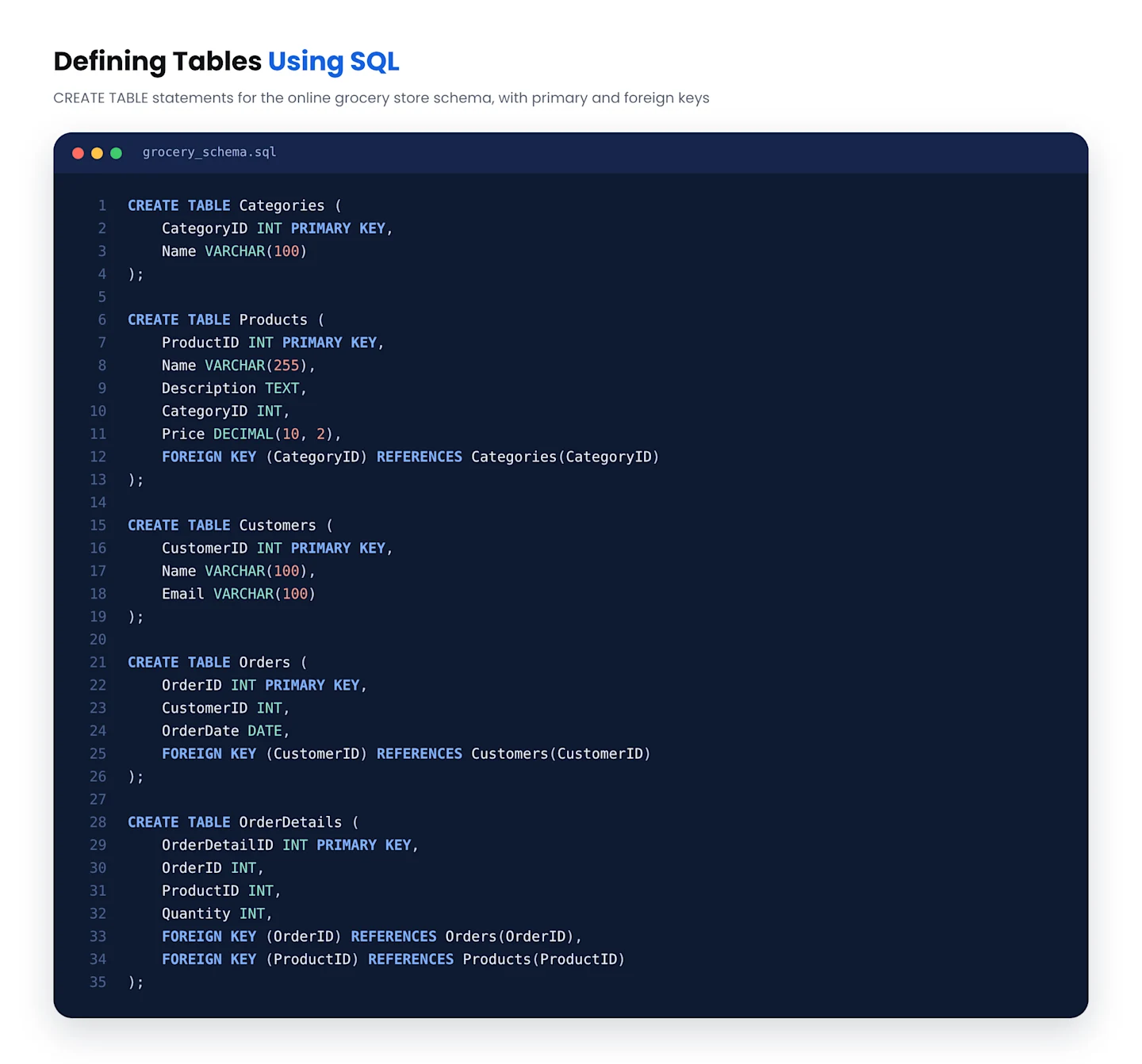
4. Defining The Tables
Next, you’ll need to define the tables using SQL:
5. Defining Columns and Data Types
If the columns aren’t already defined and the appropriate data types for each table aren’t specified, you’ll first need to understand the nature of the data you’ll store in each column. Secondly, you’ll choose the most suitable data type to represent that data while ensuring data integrity.
6. Defining Primary and Foreign Keys
Each table should have well-defined primary and foreign keys to help you uniquely identify records and establish relationships between the tables, respectively.
7. Adding Constraints
You can add additional constraints at this stage if needed, such as default values or unique constraints. These constraints ensure data quality, integrity, and consistency and enforce business rules and requirements.
8. Creating Indexes
You can create indexes on the columns you frequently use in search operations depending on your query patterns.
Note that the above steps create a basic hypothetical business schema. The schema’s complexity and the difficulty of manually designing it will increase as your business expands and your requirements become more varied.
A Shorter Path to Your Database Schema
Find out how Astera can simplify and accelerate database schema design — with no coding required.
Why You Should Opt for an Automated Alternative
Manually creating a database schema can be a long, complicated task — but Astera simplifies it considerably. You can fully automate DDL/Diff script creation and execution or have Astera create it for you so you can execute it manually.
Using Astera, you can save time and get your database schema ready quickly without dealing with extensive coding.
Conclusion
A well-designed database schema is just a few clicks away. Enjoy faster and more reliable database schema design in a no-code environment. Reach out to our team today for more information.