
Source-to-Target Data Mapping, Automated with AI
Map any source to any target on a visual, no-code canvas. AI matches fields by meaning, even when the names differ, and you refine the links, preview the data and validate it before it runs.
How AI-powered data mapping works
From connecting your systems to running the mapping, with AI drafting the field links and your team reviewing them.
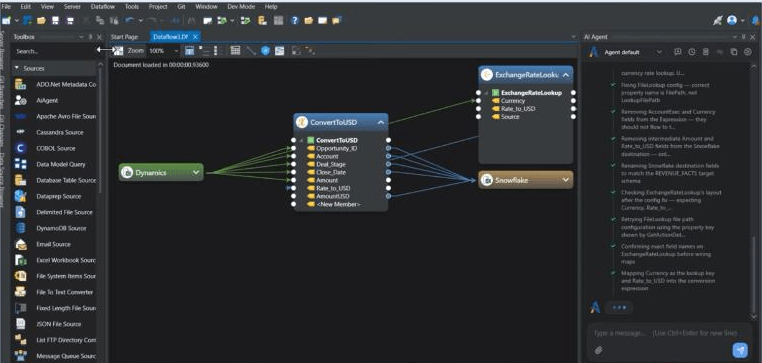
Step 1 of 4: Connect source and target
See AI-powered data mapping in action
Data mapping capabilities in one unified platform
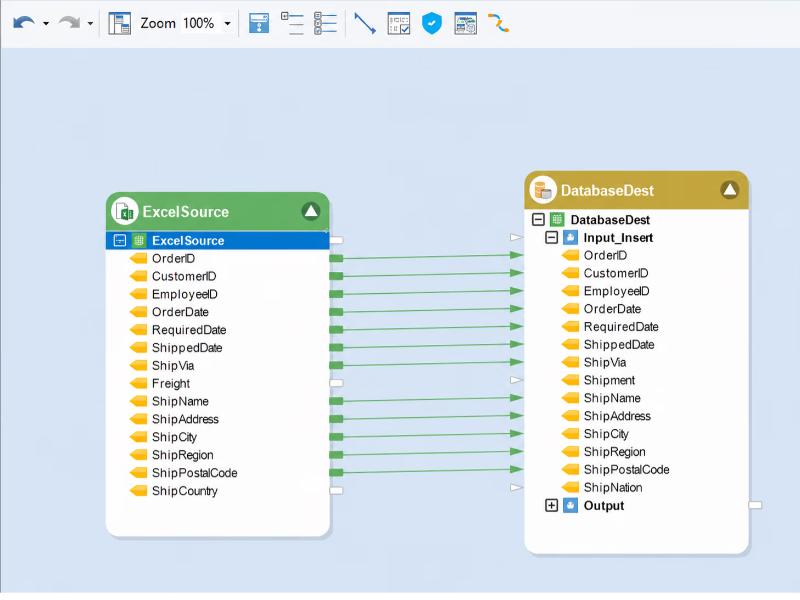
Visual mapping canvas
Link source fields to destination fields by dragging, and see every connection on one canvas, with no code to write.
AI Automapper
Matches fields by meaning, even when names differ, for example ShipCountry to ShipNation, and leaves the links for you to review.
Automatic name matching
Dragging a source onto a destination maps similarly named fields at once, so only the exceptions need attention.
AI chat for mappings
Ask the AI chat to generate or refresh mappings and to match unmapped fields, then approve what it proposes.
Expressions and transformations
Apply expressions and 200+ built-in transformations, such as cleanse, lookup and aggregate, to individual fields or whole records.
Live data preview
Preview the data at each mapping step and see the effect of every rule before you run.
Data quality validation
Quality rules flag errors and warnings. Records with errors are kept out of the target and logged, and warnings are flagged.
Any source, any target
Map databases, ERPs, CRMs, files and cloud apps through 60+ native connectors plus 200+ via custom API connectors.
Layouts from sample files
Build a file layout automatically by reading a sample data file, so file sources are ready to map in a few clicks.
Currency and data type conversion
Convert currencies and data types as part of the mapping, for example standardizing every amount to US dollars with an exchange rate lookup, without manual scripts.
Reusable mappings
Save mappings and reuse them in model-driven pipelines, so a change is made once and carries through.
Dataflows, workflows and scheduling
Run mappings inside dataflows for batch loads or Change Data Capture, orchestrate them with workflows and schedule them with the built-in scheduler.
Human review before anything runs
AI drafts the mappings, and your team reviews and approves them. AI works at design time, and runs execute deterministic logic from the approved configuration.
Deployment and governance
Role-based access control and Git-based version control for your mapping projects. Deploy on-premises or in your own cloud environment.
AI-assisted data mapping built for analysts and engineers
Less hand matching
Name matching and AI field matching take care of the repetitive links, so your team spends its time on the exceptions.
A visual, no-code canvas
A visual canvas and AI chat let semi-technical users map data, while engineers refine expressions and rules.
Mapping, rules and preview together
Transformations, quality rules and data preview sit on the same canvas, so you see the result as you map.
Ready to run
Mappings live inside dataflows and workflows, so what you design is what the server runs, on a schedule if you like.
Keep AI under your control
Agents only reach the data each user can access, your team approves every change, and Astera never trains models on your content.
Predictable, upfront pricing
Pay a custom price that is fixed up front, with renewal terms in writing and annual increases capped for existing licenses.
Rated and recognised by the people who use it
- G24.3/531 reviews
 4.8/513 ratings
 8.7/1055 reviews

Centerprise is a real easy and fast tool to get up and running. You can have a dataflow up and running in mere minutes compared to some other tools on the market. The interface is simple and pretty much everything is all in one place.
 Usability
 Performance
 Support
 Support
Pricing fixed up front, from day one.
Your price is custom and fixed up front. Renewal terms are in writing, with annual increases capped for existing licenses.
What's included
- Visual mapping canvas with drag-and-drop links
- AI Automapper and AI chat for field matching
- Expressions and 200+ built-in transformations
- Live data preview at every mapping step
- Built-in data quality validation
- 200+ pre-built source and destination connectors
- Role-based access control and Git-based version control
- Award-winning support, onboarding and training
Data mapping FAQs
Data mapping is the process of matching fields in a source to fields in a target, so data lands in the right place and the right shape when it moves between systems. It is the step that defines how each field is carried, converted and validated. Learn more about data mapping .
Drag a source onto a destination and Centerprise maps similarly named fields. For fields whose names differ but whose meaning is the same, such as ShipCountry and ShipNation, the AI Automapper matches them semantically using field names and sample data. You review the links on the canvas and adjust or approve them before anything runs.
Centerprise reads from and writes to databases, ERPs, CRMs, files and cloud apps through 60+ native connectors plus 200+ via custom API connectors. You choose the source and the destination, bring in their layouts and map between them on the same canvas.
No. You link fields visually, ask the AI chat to generate or refresh mappings, and apply built-in transformations and expressions from the designer. Engineers can refine expressions and rules where a mapping needs them.
Add data quality rules to the mapping. Records with errors are kept out of the target and logged, and records with warnings are flagged and still written. You can also preview the data at each step to check the result before you run.
When a source or destination layout changes, use Refresh Mappings to update the links, then review the result. Saved mappings can be reused in model-driven pipelines, so a change is made once and carries through to the pipelines that use it.
Data mapping decides which source field feeds which target field. Data transformation changes the values on the way, for example cleansing, looking up or aggregating them. Centerprise does both in the same dataflow, so a mapping can carry expressions and rules without a separate tool.
Still have questions?
Book a demo