
Data Migration to the Cloud, Automated with AI
Reverse engineer your source schema, forward engineer it to your cloud platform and let AI match the fields. Centerprise AI generates the incremental load pipelines and runs your migration on schedule.
How enterprise data migration comes together
See how Centerprise captures source structures, selects destinations and connects systems end to end, with AI drafting the model and the mappings for your team to review.
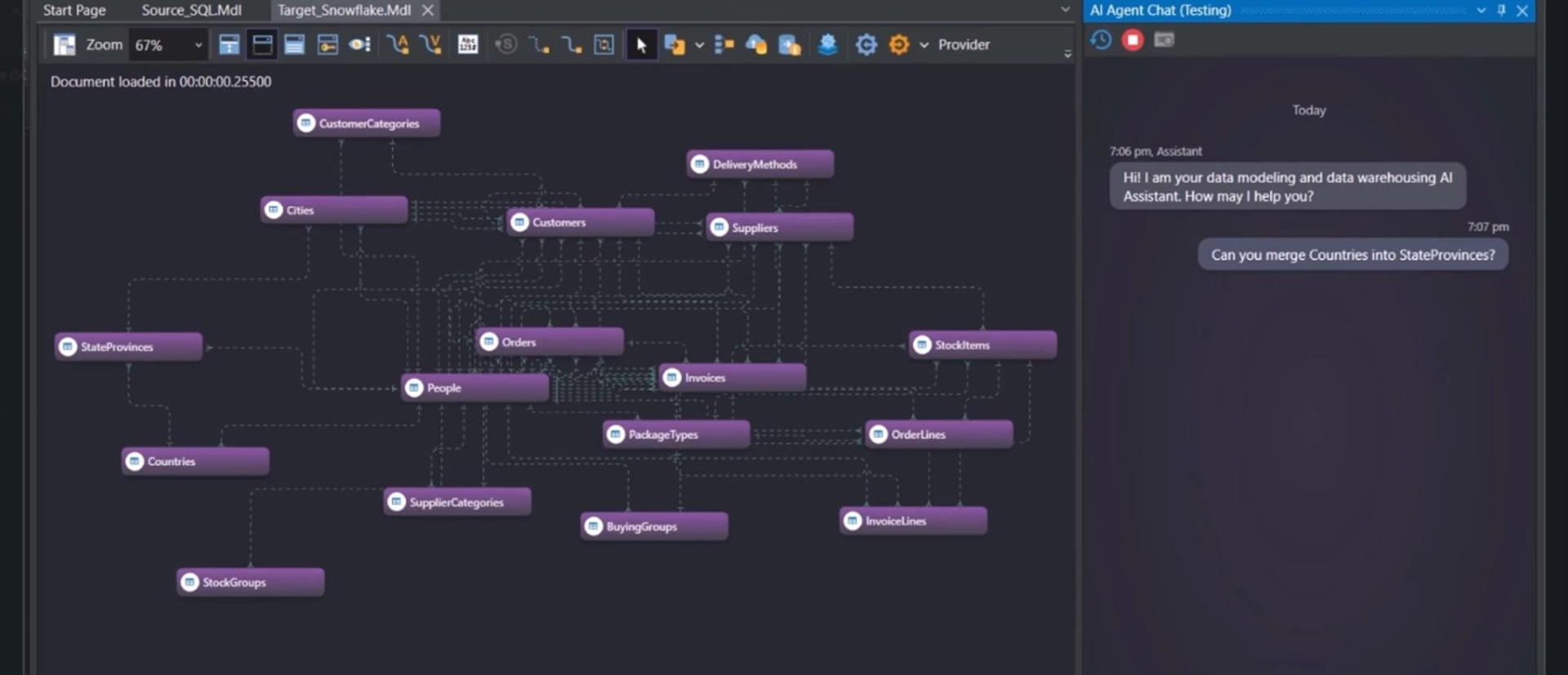
Step 1 of 3: Capturing the Source System’s Structure
See AI-powered data migration in action
Data migration capabilities in one unified platform
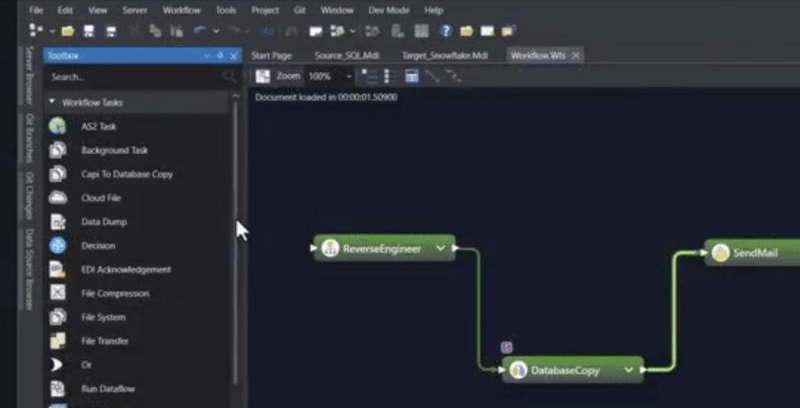
Reverse engineering
Generate a full model of your source database from its schema, including tables, columns, data types and relationships, so you start from what you already have.
AI-assisted schema refinement
Update entities and adjust relationships with AI chat commands, so the model is optimized for your target environment before anything is created.
Forward engineering to cloud platforms
Convert the logical model into a physical schema on your chosen platform, with platform-specific DDL for targets such as Snowflake, Amazon Redshift, Azure Synapse, SQL Server, PostgreSQL and Oracle.
AI-powered field mapping
The mapping module generates field-to-field mappings for straightforward cases, and AI-powered matching helps resolve more complex transformations.
Reusable, model-driven pipelines
Save your mappings and reuse them to drive model-driven pipelines, so a design change is made once on the model.
200+ connectors
Read from databases, ERPs, CRMs, files and cloud apps: 60+ native connectors plus 200+ via custom API connectors.
Legacy and mainframe sources
Read COBOL files with a built-in copybook parser that builds the record layout, in EBCDIC and other encodings, alongside flat files and SAP data.
Profiling and cleansing
Profile source data, then cleanse, join and aggregate it with 200+ built-in transformations before it reaches the target.
Data quality validation
Quality rules flag errors and warnings. Records with errors are kept out of the target and logged, and you can preview output at every step.
Incremental loads with CDC
Generate incremental load pipelines after the first load, or capture changed source records with Change Data Capture, so the target stays current.
Workflow automation
Orchestrate reverse engineering, database copy and notification steps in one workflow that runs your migration end to end.
Scheduling and email alerts
Run migrations with the built-in scheduler and send email alerts when a migration completes.
Human review before anything runs
AI drafts the model and mappings, and your team reviews and approves them. AI works at design time, and runs execute deterministic logic from the approved configuration.
Deployment and governance
Role-based access control and Git-based version control for your migration projects. Deploy on-premises or in your own cloud environment.
Data migration that your team can plan, run and trust
A faster path to the cloud
Reverse engineering, AI-assisted modeling, generated DDL and auto-generated mappings take on the manual work of moving a legacy database to a cloud platform.
Built for analysts and engineers
Work in a visual designer or with AI chat commands, so migrations are not limited by hand-written scripts or a handful of specialists.
One platform, schema to schedule
Modeling, mapping, loading, quality checks and scheduling live in one place, so a change to the model carries through to your pipelines.
Stay aligned after cutover
Refresh models as the source evolves, load incrementally and schedule runs, so your migrated system stays aligned with source updates.
Keep AI under your control
Agents only reach the data each user can access, your team approves every flow, and Astera never trains models on your content.
Predictable, upfront pricing
Pay a custom price that is fixed up front, with renewal terms in writing and annual increases capped for existing licenses.
Rated and recognised by the people who use it
- G24.3/531 reviews
 4.8/513 ratings
 8.7/1055 reviews

We are using it in Data Migration project to move data from legacy applications to state of the art applications. Offers short learning curve for any ETL developer, shorter development cycle, and has very prompt, pro-active, 24/7 support.
 Usability
 Performance
 Support
 Support
Pricing fixed up front, from day one.
Your price is custom and fixed up front. Renewal terms are in writing, with annual increases capped for existing licenses.
What's included
- Reverse and forward engineering for database schemas
- AI-powered schema refinement and field mapping
- Auto-generated DDL and incremental load pipelines
- 200+ pre-built source and destination connectors
- Built-in data quality validation
- Workflow automation, scheduling and email alerts
- Role-based access control and Git-based version control
- Award-winning support, onboarding and training
Data migration FAQs
Data migration is the process of moving data from one system to another, for example from an on-premises database to a cloud data platform. It covers capturing the source structure, creating the target schema, mapping fields and loading the data. Learn more about data migration .
In three steps. Reverse engineering captures your source schema as a model, which you can refine with AI chat commands. Forward engineering converts that model into a physical schema on your chosen cloud platform. The mapping module then generates field-to-field mappings, with AI-powered matching for more complex cases, and workflow automation runs the migration on schedule.
Data migration moves data from a source system to a new target, such as a legacy database to the cloud, and typically ends with a cutover. Data integration keeps systems connected over time by moving and combining data on an ongoing basis. Centerprise AI supports both, so a migrated system can stay aligned with source updates through incremental loads and scheduled runs.
Centerprise AI reads from databases, ERPs, CRMs, files and cloud apps through 60+ native connectors plus 200+ via custom API connectors. Forward engineering generates platform-specific DDL for targets such as Snowflake, Amazon Redshift, Azure Synapse, SQL Server, PostgreSQL and Oracle.
Quality rules flag records as errors or warnings. Records with errors are kept out of the target and logged, warnings are flagged, and you can preview output at every step. Your team also reviews and approves every AI-generated model and mapping before it runs.
Yes. After the initial load, Centerprise AI can generate incremental load pipelines, and Change Data Capture reads only the records that changed in the source. The built-in scheduler runs the workflow on a schedule, and email alerts let your team know when a migration completes.
Centerprise AI reads COBOL files, with a built-in copybook parser that builds the record layout from your copybook and support for EBCDIC and other encodings. It also reads flat files, databases and SAP data, so legacy data can be modeled, mapped and loaded to your cloud platform.
Still have questions?
Book a demo