

AI agents for HR are software agents that understand employee and HR requests, reason over data from HR systems, and carry work through to completion. Unlike a chatbot, which mostly answers questions, an AI agent takes action within the limits HR sets. It works across the employee lifecycle, from hiring and onboarding to pay, learning, and offboarding. AI agents for HR are a practical form of agentic AI and go further than generative AI in HR, which drafts content such as job posts.
Analysts expect agents to take on a large share of HR work. In November 2025, Gartner predicted that 50% of current HR tasks will be automated or managed by AI agents by 2030. This guide explains what HR agents can do today, the data they depend on, and the controls that keep them trustworthy. It also walks through a real request handled by the HR agent we built and use with our own team.
What are AI agents for HR?
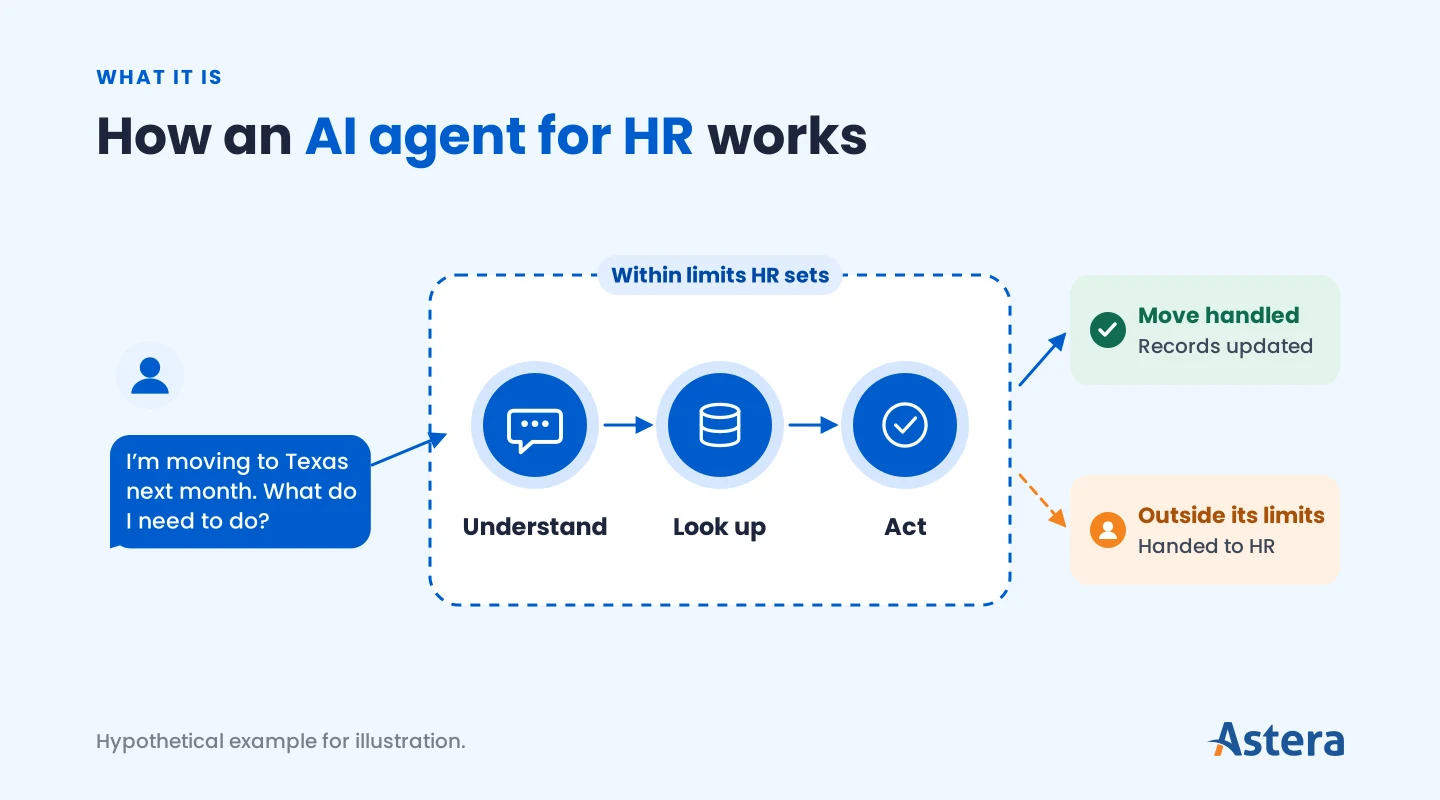
An AI agent for HR is software that understands a request, gathers context from HR systems and policies, and acts through connected tools. When a decision falls outside its permissions, it routes the case to the right HR specialist or manager with full context.
Say an employee writes, "I'm moving to Texas next month. What do I need to do?" An agent checks the policy, updates the address once HR approves, alerts payroll to the state change, and opens tasks for IT and facilities. The exact steps vary by company because the agent follows your own policies, approval rules, and processes.
AI agent vs. HR chatbot vs. HR automation
HR automation, HR chatbots, and AI agents can look alike, but they differ in what they work from and how far they can go.
HR automation (rule-based) | HR chatbot | AI agent for HR | |
|---|---|---|---|
Works from | Fixed if-then rules | Scripted answers or a knowledge base | Goals, policies, live data, and tools |
Scope | One predefined path | One conversation | End-to-end work across systems |
Can it take action? | Yes, only on the exact path set up | Usually not; it replies or logs a ticket | Yes, within the permissions HR sets |
When something unexpected happens | Stops | Gives a general reply | Adapts or hands it to the right person |
Example | A reminder 30 days before a review | "What is our PTO policy?" | "I'm moving next month," then updates records and opens tasks across teams |
The difference matters most when a request doesn't fit the script. Rule-based automation stops because it follows only the paths someone built in advance. A chatbot gives a general reply, while an AI agent works out the next step for that specific request. That flexibility is why teams choose an agent for varied HR requests.
Do AI agents work in HR? What early adopters report
Yes. Large employers that use HR agents with their own staff report fewer tickets and faster answers. These companies also sell HR agent technology, so read their results as encouraging examples and expect your own numbers to differ.
Salesforce
Salesforce runs an employee agent that its staff use as a one-stop shop for HR. Its tasks include answering HR questions in Slack, booking meeting rooms, recommending internal jobs, and issuing employment verification letters. In Salesforce's August 2026 report on the first year of its employee agent, the agent handled more than 300,000 conversations. In 97.7% of sessions, employees resolved their issue themselves with no ticket filed.
Basic support cases fell 20% year over year, and cases during open enrollment fell 58%. The lesson came early. Its library of more than 1,000 knowledge articles was full of overlapping policies and outdated text, which led to confusing and sometimes incorrect answers. The team archived hundreds of outdated pages and rewrote complex policy language in clear, simple terms.
IBM
IBM's HR agent, AskHR, handles about 80 HR tasks, such as vacation requests, payslips, and employment letters. Managers also start employee transfers through it.
According to IBM's August 2025 case study on its AskHR agent, it handles 94% of common questions without human help. IBM says it helped contribute to a 40% cut in HR operating costs over four years. Complex questions still go to human advisors.
Microsoft
Microsoft rolled out an HR and IT agent to its own employees and studied it in late 2024. Its tasks include answering HR and IT questions and helping with parental leave requests, and it hands off to a live person when needed.
In Microsoft's internal study of 72 employees, people were 25% more likely to get a correct answer than with the old HR tool. They were also 31% less likely to file a ticket. It's a small study, and Microsoft's top advice is to govern the data the agent can reach before rollout.
All three started with common questions, connected the agent to HR systems, kept people on sensitive cases, and cleaned up their data. We use an HR agent with our own team too, and the next section follows one request through it.
How an HR agent handles a request
In practice, one request can involve a policy lookup, a records check, an action, and an approval chain. Here's one handled by the HR agent our own team uses.
ARIA is Astera's copilot, an agent we built with Astera Studio. ARIA for HRMS is the HR agent our employees use in HRMS, our in-house HR system.
See how ARIA for HRMS answers policy questions and files leave requests within our own approval process.
Our HR agent runs around 200 built-in actions, from checking leave balances and finding payslips to raising any request type HR publishes. Employees reach it in the HR portal, Microsoft Teams, Slack, WhatsApp, or on our website. Here's an illustrative request that pairs a policy question with an action under our own approval process:
An employee asks in Teams: “I have a certification exam next month. Does our policy give study leave, and can you book two days?”
ARIA searches the company’s policy documents and answers with the study leave policy as its source.
ARIA checks the leave balance and files a two-day leave request through the employee’s own permissions.
The request follows the usual approval flow from the manager to HR for final sign-off.
The employee is notified of the decision, and every question and action is recorded with who asked and when.
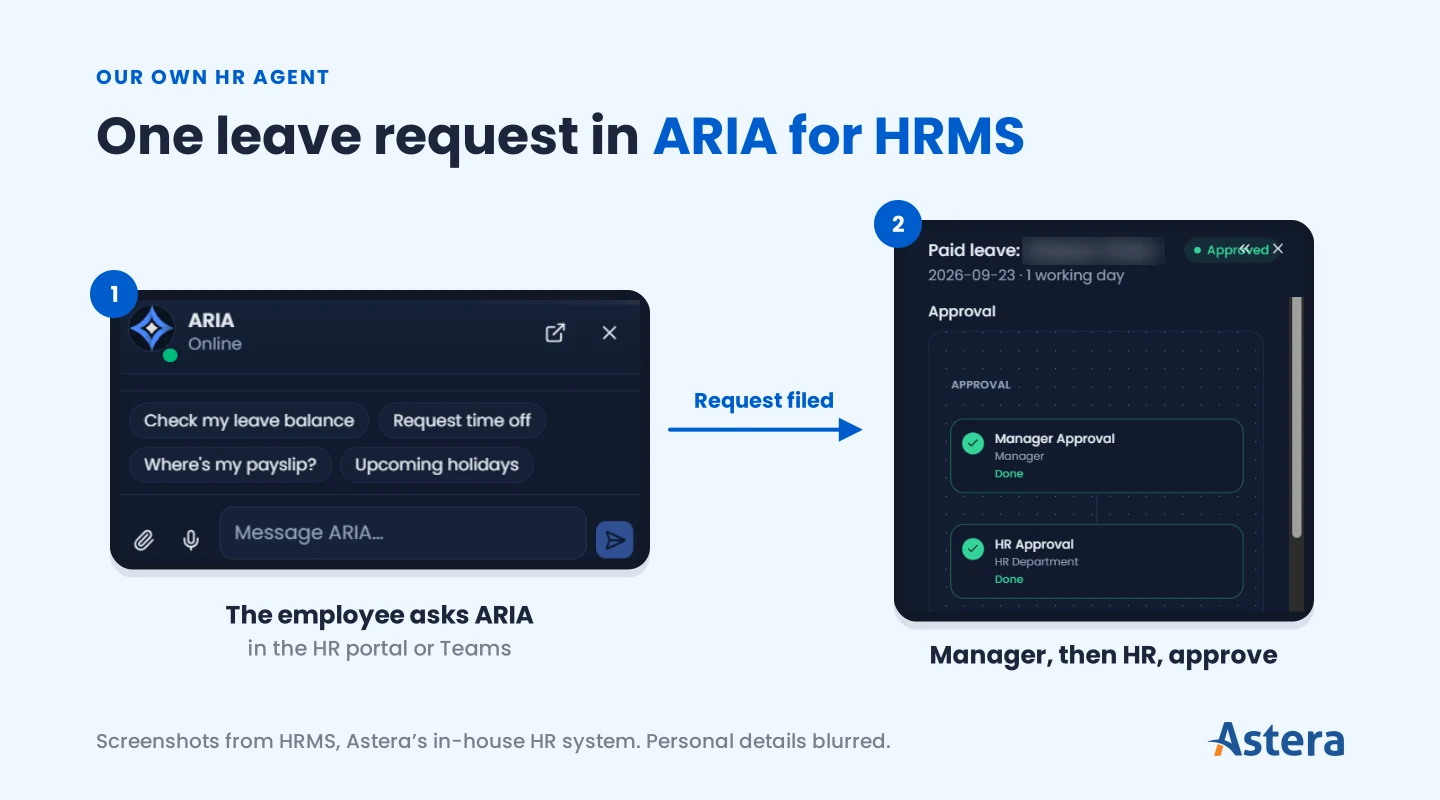
The agent never does more than the person asking could. Each action is limited to the roles allowed to use it, and requests go to the same managers and HR approvers as any other request. Security and compliance teams can review the agent's full activity record at any time.
The data HR agents depend on
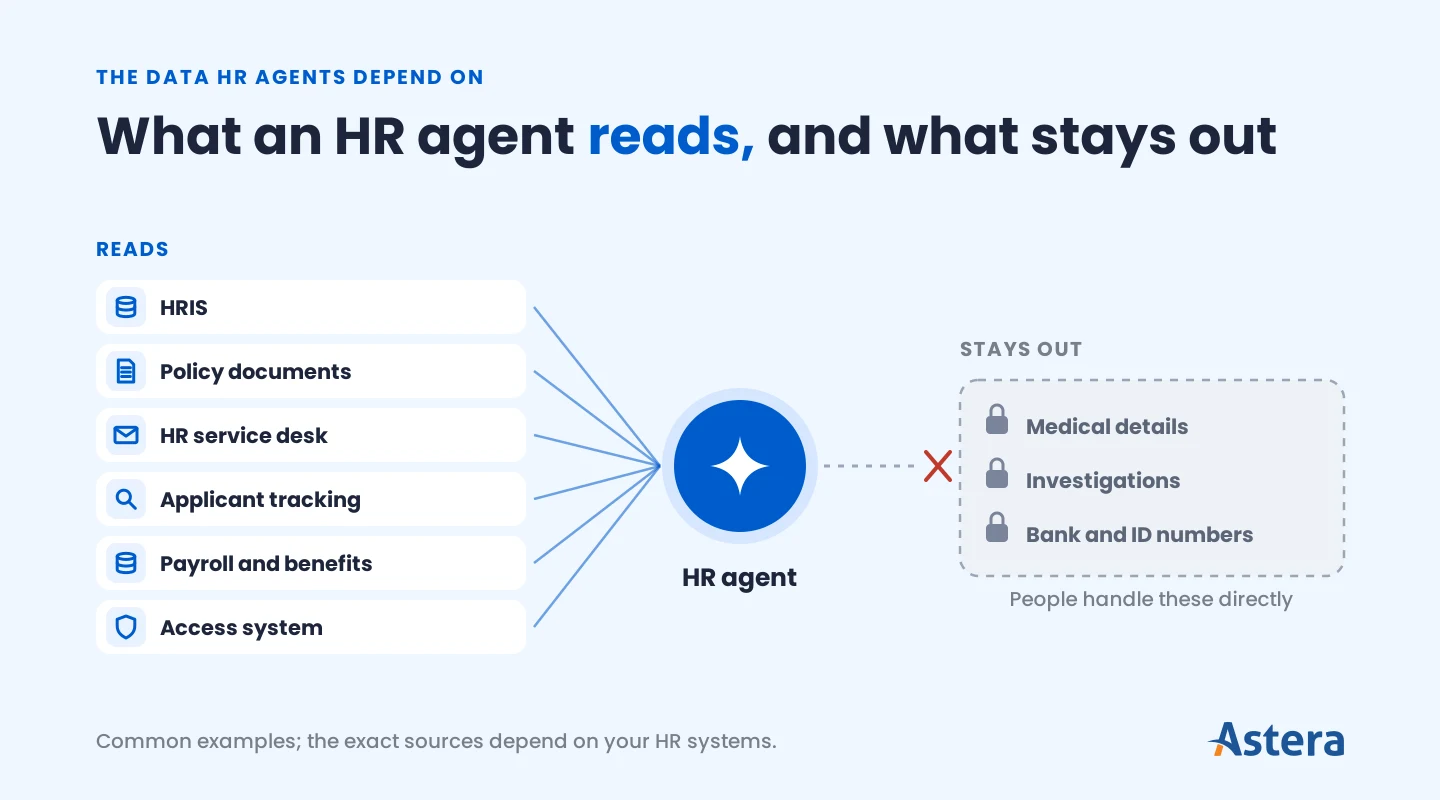
An HR agent is only as good as the records and policies it reads. Most HR agents draw on data from sources such as these:
Where the data lives | What the agent uses it for |
|---|---|
HRIS (the main employee record system) | Job, manager, location, start date, and eligibility |
Policy documents and handbooks | Answering questions with a source |
HR service desk or case system | Opening, routing, and updating requests |
Applicant tracking system | Interview scheduling and candidate questions |
Payroll and benefits | Explaining a payslip or leave balance to its owner |
Login and access system | Knowing who may see what |
Sensitive data usually stays out of a general HR agent. Examples include medical and accommodation details, complaints and investigations, and bank or government ID numbers. People handle these directly.
Building an agent-ready HR data foundation
Agents act on whatever HR records say, so data quality works as a control on every action. Before an agent goes live, put these five foundations in place:
One trusted employee record: Match the same person across HRIS, payroll, recruiting, and service desk systems, with one system of record for each field.
Consistent reference data: Align master data such as job codes, locations, cost centers, and the org structure across systems so requests reach the right approvers.
Current, governed policies: Keep one approved version of each policy per country and employee group, and retire old versions when rules change.
Fresh data: Sync transfers, terminations, and manager changes quickly enough that the agent acts on current records.
Access that mirrors roles: Carry each system's permissions into the agent so it shows and changes only what the requester may access.
Data quality also needs monitoring after launch. A well-built agent flags missing or conflicting records and holds the action until someone resolves them. In a hypothetical case, it could pause an onboarding step until a missing document arrives. Many teams also run scheduled data quality checks that catch gaps before employees notice them.
Policies need the same care as employee records. Much of what an HR agent needs lives in documents, such as handbooks, contracts, and policy files. Teams that build a knowledge base for retrieval-augmented generation (RAG) tie each answer to an approved document. Together, these foundations make up an agentic data stack.
Get your data ready for agents
See what an agent-ready data stack looks like, layer by layer.

Use cases and examples of AI agents in HR
Agentic AI in HR runs work across the employee lifecycle, and each workflow follows your own policies and processes. These examples of AI in HR show what agents can handle and where people stay in charge:
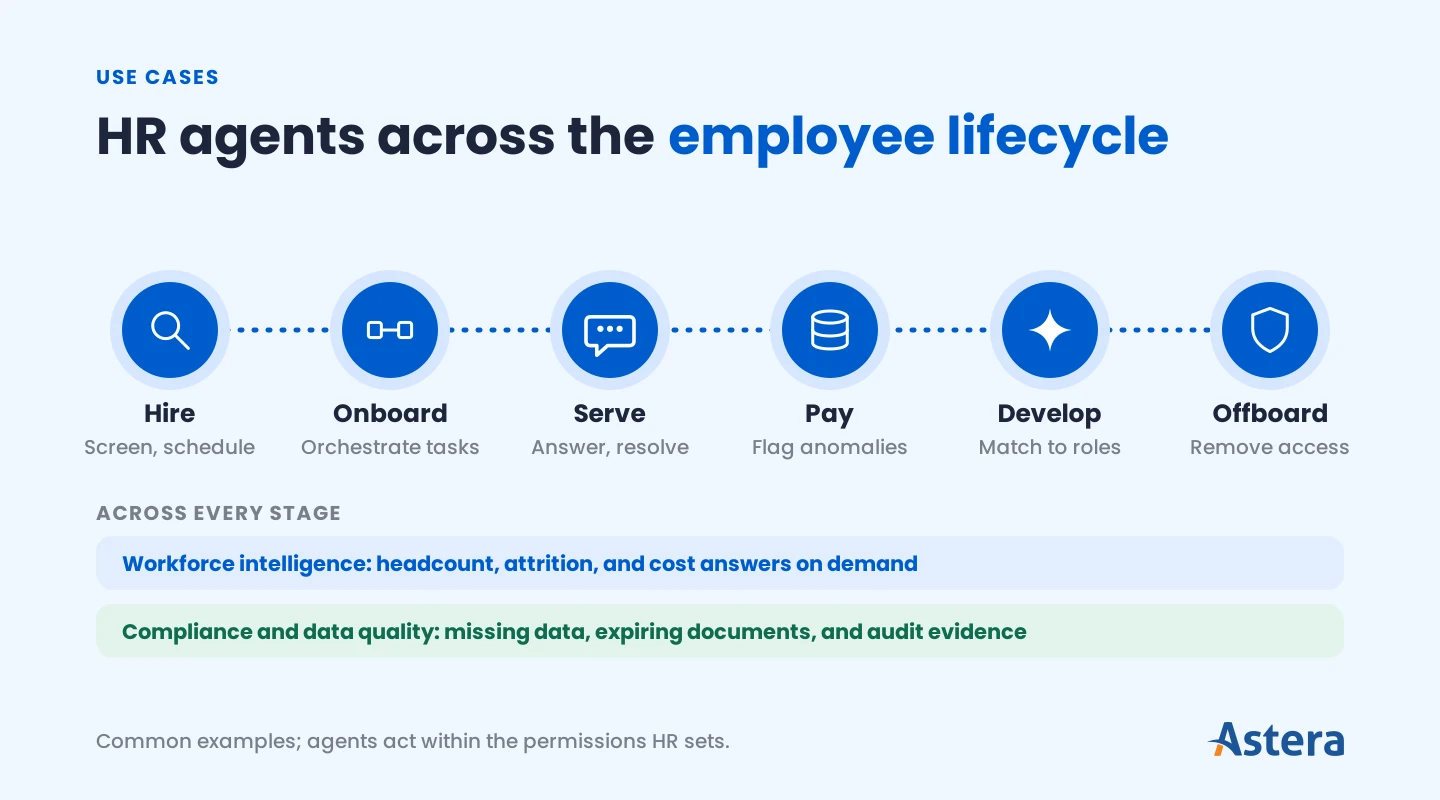
Area | What the agent can do | Where people decide |
|---|---|---|
Employee service | Answers policy, pay, and benefits questions with sources, resolves requests end to end, and routes complex cases with a summary | HR handles sensitive and unclear cases |
Recruiting | Screens and summarizes applications against set criteria, schedules interviews, answers candidate questions, and keeps candidates updated | Recruiters and hiring managers decide who moves forward |
Onboarding | Orchestrates tasks across HR, IT, payroll, and facilities, chases missing documents, and requests system access | HR and IT approve access and pay setup |
Pay and time | Explains payslips, flags payroll and timesheet anomalies before a pay run, and reconciles leave balances | Payroll approves corrections |
Learning and mobility | Recommends courses, matches employees to internal roles and projects, and tracks required training | Employees and managers choose |
Workforce intelligence | Answers headcount, attrition, and cost questions on demand and keeps dashboards current | Leaders decide what to act on |
Compliance and data quality | Monitors records for missing or expired data, tracks policy acknowledgments, and prepares audit evidence | HR operations resolves issues and signs off |
Offboarding | Coordinates final pay steps, access removal, asset returns, and exit surveys | HR and IT confirm access removal |
Many of these run on events. A new-hire record, an expiring certification, or a payroll file landing can start an agent without a manual request. In larger organizations, specialized agents also work together, such as an onboarding agent that hands access requests to an IT agent. These multi-agent systems keep each agent focused while the work flows end to end.
An AI recruiting agent depends on clean recruiting data as much as an employee service agent depends on employee records. Agents in other departments, such as finance and customer service, follow the same pattern.
Benefits for employees and HR teams
Most benefits of AI in HR come from agents taking on routine work at scale, so HR can focus on work that needs human judgment. Gartner recommends using AI agents as HR's front door, moving support from tickets to self-service that anticipates employee needs. For employees and HR teams, that brings five gains:
Faster, consistent service: Gives employees sourced answers and resolves routine requests without a queue.
Service that scales: Handles more requests as the workforce grows, across countries, languages, and time zones.
Fewer errors and compliance gaps: Catches missing data, expiring documents, and payroll anomalies before they reach a pay run or an audit.
Better workforce decisions: Gives leaders headcount, attrition, and cost answers when they need them.
More time for strategic HR: Frees HR staff for workforce planning, culture, and employee relations.
Each of these depends on clean data and clear controls, which is where responsible use comes in.
Using AI agents in HR responsibly
AI in human resources touches people's jobs, pay, and personal data, so responsible use matters from day one. It starts with three practices: protecting employee data, keeping decisions fair, and keeping answers accurate.
Protecting employee data
Give the agent only the data each task needs. Treat each agent as a governed identity with its own permissions and regular access reviews. Log every lookup and action so you can check what the agent did and who asked.
Keeping decisions fair
An agent can repeat bias hidden in past decisions, for example by favoring candidates from certain schools. That's why teams review the agent's recommendations and check outcomes across groups before acting on them.
Some places now regulate AI in hiring. New York City requires a bias audit and notices before employers use automated hiring tools. The EU AI Act treats AI used in recruitment and promotion decisions as high-risk.
Keeping answers accurate
An agent can quote an old policy or act on the wrong record. Teams lower that risk in several ways, including these three:
The agent shows the source of each answer.
It sends unclear cases to an HR specialist.
It asks for approval before changes HR marks as sensitive.
These habits also catch AI hallucinations, where a model states something false with confidence.
Some decisions should always stay with people, including hiring, pay, promotion, discipline, and termination.
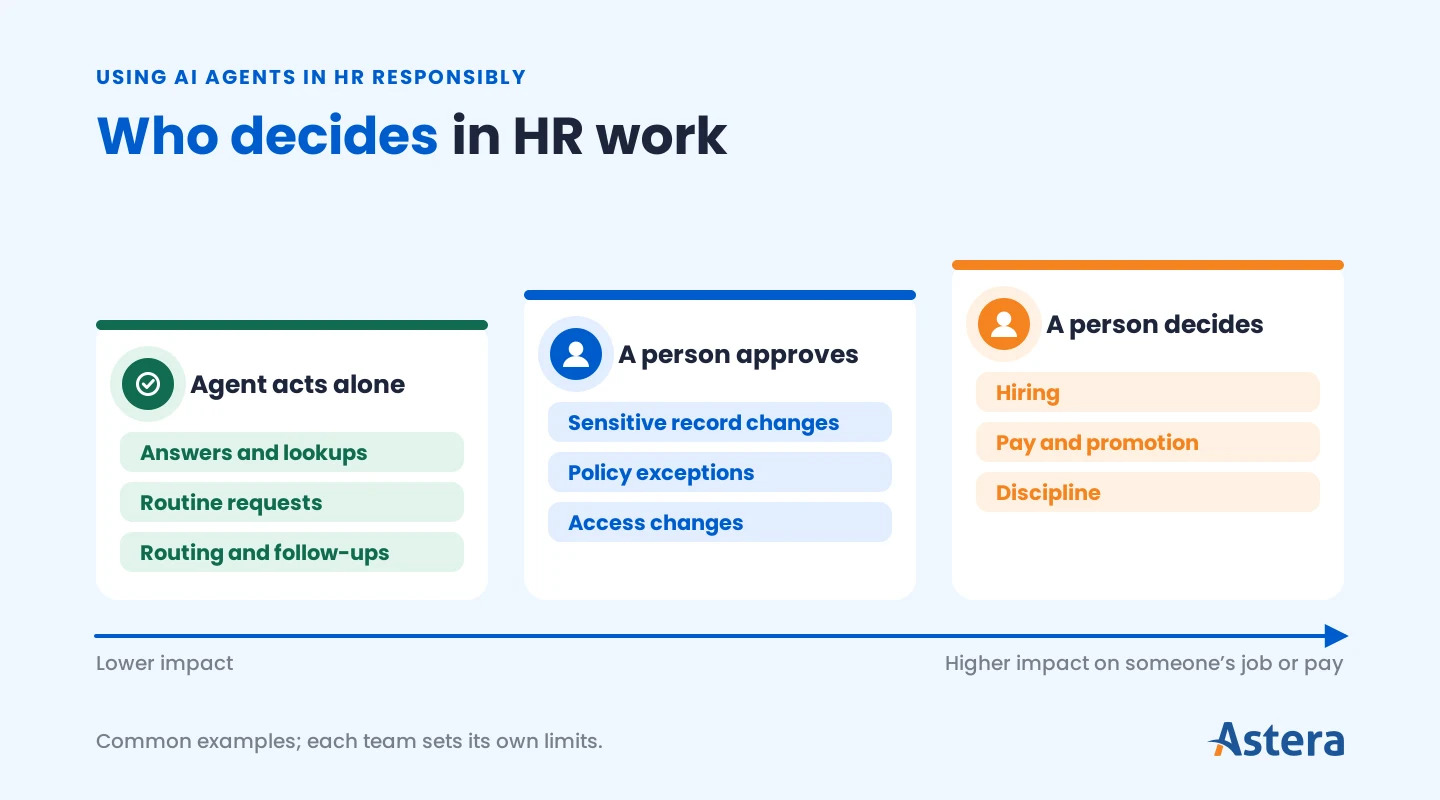
Tell employees when they're talking to an AI and how to reach someone on the HR team. Before any agent goes live, put security and governance controls in place.
Planning agents across your company?
Seven things to weigh before your first enterprise agent.
How to get started with AI agents in HR
To use AI in HR well, start with one high-volume workflow, prove it, and then expand across the lifecycle. These five steps keep a first project on track:
Pick a workflow with clear value, such as employee questions, onboarding, or payroll checks.
Map the data and systems it touches and fix gaps in those records first.
Set permissions, approval rules, and handoffs before the agent goes live.
Run a pilot with a defined group and review what the agent says and does.
Expand to related workflows and connect agents as each one proves reliable.
Ownership matters as much as technology. Gartner predicts that by 2029, 30% of organizations will form blended HR-IT teams to accelerate AI enablement. HR defines the policies and decisions, while IT and data teams own the connections, access, and monitoring.
Signs that the agent is working include:
More questions get resolved without HR.
Spot-checked answers are correct.
Responses come faster than before.
Handoffs shrink to complex or sensitive cases.
AI agents can now run HR work across the employee lifecycle, from answering an employee’s first question to sending a request for approval. Teams that design data, permissions, and ownership in from the start get the most from them.
How Astera Studio helps
Astera Studio supports that approach. It's an AI agent framework for enterprise teams, built on Astera's data foundation. It connects and prepares HR data, turns your policies into agent skills, and keeps people in the loop for approvals. Access is set by role, and every run is recorded in logs and audit trails.
Build HR agents on clean, governed data
Talk to us about connecting your HR data to agents with Astera Studio.
Suggested reading
If you're planning HR agents or other enterprise agents, these guides go deeper on how agents are built and run:
How to build an AI agent: The steps from defining an agent's goal to testing and deploying it.
AI agent framework: what it is and how to choose one: What to look for in the framework your agents run on.
What are agentic workflows?: How agents carry multi-step work across systems.
LLM and AI agent observability: What to log, evaluate, and monitor once agents are in production.