

AI customer service agents are a practical form of agentic AI that understand customer requests and resolve them within limits you set. They read your data, such as CRM records, orders, and policies, and take action in those systems, like starting a return or updating an address.
Taking action is what makes these agents efficient. AI agents for customer service complete routine requests end to end. Cases that need human judgment go to your team with the full context. That way, your specialists spend less time on repetitive requests and more on the complex cases where their judgment improves the customer's experience.
This guide explains what these agents are, how they work, and where they help most. It starts from the data an agent needs to act correctly, then walks through a worked example of an order and an address change. It also covers how to measure agents, the rules to check, and how to start with a pilot.
What are AI customer service agents?
An AI customer service agent is a type of AI agent that resolves customer requests by reading your business data and acting through connected tools.
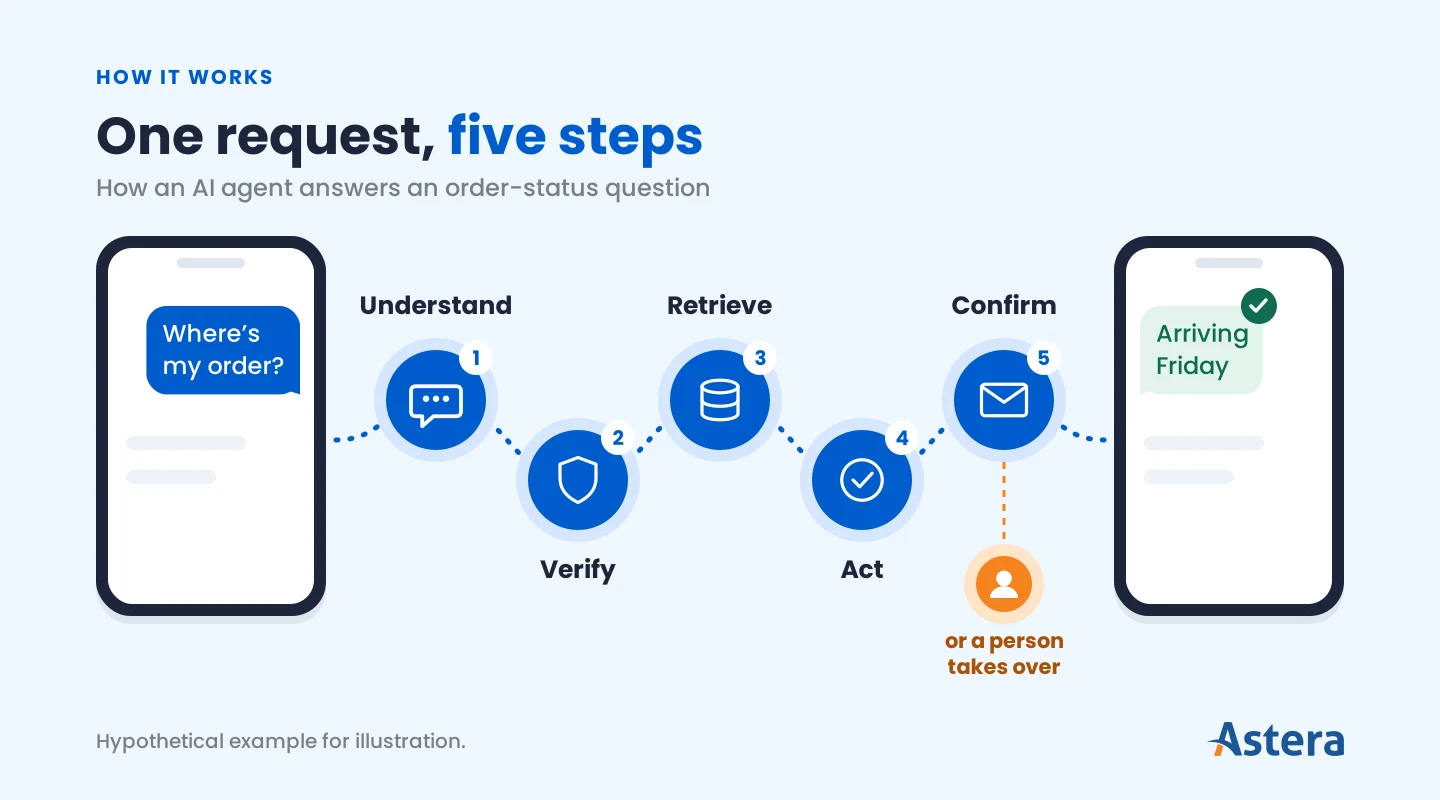
To resolve a request, the agent works through it step by step. It works out what the customer wants, looks up the records it needs, takes the action your policy allows, and confirms the outcome.
AI customer service agents vs. chatbots
A chatbot answers a customer's question, while an AI customer service agent completes the request in your systems, within limits you set.
The difference is easiest to see when both get the same request. Let's say a customer types, "I want to return these shoes." A chatbot explains your return policy and links to the returns form. A scripted chatbot follows a fixed flow, and a generative one writes a more natural reply, but neither changes anything in your systems.
An AI agent goes further. It finds the order, checks that the shoes are within the return window, and starts the return. In this setup, if the request falls outside your policy, it passes the case to a person with everything it has learned so far.
Handing the case to a person is just one option. You decide how the agent handles each situation and which actions it's allowed to take. It could offer store credit for a late return, for example, or approve small exceptions on its own.
That flexibility is what sets an agent apart. Think of a chatbot as a help page that can talk back. An agent is more like a colleague who can open the order system and follow your instructions. The same difference shows up outside customer support, where AI agents and chatbots differ in how much they can do on their own.
Autonomous agents vs. agent assist
Autonomous agents talk to your customers directly and resolve routine requests from start to finish. Agent assist works behind the scenes for your human agents, drafting replies, summarizing cases, and finding the right policy.
Many teams start with agent assist because a person still reviews every answer before it reaches a customer. That review shows you how accurate the agent is before you let it work on its own. Agent assist works like the copilots that support other knowledge workers, and it's often the safest first step toward autonomous agents.
Can you use ChatGPT for customer service?
Yes, ChatGPT can help your support team, but on its own it doesn’t answer your customers or resolve their requests. Your support staff can use it to draft replies, summarize long cases, and rewrite help articles. On business plans, it can also connect to some work apps, such as a CRM, to look up records.
What ChatGPT lacks is a place in your customer channels and the controls that customer-facing work needs. An AI customer service agent runs in your chat, email, or phone channels. It checks each request against your policies, takes only the actions it’s allowed, hands off to your team, and logs what it did.
These agents can run on the same kind of language model that powers ChatGPT. The difference is the setup around the model: connections to your customer data, permissions for each action, and handoff rules. The Astera Studio section shows how teams build that setup on their own data.
How AI customer service agents work
Most AI customer service agents follow five core steps, though the exact flow depends on the request and the systems involved.
Understand the request: The agent identifies what the customer wants, such as an order update or a refund.
Verify the customer: The agent confirms the customer's identity before it shares account details or makes changes.
Retrieve the data: The agent pulls records from the CRM, the order system, and the knowledge base.
Act within policy: The agent applies your rules, picks the next step, and acts through connected tools.
Confirm or hand off: The agent confirms and logs the result or passes the case to a person with full context.
Steps 3 and 4 are where the agent's answers come from, so they decide its accuracy. For policy and product questions, agents often use retrieval-augmented generation (RAG). RAG grounds each answer in your approved documents. This keeps the agent's answers consistent with your official policies and product information.
Step 5 is the one customers notice most. Gartner surveyed 3,566 B2B and B2C customers in February and March 2026. In that survey, 87% said companies using generative AI for service must offer an option to reach a human agent. So design the handoff as carefully as the rest of the agent.
The data and systems AI customer service agents need
An AI customer service agent can only be as accurate as the data it reads. Incomplete, outdated, or conflicting data leads to wrong answers and wrong actions, like an incorrect refund or an update to the wrong account. It also forces extra handoffs, which cancels out the time the agent was meant to save.
Most service agents draw on five sources:
CRM: Customer identity, contact details, and account history
Order and billing systems: Orders, shipments, invoices, and payment status
Helpdesk: Past tickets, conversations, and open cases
Knowledge base: Approved answers, how-to articles, and product details
Policies: Rules for returns, refunds, and account changes
Connecting these systems is only half the job. To avoid mistakes, such as updating the wrong account or giving an outdated answer, put these four conditions in place:
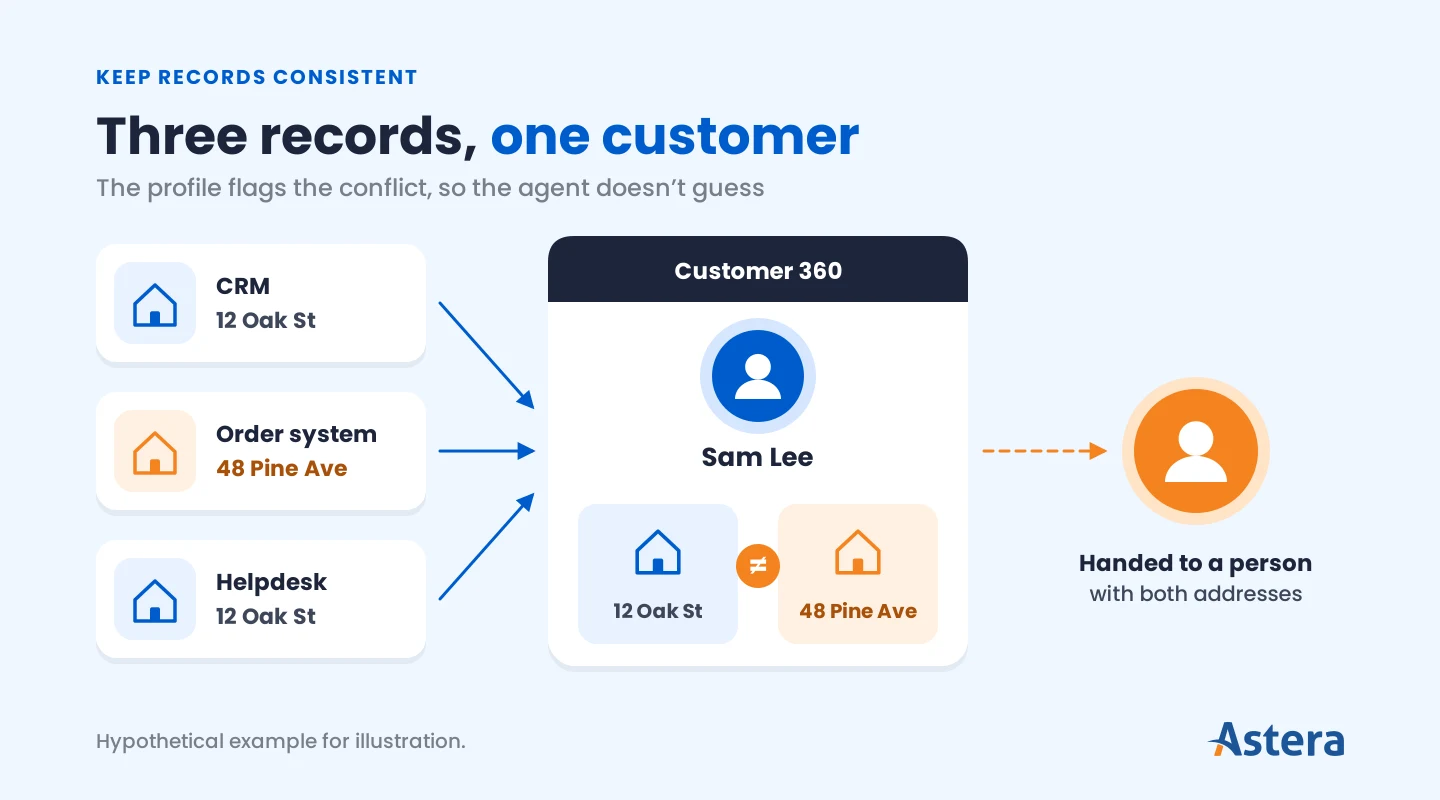
Keep records consistent. Your systems need to agree on who the customer is. A single customer view matches the same person across your CRM, orders, and helpdesk, often through a Customer 360 profile. Without it, the agent can update one customer's account with another customer's details.
Keep knowledge current. An agent repeats whatever your knowledge base says. If the return policy changed last month and the article didn't, every customer who asks gets the old answer.
Match permissions to the task. Checking order status carries little risk, so the agent can do it freely. Issuing refunds is different, so it needs tighter limits and often a person's approval.
Log every action. Record what the agent read and changed. When something goes wrong, the log shows you which step caused it, so you can fix the cause quickly.
Together, these conditions make up the agentic data stack that agents run on. With these in place, you can hand real customer requests to an agent with confidence.
Get your data ready for AI agents
What has to be in place in your systems before an agent can act on customer data.

AI customer service agent use-cases
AI customer service agents suit requests that come in often, follow clear rules, and depend on data you already hold. The table shows the most common customer support requests, the systems each mostly needs, and the point where a person may need to take over.
Use case | What the agent does | Systems and data it needs | When a person steps in |
Order status | Finds the order and shares its status and delivery date | Order system, shipping data, CRM | The order is lost or delayed past the promised date |
Returns and refunds | Checks eligibility and starts the return | Order system, return policy, payment records | The refund is above a set amount or outside policy |
Account changes | Updates an address, plan, or contact detail | CRM, billing system, identity checks | Identity can't be confirmed, or records conflict |
Policy and product answers | Answers questions from approved content | Knowledge base, product catalog, policies | The answer isn't in the approved content |
Ticket triage and routing | Classifies new tickets and routes them to the right team | Helpdesk, routing rules, customer tier | The ticket is a complaint, dispute, or legal matter |
Agent assist | Drafts replies, summarizes cases, and suggests next steps | Helpdesk, knowledge base, CRM | A person reviews every draft before it goes out |
Proactive updates | Tells customers about delays before they ask | Order and shipping systems, contact preferences | The delay needs an offer or exception |
Voice and phone calls | Handles the same requests by phone, using speech | The same systems as the matching text use case | The caller asks for a person, or the case is sensitive |
Every row depends on connected, consistent systems, so the cleaner your data, the more of this table you can hand to an agent. Voice calls follow the same logic with speech added. See how AI voice agents handle the phone channel.
Worked example: an order and an address change
Let's consider an example scenario where a customer writes: "Where's my order, and can I change the delivery address?"
The agent first confirms who the customer is, then finds the order and sees it hasn't shipped. Your policy allows address changes before shipping, so the agent updates the address. It confirms the new delivery date with the customer and logs the change in the CRM.
Now suppose the CRM and the order system hold different addresses for the same customer. The agent can't tell which one is right, so it doesn't guess. It hands the case to a person with both records and a short summary, and it tells the customer when to expect a reply.
Consistent data and a clear point to hand off made the agent reliable here. The same pattern holds in agentic AI examples from other departments.
Benefits of AI customer service agents
The benefits of AI customer service agents come from the use cases they take on, and each one depends on the data behind it. Here's what you gain when that data is in good shape:
Faster answers at any hour: When the agent reaches live order and account data, customers get answers without waiting for a shift to start.
Consistent answers: When policies are current and approved, every customer gets the same answer to the same question.
More time for complex cases: When routine requests resolve end to end, your team has more time for judgment calls, such as disputes, exceptions, and sensitive conversations.
Clearer view of contact reasons: When conversations are logged, you can see why customers get in touch and fix the cause.
Customers feel the difference too. In that same Gartner survey, 50% said interactions are easier when companies use generative AI.
Gartner also expects agents to take on a larger share of the work over time. In a March 2025 forecast, Gartner predicted that by 2029, agentic AI will resolve 80% of common customer service issues without human intervention. It expects a 30% reduction in operational costs as a result.
Industry figures like these show what's possible. If you're planning an agent for your own support team, decide early how you'll measure it. Your own numbers will show whether it's set up right and worth what you spend.
Metrics that show your AI customer service agents are working
Once an agent goes live, the right metrics show how well it's working. They cover whether it solves problems, how customers feel about it, how smoothly it hands cases to your team, and what each resolution costs.
One distinction matters more than most: the difference between resolving an issue and deflecting it. A deflected conversation ended without reaching anyone on your support team, but the customer's problem may still be open.
An unresolved problem also costs you the next conversation. Gartner shared more from the same survey in a September 2026 release. Only 27% of customers said they would try a chatbot again after a negative experience.
To catch those unresolved conversations early, track these seven important metrics:
Metric | What it tells you | Watch out for |
Resolution rate | The share of conversations where the issue was actually solved | Counting a closed chat as solved without checking |
Containment or deflection rate | The share of conversations that never reached your support team | Treating it as success on its own |
Reopen or repeat-contact rate | How often the same customer comes back about the same issue | A rise that signals answers that didn't stick |
CSAT after AI conversations | How satisfied customers are with the agent's help | Low response rates that skew the score |
Handoff rate and reasons | How often the agent passes a case on, and why | Handoffs caused by missing or conflicting data |
Handle time for handed-off cases | How long people spend on cases the agent passed on | Time lost when the handoff lacks context |
Cost per resolution | What each solved issue costs, including model and integration costs | Comparing it with cost per contact instead |
Read the metrics together. A high deflection rate looks good on its own. Paired with a rising reopen rate, it means customers are coming back with the same problem.
Compare each number with your own baseline from before launch. To find out why a number changed, use LLM observability. It's the practice of recording what the agent received, said, and did at each step, such as prompts, responses, and tool calls. That lets you trace a change back to the conversations and actions behind it.
Rules to know before you launch
Before you buy a platform or build an agent, check the laws that apply to AI in customer service. They cover issues such as telling customers they're talking to AI, recording calls, and using customer data in automated decisions.
These laws are still taking shape, and they differ from one state or country to the next. Here are the main kinds of rules to raise with your legal team, with examples current as of November 2026.
Types of laws to check
Telling customers they're talking to AI. Several places require disclosure, but the triggers differ. The EU AI Act requires it unless it's obvious, while Utah requires it when a customer asks. California prohibits using bots to intentionally mislead people about their identity to encourage a purchase or sale. Similarly, Colorado's 2026 chatbot law excludes systems primarily designed for customer service and other transactional assistance.
AI voice calls and call recording. In the US, the FCC ruled that outbound calls using an AI-generated voice need the called party's prior consent. Recording laws vary too, and some states, such as California, require every party's consent.
Privacy and automated decisions. Some laws add duties when automated systems make significant decisions about people, such as lending or employment. California's and Colorado's new rules both start in 2027. Both cover high-stakes decisions, so routine service requests usually fall outside them.
Consumer protection. General consumer protection laws apply to AI claims as well. The FTC's Operation AI Comply targeted companies that made deceptive claims about what their AI could do.
Industry rules. Regulated sectors add their own requirements. In finance, the CFPB has said chatbots must still comply with federal consumer financial law, including how disputes are handled. Payment and health data fall under standards such as PCI DSS and HIPAA. These examples aren't a complete list. Check the rules in each place your customers are and involve your legal team before launch.
Plan your agent controls
Risks, approvals, and a practical checklist for governing AI agents.
How to use AI agents for customer support
If you've decided to use AI agents for customer support, start with a small pilot. Test it on a few low-risk requests first, then expand once it proves reliable. These six steps keep the pilot on track:
Pick one or two requests. Choose requests that come in often and carry little risk, such as order status.
Map the data each request needs. List the systems involved and name an owner for each. Check the four data conditions: consistent records, current knowledge, task-matched permissions, and action logs. Fix any gaps before the agent goes live.
Choose a platform type. Pick the option that fits where your data lives, using the comparison below.
Set limits, approvals, and handoff rules. Decide what the agent can do alone and when it passes a case to a person. Tell customers up front that they're talking to AI and pass the full conversation along at every handoff.
Start in agent-assist or shadow mode. This step is optional, but it's the safest start. Let your team review the agent's answers before customers see them, because models can produce confident but wrong answers. Once reviewed answers are consistently right, let the agent reply to customers directly, starting with the simplest requests.
Measure, then expand. Record your current resolution rate, handle time, and CSAT before launch. Then track the same numbers, plus handoff rates, for a set period before you add the next request.
Choosing a platform type
For step 3, most options fall into three types. The right one depends mainly on where your data lives.
Platform type | Fits when | Trade-off |
AI agent built into your helpdesk or CRM | Most answers and actions live in that one system | Quickest to start, but limited to that system's data |
Standalone AI agent platform | You want a ready-made agent that connects to your helpdesk and other systems | Check which systems it can update |
Agent framework for building your own | Answers depend on several systems, custom policies, or strict data control | Takes more setup, but fits your data and rules exactly |
Whichever type you choose, it must support disclosure, handoff with context, and a record of the agent's actions. If you decide to build, the process follows the same steps as any AI agent, with extra work on integrations and testing.
Build customer service agents with Astera Studio
Astera Studio is an AI agent framework for enterprise teams. With Studio, teams can build agents on their own data, run them automatically, and share them across the organization. Agents are built in a workspace through chat, and each workspace is stored in the organization's cloud storage.
A support team would build a customer service agent in six steps:
Connect your data. Add saved connections to the databases and APIs that hold your customer and order data. Studio supports more than 20 database providers and keeps credentials encrypted in a vault, out of chat. Data passes through Astera's ETL engine before it reaches the model.
Write the agent's skills. A skill is an instruction document that defines how the agent behaves, what it knows, and which rules it follows. Studio can draft one from a one-line description or turn a chat into a skill.
Test it in chat. Reference your skills and connections in a chat and try sample requests. You choose the model for each chat, and you can switch models without rebuilding the agent.
Publish it to the catalog. Your workspace stays private until you publish it as a catalog. You then decide which roles can use, read, or write what you published.
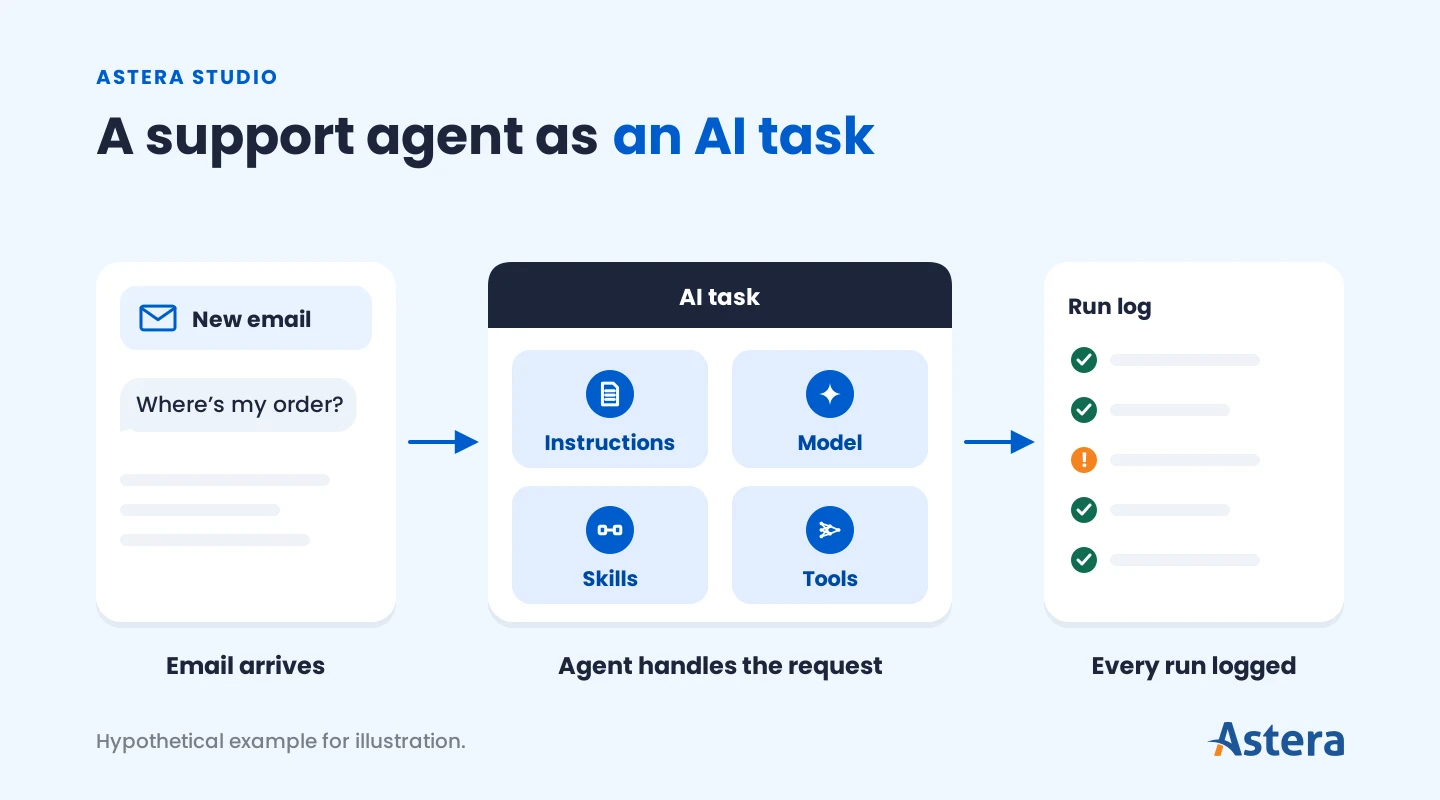
Run it automatically. Create an automation with an AI task: plain-language instructions, a model, and the catalog skills and tools it can use. A trigger starts it, such as an incoming email, a webhook from a support tool, or a schedule.
Monitor each run. The Automations page shows run counts, failures, and run times. With job tracing turned on, each run records a detailed trace of what the agent did.
You don't need to automate every request at once. Start with the one your team handles most often, prove it in a pilot, and add the next request once the numbers hold up.
Build your customer service agent with Astera Studio
Talk to us about building agents on your own data, with access controls and a record of every run.
Suggested reading
If you're still exploring before a first project, start here. These guides explain how AI agents are designed, how they carry out multi-step workflows, and how much autonomy they can be given.