

What Is Accounts Payable Automation?
Intro
It's 2026, and manual finance workflows are a thing of the past - or at least they should be. Enterprises and organizations in the healthcare, financial services, logistics, and retail sectors deal with thousands of invoices daily. Considering the high volume, automation is the obvious solution to ensure efficient and streamlined operations.
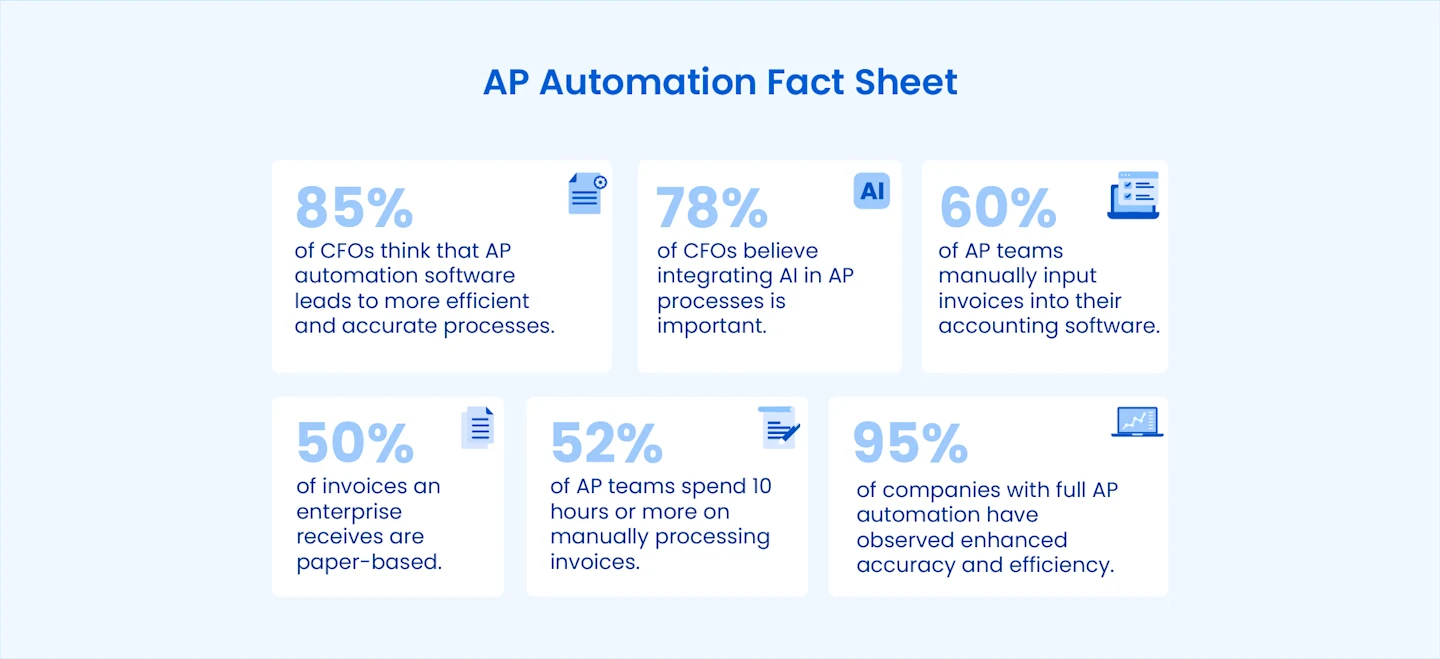
However, 52% of teams are still spending over 10 hours weekly on manually processing invoices, while 60% of Accounts Payable (AP) teams are manually inputting invoices into their accounting software.
Accounts payable automation software is a technology solution to manage, handle, and pay supplier invoices while reducing the manual tasks involved in the process. Organizations with automated AP software save on paper and computing resources, reduce the risk of human error, and free up IT and accounting teams from pulling data out of fragmented sources by hand.
What's in this guide
The building blocks: invoice capture, invoice scanning, and invoice data extraction
The end-to-end workflow: automated invoice processing
Putting it in place: our step-by-step guide to automating AP
Making the case: AP automation benefits and ROI
Choosing a tool: the 10 best AP automation platforms
Technology choices: RPA in accounts payable vs. AI invoice processing
What is Accounts Payable (AP) Automation Software?
For many organizations, invoice processing is a business-critical function. Manually processing invoices requires a lot of time, effort, and resources, and considering the organization's fiscal health depends on it, why trust it to spreadsheets and papers? The fact that 50% of the invoices an average enterprise receives are still paper documents highlights the need for digital transformation in AP document management.
While accounts payable automation software solutions have typically leveraged optical character recognition (OCR) and machine learning (ML) technologies to achieve partial automation, the arrival of GenAI and AI-powered OCR have revamped AP automation altogether. GenAI is making end-to-end AP automation a possibility, and as PYMNTS reports, 78% of CFOs now believe that AI integration in AP processes is important. Older tools relied on templates and RPA in accounts payable, which break when invoice layouts change.
8 Benefits of AP Automation Software for Enterprises and SMBs
AP automation software offers a host of benefits that make it a worthwhile investment. Apart from the obvious efficiency and cost benefits, AP automation solutions also help enterprises and SMBs improve visibility, spend management, supplier management, and fraud monitoring.
1. Increased Accuracy & Operational Efficiency
According to PYMNTS, 85% of CFOs think that AP automation software leads to more efficient and accurate processes. In fact, 95% of companies that have automated AP processes observed enhanced accuracy and efficiency.
2. Considerable Time & Cost Savings
PYMNTS reports that 84% of companies that automated their AP processes noticed increased savings, cash flow, and overall growth.
3. Automated Three-way Matching for Increased Visibility
AP teams use the three-way match process to match invoices, receipts, and purchase orders, verifying that they're paying for services or goods they actually ordered and received.
4. Transparent & Improved Spend Management
By automatically syncing ledger accounts, pricing, electronic payments, and approvals with an organization's accounting software and ERP, AP automation helps reduce late fees and payment errors.
5. Streamlined Supplier Relationship Management
74% of businesses that fully automated AP processes have reported significantly higher supplier satisfaction.
6. Greater Scalability for Business Growth
A Stampli survey of financial leaders found 71% expect invoice volume to increase, while 55% are seeing invoice complexity increase.
7. Enhanced Compliance & Fraud Monitoring
1 in 5 mid-sized firms expect AP automation software to improve fraud prevention, while 58% of businesses with fully automated AP report easier compliance and monitoring.
8. Improved Reporting & Analytics
PYMNTS reports that 53% of financial leaders believe automating accounts payable enhances data analytics capabilities.
For the ROI math and more benefits by industry, see our full guide to AP automation benefits.
How accounts payable automation works
Here's how automation handles each step of the accounts payable process:
Capture:
invoices arrive by email, portal or paper and are
automatically.
Extract and validate:
AI pulls the vendor, totals and line items, then checks them against vendor and PO data.
Match:
each invoice is matched to its purchase order and goods receipt, and only mismatches go to a person.
Approve:
invoices are routed by amount, vendor or cost center.
Pay and reconcile:
approved data posts to the ERP, and payments are scheduled and reconciled.
Ready to set it up? Follow our step-by-step guide to automating accounts payable.
Manual vs. automated accounts payable
AP step | Manual process | With AP automation |
|---|---|---|
Receive invoices | Paper, email attachments and supplier portals, handled one by one | One inbox; every format ingested automatically |
Capture data | Clerks key in vendor, amounts, dates and line items | AI extracts header and line-item fields in seconds |
Match | Staff compare the invoice, PO and receipt side by side | Rules match all three and flag only mismatches |
Approve | Emails and desk drops; invoices get lost | Routed by amount, vendor or cost center, with reminders |
Pay and reconcile | Payment runs and bank matching in spreadsheets | Scheduled payments and automatic reconciliation |
Report | Monthly, after the fact | Live cycle time, exception rate and discount capture |
Automate accounts payable end to end
AI-powered capture, validation and ERP export, with up to 97% fewer errors.

What does AP automation save?
Ardent Partners' 2025 State of ePayables survey shows how far automated AP teams pull ahead on the core AP KPIs:
Metric | Average AP team | Best-in-class AP team |
|---|---|---|
Cost to process one invoice | $9.84 | 79% lower than peers |
Invoice cycle time | 8.2 days | 79% faster than peers |
Invoice exception rate | 18.4% | 47% lower than peers |
Straight-through processing | Baseline | 1.8× as many invoices |
Source: Ardent Partners, State of ePayables 2025. For the ROI formula, see AP automation benefits and ROI.
Want the number for your own invoice volume? Estimate your savings with our cost savings calculator.
What to look for in AP automation software
Feature | What it does | Question to ask the vendor |
|---|---|---|
AI invoice capture | Reads PDFs, scans, emails and images without a template per vendor | What happens when a new vendor sends an unfamiliar layout? |
Line-item extraction | Pulls every line, quantity and unit price | Can it extract tables that span pages? |
Validation and duplicate checks | Checks totals, tax, dates, vendor master data and repeat invoices | Can finance edit the rules without IT? |
Two- and three-way matching | Matches the invoice to the PO and goods receipt | How are tolerance thresholds set? |
Approval workflows | Routes by amount, vendor, entity or cost center | Can approvers act from email or mobile? |
ERP integration | Posts validated data to your ERP, accounting system or database | Is the connector native, or file-based? |
Audit trail and analytics | Logs every action; tracks cycle time and exception rate |
Comparing vendors? See the 10 best AP automation software for 2026.
Real-world results: from 24 hours to 3 minutes per invoice
GaP Solutions, an Australian retail technology provider, handles 6,000-10,000 vendor invoice files a month across about 3,000 different layouts. Each invoice used to take up to 24 hours to reach its store systems in a structured format. With Astera’s template-based extraction and scheduled workflows, GaP Solutions cut that to three minutes, a 99.79% reduction.
Ready to Automate? See Astera's AP automation platform
Comparing vendors first? See the full comparison guide