

Does it feel like your accounts payable process is stuck in the Stone Age? You're not alone. For many businesses, manually managing invoices means drowning in piles of paperwork, chasing approvals, and fixing costly errors. It's time-consuming and can lead to missed payment deadlines that hurt vendor relationships. But there's a better way to manage invoicing workflows: automated invoice processing. Invoice processing automation streamlines your workflow, giving you back time, money, and peace of mind.
What is automated invoice processing?
Automated invoice processing is the automatic handling of several invoices using software and technology. It automates invoice data extraction and several other tasks that comprise the invoice management and accounts payable workflows, such as loading data into your ERP or accounting software.
Think of automated invoice processing as your personal assistant for handling invoices—only faster, more accurate, and tirelessly efficient. Using technologies like optical character recognition (OCR) and artificial intelligence (AI), an automated invoice processing system can capture data from invoices, validate it against existing records, match it with purchase orders, and route it for approval—all without manual intervention.
The result? No more late payments, misplaced invoices, or endless back-and-forth emails.
Why automated invoice processing matters
Automated invoice processing addresses critical inefficiencies and challenges inherent in manual invoice management, making it a necessity for modern businesses.
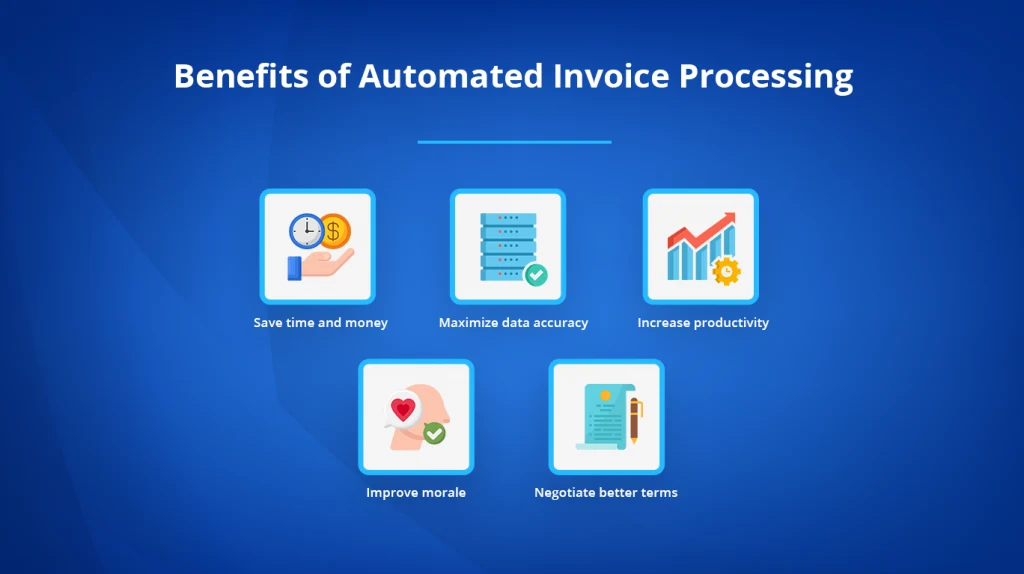
Traditional methods rely on manual data entry, paper-based workflows, and fragmented systems, which introduce delays and errors, raising the already high operational costs. According to a study, 51% of enterprises say manual data causes them the most problems in processing invoices. These challenges are amplified as businesses grow, leading to bottlenecks that disrupt financial operations.
In contrast, automated invoice processing transforms this traditionally time-consuming and error-prone task into a more streamlined and reliable process by automating data capture, eliminating bottlenecks, reducing errors, and enhancing visibility. These gains make it an essential tool for businesses seeking to save time and money, all while modernizing and future-proofing their financial operations. It is a core part of broader accounts payable automation.
Process every invoice format automatically
Capture, extract and validate invoices from any vendor, with no templates to build.
Here are more reasons why automated invoice processing matters:
Scalability on demand
Businesses manually handling hundreds or thousands of paper invoices struggle to scale during peak periods. Invoice processing automation systems easily accommodate growing volumes without compromising efficiency, making them ideal for businesses planning to expand.
Improved vendor relationships
Delays in manual processing can result in late payments, straining vendor relationships. With automated invoice processing you can make payments in a timely manner and eliminate delays, strengthening trust and fostering better partnerships.
Compliance and audit readiness
Manually tracking and organizing invoices can lead to incomplete records or compliance risks. Automated systems maintain a clear audit trail, making it easier to comply with regulations and prepare for audits.
Better cash flow management
Invoice processing automation provides real-time visibility into invoice statuses and cash flow. Unlike manual processes, where tracking outstanding payments can be cumbersome, automated systems enable businesses to forecast cash needs accurately and avoid financial surprises.
How does automated invoice processing work?
Invoice processing automation is typically divided into several key stages, each designed to replace manual tasks with automated workflows:
The invoice lifecycle, step by step
Capture and scan.
Invoices arrive by email, upload, scan or EDI. → Invoice capture · Invoice scanning
Extract.
Header fields and line items become structured data. → Invoice data extraction
Validate and match.
Data is checked against POs and goods receipts. → Three-way matching
Approve.
Invoices route to the right approver based on amount, vendor or cost center. → The AP process
Pay and reconcile.
Approved invoices post to the ERP and are scheduled for payment. → How to automate accounts payable
Invoice capture
Invoices, whether received as paper documents, emails, or digital files (e.g., PDFs), are ingested into the system. Invoice scanning technology and email integration ensure that all invoices are centralized in one location. High-volume teams often use dedicated invoice scanning software to digitize paper at this stage.
Data extraction
Technologies like OCR and intelligent document processing (IDP) automatically extract key information from the invoice, such as invoice number, vendor details, line items, amounts, and due dates. Advanced invoice processing software uses machine learning to improve accuracy, even with varying formats and layouts.
Dedicated invoice data extraction software focuses on this step and handles complex, high-volume layouts.
Read more about the differences between OCR and IDP.
Validation
The system automatically validates the extracted data by cross-checking it against relevant documents, such as purchase orders, contracts, or vendor records. For example, it ensures that amounts match agreed-upon terms and flags discrepancies for review.
Approval workflow
Predefined rules route invoices to the appropriate personnel for approval. For instance, invoices above a certain threshold may require your manager's approval, while smaller amounts might be automatically approved. Automated notifications and reminders further help avoid delays.
Integration with financial systems
Once approved, invoice data is seamlessly transferred to ERP or the accounting system, ensuring that payment schedules and financial records are updated without manual input.
Payment processing
The system schedules payments based on terms, ensuring vendors are paid on time. It can also generate and store payment confirmations, further streamlining financial operations.
Recordkeeping and reporting
Automated systems store all invoices and related data in a centralized, searchable repository, making recordkeeping and reporting more straightforward and providing real-time insights into cash flow and outstanding liabilities.
Implementing automated invoice processing
Transitioning from a manual procedure to a fully automated invoice processing workflow requires thorough planning and a clear understanding of the challenges and inefficiencies in your existing system.
You must also evaluate specific needs, such as integrating with existing ERP systems or accommodating various invoice formats.
Map your current workflow
Start by identifying bottlenecks in your existing invoicing process. Are approvals taking too long? Are errors a frequent issue? Mapping your workflow will help you pinpoint where invoice automation can make the biggest impact.
Get team buy-in
Your team's support is crucial in this transition. Show them how invoice automation will make their jobs easier—fewer repetitive tasks, faster approvals, and more time for meaningful work. Address concerns upfront to ease the transition.
Start small, then scale
Begin with a pilot project, automating a single workflow, such as invoice data extraction. Once you've ironed out the obstacles and seen the results, expand automation across your entire accounts payable process.
Remember, this transition is not limited to implementing technology, but also about aligning your workflows, addressing potential resistance to change, and ensuring the solution fits seamlessly into your organization's broader financial strategy.
Taking invoice processing automation to the next level
Integrating AI is the way to go beyond simple automation and incorporate intelligent, self-improving systems capable of handling complex invoicing workflows, adapting to new invoice formats and layouts, and providing deeper insights. While traditional invoice processing automation focuses on predefined rules and processes, AI enhances it with advanced capabilities like machine learning, natural language processing (NLP), and predictive analytics.
Even greater accuracy
AI invoice processing uses machine learning models to extract invoice data with high accuracy, even from unstructured or complex formats. These systems adapt to various layouts, learn from previous errors, and improve over time, bringing down manual intervention to a minimum.
Integration with other AI tools
Connecting your invoice processing system with complementary AI-driven technologies further enhances its functionality and user experience. For example, while your invoice processing system handles specific tasks, integrating with broader IDP solutions allows for streamlined processing of related documents, such as purchase orders, contracts, or receipts.
Dynamic workflow optimization
AI analyzes invoice processing patterns to optimize workflows. You can use it to identify bottlenecks or predict which invoices are likely to require manual review, allowing you to allocate resources more effectively.
Proactive fraud detection
Detecting anomalies or patterns indicative of fraudulent invoices becomes simpler when you integrate AI into your invoice processing systems. AI adds an additional layer of security to the process by analyzing historical data and identifying unusual vendor behavior, such as discrepancies in amounts.
Case study: How GaP Solutions processes invoices in three minutes
GaP Solutions, a leading Australian provider of custom retail software and hardware solutions, faced a major challenge in processing invoices. With 6,000–10,000 vendor invoice files arriving every month across about 3,000 different layouts, manual data entry was time-consuming and prone to errors. Employees had to manually extract unstructured data from each invoice, a process that could take up to 24 hours for a single invoice. This cumbersome workflow not only delayed reporting and payment processing but also hindered efficiency across the company.
To overcome these challenges, GaP Solutions sought a solution to automate the extraction and processing of invoice data, ensuring accuracy and reducing processing time. After evaluating multiple data management tools, they selected Astera for its ability to handle complex data extraction workflows and integrate seamlessly with cloud storage systems.
Astera’s unstructured data extraction technology proved to be a game-changer for GaP. The system automatically identified key fields from invoices, such as the invoice ID, vendor name, and total cost, and transformed them into a structured format for easy processing. Automation enabled GaP to cut down invoice processing time from 24 hours to just three minutes. Read the case study.
What would automating invoice processing save you?
Calculate it in 2 minutes.
Automate invoice processing with Astera’s intelligent platform
Astera’s intelligent document processing platform addresses key pain points in traditional invoicing workflows, which struggle with inefficiency, human error, and scalability. With intelligent features, like OCR and IDP, built into the software, it extracts and validates invoice data with high precision, ensuring consistency across formats and eliminating the need for manual data entry.
Astera also integrates seamlessly with your ERP and accounting systems, enabling effortless financial data synchronization and giving you a strategic advantage in managing your financial operations. It’s a more streamlined and reliable way to ingest several invoices, extract and validate invoice data, and route invoices for payment approvals without the back-and-forth of manual review.
Ready to automate your invoice processing workflow? See Astera’s invoice processing automation platform, contact us today, or download a 14-day free trial to see if it fits your needs. Comparing tools first? See the full comparison guide.